Available Quota=Quota Amount-Consumed & Deducted Value-Consumed & Undeducted
This quota is specifically used by Partners to manage their customers' available quota. For customer's billing, please refer to the relevant billing data in the Expense Center on the ACPN platform. For specific reconciliation methods, see the content under the [Finance Center] category.
Please continuously monitor changes in customer credit limits and promptly adjust the available credit to avoid business disruptions due to insufficient credit.
[Available Quota]: The amount available for the use of customer. When the amount falls below zero, the customer will enter an outstanding state.
[Quota Amount]: The maximum quota (also known as credit limit) that Partner assigned to End User.
[Consumed & Deducted Value]: The credit that has been consumed and deducted as of the current point in time.
[Consumed & Undeducted Value]: The credit that is available for an end user UID. Available credit can be used to buy subscription instances and pay-as-you-go instances. If the available credit is less than zero, further purchase of service will fail.
Background:
If partners set the "default" shutdown policy for end users, those who have exhausted their quota amount can keep their running instances for 15 days before service shutdown, with an additional 15-day buffer before their data is released. This "default" shutdown policy may lead to financial losses and account receivables issues for some partners. Therefore, flexible shutdown policies are now available for partners on ACPN.
1. Policy Introduction
1.1. Shutdown by Exceeding Quota
Available Quota < 0:
The account has an overdue payment and cannot make new purchases.
Pay-as-you-go instances will be shut down immediately and new purchases will be blocked.
Prepaid instances will continue to operate until their expiration dates.
The product experiences billing delays, which may lead to the quota continuing to be deducted even after the instance has been successfully shut down.
If the account remains in a shutdown status for 15 days, pay-as-you-go instances will also be released.
This policy is tailored for managing long tail customer.
Available Quota | Instance Status | Purchase Control |
x < 0 | Shutdown | Purchase Forbidden (The displayed transaction status depends on whether Manual Shutdown is enabled.) |

1.2. Shutdown after Delay Privilege 600 USD
The delay privilege is determined by the account's historical spending, with a minimum of $600 USD. It is expected that instances can continue to be used for 15 days after an overdue payments.
Total consumption amount from last month / 30 * 15 = monthly shutdown quota.
The shutdown quota is recalculated each month, and any changes will be communicated via SMS around the 7th.
The delay privilege only applies to pay-as-you-go products. When a customer has an overdue payment (available quota < 0), and the overdue amount is within the overdraft limit, instances will not be shut down.
The overdraft limit is not the maximum overdue amount; since products have billing cycles, there may be cases where, after one billing cycle, the overdue amount exceeds the overdraft limit.
If the account status remains in shutdown for 15 days, the pay-as-you-go instances will be released.
If the Delay Privilege ≤ Available Quota < 0, instances within the account will be manually shutdown.
This policy is suitable for managing customers with moderate business volumes.
Available Quota | Instance Status | Purchase Control |
Delay Privilege ≤ x < 0 | Overdue & Services available | Purchase Forbidden (The displayed transaction status depends on whether Manual Shutdown is enabled.) |
x < Delay Privilege | Shutdown | Purchase Forbidden (The displayed transaction status depends on whether Manual Shutdown is enabled.) |
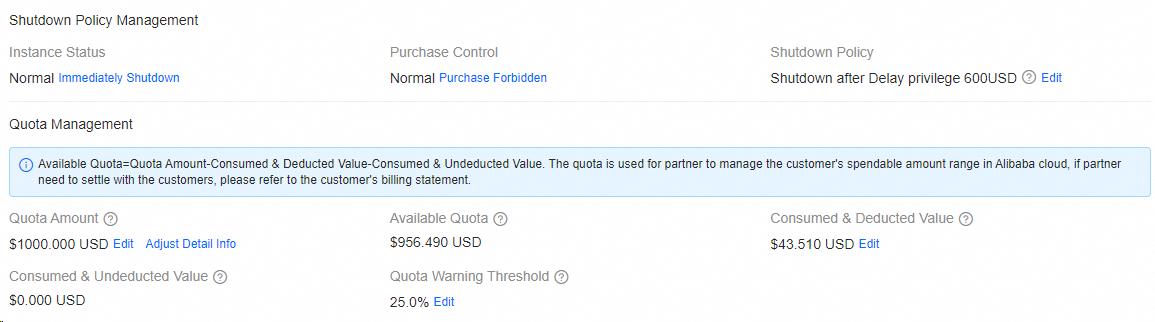
1.3. Manual Shutdown
An overdue payment (Available Quota < 0) will not automatically trigger instance shutdown. You can use the [Immediately Shutdown] button in ACPN to perform a manual shutdown.
This policy is intended for managing key customers.
Available Quota | Instance Status | Purchase Control |
-∞ < x < 0 | Normal | Purchase Forbidden (The displayed transaction status depends on whether Manual Shutdown is enabled.) |
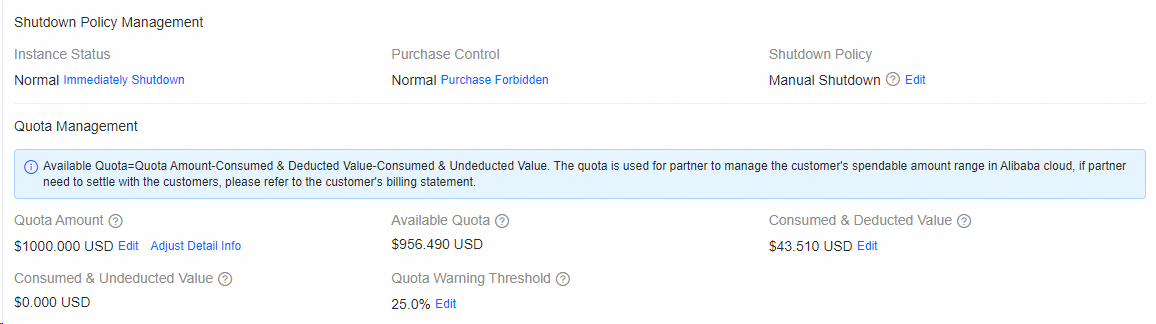
2 Shutdown Configuration
2.1. Shutdown Policy Configuration
2.1.1. Setting Initial Shutdown Policy for New Customers
Partners can set the shutdown policy when inviting new customers.
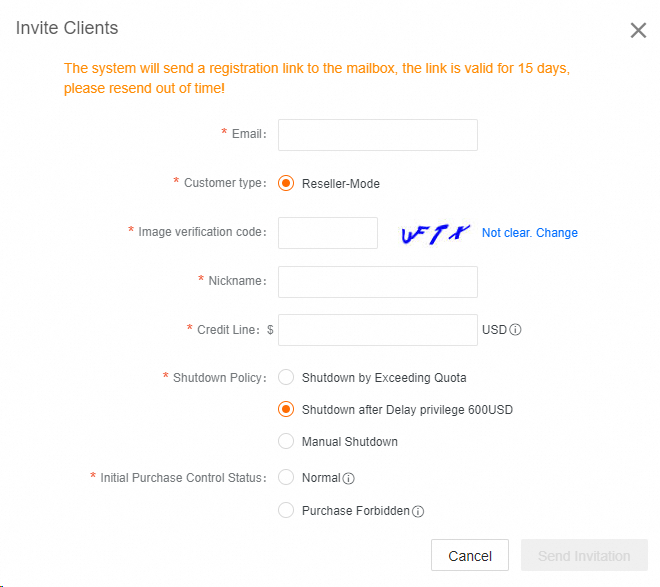
2.1.2. Changing the Shutdown Policy for Linked Customers
On the [UID Manage] page, find the target UID, click [Manage] → [Shutdown Policy Management], and then edit the [Shutdown Policy].
The shutdown policy cannot be altered once customer's account has an overdue payment (Available Quota<0).
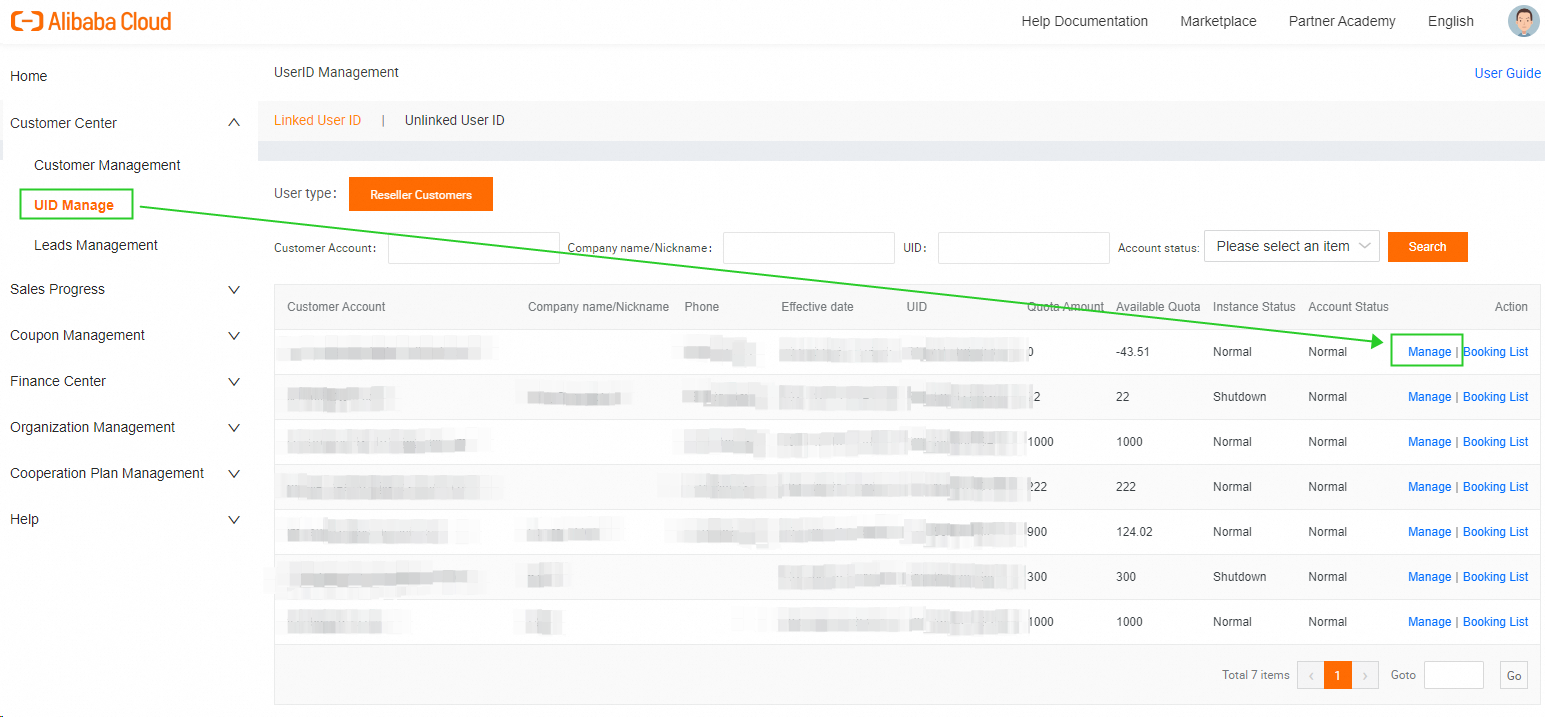
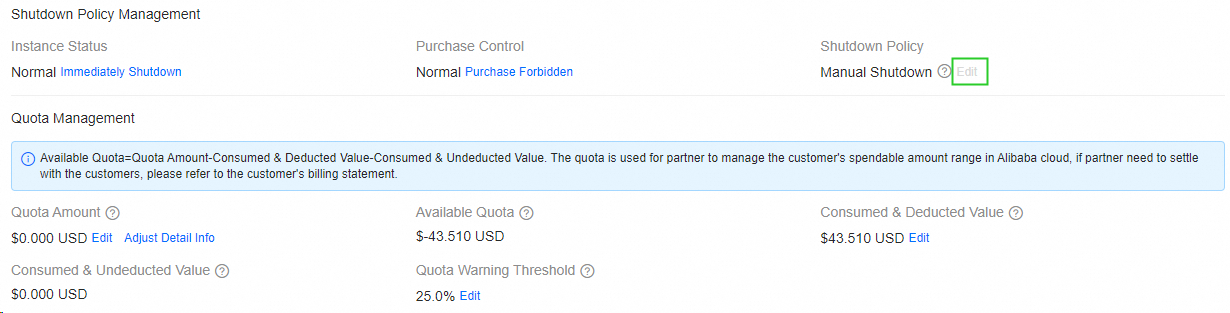
2.2 Manual Shutdown Management
2.2.1. Shuting Down Instances
Go to [Shutdown Policy Management] → [Instance Status], and click [Immediately Shutdown]

Instances in either 'Normal' or 'Overdue & Services Available' states can be manually shut down using the [Immediately Shutdown] button. The instance status will change to "Shutdown," and this status will remain for 15 days. The affected instances will be automatically released after 15 days.
2.2.2. Forbidding New Purchases
Go to [Shutdown Policy Management] → [Purchase Control], and click [Purchase Forbidden].
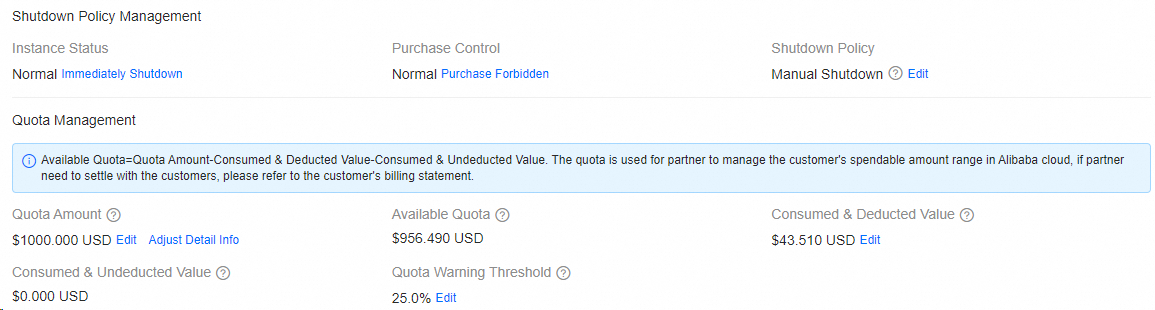
For accounts without overdue payments (Available Quota > 0), partners can control customer purchase behavior using the [Purchase Forbidden] button. Transaction statuses can be either Normal or Purchase Forbidden.
When the available quota is less than zero, the transaction status may still display as "normal," but the customer will be unable to place an order due to insufficient funds to cover the order amount.
3. Resuming instances
Step 1: Resolve Overdue Payment (Available Quota>0)
In the [Quota Amount] section, click [Edit] under [Consumed & Deducted Value] to increase the available quota to a value greater than zero..

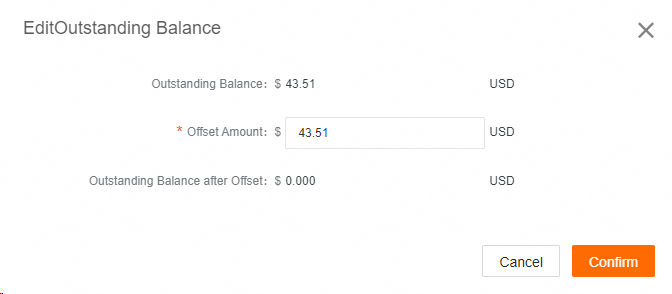
Step 2: Reopen Account and Resume Instances
Click [Re-open Now] to reactive instances and [Purchase Allowed] to permit new purchases.

FAQ
If tier-1 distributors update shutdown policies and purchase controls for their tier-2 resellers, will this affect the end users of those tier-2 resellers?
No. Changes to shutdown policies and purchase controls will affect only the specified UID and will not influence their sub-accounts. The remaining quota of the tier-1 distributor's main account will affect the maximum order limit for end customers.
Can end users and resellers modify the shutdown policy for their own accounts?
No. Only distributors and resellers can manage shutdown policies for their sub-accounts.
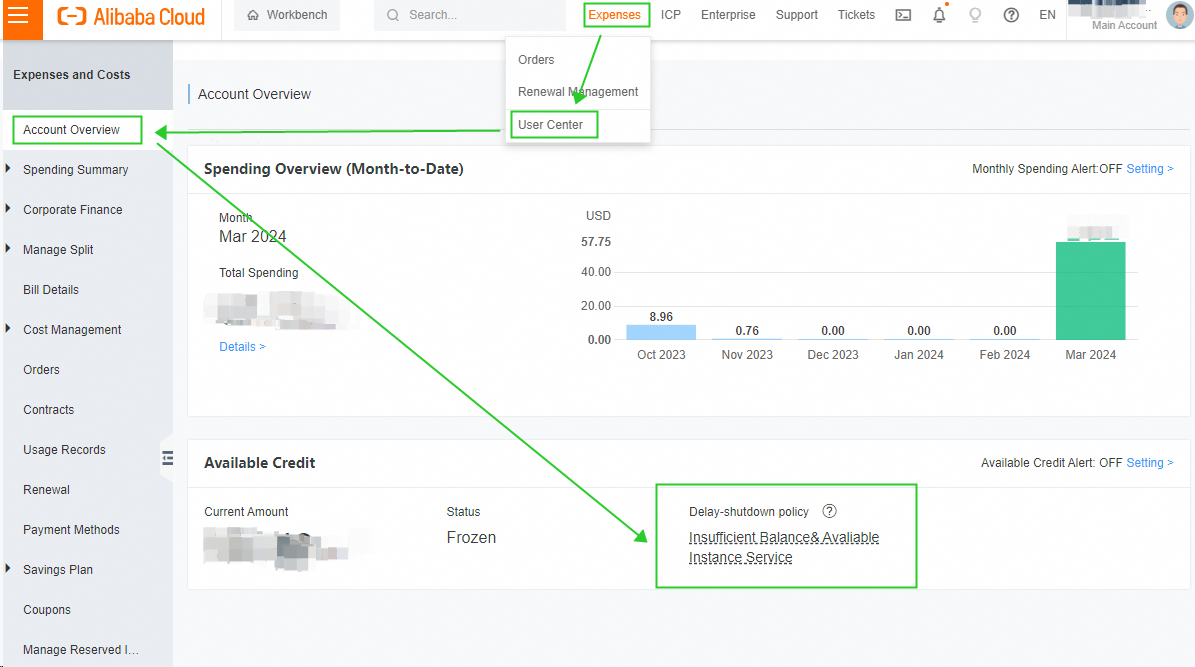
How can an end user or reseller check their shutdown policy?
Log into the Alibaba Cloud Management Console.
Click [Console] in the upper-right corner.
Choose [Expenses] > [User Center] in the top navigation bar.
On the [Account Overview] page, find the [Available Credit] section, and view your current Shutdown Policy under the [Delay-shutdown policy].

Can the delay privilege amount be modified?
No. The delay privilege is automatically configured based on system data and cannot be manually adjusted by partners or customers.
Detailed illustrations of the three shutdown strategies corresponding to specific scenarios
PIC
Why does the amount owed after instance shutdown exceed the shutdown quota? Why is the quota still being deducted under the immediate suspension strategy after instance shutdown?
This occurs because Alibaba Cloud's pay-as-you-go products have delayed billing, which can lead to actual arrears exceeding the shutdown quota, while the immediate shutdown strategy continues to deduct from the quota. We recommend that partners implement an "immediate shutdown for arrears" strategy along with an initial "prohibit new purchases" order status for new customers. The "allow new purchases" option should only be enabled after the customer passes the partner's verification or registers through the partner's system, thereby minimizing the risk of bad debt for partners.
PIC