This page enables you to create coupon templates for specific customer accounts, providing discounts on products for a specific amount and duration. Alibaba Cloud offers a coupon distribution function for partners, including Distributor Resellers and T2 resellers. Partners can issue coupons to their end users to encourage spending and facilitate POC tests."
1. How to Apply and Distribute Coupon
Step 1: Create Coupon Template
Log in to the ACPN platform and click "Coupon Management" --- "Coupon Discount Management" --- "Create Template".

Step 2: Edit Coupon Information
Fill in the coupon information and click the 'Confirm' button to generate the corresponding template ID.

Partner: Alibaba Cloud charges partners for the coupon amounts used by sub-accounts. (E.g. If a product costs $10 and the partner offers a 20% discount, and the end user uses the coupon to cover the full amount, the end user pays $0, and the partner owes Alibaba Cloud $8.)
Alibaba Cloud: Alibaba Cloud does not charge partners for the coupon amounts used by sub-accounts.(Example: If a product costs $10 and the partner offers a 20% discount, and the end user uses the coupon to cover the full amount, the end user pays $0 and the partner owes Alibaba Cloud $0.)
All Products: Any product on the distribution side that meets the deduction criteria can use the coupon
Custom: Partners can limit the coupon to specific products as needed.

Limited to 1: Only one coupon can be issued to the same end user.
Unlimited: Unlimited coupon can be issued to the same end user.
Validity Duration: Set the coupon validity period starting from midnight on the day it is issued, with the duration measured in days.
Custom Timeframe: Edit the specific start and end dates for validity..
Subscription: Deduct the order cost of prepaid products.
Pay-As-You-Go: Deduct billing charges for postpaid products.
[Template Name] : Partner can name the coupon as needed.
[Reason For Application] : Partner can describe the reason as needed.
[Cost Bearer] :
[Applicable Products] :
[Limit Per Person] : Refers the number of times the coupon can be issued to the same end users.
[Value] : Partner can set the value as needed.
[Valid Period] : The applicable duration of the discount coupon. The maximum validity period for cost-bearing coupons from Alibaba Cloud is 180 days; there are no restrictions on the validity period for cost-bearing coupons that partners are responsible for, and partners can customize the duration based on their needs.
[Purchase Type] :
[Coupon Description] : Partners can edit the coupon description as needed.
Step 3: Issue Coupon
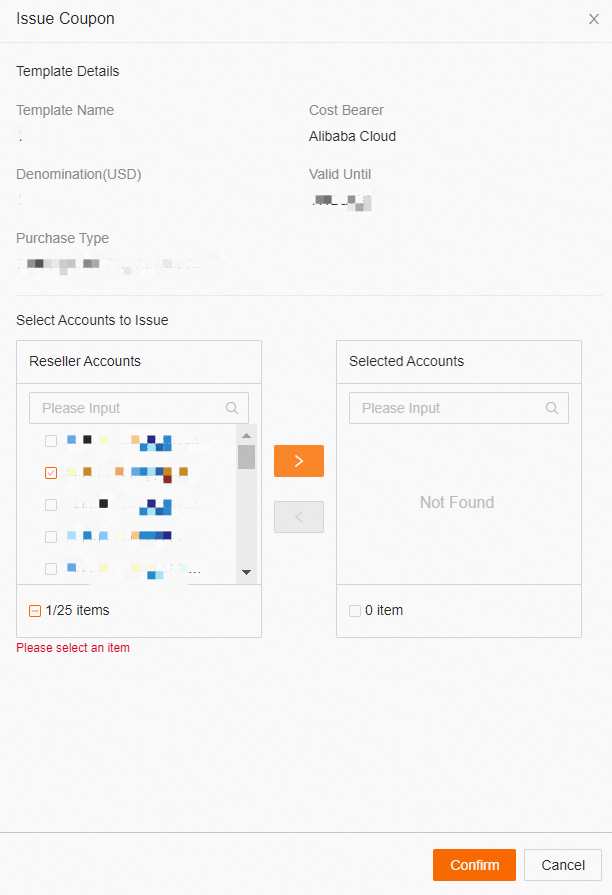
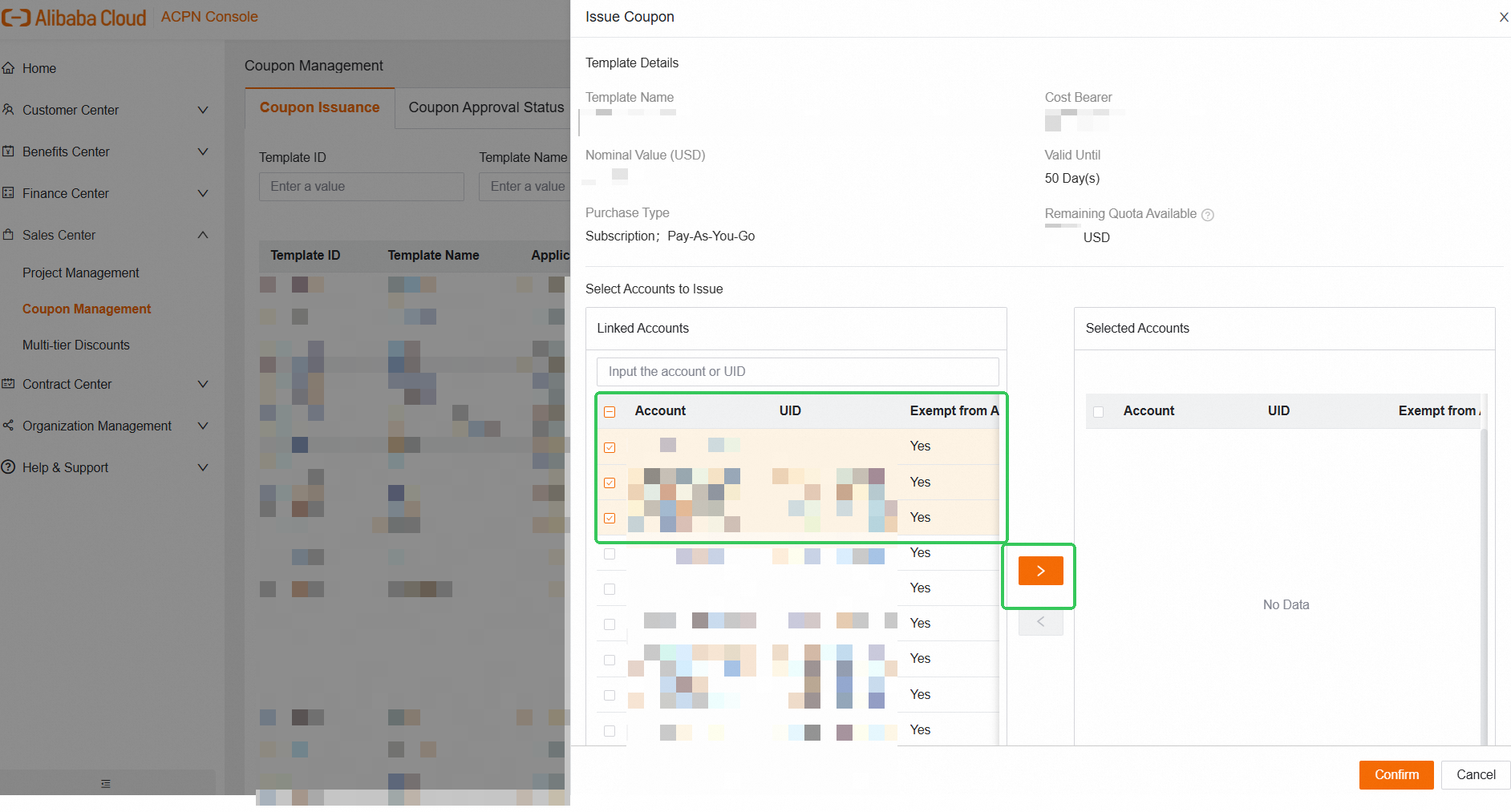
In Coupon Distribution Management, find the Template ID used for issuing coupons. Click 'Issue Coupon' in the Actions menu. Select the account to receive the coupon and click the shuttle icon to move it to the list on the right. Verify the selected account and click 'Confirm'.
A coupon template with the status [Approved] can be reused and sent to different end users within its validity period.
A template with the status [Expired] cannot be sent. If an end user needs a coupon with the same settings, please recreate the coupon template.

Step 4: Waiting for Coupon Authorization
Switch to the 'Coupon Authorization Status' page and wait for the approval.

Attention:
If BD approval is not required, the coupon application is automatically approved, and the system will release the coupons to the selected end users.
If BD approval is required, the approval results can be viewed in this menu. The partner can withdraw the application before BD completes the approval. Once approved, the system will automatically release the coupons to the selected end users.
2. How to Apply and Distribute PoC Coupon for New Customers (Partner Benefits)
What is PoC Coupon for New Customers?
Alibaba Cloud PoC Coupon for New Customers (hereinafter referred to as "Approval-Exempted Coupons ") is a core strategic enablement tool within the Alibaba Cloud international ecosystem, designed for authorized reseller and distributors. As a key component of the Global Partner Tier Program, it aims to help partners quickly assist new customers with testing through systematic funding support, enabling precise opportunity identification and commercial value realization.
The cost of the Approval-Exempted Coupons is borne by Alibaba Cloud, and the deduction is reflected in both the customer's bill payable to the channel partner (shown as a coupon deduction) and the channel partner's bill payable to Alibaba Cloud (shown as a discount deduction).
If partners obtain partner rating in the Benefits Center and have sufficient Approval-Exempted Coupons, with the customer UID meeting the qualification of using the Approval-Exempted Coupons, the issuance application of the Alibaba Cloud-borne coupon does not need to go through the internal approval by Alibaba Cloud, and will be issued directly to their customers through ACPN.
PoC coupon exempt from approval is primarily determined based on the customer UID's eligibilty to assess whether it can use the Approval-Exempted Coupons pool and its management rules are the same as those for coupons borne by Alibaba Cloud and required internal approval by Alibaba Cloud.
? What is the difference between this type of coupon and other types of coupons?
In comparison to cases where [Alibaba Cloud bears the cost, but the customer does not meet the eligibility for using the PoC coupon for new customers]:
After the partner submits the application, it will need to go through the internal approval by Alibaba Cloud. Only after approved by Alibaba Cloud, the partner then could issue the coupons to their customers.
In comparison to cases where【The partner bears the cost】;
Because the cost of coupons is borne by the partner, when the partner, issues the coupons to their customers, the deduction is reflected only in the customer's bill payable to the partner (shown as a coupon deduction). There is no deduction in the partner's bill payable to Alibaba Cloud. The logic for coupon deduction follows the order in which the partner's customers place their orders.
PoC Coupon for New Customers Usage Qualifications (All of the following conditions must be met):
Partners must meet benefits tier requirements and have PoC coupon for new customers quota pool (Approval-Exempted Coupons).
The remaining quota in PoC coupon for new customers is sufficient to cover the total amount requested in the coupon issuance application.
The customer UID qualifies for using the PoC coupon for new customers. Please refer to channel policy for detailed requirements.
The customer UID has no associated Alibaba Cloud special tags that disqualify it from using the PoC coupon for new customers. For details, please consult you business manager.
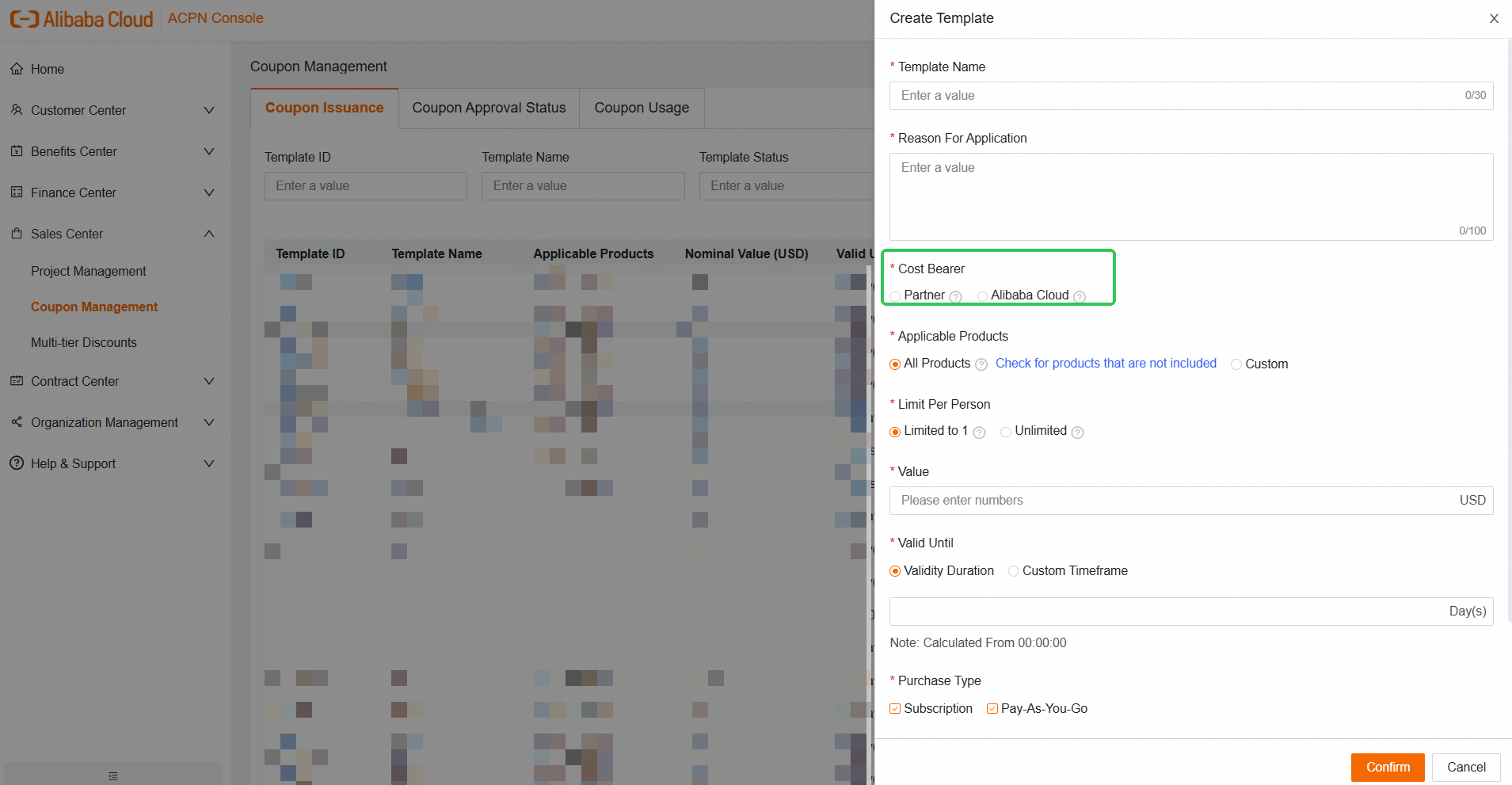
Select [Cost Bearer: Alibaba Cloud] when creating the coupon template.
How to Apply and Distribute PoC Coupon for New Customers:
Step 1: Create Coupon Template
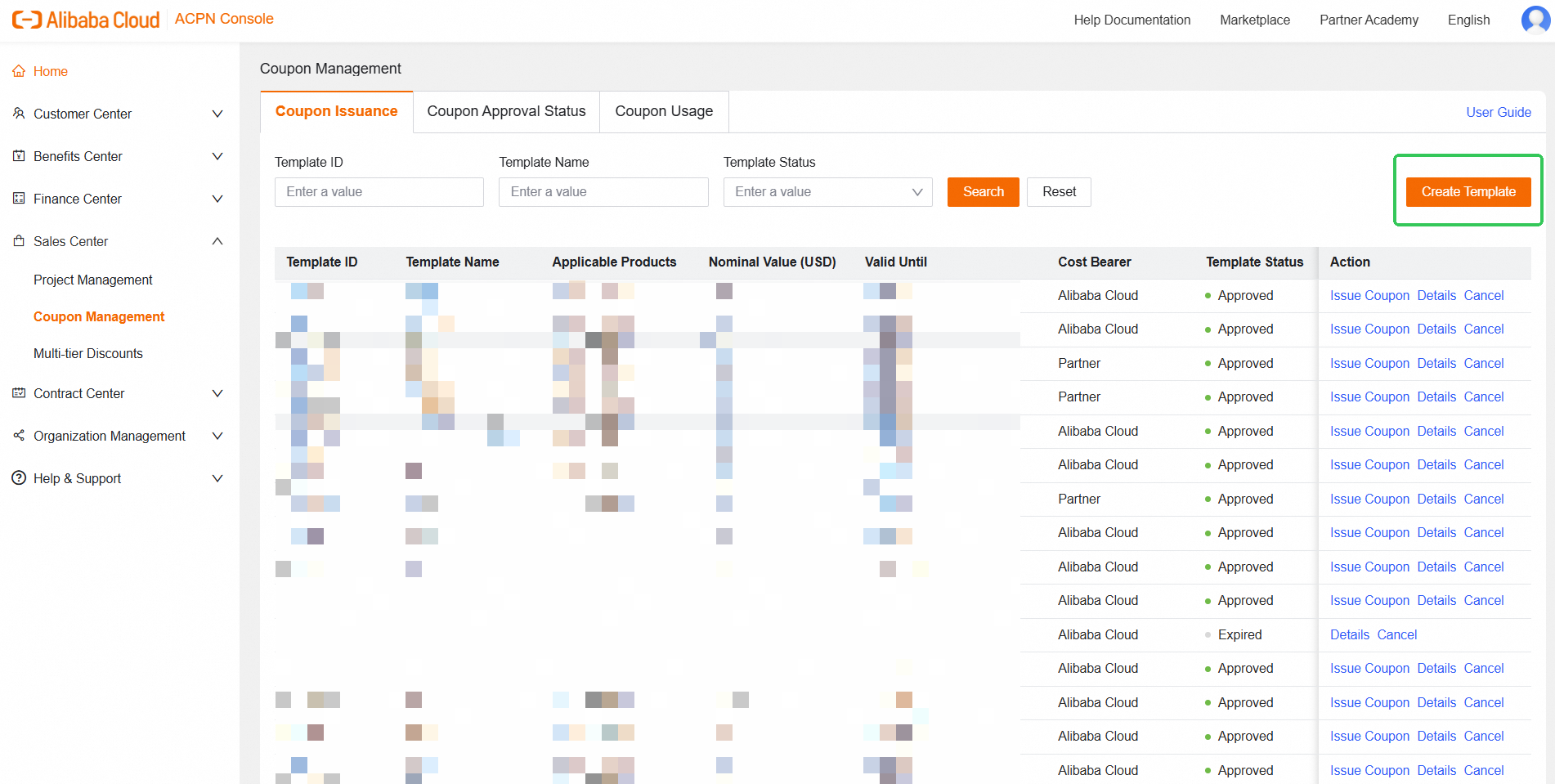
Log in to the ACPN platform and click [Sales Center] - [Coupon Management] - [Create Template].
Step 2: Edit Coupon Information
Fill in the coupon information and click [Confirm] button to generate the corresponding template ID. Please note that partners must select [Alibaba Cloud] in [Cost Bearer].
Step 3: Issue Coupon
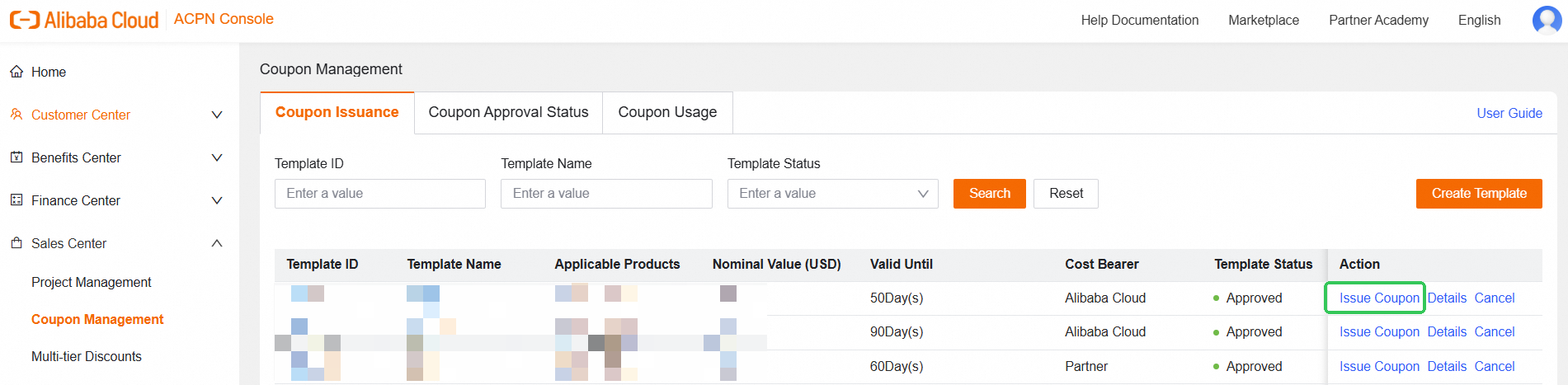
In Coupon template list, find the Template ID used for issuing coupons. Click Issue Coupon in the Action bar. Select the account to receive the coupon (search precisely by account information or UID, or check the intended recipients). Then click the shuttle icon in the middle to move it to the Selected Accounts list on the right.
If the customer UID qualifies for using the PoC coupon exempt from approval, [Yes] will be displayed in the [Exempt from Approval] column.
Please note that, the [Exempt from Approval] only verifies whether the customer UID qualifies for the PoC coupon exempt from approval; If the customer UID has associated Alibaba Cloud special tags that disqualify it from receiving the coupon exempt from approval, the internal approval by Alibaba Cloud is still required after the coupon application is submitted. If you encounter the above situation and need to review the detailed policies, please contact your business manager promptly.
After verifying the selected accounts on the right, click confirm. If the coupon issuance application meets all usage requirements of PoC coupon for new customers, the coupon will be automatically sent to the corresponding customer UID accounts.
When T2 reseller assists its customer in applying for the coupon, the coupon issuance application must still go through the approval by distributor—even if all requirements of using PoC coupon for new customers are met.
FAQ:
1) Can a T2 reseller apply for the approval-exempted coupon on behalf of a customer qualifying for approval exemption?
When a T2 customer meets all requirements of using PoC coupon for new customers, the customer can apply to use the PoC coupon for new customers quota pool of distributor after the distributor's approval. This application does not require the internal approval by Alibaba Cloud.
2) How to quickly check whether the customer UID is meeting the qualification for using the PoC coupon for new customers?
The partner needs to select the coupon template with the cost borne by Alibaba Cloud and click [Issue Coupon]. It can be checked in the [Exempt from Approval] column.
3. FAQ
Can T1 partner issues coupons to T2 reseller?
No, T1 partners cannot issue coupons to T2 resellers. If a T2 reseller has a testing request, they can create an end user account under tier 2 for testing purposes, and then apply coupons to that end user, with the costs covered by Alibaba Cloud. Due to restrictions within the ACPN platform, partners cannot apply coupons to sub-accounts in certain scenarios, as indicated by the red line in the screenshot below.

Can BD directly apply for coupons for end users?
No, BDs cannot directly apply coupons for end users. If channel partners need coupons from Alibaba Cloud for their end users' testing or other scenarios, they must inform the BD. Once both sides agree, the BD can initiate the application.
What are the rules for deducting the amount of coupons?
A coupon can only be successfully deducted if its amount is greater than or equal to the order or bill amount. For example, if the coupon amount is $100 and the order amount is $90, the coupon can be used, leaving a remaining $10 for future use. However, if the coupon amount is $100 and the order amount is $110, the coupon cannot be applied.
What's the deduction order of coupons and discounts?
The system prioritizes discount information first, followed by coupons. For instance, if an end user has a 10% discount and a $100 coupon for an order with an original price of $100, the discount will reduce the price by $10, making the payable amount $0 after applying the coupon.
What is the payment effect of different coupon cost bearing parties?
Premise [1] : T1 has a 20% discount configuration and a $100 coupon covered by Alibaba Cloud; T2 has no discount configuration or coupons, and the end user has a $100 coupon also covered by Alibaba Cloud. If the end user orders $100 worth of products, the disbursement effect is as follows:
Original cost | Discount Deduct | Discount (%) | Coupon Deduct | Pretax cost | |
Enduser Billing | 100 | 0 | 0 | 100 | 0 |
T2 reseller Billing | 100 | 100 | 100% | 0 | 0 |
T1 partner Biliing | 100 | 100 | 100% | 0 | 0 |
Premise [2] : T1 has a 20% discount configuration and a $100 coupon covered by Alibaba Cloud. T2 has no discount configuration or coupons. The end user has a $100 coupon covered by Tier 2 and orders $100 worth of products. The effect of disbursement is as follows:
Original cost | Discount Deduct | Discount (%) | Coupon Deduct | Pretax cost | |
Enduser Billing | 100 | 0 | 0 | 100 | 0 |
T2 reseller Billing | 100 | 0 | 0 | 0 | 100 |
T1 partner Biliing | 100 | 20 | 20% | 80 | 0 |
How to refund an instance purchased with a coupon deduction?
The amount deducted by the coupon will not be refunded, and there will be no cash refund. If the amount payable is $0 due to the coupon deduction at the time of purchase, the refund amount will also be $0, and the coupon amount will remain $0.
Will coupons issued by the original partner remain valid after the distribution relationship changes?
No.
Where can partners check the coupons that belong to themselves?
"Console" --- "Expenses" --- "User Center" --- "Coupons"


Where can end users check the coupons that have been issued by partners?
"Console" --- "Expenses" --- "User Center" --- "Coupons"
What if partner issues a coupon by mistake?
Contact BD and send the relevant email. Use the following text template:
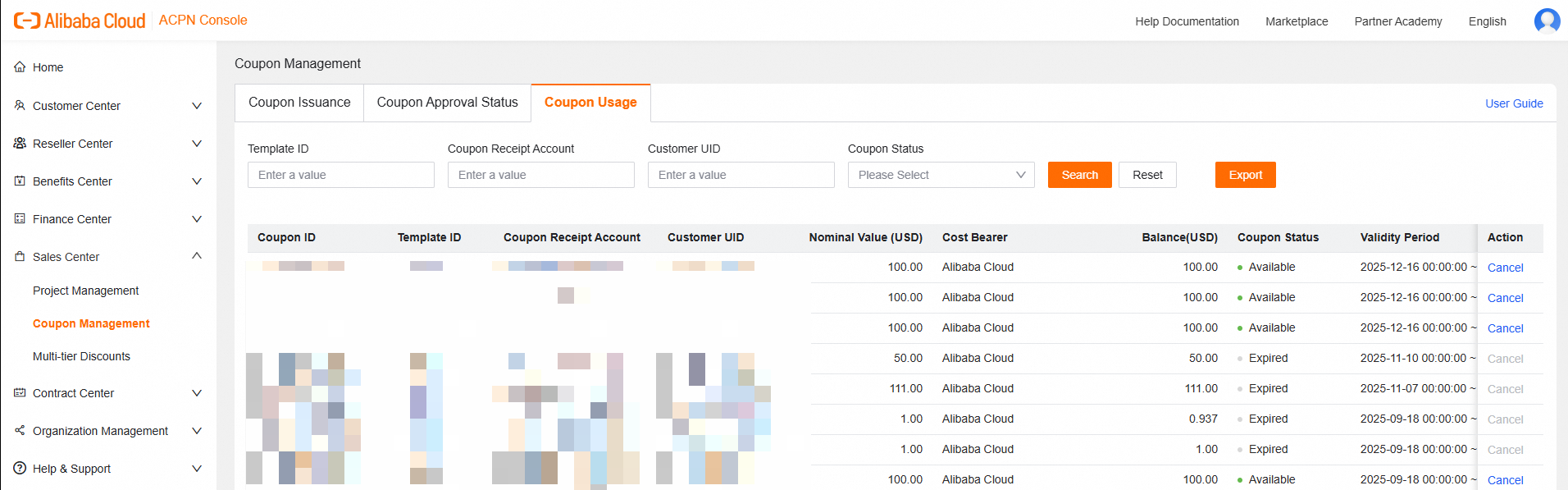
[Relevant Coupon ID] :
(Relevant data is located in [Sales Center] - [Coupon Management] - [Coupon Usage] - [Coupon ID], please get the information in the following screenshot)
[Relevant Template ID] :
[Relevant UID] :
[Reasons for cancellation of application] :
Can the coupon be used to deduct amounts from past billing periods?
No, the coupon can only be used to deduct amounts from bills or orders that occur after the coupon takes effect and cannot be applied to past billing periods. For example, if an account has an outstanding balance of $90 from November and receives a $100 coupon in December, the coupon cannot be used to cover the November balance but can be used for future orders after it becomes effective.
Will the coupon be considered as a part of available fund?
No. For example, if an end user has an available balance of $10 and a $100 coupon and wants to place a $90 order, an error will occur due to insufficient available funds.
Can partner cancel/revoke/delete the issued coupon ?
Yes,partner can go to coupon management page. Use"Cancel" button to make the coupon invalid. 