1. Notes
All forward operations are described in the operation guide steps, and the reverse "withdrawal" and "error" are described in the form of FAQs.
2. Operation process guidance
2.1. Alibaba Cloud Account Registration & Enterprise Certification
Step1 Alibaba Cloud Account Registration
Please log in Alibaba Cloud International home page to regist an account.
Step2 Enterprise Certification
Please click the link mentioned below to complete the enterprise certification.
https://account-console.alibabacloud.com/#/newIntlAuth
Step3 Qualification Review
Contact the business manager to understand the qualification requirements and policy content for agency' onboarding, and prepare relevant materials for onboarding interview.
Step4 Invitation
After the partner completes and passes the interview for distributor onboarding, the business manager will share the invitation link and the partner will submit the application for joining.
2.2. Parnter Submit Application
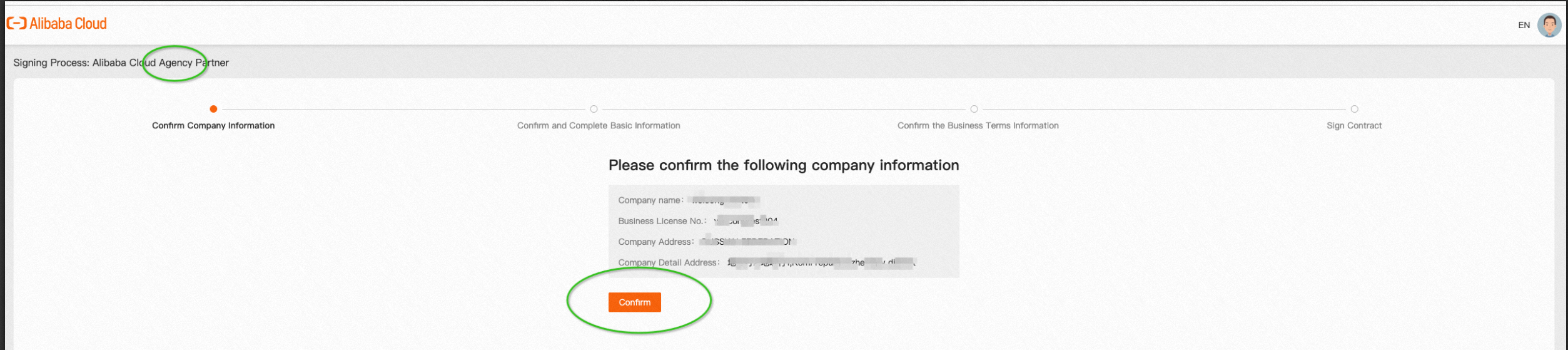
Step1 Comfirm Company Information
Confirm the top left corner information is [Signing Process: Alibaba Cloud Agency Partner].
Click Confirm and come to the next step.
Step2 Confirm and Complete Basic Information
Fill in requested information into the table.

After partner application submitted, Alibaba Cloud BD will review the application within three working days.
Partner can check the relevant reminder E-mail in the filled "Contact E-mail" address and BD may contact applicant as to justify the qualification.
If partner need modify information, please click "Withdraw application".

If partner close the webpage and re-enter the process, it will be prompted as the screenshot mentioned below, please be patient and wait for approval.

When partner clicks [Enter the Application Process], the webpage would be shown the current node of the process as the screenshot mentioned below.

2.3. Decision Sheet Process
After Alibaba Cloud BD approve the application, partner receive the E-mail notification.

The signing process change to "Congratulations on passing the qualification".

Partner communicate the decision sheet with Ali BD and Ali side fill in all the information according to the communication content.
Partner will receive the following screenshot E-mail to remind partner to confirm the relevant settlement information.

The signing process will enter [Please confirm the following business terms]. Please check carefully about [Basic information] [Commission Policy Information]
If partner have any questions about the meaning of specific words, please consult BD.
If there is an error, please click "Modify" to describe the revision information in detail and "Submit" (After submission, it will automatically enter the correction process).

Partner enter [Waiting for signing contract] process and wait for the contract to be signed. BD will contact partner within three working days for commercial contract signing issues.

2.4. Contract Process
According to the bussiness scenario in detail, there would be different contract signing processes. Please counmunicate with your BD to decide the process, matching with your bussiness scenario.
After both parties have signed the contract, partner will receive a prompt in E-mail address.

The status of partner's signing process will be changed to the status of [You have successfully signed the contract]. Please be patient and wait for the prompt E-mail for the contract to take effect and the permission to open. Click to log in to the ACPN platform before the permission is opened will cause an error, which is a normal phenomenon.

2.5. ACPN Empowerment
After ACPN permission is activated, there will be a E-mail in partner's mailbox.

Partner can click the link in the E-mail, or directly enter https://www.alibabacloud.com/, and click Alibaba Cloud Partner Network > Console to enter the ACPN.


3. FAQ
Q1. Why the sysytem shows "Your account has not completed enterprise verification"?

If there is an error as shown in the screenshot above, it is because the real-name authentication of the enterprise was not carried out when partner registered. Please click Go to Verify.
Q2. The difference and connection between Company Master UID, Main UID and Associated UID:

Company Master UID, Main UID, and Associated UID must be real-name accounts of the same enterprise.
Q3. Whether Company Master UID can conduct distribution business or not?
If partner want Company Master UID to carry out distribution business, please fill in the Company Master UID in the Main UID or Associated UID and the authorization can be completed after partner successfully settle in.
Q4. What business types can real-name partners of the same company have?
Associated UID and Main UID need to be the same type as well as the same commission. Example: When Main UID is Reseller, associated UID can only be Reseller, not Distributor or Agency.
Q5. What is ACPN?
refer to the ACPN Platform Instruction manual