All Products
Search
Document Center

CDN:Traffic throttling FAQ

Last Updated:Oct 15, 2026

This FAQ answers common questions about Alibaba Cloud CDN traffic throttling, including the scope and effective rules of single-request throttling, the capabilities and threshold settings of usage caps, and the effects of a triggered cap on domain name access and billing. For problems such as throttling or usage cap settings that do not take effect, a domain name being disabled after a cap is triggered, or frequent automatic disabling, see the traffic throttling troubleshooting guide.

Alibaba Cloud CDN provides two traffic throttling capabilities: single-request throttling and usage caps. The following table describes their key differences and applicable scenarios.

Capability

Scope

Disables the domain name

Purpose

Single-request throttling

The download rate of an individual request for a single URL

Does not disable the domain name

Limits the download rate of each request to suppress bandwidth spikes when a single large file is downloaded or played.

Usage cap

The total bandwidth, traffic, or number of HTTPS requests for an entire accelerated domain name

Automatically disables the domain name when usage reaches the threshold.

Controls costs and prevents high traffic, bandwidth, or HTTPS request fees.

Single-request throttling capabilities and scope

What is the scope of single-request throttling? Is it calculated independently for each URL?

Single-request throttling applies to each individual request. Different requests, including multiple requests initiated by the same client, are calculated independently and do not affect one another. An Alibaba Cloud CDN point of presence starts throttling a request only after the volume of data sent for that request reaches the configured no-throttling data-size threshold.

Is the no-throttling threshold recalculated for Range requests?

Yes. When you initiate a new Range request that returns an HTTP 206 status code, Alibaba Cloud CDN treats it as a new request. The no-throttling threshold is recalculated from zero, and traffic accumulated for the previous request is not included when throttling is evaluated for the new request.

This recalculation is one common reason why throttling settings appear not to take effect. It typically occurs in the following scenarios:

  • Video seeking: Video seeking initiates a new Range request that returns an HTTP 206 status code. Alibaba Cloud CDN treats the request as a new request and recalculates the no-throttling threshold from zero.

  • Segmented downloads: When a client uses a browser or tool that supports segmented downloads, each segment request is treated as a separate new request. The no-throttling threshold is repeatedly reset, so the actual download rate may be higher than expected.

Usage cap capabilities and threshold settings

Can I configure an overall bandwidth cap for all Alibaba Cloud CDN domain names?

No. Alibaba Cloud CDN limits usage separately for each domain name. It does not support account-level or domain-name-group-level statistics. To configure usage caps for multiple domain names, configure each domain name separately.

Can Alibaba Cloud CDN limit traffic, bandwidth, or request rates for an individual or specified IP address?

No. An Alibaba Cloud CDN usage cap applies to the total usage of an entire accelerated domain name. You cannot limit traffic, bandwidth, or request rates at the level of an individual or specified IP address. To control request frequency or block requests based on client IP addresses, use WAF rate limiting for Edge Security Acceleration. A client IP address is blocked when its request frequency exceeds the configured threshold.

Usage cap effects and billing

Does the Alibaba Cloud CDN usage cap feature incur fees? What happens after a cap is triggered?

The Alibaba Cloud CDN usage cap feature is available at no additional charge. This applies to bandwidth caps, traffic caps, and HTTPS request caps.

When the usage of a domain name exceeds the configured threshold during a statistical period, Alibaba Cloud CDN stops providing acceleration services for that domain name, and the domain name enters the offline state. All access requests to the domain name, including normal and unusual traffic, can no longer be served through Alibaba Cloud CDN, and the website becomes inaccessible. This mechanism proactively suspends the service to prevent high traffic or bandwidth fees.

After a domain name is disabled, the service is automatically restored at the configured recovery time. To restore the service earlier, or to restore a domain name configured never to recover automatically, manually enable the domain name on the Domain Names page in the Alibaba Cloud CDN console.

Why can actual usage exceed the bandwidth, traffic, or request cap threshold before a domain name is disabled?

Domain name bandwidth monitoring data is delayed by approximately 10 minutes. As a result, a domain name is disabled approximately 10 minutes after its actual bandwidth reaches the threshold. Traffic, bandwidth, requests, and other resources consumed before the domain name is disabled are billed as usual. The following examples illustrate this behavior:

  • Example 1 (pay-by-peak-bandwidth billing):

    Customer A uses pay-by-peak-bandwidth billing, has added only the domain name example.com, and has enabled the bandwidth cap feature with the bandwidth limit set to 10 Gbps.

    From 21:00 to 21:01 on February 1, 2021, bandwidth usage spiked to 10 Gbps. Because monitoring data was delayed, the domain name was not disabled until approximately 21:11 on February 1, 2021. Before the domain name was disabled, peak bandwidth reached 25 Gbps. Therefore, the pay-by-peak-bandwidth bill generated for February 1, 2021, is calculated based on 25 Gbps of bandwidth usage.
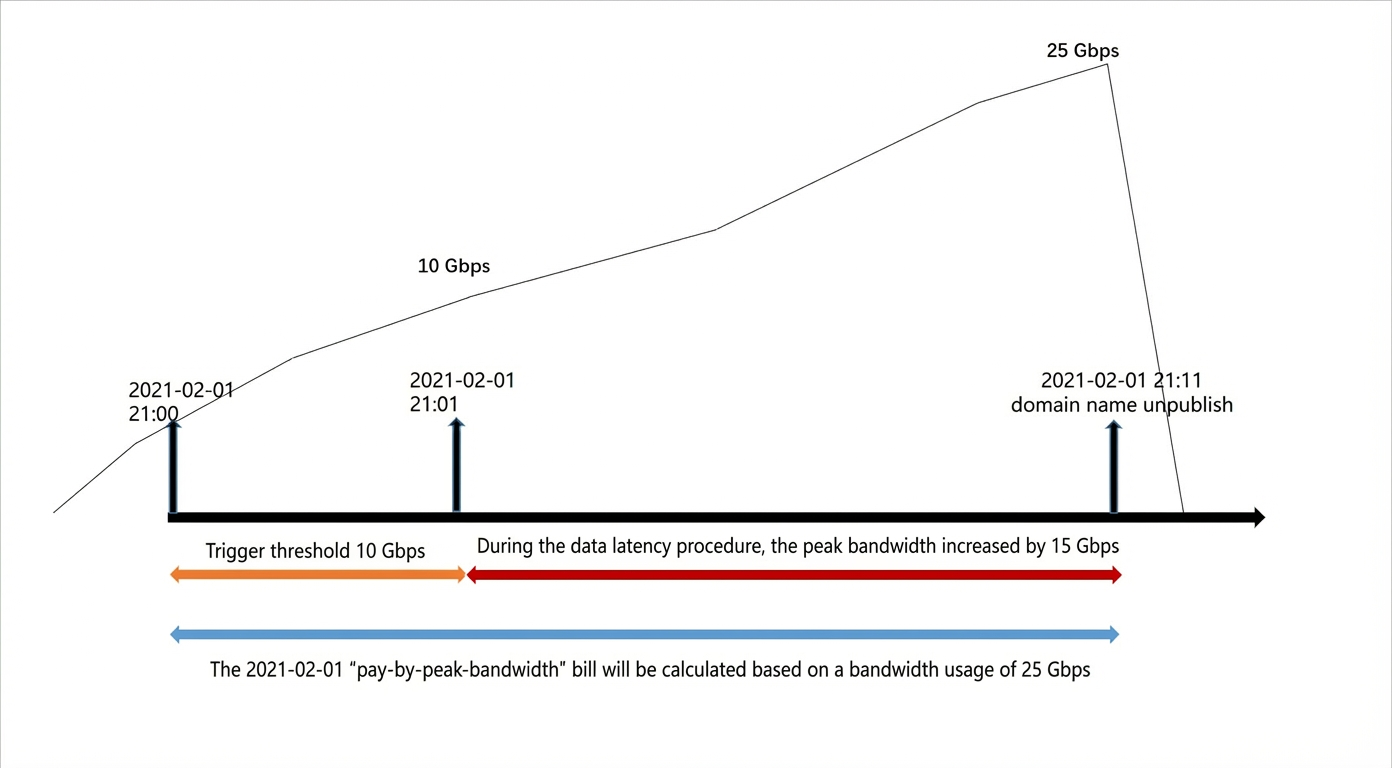
    Bill example for pay-by-peak-bandwidth billing

  • Example 2 (pay-by-traffic billing):

    Customer B uses pay-by-traffic billing, has added only the domain name example.com, and has enabled the bandwidth cap feature for that domain name with the bandwidth limit set to 10 Gbps.

    From 21:00 to 21:01 on February 1, 2021, bandwidth usage spiked to 10 Gbps and 30 GB of traffic was consumed. Because monitoring data was delayed, the domain name was not disabled until approximately 21:11 on February 1, 2021. During the data delay, 400 GB of traffic was consumed. All traffic generated by example.com before the domain name was disabled is included in the pay-by-traffic bill for the period from 21:00 to 22:00 on February 1, 2021.
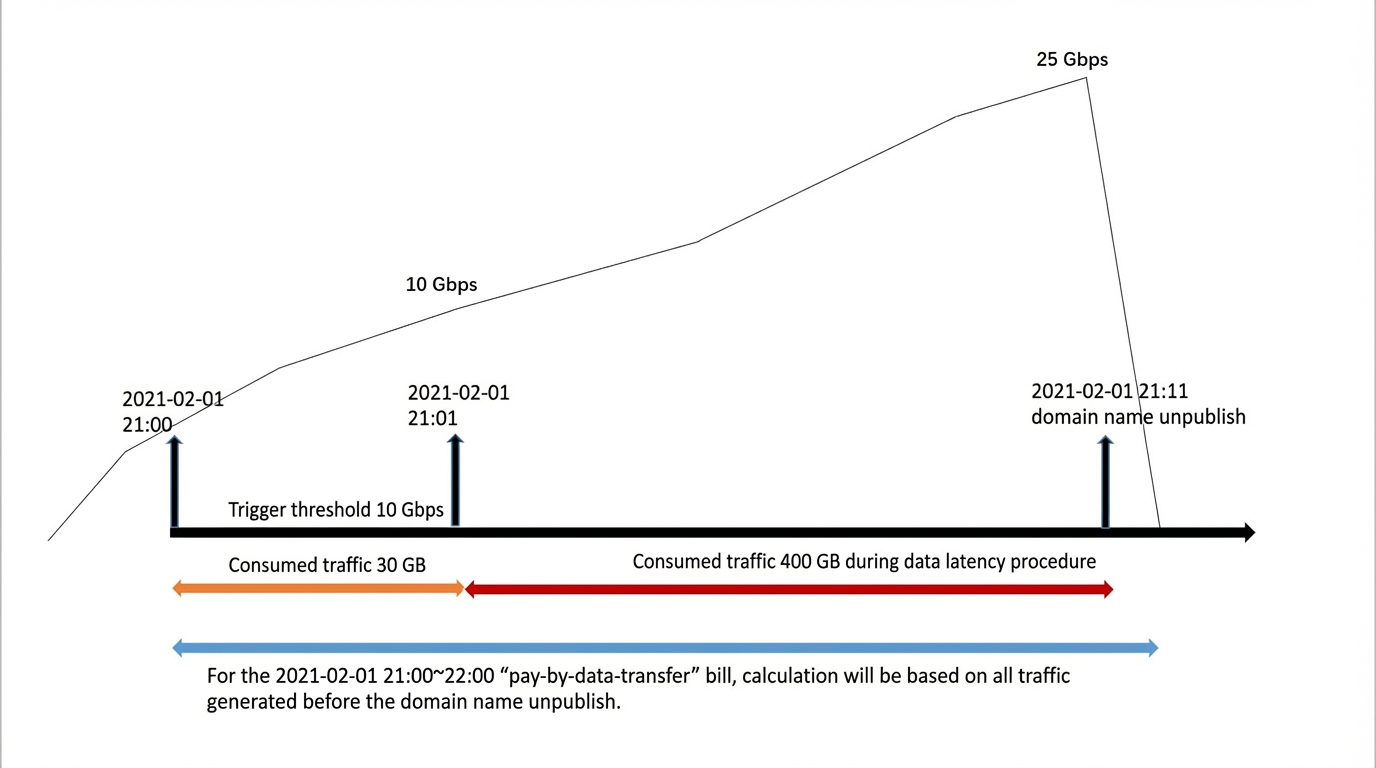
    Bill example for pay-by-traffic billing

Can I automatically stop the service after an Alibaba Cloud CDN resource plan is exhausted to avoid pay-as-you-go bills?

No. Alibaba Cloud CDN does not support stopping the service immediately when a resource plan is exhausted. After an Alibaba Cloud CDN resource plan is exhausted, the system automatically switches to pay-as-you-go billing, which cannot be disabled directly.

To avoid high pay-as-you-go bills after a resource plan is exhausted, take the following measures:

  • Configure a usage cap: Set an appropriate bandwidth or traffic threshold. When usage reaches the threshold, the domain name is automatically disabled to prevent subsequent charges.

  • Set a resource plan alert: Set an alert for the remaining amount of a resource plan, such as when 20% remains, so that you can intervene manually in time. Resource plan alerts may be delayed, and excess fees may already have been incurred when you receive an alert.

  • Set up auto-repurchase for a resource plan: Automatically purchase a new resource plan when the plan is N days away from expiration or its remaining amount is less than or equal to N%, so that subsequent usage continues to be offset by the resource plan instead of switching to pay-as-you-go billing. Auto-repurchase does not stop the service, and each repurchase incurs a new resource plan fee. Because a new resource plan inherits the repurchase configuration of the original plan by default, abnormal usage such as traffic theft may trigger repeated repurchases. We recommend that you use auto-repurchase together with a usage cap.

How do I view the time and records for a domain name disabled by a usage cap?

Use the following methods to view records of domain names disabled because of a usage cap:

  • Log on to the Alibaba Cloud CDN console. On the Domain Names page, find the target domain name. In the domain name details, go to the Traffic Throttling page to view the current configuration and status of each cap policy.

  • To view detailed operation records, including the exact time when a domain name was disabled and the trigger reason, go to the ActionTrail console and query Alibaba Cloud CDN operation events.

Related documentation