You can add watermarks for branding and publicity. This helps protect the copyright of images and prevent unauthorized use of images. Alibaba Cloud CDN supports picture watermarks and text watermarks. You can place watermarks on images and change the transparency of watermarks so that watermarks do not affect the image content.
The image editing feature of Alibaba Cloud CDN, the image editing feature of Dynamic Content Delivery Network (DCDN), and the Image Processing (IMG) feature of Object Storage Service (OSS) are independent features and cannot be used interchangeably.
Image editing is free of charge until further notice.
Usage notes
You can add a maximum of five watermarks to an image. Picture watermarks and text watermarks are supported.
You cannot resize picture watermarks. The size of a base picture that is used as the watermark cannot exceed 1 MB.
Parameters
Action: watermark
Basic parameters
Parameter
Description
Value range
t
The opacity of the text or image watermark.
[0,100]
Default value: 100. A value of 100 specifies that the watermark is opaque.
g
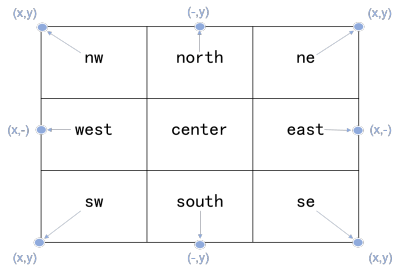
The position of the watermark on the image.
nw: upper left.
north: upper middle.
ne: upper right.
west: middle left.
center: center.
east: middle right.
sw: lower left.
south: lower middle.
se: lower right.
For more information about the positions, see the following figure.
x
The horizontal margin, which is the horizontal distance between the watermark and the image edge. This parameter takes effect only when the watermark is on the upper left, middle left, lower left, upper right, middle right, or lower right of the image.
[0,4096]
Default value: 10. Unit: pixels.
y
The vertical margin, which is the vertical distance between the watermark and the lower edge of the image. This parameter takes effect only when the watermark is on the upper left, upper middle, upper right, lower middle, or lower right of the image.
[0,4096]
Default value: 10. Unit: pixels.
You can use x, y, and offset to adjust the position of a watermark on an image. You can also use these parameters to adjust the watermark layout when the image has multiple watermarks.
Picture watermark parameters
Parameter
Description
Value range
image
The watermark URL that is accessible over the Internet. If authentication or permissions are required to access the specified URL, Alibaba Cloud CDN may fail to retrieve the watermark URL.
Watermark URLs must be Base64-encoded. For more information, see Encode watermarks.
Base64-encoded strings
Text watermark parameters
Parameter
Description
Value range
text
The content of the text watermark. The text content must be Base64-encoded. For more information, see Encode watermarks.
A Base64-encoded string that contains at most 60 characters in length.
type
The font of the text watermark. The font name must be Base64-encoded. For more information, see Encode watermarks.
Up to 10 fonts are supported. For more information, see the following table.
NoteIf you specify an unsupported font, the system uses
alihyaiheiby default.color
The color of the text watermark. The valid values for this parameter are RGB color values.
For example, 000000 specifies black, and FFFFFF specifies white.
Default value: 000000.
rotate
The degree by which the text watermark is rotated clockwise.
[0,360]
Default value: 0. A value of 0 specifies that the text watermark is not rotated.
fill
Specifies whether to tile the base image with the text watermark.
Valid values: 0 and 1. Default value: 0.
0: does not tile the base image with the text watermark.
1: tiles the base image with the text watermark.
size
The size of the text watermark.
(0,1000]
Default value: 40.
Unit: pixels.
The following table describes the valid values of the type parameter and the encoded strings of these values.
Text font
Description
Encoded value
alihyaihei
A bold font. This is the default font.
YWxpaHlhaWhlaQ
hysong
A Songti font variant.
aHlzb25n
hyhei
A Heiti font variant.
aHloZWk
hyshuangxian
A double line font.
aHlzaHVhbmd4aWFu
comfortaa
Comfortaa
Y29tZm9ydGFh
notosans
NotoSans
bm90b3NhbnM
Encode watermarks
When you add watermarks, the content and fonts of text watermarks and the URLs of picture watermarks must be URL-safe Base64-encoded. To encode watermarks, perform the following steps:
Encode the watermark content in Base64.
We recommend that you use URL-safe Base64 encoding tools to encode the content and fonts of text watermarks and URLs of the image watermarks. The encoded strings of watermarks can be used only in parameters used to add watermarks. Do not include the encoded strings of watermarks in signature strings.
Replace characters in the Base64-encoded watermark content based on the following rules:
Replace the plus signs (+) with hyphens (-).
Replace the forward slashes (/) with underscores (_).
Omit the equal signs (=) at the end of the Base64-encoded watermark content.
Examples
Add a text watermark "Hello World":
Base64-encode the string "Hello World" into a URL-safe string. For more information, see Encode watermarks. The encoding result of the text watermark is
SGVsbG8gV29ybGQ. The encoding result of the hysong font isaHlzb25n. The image processing URL ishttp(s)://example.com/image01.png?image_process=watermark,text_SGVsbG8gV29ybGQ,type_aHlzb25n.Add text and image watermarks:
Add a text watermark: Hello World. The Base64-encoded URL-safe string is
SGVsbG8gV29ybGQ.Set the position of the text watermark to lower right, the horizontal margin to 10 pixels, and the vertical offset from the middle line to 10 pixels by using
g_se,x_10,y_10.Base64-encode the
http://example-test.oss-ap-southeast-1.aliyuncs.com/image/shuiyin.pngimage watermark URL into theaHR0cDovL2V4YW1wbGUtdGVzdC5vc3MtYXAtc291dGhlYXN0LTEuYWxpeXVuY3MuY29tL2ltYWdlL3NodWl5aW4ucG5nstring.Set the position of the image watermark to upper left, the horizontal margin to 10 pixels, and the vertical offset from the middle line to 10 pixels by using
g_nw,x_10,y_10.The image processing URL is
http(s)://example.com/image01.png?image_process=watermark,text_SGVsbG8gV29ybGQ,g_se,x_10,y_10/watermark,image_aHR0cDovL2V4YW1wbGUtdGVzdC5vc3MtYXAtc291dGhlYXN0LTEuYWxpeXVuY3MuY29tL2ltYWdlL3NodWl5aW4ucG5n,g_nw,x_10,y_10