Custom cache key rules generate cache keys from specific parts of an HTTP request, such as the URI, request parameters, HTTP headers, or custom variables. By consolidating requests for the same resource into a uniform cache key, this feature improves cache hit ratios, reduces origin fetches, and lowers response times and bandwidth consumption.
Feature comparison and selection
Conflict between custom cache key and Ignore Parameters: If you configure both parameter filtering and a custom cache key at the same time, parameter filtering becomes invalid.
The custom cache key feature offers finer control, therefore it is recommended over parameter filtering. The following table compares the two features.
Use case
Parameter filtering
Custom cache key
Ignore all request parameters in the cache key
Set Ignore Parameters to Yes and leave the Retain Specified Parameters field blank.
Add a request parameter rule. Set Action to Reserve and set Parameter Name to a non-existent parameter name, such as
example-argument.Retain only the request parameter
key1in the cache keySet Ignore Parameters to Yes and set Retain Specified Parameters to
key1.Add a request parameter rule. Set Action to Reserve and set Parameter Name to
key1.Remove only the request parameter
key1from the cache keySet Remove Specified Parameters to
key1.Add a request parameter rule. Set Action to Delete and set Parameter Name to
key1.Rewrite origin parameters: The custom cache key feature only modifies the cache key and does not change the URL for the origin fetch request. The origin fetch request remains the same as the client request. To modify the request parameters sent to your origin, use Rewrite origin parameters.
Purge cache: After you configure a custom cache key, a purge by URL task might fail to match the cached content. To ensure a successful purge, use the final cache key generated by your rules as the purge target.
Use cases
A cache key is a unique identifier for a file cached on a CDN point of presence (POP). Each cached file has a corresponding cache key. By default, the cache key is the client's request URL, including any parameters. The custom cache key feature does not modify the URL for the origin fetch. It only changes the cache key. The origin fetch request remains the same as the client's original request.
CDN is designed to accelerate static resources and does not support dynamic API acceleration. The custom cache key feature optimizes caching strategies for static resources, such as standardizing URL parameters or differentiating between clients, and is not suitable for dynamic API caching scenarios. For dynamic content acceleration, consider using Edge Security Acceleration (ESA).
Use case 1: Consolidate requests
Different client requests often include varying parameters in the URL. Even if multiple requests target the same file, CDN POPs treat requests with different URL parameters as separate files. This results in multiple cached copies and additional origin fetches.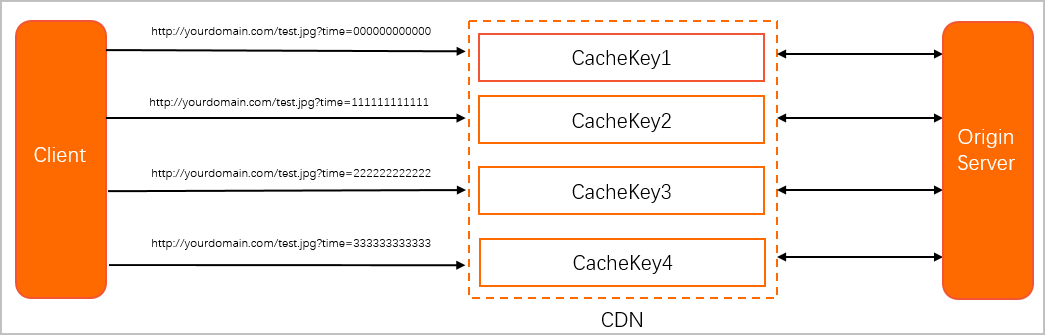
You can use custom cache key rules to unify the cache key for these requests, which reduces the origin fetch rate.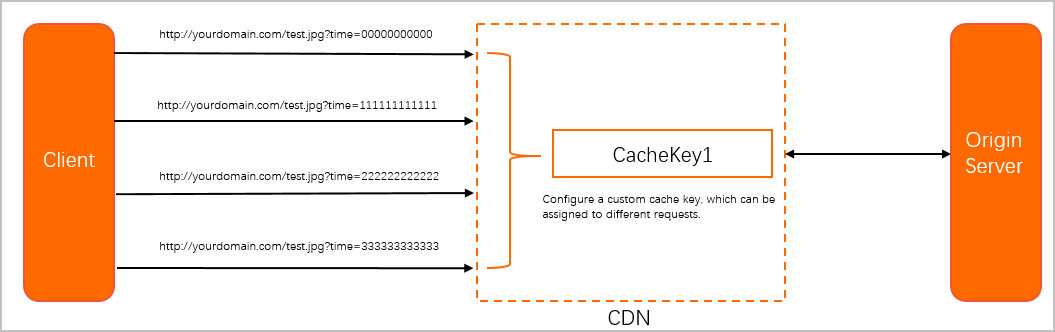
Use case 2: Differentiate requests
When client requests share the same URL, CDN treats them as requests for the same file. However, you might need to serve different content based on a client field in the HTTP header that identifies different client systems.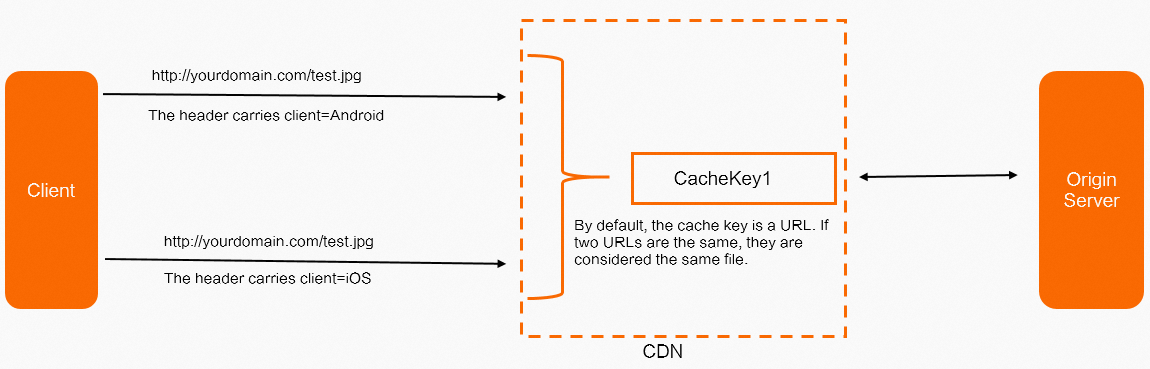
In this case, append the value of the client header to the cache key by using a custom cache key rule. This creates a distinct cache key for each client type.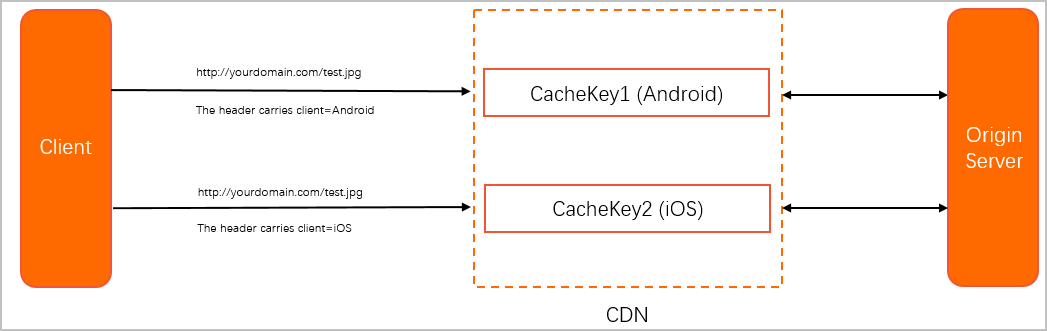
Procedure
-
Log on to the CDN console.
-
On the Domain Names page, find the target domain name and click Manage in the Actions column.
In the left-side navigation pane, choose Cache.
On the Custom Cache Key tab, click Create Rule to set the following parameters:
Rule Condition
A Rule Condition identifies requests based on various parameters to determine whether a configuration applies to a specific request. If a rule uses a Rule Condition, the Rule Condition's priority determines the execution order, not the feature's priority setting.
Do not use: The custom cache key applies to all requests without a Rule Condition.
To add or edit a Rule Condition: Manage it in the Rules Engine. For more information, see Rule Conditions and Rules Engine.
URIs
When a client request URI matches the Source URI in the configuration, the system replaces it with the configured Final URI to generate the cache key. You can configure multiple URI replacement policies. Policies are matched sequentially from top to bottom. Once a Source URI is matched, the system applies the corresponding Final URI and stops matching subsequent policies.
Source URI: A URI that starts with a forward slash (
/) and does not include thehttp://prefix or the domain name. PCRE regular expressions are supported.Final URI: A URI that starts with a forward slash (
/) and does not include thehttp://prefix or the domain name.
Request Parameter
Operations are performed on the parameters of the original request URL. You can perform Add, Delete, Modify, and Reserve operations. The result is appended to the cache key. If you configure multiple operations, they are executed sequentially from top to bottom.
Add: Appends a new request parameter to the cache key. For example, if the original URL is
http://image.example.com/cat.jpgand you add the parametertype=jpg, the cache key becomeshttp://image.example.com/cat.jpg?type=jpg.Delete: Removes the specified parameter from the original request URL when generating the cache key. For example, if the original URL is
http://image.example.com/cat.jpg?type=jpgand you delete the parametertype, the cache key becomeshttp://image.example.com/cat.jpg.Modify: Changes the value of a specified parameter in the original request URL when generating the cache key. For example, if the original URL is
http://image.example.com/cat.jpg?type=jpgand you change the parameter totype=png, the cache key becomeshttp://image.example.com/cat.jpg?type=png.Reserve: Retains only the specified parameters from the original request URL when generating the cache key. All other parameters are removed. For example, if the original URL is
http://image.example.com/cat.jpg?type=jpg&path=imageand you reserve thetypeparameter, the cache key becomeshttp://image.example.com/cat.jpg?type=jpg.
HTTP Headers
Appends the values of specified HTTP headers from the client's original request to the cache key. You can specify multiple header names, separated by spaces. Values are appended in the order the headers are specified. For example, if the original URL is
http://image.example.com/cat.jpgand the client request carries an HTTP headerpath:image, settingpathin the HTTP Headers field produces the cache keyhttp://image.example.com/cat.jpgimage.Custom Variables
Adds custom variable values to the generated cache key to improve caching flexibility. A custom variable consists of the following parameters:
Variable name: A custom name for the variable.
Source: A field value carried in the client request. The following source types are available:
Query String Parameter: The query string in the request URL.
Request Header: A request header carried in the client request.
Path: The resource path in the request URL.
Scheme: The protocol used by the request URL. Supports HTTP and HTTPS.
Source field: Required only for the Query String Parameter, Request Header, and Request Cookie source types. Specify one of the following:
The name of a specified parameter in the query string.
The name of a specified request header.
Match rule: A regular expression that matches a specific string in the source field value.
Variable expression: Generates the final variable value. Supports fixed strings and capture group references such as
$1, which references the content captured by the first parenthesized group.
Click OK.
Configuration examples
URIs
Requests for http://aliyundoc.com/a/b/image.jpg and http://aliyundoc.com/a/b/c/image.jpg are treated as requests for the same file. The cache key for this file is http://aliyundoc.com/c/image.jpg. Configure the following URI rewrite rules: rewrite Source URI /a/b to Final URI /c, and rewrite Source URI /a/b/c to Final URI /c. Click + Add Source URI to add rewrite rules, or click Delete to remove existing rules.
Request Parameter
A client request for http://aliyundoc.com/a/b/image.jpg?delete_par=1&modify_par=1 is processed as follows: add_par=1 is added, delete_par is deleted, and the value of modify_par is changed to 2. The resulting cache key is http://aliyundoc.com/a/b/image.jpg?modify_par=2&add_par=1.
If multiple operations target the same request parameter, the priority order is: Add > Delete > Reserve > Modify.
The Delete action supports only a single parameter name. To delete multiple parameters, click + Add Parameter Operation to add a separate Delete rule for each parameter.
HTTP Headers
The values of the User-Agent and Accept-Language headers from a client request are appended to the cache key. For example, if a request for http://aliyundoc.com/a/b/image.jpg contains the headers User-Agent=Mozilla/5.0 (Linux; X11) and Accept-Language=en, the cache key is http://aliyundoc.com/a/b/image.jpgMozilla/5.0(Linux;X11)en. In the HTTP Headers text box, enter the request header fields you want to include, such as User-Agent and Accept-Language.
Custom Variables
Example 1
The variable name is language, the source is Request Header, the source field is Accept-Language, the match rule is ([%w]+),([%w]+), and the variable expression is $1aa. Configure the custom variable as follows: set Variable name to language, select Request Header as the Source, enter Accept-Language as the Source field, enter ([%w]+),([%w]+) as the Match rule, and enter $1aa as the Variable expression.
A client requests http://aliyundoc.com/a/b/image.jpg with the HTTP header Accept-Language=en,ch. The match rule captures en and assigns it to $1 in the variable expression. The variable expression also appends aa, resulting in the variable value enaa with the alias language. This value is appended to the URL to form the final cache key: http://aliyundoc.com/a/b/image.jpgenaa.
The $n in the variable expression refers to the content captured by the n-th parenthesized group in the match rule. For example, with Accept-Language=en,ch and the match rule ([%w]+),([%w]+), $1=en and $2=ch.
Example 2
The variable name is expired, the source is Request Cookie, the source field is a, the match rule is [%w]+:(.*), and the variable expression is $1. Configure the custom variable as follows:
Variable name:
expiredSource: Request Cookie
Source field:
aMatch rule:
[%w]+:(.*)Variable expression:
$1
A client requests http://aliyundoc.com/a/b/image.jpg with the cookie Cookie a=expired_time:12635187. The match rule captures 12635187 and assigns it to $1 in the variable expression, with the alias expired. This value is appended to the URL to form the final cache key: http://aliyundoc.com/a/b/image.jpg12635187.
Example 3
This example combines a URI rule and a custom variable.
URI:
Merge all requests with a URI matching /abc/.*/abc into /abc. The Source URI is /abc/.*/abc, and the Final URI is /abc.
Custom Variables:
The variable name is testname, the source is Path, the match rule is /abc/xyz/(.*), and the variable expression is $1. Configure as follows: set Variable name to testname, set Source to Path, set Match rule to /abc/xyz/(.*), and set Variable expression to $1.
A client requests http://aliyundoc.com/abc/xyz/abc/image.jpg. According to the URI configuration, the cache key is rewritten to http://aliyundoc.com/abc/image.jpg. Then, based on the custom variable configuration, the original request path matches /abc/xyz/(.*). At this point, $1 is assigned the value abc/image.jpg and appended to the cache key, forming the final cache key: http://aliyundoc.com/abc/image.jpgabc/image.jpg. This demonstrates how you can combine rules to implement more complex caching logic.
If a custom variable for the cache key is not matched, the variable expression $1 is not appended to the cache key.
Example 4
This example combines a Rule Condition and a custom variable to generate different cache keys for requests from mobile and PC clients.
Mobile Rule Condition:
The User-Agent header contains any of the following strings: *Mobile*,*Android*,*iPhone*,*ipad*.
PC Rule Condition:
The User-Agent header does not contain any of the following strings: *Mobile*,*Android*,*iPhone*,*ipad*.
Mobile custom cache key:
For Rule Condition, select Mobile. For the Custom Variables, set Variable Name to Mobile, Source to Path, Matching Rule to /, and Variable Expression to +mobile.
PC custom cache key:
For Rule Condition, select PC. For the Custom Variables, set Variable Name to PC, Source to Path, Matching Rule to /, and Variable Expression to +pc.
For a client request to http://aliyundoc.com/image.jpg, the request matches either the Mobile or PC custom cache key rule based on the User-Agent value. The final cache key for mobile clients is http://aliyundoc.com/image.jpg+mobile, and the final cache key for PC clients is http://aliyundoc.com/image.jpg+pc.