Remote authentication forwards user requests to an authentication server that you specify, and the authentication server validates the requests. Configure remote authentication for an accelerated domain name when your own authentication server, rather than the POPs, must decide whether a request is authorized.
How it works
Remote authentication and URL signing serve the same purpose: both protect resources so that only authorized users can access them. The two features differ in how they are implemented:
URL signing — You distribute the signing rules of a domain name to the CDN POPs, and the CDN POPs complete the entire data exchange and authentication process.
Remote authentication — You operate your own authentication server. After a CDN POP receives a user request, it forwards the request to the authentication server for authentication.
Use URL signing when the CDN POPs can enforce the authentication rules on their own. Use remote authentication when your own authentication server must make the decision for each request.
The data exchange process of remote authentication is as follows: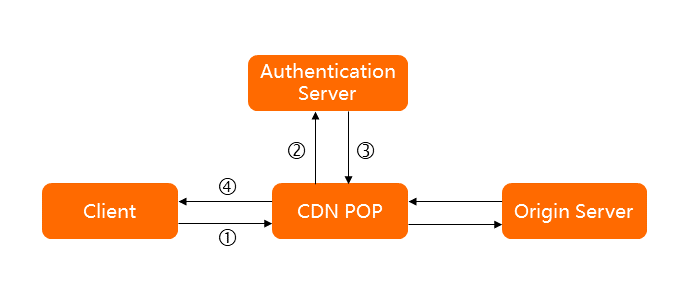
No. | Interaction description |
① | A resource access request initiated by a user arrives at a CDN POP, and the request carries authentication parameters. For example, the original request URL is |
② | The CDN POP receives the user request and forwards it to the authentication server, either directly or after processing it based on the specified rules. For example, the address of the authentication server is |
③ | The authentication server returns an authentication result to the CDN POP based on the authentication parameters carried in the user request. |
④ | The CDN POP performs the corresponding action based on the authentication result returned by the authentication server and returns the corresponding data to the user. The following examples describe authentication results.
|
Usage notes
Logging — After you configure remote authentication, requests that fail authentication can still reach the CDN POPs, but the CDN POPs reject the requests and return the HTTP status code that you specify in Custom HTTP Status Code, such as 403. The client request records are still written to the CDN logs.
Billing — Remote authentication forwards user requests to the authentication server that you specify, so you are charged traffic fees even when the CDN POPs block malicious requests. Blocking malicious requests consumes the processing resources of the CDN POPs. If clients use HTTPS, you are also charged for HTTPS requests.
Prerequisites
An authentication server that you deploy and manage is available at an address that can be accessed externally.
Procedure
-
Log on to the CDN console.
-
In the left navigation pane, click Domain Names.
-
On the Domain Names page, find the target domain name and click Manage in the Actions column.
-
In the domain's navigation pane, click Access Control.
Click the Remote Authentication tab.
Turn on the Remote Authentication switch and configure the remote authentication settings as prompted on the page.
NoteAfter you enable remote authentication, every user request must be forwarded to the authentication server for processing. When the request volume is large, consider the load and performance of the authentication server.
Parameter
Description
Authentication Server Address
The address at which the authentication server can be accessed externally. The system validates the authentication server address that you enter, including format validation and value validation.
Format requirements:
The authentication address supports the HTTP and HTTPS protocols, in one of the following formats:
http://example.com/auth,https://example.com/auth,http://192.0.2.1/auth, orhttps://192.0.2.1/auth.
Value requirements:
The value cannot contain 127.0.0.1 or localhost. The POP initiates the authentication request, so the address must be reachable from the POP.
Request Method
The request method that the authentication server supports. Valid values: GET, HEAD, and POST. Default value: GET.
File Types
All: All file types are authenticated.
Specified: Only the specified file types are authenticated.
When you specify file types, separate multiple file types with a vertical bar, for example,
mp4|flv.File types are case-sensitive:
.jpgandJPGare two different file types.
URL parameters used for authentication
Parameters to Retain
Controls which parameters in the user request URL are authenticated. You can select Retain All Parameters, Retain Specified Parameters, or Delete All URL Parameters.
When you retain specified parameters, separate multiple parameters with a vertical bar, for example,
user|token.Parameters are case-sensitive:
keyandKEYare two different parameters.
Custom Parameters
Adds custom parameters to the request URL that the CDN POP forwards to the authentication server. You can define the parameters and their values, or use the variables preset in the CDN console.
When you define parameters and their values, the following requirements apply:
separate multiple parameters with a vertical bar, for example,
token=$arg_token|vendor=ali_cdn;parameter values are case-sensitive, which means that
keyandKEYare two different parameter values.
When you use preset variables, you can extract the value of a variable and add it to the request that CDN forwards to the authentication server.
For example, if you select the variable
$http_host,host=$http_hostis appended to the URL of the user request, where host indicates the host value in the user request header. For a description of the variable names and their meanings, see Variables.
Request headers used for authentication
Request Headers to Retain
Controls which request headers in the user request are authenticated. You can select Retain All Parameters or Retain Specified Parameters.
When you retain specified request headers, separate multiple request headers with a vertical bar, for example,
user_agent|referer|cookies.Request headers are not case-sensitive, which means that
http_remote_addrandHTTP_Remote_Addrare the same.
NoteWhen you select Retain All Parameters, the CDN POP deletes the HOST header by default. The HOST header carried in the authentication request that the CDN POP forwards to the authentication server is the accelerated domain name, which may prevent the authentication server from recognizing the authentication request and cause a 404 status code to be returned and authentication to fail. To retain the HOST header, use Retain Specified Parameters or Custom Parameters.
Custom Parameters
Adds custom parameters to the request header that the CDN POP forwards to the authentication server. You can define the parameters and their values, or use the variables preset in the CDN console.
When you define parameters and their values, the following requirements apply:
separate multiple request headers with a vertical bar, for example,
User-Agent=$http_user_agent|vendor=ali_cdn.Request headers are not case-sensitive, which means that
http_remote_addrandHTTP_Remote_Addrare the same.
When you use preset variables, you can extract the value of a variable and add it to the request that CDN forwards to the authentication server.
For example, if you select the variable
$http_host,host=$http_hostis appended to the URL of the user request, where host indicates the host value in the user request header. For a description of the variable names and their meanings, see Variables.
HTTP Status Code to Return
Passes Authentication
The HTTP status codes that the authentication server returns to CDN when authentication succeeds. You can configure multiple status codes and separate them with commas (,). Example: If you set the authentication success status code to
200,206, authentication is successful when the authentication server returns200or206. For status codes that are neither success status codes nor failure status codes, see Whether to allow other status codes in this table.Fails Authentication
The HTTP status codes that the authentication server returns to CDN when authentication fails. You can configure multiple status codes and separate them with commas (,). Example: If you set the authentication failure status code to
400,403, authentication fails when the authentication server returns400or403. For status codes that are neither success status codes nor failure status codes, see Whether to allow other status codes in this table.Whether to allow other status codes
Determines how the CDN POP handles a user request when the status code returned by the authentication server is neither a success status code nor a failure status code. Yes: To prevent all user requests from being blocked by an exception, the CDN POP allows the user request. For example, if the authentication success status code is set to 200 and the authentication server returns 201, the user request is allowed. If the authentication failure status code is set to 403 and the authentication server returns 404, the user request is allowed. No: The CDN POP rejects the user request.
Action that CDN performs after authentication fails
Custom HTTP Status Code
The status code that the CDN POP returns to the user when a user request fails authentication.
For example, if you set the custom response status code to 403, the CDN POP returns 403 to the user when a user request fails authentication.
Authentication timeout settings
Timeout
The period that is measured from when the CDN POP initiates an authentication request to when the CDN POP receives the result returned by the authentication server. Unit: milliseconds. Maximum value: 3000.
Action After Timeout
How CDN handles a user request after the data exchange between CDN and the authentication server times out. You can select Pass or Reject.
Pass: If authentication times out, CDN allows the user request.
Reject: If authentication times out, CDN rejects the user request and returns the Custom HTTP Status Code that you configured to the user.
Click OK to complete the configuration.
After you successfully configure the remote authentication feature, you can modify the current configuration or disable remote authentication on the Remote Authentication tab. Disable remote authentication to stop forwarding user requests to the authentication server.
Variables
When you add custom parameters, you can directly use the variables preset in the CDN console. The following table describes the variable names and their meanings.
Variable name | Variable meaning |
$http_host | The Host value in the request header. |
$http_user_agent | The User-Agent value in the request header. |
$http_referer | The Referer value in the request header. |
$http_content_type | The Content-Type value in the request header. |
$http_x_forward_for | The X-Forwarded-For value in the request header. |
$remote_addr | The client IP information of the request. |
$scheme | The protocol type of the request. |
$server_protocol | The protocol version of the request. |
$uri | The original URI of the request. |
$args | The query string of the request, which does not include the question mark (?). |
$request_method | The request method. |
$request_uri | The content of uri+'?'+args. |