Template ID: SX4CLB1IH4FYNAGH
Address: https://bpstudio.console.alibabacloud.com/bpStudio/topo?TemplateId=SX4CLB1IH4FYNAGH
Supported regions: China (Hangzhou), China (Beijing), China (Shanghai), China (Shenzhen), China (Guangzhou), China (Chengdu), etc.
Template architecture:
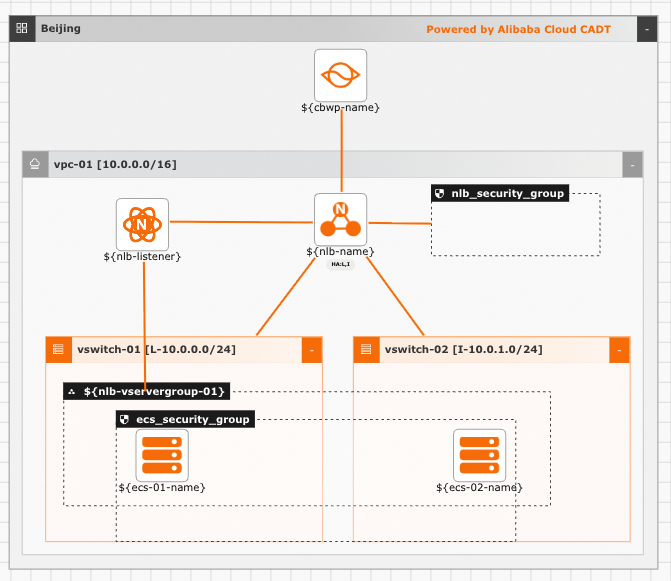
Parameter variables: Parameter types include String, Integer, Boolean, and Map. Pass parameter values through variables. If not specified, default values are used. To modify template variable configuration, see Configure template variables.
No. | Parameter | Type | Default | Description |
1 |
| String | nlb | NLB instance name |
2 |
| String | Internet | Network type |
3 |
| Map | {"createBy":"cadt"} | Resource tags |
4 |
| String | cbwp | Internet Shared Bandwidth name |
5 |
| Integer | 1 | Bandwidth in Mbps |
6 |
| String | nlb_listener_80 | NLB listener name |
7 |
| Integer | 80 | Listener port |
8 |
| String | nlb_servergroup | Server group name |
9 |
| List<Map> | [{"backend_port":"80","weight":100}] | Server group port configuration |
10 |
| String | ecs.c6.large | ECS01 instance type |
11 |
| String | ecs-test-01 | ECS01 instance name |
12 |
| String | Test1234 | ECS01 password |
13 |
| Integer | 1 | Number of ECS01 instances |
14 |
| String | ecs.c6.large | ECS02 instance type |
15 |
| String | ecs-test-02 | ECS02 instance name |
16 |
| String | Test1234 | ECS02 password |
17 |
| Integer | 1 | Number of ECS02 instances |
Command line debugging: Example YAML configuration (creates new VPC, vSwitch, bandwidth, NLB, and ECS by default):
template_id: SX4CLB1IH4FYNAGH
area_id: "cn-beijing"
instances:
#  - node_type: vpc
#    node_name: vpc-01
#    id: vpc-bp**********ws
#  - node_type: vswitch
#    node_name: vswitch-01
#    id: vsw-bp**********0ex
#  - node_type: vswitch
#    node_name: vswitch-02
#    id: vsw-bp**********1ek
# Creates new VPC and vSwitch by default. To reuse existing resources, uncomment and update IDs

variables:
  ${nlb-name}: "ali-prod-nlb"
  ${nlb-network-type}: "Intranet"
  # Private: Intranet, Public: Internet
  ${cbwp-name}: "ali-nlb-cbwp"
  ${cbwp-bandwidth}: "1"
  # Default 1 Mbps, automatically adds NLB to Internet Shared Bandwidth
  ${nlb-listener}: "listener_TCP_80"
  ${nlb-listener-port}: "80"
  ${nlb-vservergroup-01}: "SG_TCP_01"
  ${nlb-sg-backend-port}: "[{\"backend_port\":\"80\",\"weight\":\"100\"}]"
  ${ecs-01-type}: "ecs.c6.large"
  ${ecs-01-num}: "1"
  ${ecs-01-name}: "ecs-test-01"
  ${ecs-01-password}: "Test1234"
  ${ecs-02-type}: "ecs.c6.large"
  ${ecs-02-num}: "1"
  ${ecs-02-name}: "ecs-test-02"
  ${ecs-02-password}: "Test1234"
  ${instance-tags}: "{\"env\":\"test\",\"createBy\":\"cadt\"}"
  #${resourcegroupId}: "rg-ac*****y"

configuration:
  enableMonitor: "0"
  enableReport: "0"

output:
  nlb:
    - Address
    - Port
  ecs:
    - Private_ip
Notes:
1. To change regions, update area_id. For example, replace cn-beijing with cn-shanghai for China (Shanghai). For region IDs, see Regions and Zones.
2. To use existing resources (VPC, vSwitch, etc.), update the id field for that resource:
instances:
  - node_type: vpc
    node_name: vpc-01
    id: vpc-bp**********ws
  - node_type: vswitch
    node_name: vswitch-01
    id: vsw-bp**********0ex
  - node_type: vswitch
    node_name: vswitch-02
    id: vsw-bp**********1ek