WA-NLB-ECR
Template ID
FMW2B14GQWCIUYD5
Address: https://bpstudio.console.alibabacloud.com/bpStudio/topo?TemplateId=FMW2B14GQWCIUYD5
Supported regions
Hangzhou, Beijing, Shanghai, Shenzhen, Guangzhou, and Chengdu
Template architecture
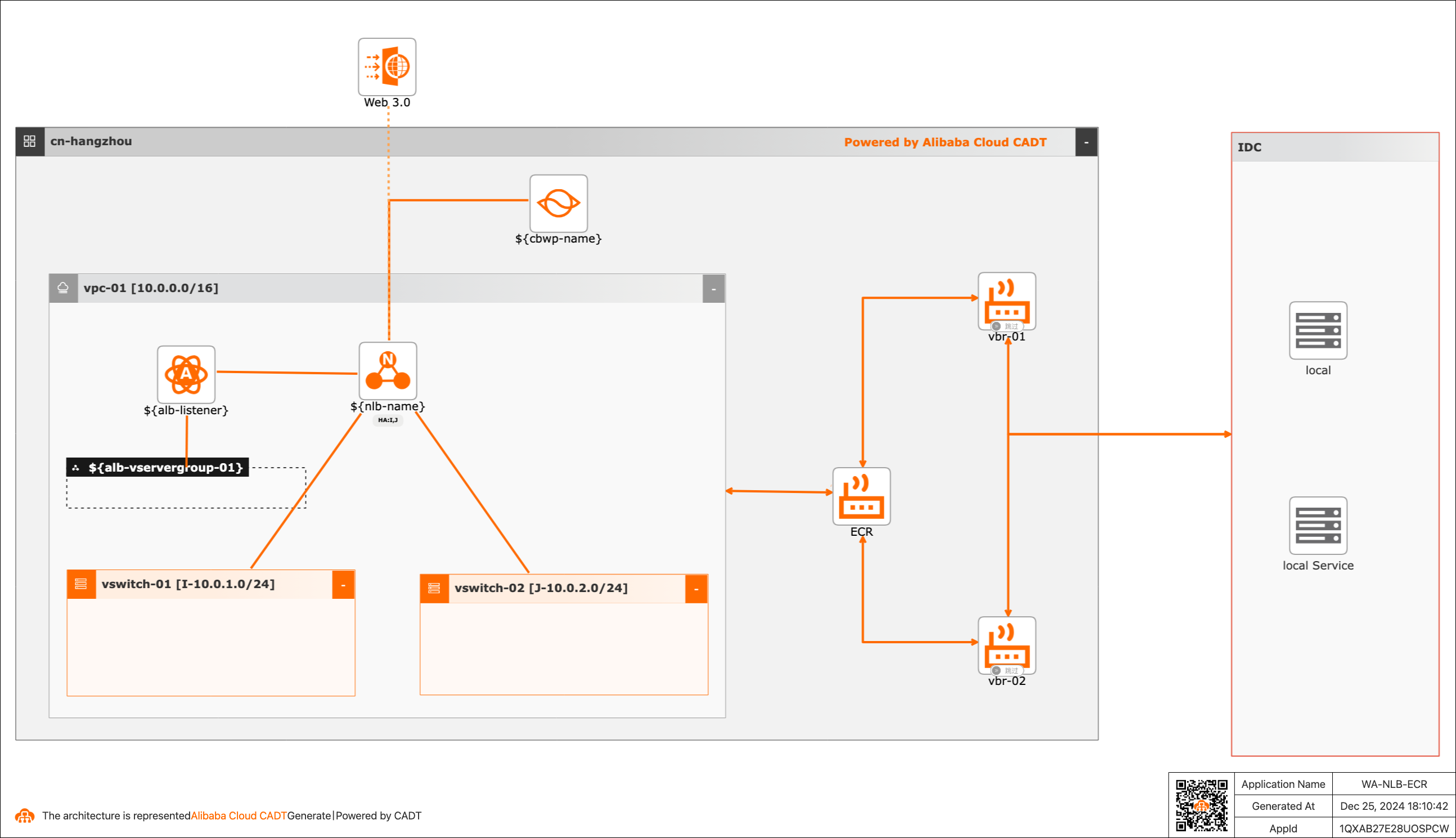
Variables
The parameter type can be STRING, INTEGER, BOOLEAN, MAP, or other types. You can configure the values of the variables.
If the value of a variable is not configured, the default value is used. For information about how to modify the template variables, see Configure template variables.
No. | Variable | Type | Default value | Description |
1 | ${nlb-name} | String | prod-nlb | The name of the Network Load Balancer (NLB) instance. |
2 | ${nlb-network-type} | String | Internet | The network type. |
3 | ${instance-tags} | Map | {"createBy":"cadt"} | The resource tags. |
4 | ${resourcegroupId} | String | The ID of the resource group. | |
5 | ${cbwp-name} | String | nlb-cbwp | The name of the Internet Shared Bandwidth instance. |
6 | ${cbwp-bandwidth} | Integer | 1 | The bandwidth. Unit: Mbit/s. |
7 | ${nlb-listener} | String | nlb_listener | The listener of the NLB instance. |
8 | ${nlb-listener-port} | Integer | 80 | The listening port. |
9 | ${nlb-vservergroup-01} | String | nlb_vservergroup-idc | The vServer group. |
10 | ${nlb-sg-backend-port} | List<Map> | [{"backend_port":"80","weight":100}] | The port configurations for the vServer group. |
CLI-based debugging
The following sample code provides an example of parameter configurations, including the default VPC, vSwitch, and Internet Shared Bandwidth instance, in a YAML file:
template_id: FMW2B14GQWCIUYD5
area_id: "cn-hangzhou"
instances:
#  - node_type: vpc
#    node_name: vpc-01
#    id: vpc-bp**********ws
#  - node_type: vswitch
#    node_name: vswitch-01
#    id: vsw-bp**********0ex
#  - node_type: vswitch
#    node_name: vswitch-02
#    id: vsw-bp**********1ek
# By default, a VPC and a vSwitch are created. The related parameters are commented on. When you reuse an existing VPC and vSwitch, uncomment the related parameters and replace the id value with the required ID.

variables:
  ${nlb-name}: "ali-prod-nlb"
  ${nlb-network-type}: "Internet"
  # Private network: Intranet, public network: Internet
  ${cbwp-name}: "ali-nlb-cbwp"
  ${cbwp-bandwidth}: "1"
  # The default bandwidth is 1 Mbit/s, and the NLB instance is automatically added to the Internet Shared Bandwidth instance.
  ${nlb-listener}: "listener_TCP_80"
  ${nlb-listener-port}: "80"
  ${nlb-vservergroup-01}: "SG_TCP_01"
  ${nlb-sg-backend-port}: "[{\"backend_port\":\"80\",\"weight\":\"100\"}]"
  ${instance-tags}: "{\"env\":\"test\",\"createBy\":\"cadt\"}"
  #${resourcegroupId}: "rg-ac*****y"

configuration:
  enableMonitor: "0"
  enableReport: "0"

output:
  nlb:
    - Address
    - Port
  eip:
    - IpAddress
    - RegionId
  gateway:
    -EcrId
Note:
1. If you want to change the region, change the value of the area_id field. For example, change cn-hangzhou to cn-shanghai.
For more information, see Regions and zones.
2. If you want to modify the configurations, such as VPC and vSwitch, change the value of the id field for a specific resource.
instances:
  - node_type: vpc
    node_name: vpc-01
    id: vpc-bp**********ws
  - node_type: vswitch
    node_name: vswitch-01
    id: vsw-bp**********0ex
  - node_type: vswitch
    node_name: vswitch-02
    id: vsw-bp**********1ek