Template ID
Supported regions
Beijing, Shenzhen, Shanghai
Template architecture
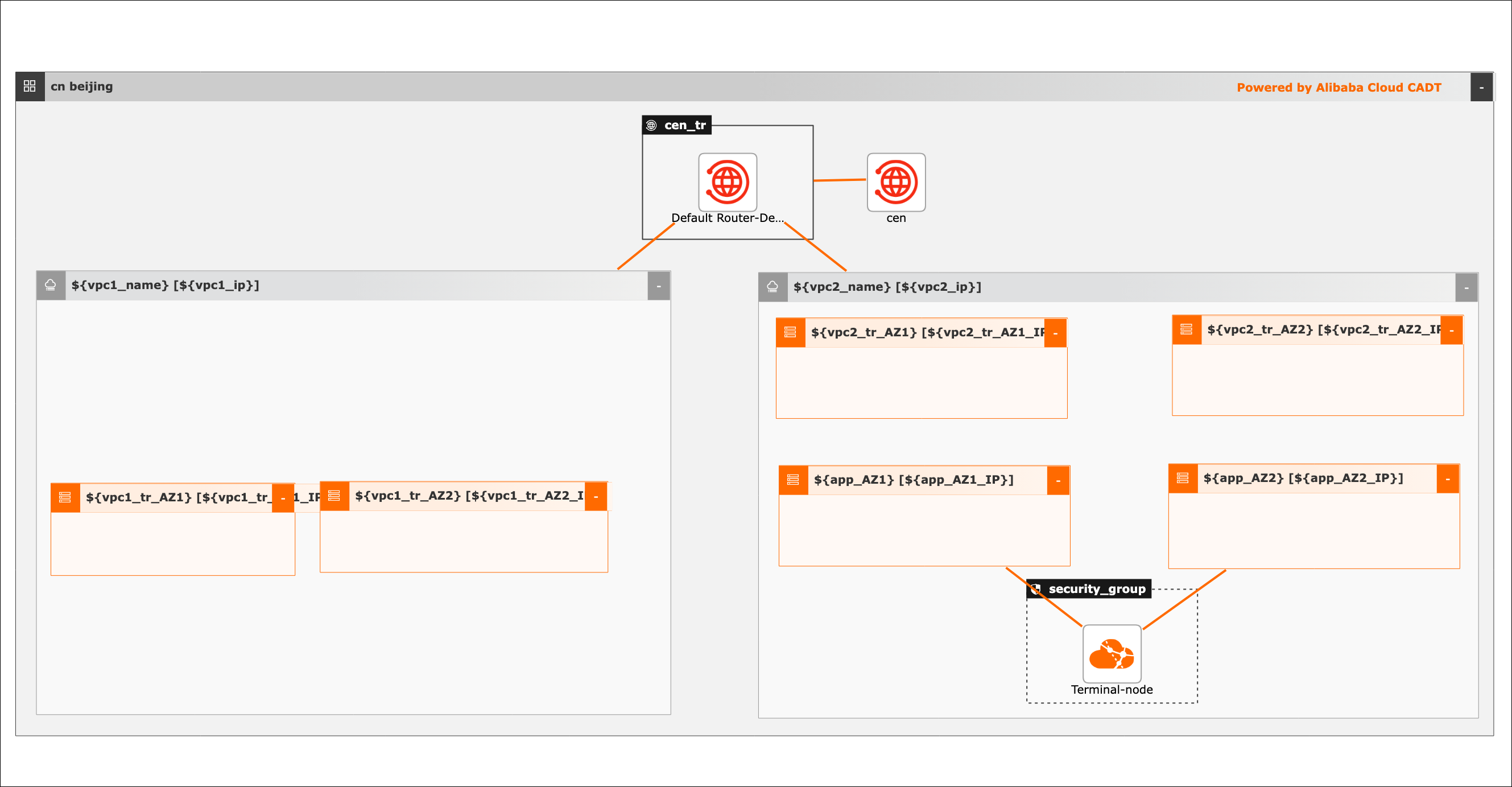
Parameter variables
Types of parameter variables include String, etc., with related values passed through variables.
Default values are used if not passed. To modify the template variable configuration, refer to:Template variable configuration
Ordinal number | Variable name | Variable type | Default value | Description |
1 | Region | String | cn-Beijing | Beijing region |
2 | ${vpc1_name} | String | vpc1 | The name of vpc1 |
3 | ${vpc1_ip} | String | 172.16.0.0/16 | The CIDR block of vpc1 |
4 | ${vpc1_tr_AZ1} | String | vpc1-tr-K | The name of vpc1-tr switch 1 |
5 | ${vpc1_tr_AZ1_IP} | String | 172.16.0.0/24 | The CIDR block of vpc1-tr switch 1 |
6 | ${vpc1_tr_AZ2} | String | DMZ-vsw-K | The name of vpc1-tr switch 2 |
7 | ${vpc1_tr_AZ2_IP} | String | 172.16.1.0/24 | The CIDR block of vpc1-tr switch 2 |
8 | ${vpc2_name} | String | vpc2 | The name of vpc2 |
9 | ${vpc1_ip} | String | 192.168.0.0/16 | The CIDR block of vpc2 |
10 | ${vpc2_tr_AZ1} | String | vpc2-tr-K | The name of vpc2-tr switch 1 |
11 | ${vpc2_tr_AZ1_IP} | String | 192.168.10.0/24 | The CIDR block of vpc2-tr switch 1 |
12 | ${vpc2_tr_AZ2} | String | vpc2-tr-H | The name of vpc2-tr switch 2 |
13 | ${vpc2_tr_AZ2_IP} | String | 192.168.11.0/24 | The CIDR block of vpc2-tr switch 2 |
14 | ${app_AZ1} | String | vswitch-K | The name of application switch 1 |
15 | ${app_AZ1_IP} | String | 192.168.0.0/24 | The CIDR block of application switch 1 |
16 | ${app_AZ2} | String | vswitch-H | The name of application switch 2 |
17 | ${app_AZ2_IP} | String | 192.168.1.0/24 | The CIDR block of application switch 2 |
Command line debugging
Example of YAML file parameter configuration (default VPC, switch, security group, IPv4, and route table are newly created):
template_id: C25E5F0DE12CJBPN
area_id: "cn-beijing"

variables:
            ${vpc1_name}: "vpc1"
            ${vpc1_ip}: "172.16.0.0/12"
            ${vpc1_tr_AZ1}: "vpc1-tr-K"
            ${vpc1_tr_AZ1_IP}: "172.16.0.0/24"
            ${vpc1_tr_AZ2}: "vpc1-tr-H"
            ${vpc1_tr_AZ2_IP}: "172.16.1.0/24"
            ${vpc2_name}: "vpc2"
            ${vpc2_ip}: "192.168.0.0/16"
            ${vpc2_tr_AZ1}: "vpc2-tr-K"
            ${vpc2_tr_AZ1_IP}: "192.168.10.0/24"
            ${vpc2_tr_AZ2}: "vpc2-tr-H"
            ${vpc2_tr_AZ2_IP}: "192.168.11.0/24"
            ${app_AZ1}: "vswitch-K"
            ${app_AZ1_IP}: "192.168.0.0/24"
            ${app_AZ2}: "vswitch-H"
            ${app_AZ2_IP}: "192.168.1.0/24"

configuration:
  enableMonitor: "0"
  enableReport: "0"
Note:
1. To replace the region, modify the area_id field. For instance, change Beijing "cn-beijing" to Shanghai "cn-shanghai".
For more information, see the referenced document.
2. Access to the OSS service via the endpoint service requires whitelisting; otherwise, deployment will be abnormal.
Template library address: https://bpstudio.console.alibabacloud.com/#/bpStudio/topo?TemplateId=C25E5F0DE12CJBPN
Code example address:
Visualization method
Batch create related Alibaba Cloud services, including 2 VPCs, 6 switches, and 1 PrivateLink.
Create a new application based on the template. The default region is Hangzhou, with all cloud products newly created.
Complete application saving, then verify and price. All cloud products in this example are billed on a pay-as-you-go basis.
After verification, confirm the protocol to initiate batch deployment and automatically complete the routing configuration.
Integrated API invocation method
Utilize a set of openAPI interfaces for rapid use through integrated API.
Refer to the documentation to initialize using the command line tool.
Directly deploy and output using the model YAML file.
To replace the region, modify the area_id field. For instance, change Hangzhou "cn-hangzhou" to Shanghai "cn-shanghai".