Template ID: FOOKUK1EPTFB97PA
Address: https://bpstudio.console.alibabacloud.com/bpStudio/topo?TemplateId=FOOKUK1EPTFB97PA
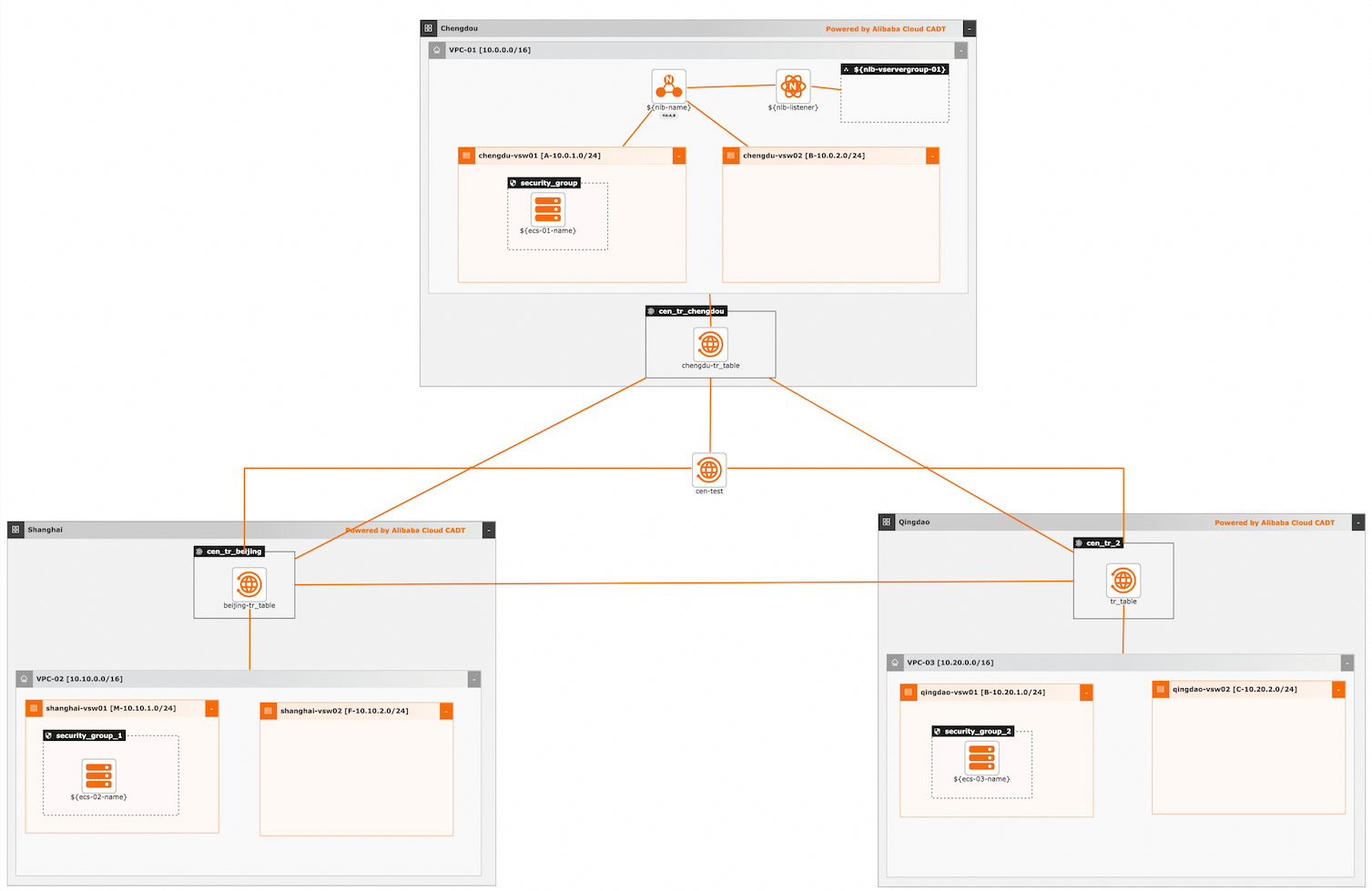
Template architecture:
Use cases
This template enables an NLB instance in Region A to attach ECS instances from two other regions, achieving cross-region high availability:
A VPC (VPC1) is created in China (Chengdu). Within VPC1, an NLB instance and an ECS instance (ECS1) are deployed to test cross-region load balancing.
A VPC (VPC2) is created in China (Shanghai) with an ECS2 instance deployed.
A VPC (VPC3) is created in China (Qingdao) with an ECS3 instance deployed. ECS2 and ECS3 run identical services.
The three regions are interconnected via Alibaba Cloud's Cloud Enterprise Network (CEN) and Transit Router, with cross-region connections and bandwidth configured.
Parameter variables
Parameter types include String, Integer, Boolean, and Map. Pass parameter values through variables. If not specified, default values are used. To modify template variable configuration, see Configure template variables.
No. | Parameter | Type | Default | Description |
1 |
| String | cen-test | CEN instance name |
2 |
| String | nlb-test | NLB instance name |
3 |
| Map | {"createBy":"cadt"} | Resource tags |
4 |
| String | nlb_listener_80 | NLB listener name |
5 |
| Integer | 80 | Listener port |
6 |
| String | nlb_servergroup | Server group name |
7 |
| List<Map> | [{"backend_port":"80","weight":100}] | Server group port configuration |
8 |
| Integer | 1 | Number of ECS01 instances |
9 |
| String | ecs.c6.large | ECS01 instance type |
10 |
| String | ecs-chengdu-01 | ECS01 instance name |
11 |
| String | Test1234 | ECS01 password |
12 |
| String | 10.0.1.100 | ECS01 private IP address |
13 |
| Integer | 1 | Number of ECS02 instances |
14 |
| String | ecs.c6.large | ECS02 instance type |
15 |
| String | ecs-shanghai-01 | ECS02 instance name |
16 |
| String | Test1234 | ECS02 password |
17 |
| String | 10.10.1.100 | ECS02 private IP address |
18 |
| Integer | 1 | Number of ECS03 instances |
19 |
| String | ecs.c6.large | ECS03 instance type |
20 |
| String | ecs-qingdao-01 | ECS03 instance name |
21 |
| String | Test1234 | ECS03 password |
22 |
| String | 10.20.1.100 | ECS03 private IP address |
Command line debugging: Example YAML configuration (creates new VPC, vSwitch, bandwidth, NLB, and ECS by default):
template_id: FOOKUK1EPTFB97PA
#area_id: "cn-beijing"
instances:
#  - node_type: vpc
#    node_name: vpc-01
#    id: vpc-bp**********ws
#  - node_type: vswitch
#    node_name: chengdu-vsw01
#    id: vsw-bp**********0ex
#  - node_type: vswitch
#    node_name: chengdu-vsw02
#    id: vsw-bp**********1ek
#  - node_type: vpc
#    node_name: vpc-02
#    id: vpc-bp**********ws
#  - node_type: vswitch
#    node_name: shanghai-vsw01
#    id: vsw-bp**********0ex
#  - node_type: vswitch
#    node_name: shanghai-vsw02
#    id: vsw-bp**********1ek
#  - node_type: vpc
#    node_name: vpc-03
#    id: vpc-bp**********ws
#  - node_type: vswitch
#    node_name: qingdao-vsw01
#    id: vsw-bp**********0ex
#  - node_type: vswitch
#    node_name: qingdao-vsw02
#    id: vsw-bp**********1ek
# Creates new VPC and vSwitch by default. To reuse existing resources, uncomment and update IDs

variables:
  ${nlb-name}: "ali-prod-nlb"
  ${nlb-network-type}: "Intranet"
  # Private network: Intranet, public network: Internet
  ${nlb-listener}: "listener_TCP_80"
  ${nlb-listener-port}: "80"
  ${nlb-vservergroup-01}: "SG_TCP_01"
  ${nlb-sg-backend-port}: "[{\"backend_port\":\"80\",\"weight\":\"100\"}]"
  ${cen-name}: "Enterprise Edition CEN-01"
  ${ecs-01-num}: "1"
  ${ecs-01-type}: "ecs.c6.large"
  ${ecs-01-name}: "ecs-chengdu-01"
  ${ecs-01-privateip}: "10.0.1.100"
  ${ecs-01-password}: "Test1234"
  ${ecs-02-num}: "1"
  ${ecs-02-type}: "ecs.c6.large"
  ${ecs-02-name}: "ecs-shanghai-01"
  ${ecs-02-privateip}: "10.10.1.100"
  ${ecs-02-password}: "Test1234"
  ${ecs-03-num}: "1"
  ${ecs-03-type}: "ecs.c6.large"
  ${ecs-03-name}: "ecs-qingdao-01"
  ${ecs-03-privateip}: "10.20.1.100"
  ${ecs-03-password}: "Test1234"
  ${instance-tags}: "{\"env\":\"test\",\"createBy\":\"cadt\"}"
  #${resourcegroupId}: "rg-ac*****y"

configuration:
  enableMonitor: "0"
  enableReport: "0"

output:
  nlb:
    - Address
    - Port
  ecs:
    - Private_ip
Notes:
1. To use existing resources (VPC, vSwitch), update the id field for those resources:
instances:
  - node_type: vpc
    node_name: vpc-01
    id: vpc-bp**********ws
  - node_type: vswitch
    node_name: chengdu-vsw01
    id: vsw-bp**********0ex
  - node_type: vswitch
    node_name: chengdu-vsw02
    id: vsw-bp**********1ek
  - node_type: vpc
    node_name: vpc-02
    id: vpc-bp**********ws
  - node_type: vswitch
    node_name: shanghai-vsw01
    id: vsw-bp**********0ex
  - node_type: vswitch
    node_name: shanghai-vsw02
    id: vsw-bp**********1ek
  - node_type: vpc
    node_name: vpc-03
    id: vpc-bp**********ws
  - node_type: vswitch
    node_name: qingdao-vsw01
    id: vsw-bp**********0ex
  - node_type: vswitch
    node_name: qingdao-vsw02
    id: vsw-bp**********1ek