This topic describes the metrics used for monitoring resource usage in Batch Compute and how to query the metrics and their statistics. Batch Compute allocates resources for running jobs on clusters. The metrics in Batch Compute are available in the cluster and job dimensions.
Cluster metrics
Metrics
The following table describes the metrics that Batch Compute provides in the cluster dimension.
Metric | Name | Unit | Aggregated statistics |
cls_dataVfsFsSizePused | Data disk usage | % | Average, maximum, and minimum |
cls_systemCpuLoad | CPU load | % | Average, maximum, and minimum |
cls_systemCpuUtilIdle | CPU idle rate | % | Average, maximum, and minimum |
cls_systemCpuUtilUsed | CPU usage | % | Average, maximum, and minimum |
cls_vfsFsSizePused | System disk usage | % | Average, maximum, and minimum |
cls_vmMemorySizePused | Memory usage | % | Average, maximum, and minimum |
Batch Compute collects the metrics for each instance.
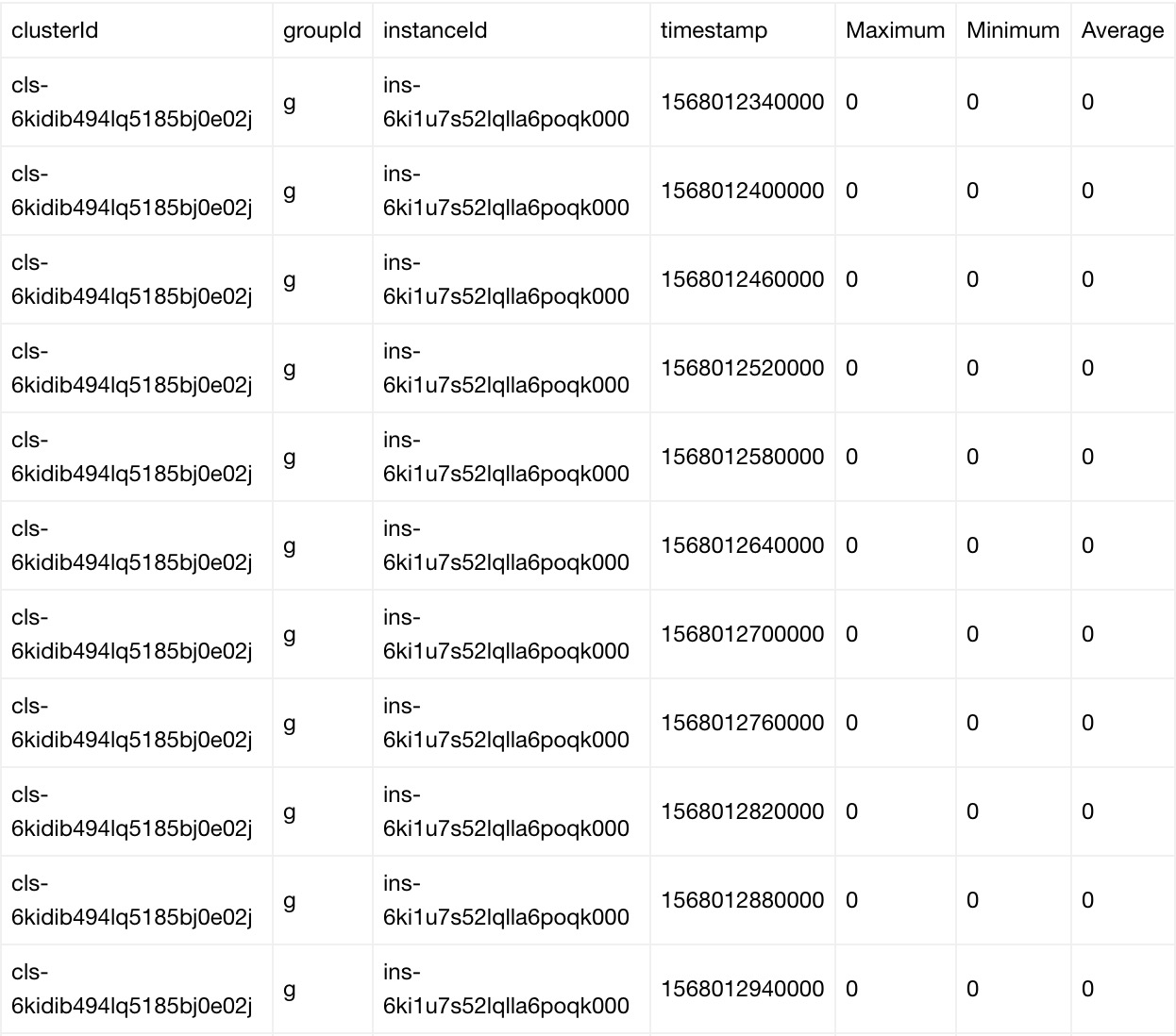
Batch Compute collects the statistics of each metric by cluster, group, and instance.
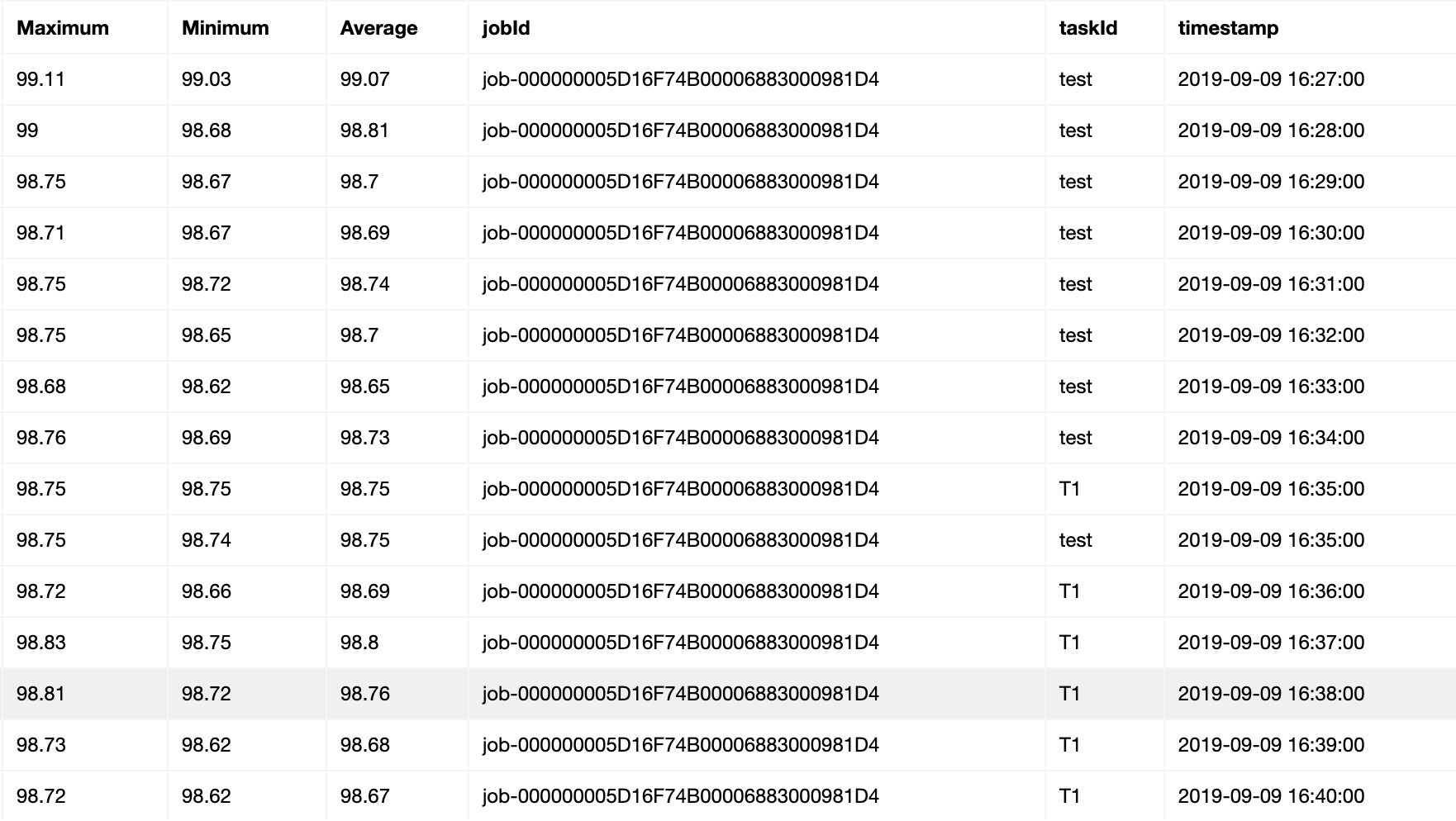
The statistics of each metric include the average, maximum, and minimum values in the past minute.
By default, Batch Compute pushes the statistics to CloudMonitor every 10 seconds.
When you call the DescribeMetricData operation to query the statistics of a metric, you can set the Period parameter to specify the period for aggregating the statistics. The default aggregation period is 1 minute.
Sample statistics
Job metrics
Metrics
The following table describes the metrics that Batch Compute provides in the job dimension.
Metric | Name | Unit | Aggregated statistics |
job_dataVfsFsSizePused | Data disk usage | % | Average, maximum, and minimum |
job_systemCpuLoad | CPU load | % | Average, maximum, and minimum |
job_systemCpuUtilIdle | CPU idle rate | % | Average, maximum, and minimum |
job_systemCpuUtilUsed | CPU usage | % | Average, maximum, and minimum |
job_vfsFsSizePused | System disk usage | % | Average, maximum, and minimum |
job_vmMemorySizePused | Memory usage | % | Average, maximum, and minimum |
Sample statistics
Use API operations to query metrics and related statistics
Batch Compute pushes the statistics of all metrics to CloudMonitor. You can query the metrics and related statistics of Batch Compute instances by calling the API operations that CloudMonitor provides.
DescribeMetricMetaList
You can call this operation to query metrics.
DescribeMetricData
You can call this operation to query the statistics of each metric collected for a cluster or job.
Sample code
#!/usr/bin/env python
#coding=utf-8

# https://www.alibabacloud.com/help/doc-detail/51936.htm
import os
import json
import time
import sys
import datetime
from functools import wraps
from aliyunsdkcore.client import AcsClient
from aliyunsdkcore.acs_exception.exceptions import ClientException
from aliyunsdkcore.acs_exception.exceptions import ServerException
from aliyunsdkcms.request.v20190101.DescribeMetricListRequest import DescribeMetricListRequest
from aliyunsdkcms.request.v20190101.DescribeMetricMetaListRequest import DescribeMetricMetaListRequest

akId = 'your key Id'
akKey = 'your key'
region = 'cn-hangzhou'

# jobId = "job-000000005D16F74B00006883000303E9"
jobId = "job-000000005D16F74B00006883000332DD"

def retryWrapper(func):
    @wraps(func)
    def wrapper(*args,**kwargs):
        index = 0
        while True:
            try:
                res = func(*args,**kwargs)
                break
            except Exception,e:
                if index > 6:
                    raise Exception(str(e))
                else:
                    time.sleep(0.5 * pow(2,index))
                    index += 1
        return res
    return wrapper

@retryWrapper
def listBatchMetricMeta(client, objId):
    metrics = []
    request = DescribeMetricMetaListRequest()
    request.set_accept_format('json')
    request.set_Namespace("acs_batchcomputenew")

    response = client.do_action_with_exception(request)
    res = json.loads(response)
    prefix = objId.strip().split("-")[0]
    for metric in res["Resources"]["Resource"]:
        if prefix not in metric["MetricName"]:
            continue
        metrics.append(metric["MetricName"])
    return metrics

@retryWrapper
def getSpecJobMetricsInfo(client, objId, metrics, startTime = None):
    nextToken = None
    request = DescribeMetricListRequest()
    request.set_accept_format('json')

    request.set_Period("60")
    request.set_Length("1000")

    request.set_EndTime(time.strftime("%Y-%m-%d %H:%M:%S", time.localtime(time.time())))

    # By default, the statistics in the past seven days are queried.
    if not startTime:
        sevenDayAgo = (datetime.datetime.now() - datetime.timedelta(days = 7))
        startTime = sevenDayAgo.strftime("%Y-%m-%d %H:%M:%S")
    request.set_StartTime(startTime)

    prefix = objId.strip().split("-")[0]
    if "job" in prefix:
        dimensionInfo = [{"jobId":objId}]
    else:
        dimensionInfo = [{"clusterId":objId}]

    request.set_Dimensions(json.dumps(dimensionInfo))
    request.set_MetricName(metrics)
    request.set_Namespace("acs_batchcomputenew")

    metricsInfo = []
    while True:
        if nextToken:
            request.set_NextToken(nextToken)
        response = client.do_action_with_exception(request)
        res = json.loads(response)

        if res.has_key("Datapoints") and len(res["Datapoints"]):
            metricsInfo.extend(json.loads(res["Datapoints"]))
        else:
            print res

        if res.has_key("NextToken") and res["NextToken"]:
            nextToken = res["NextToken"]
            continue
        else:
            break
    return metricsInfo

if __name__ == "__main__":
    client = AcsClient(akId, akKey, region)

    # metricsName = ['job_systemCpuUtilIdle', 'job_systemCpuLoad', 'job_vmMemorySizePused', 'job_vfsFsSizePused', 'job_dataVfsFsSizePused']
    metricsName = listBatchMetricMeta(client, jobId)
    for metrics in metricsName:
        try:
            ret = getSpecJobMetricsInfo(client, jobId, metrics)
        except Exception,e:
            print "get metrics info failed, %s" % str(e)
            sys.exit(1)

        if not len(ret):
            continue

        # You can aggregate the returned data.
        print ret
Before running the sample code, install the Alibaba Cloud SDK for Python by running the following commands:
pip install aliyun_python_sdk_cms
pip install aliyun_python_sdk_core
Make sure that the account with the AccessKey specified in the code has the AliyunCloudMonitorReadOnlyAccess permission. For more information about how to grant permissions, see Quick start for console.
Use OpenAPI Explorer to query metrics
Alibaba Cloud provides OpenAPI Explorer to simplify API usage. You can use OpenAPI Explorer to automatically generate the sample code by configuring the basic information required for the target operation.