This topic describes the concept, workflows, use cases, and limitations of lifecycle hooks.
What is a lifecycle hook
A lifecycle hook is a tool that manages the lifecycle of ECS instances or ECI instances in a scaling group. When Auto Scaling triggers a scaling activity, the lifecycle hook places the affected instances into a wait state. This pause gives you time to perform custom actions before the hook's timeout period ends.
A lifecycle hook supports the following settings:
To learn how to configure lifecycle hooks, see Create a lifecycle hook.
Feature | Description |
Scaling activity type | The type of scaling activity that triggers the lifecycle hook, which places an instance into a wait state. Only scale-out and scale-in activities are supported. For example:
|
Timeout period | The time an instance can remain in a wait state before the lifecycle hook times out. This period allows you to perform custom actions. Set a timeout period that meets your business requirements. If you do not complete your custom actions within the timeout period, the system performs the Default Execution Policy. You can end the wait state at any time by deleting the lifecycle hook or calling the CompleteLifecycleAction API operation. |
Default execution policy | The action taken after an instance's wait state times out. You can choose to either continue or abandon the scaling activity.
Note This note applies only when the Notification Method of a lifecycle hook is set to an OOS template. If the OOS template execution finishes before the timeout period ends, the subsequent action is determined solely by the template's execution result. If the template execution succeeds, the scaling activity continues. If it fails, a scale-out activity is rolled back, while a scale-in activity continues. |
Notification | When a lifecycle hook is triggered, you can choose to send a notification or automatically perform additional actions. For example, you can use MNS to receive notifications for manual intervention, or use an OOS template to automate tasks. Note Fees are incurred when you use MNS. For more information, see MNS pricing. |
Workflows
The following flowcharts use an ECS instance as an example. The workflows for an ECI instance are similar.
Figure 1. Scale-out process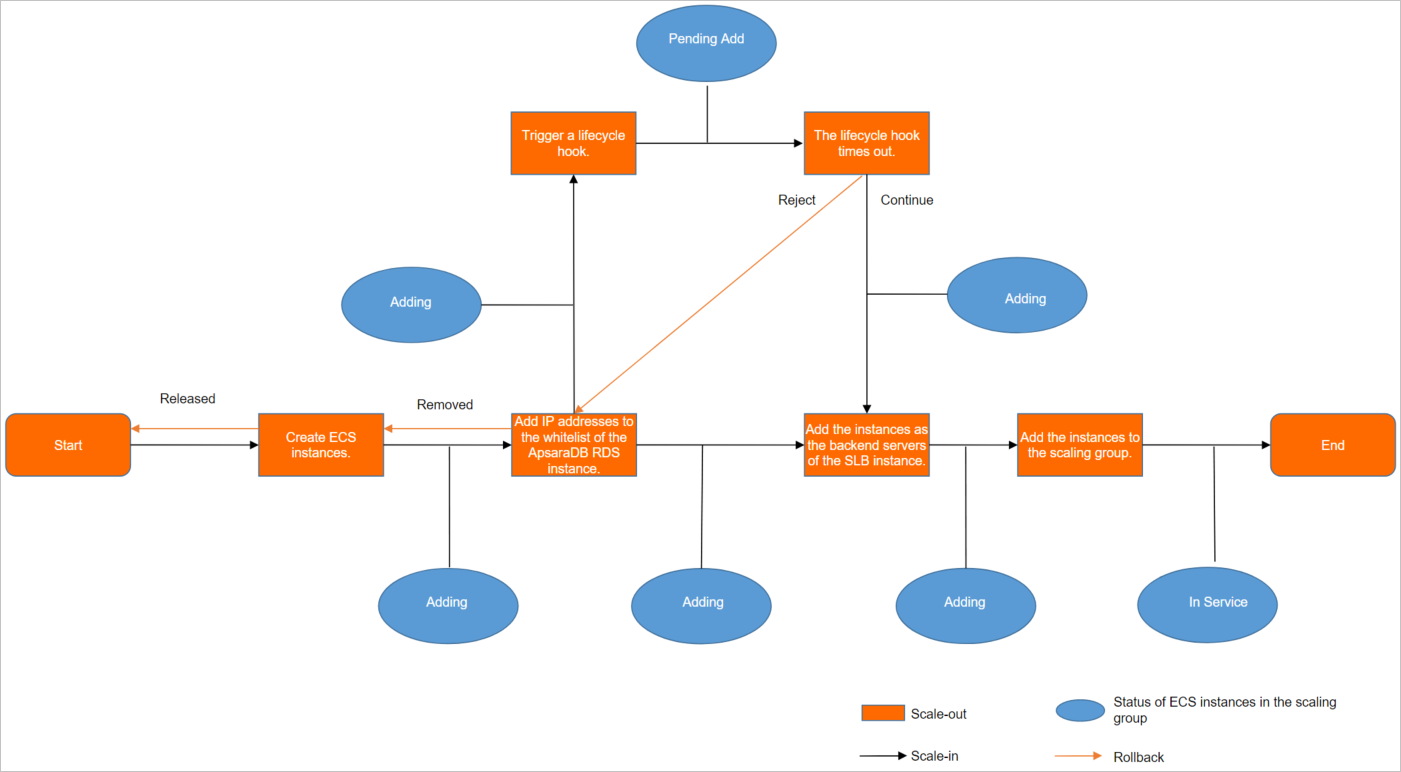
Figure 2. Scale-in flowchart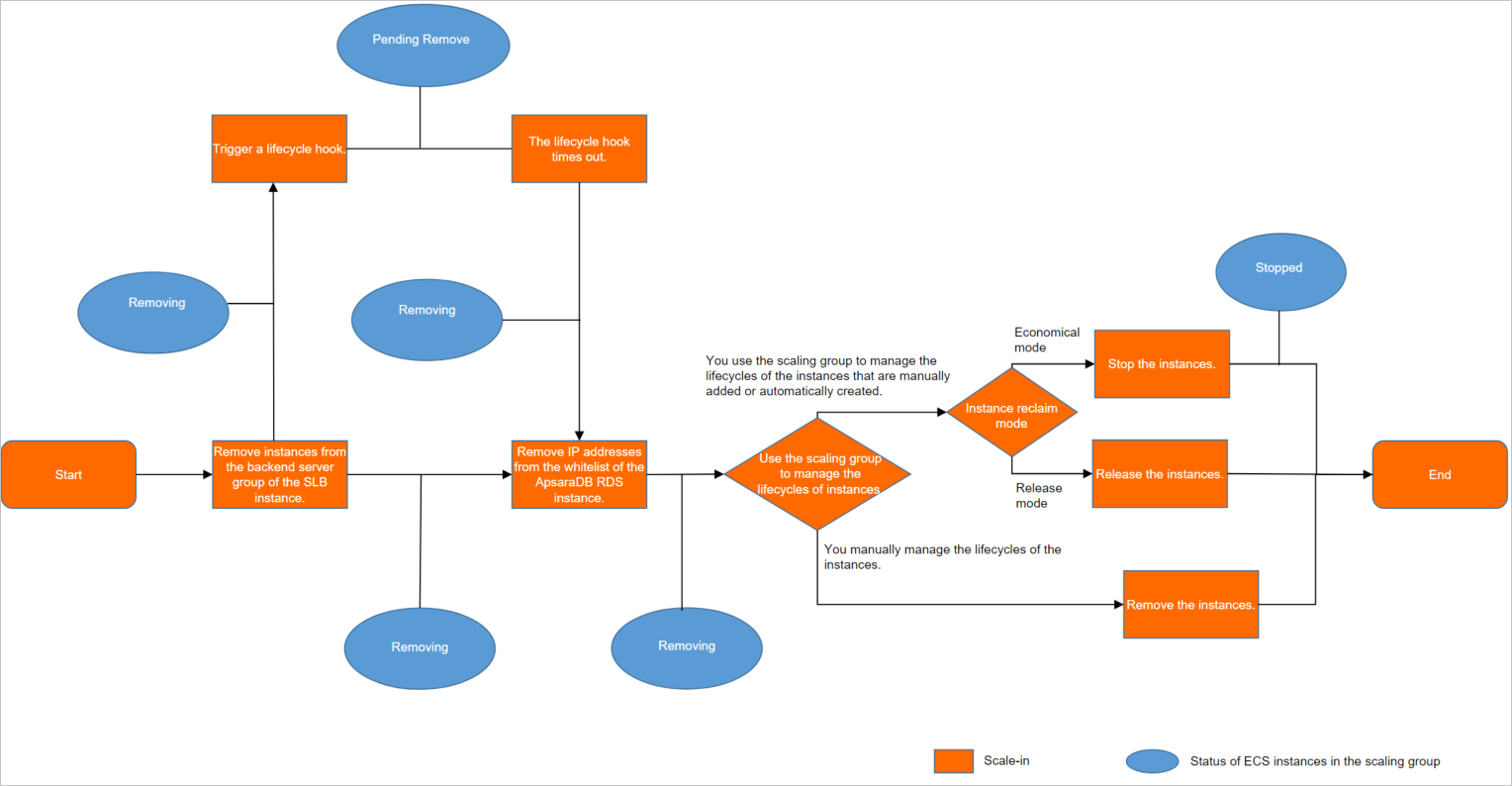
The following table describes the key concepts from the figures.
Concept | Description |
Lifecycle hook | A tool that manages the lifecycle of ECS instances or ECI instances in a scaling group. For more information, see What is a lifecycle hook. |
Instance lifecycle managed by the scaling group | The instance's lifecycle is fully managed by the scaling group. For more information about the instance lifecycle, see Instance lifecycle. The behavior differs based on how the instance is created:
|
Instance lifecycle not managed by the scaling group | A manually created ECS instance or ECI instance is added to the scaling group, but its entire lifecycle is not managed by the group. During a scale-in, Auto Scaling removes the instance from the group but does not release it. Note You can add subscription ECS instances to a scaling group, but the group cannot manage their lifecycles. |
Use cases
Lifecycle hooks are ideal for scenarios where ECS instances or ECI instances require custom actions before they are put into service or terminated.
Instances added during a scale-out are not immediately ready to serve client requests.
For example, an ECS instance may need to connect to an ApsaraDB RDS instance, attach a secondary elastic network interface, or wait for its application to start.
Instances removed during a scale-in should not be terminated immediately.
For example, you may need to back up data, copy logs, or wait for the instance to finish processing in-flight client requests.
For more information, see Overview of best practices for lifecycle hooks and OOS templates and Use lifecycle hooks to ensure service availability.
Limitations
You can create a maximum of 10 lifecycle hooks for each scaling group.
While a scaling activity is in progress, the ability to perform other scaling activities depends on whether the Expected Number of Instances feature is configured:
If the Expected Number of Instances is not configured for the scaling group, the group rejects other scaling activities.
If the Expected Number of Instances is configured for the scaling group, the group can perform other scaling activities only if the current activity is a parallel scaling activity. For more information about parallel scaling activities, see Basic concepts.
How to configure lifecycle hooks
The following table lists documentation for configuring lifecycle hooks.
Console documentation | Actions | API reference |
Create a lifecycle hook | ||
Modify a lifecycle hook | ||
Delete a lifecycle hook |