To integrate with your organization's identity management and enable individual user accountability, you can configure OpenID Connect (OIDC) authentication. This allows users to log on to Mesh Topology with an Alibaba Cloud account or as a Resource Access Management (RAM) user.
ASM v1.16.4.5 and later supports OIDC authentication for Mesh Topology. The setup consists of three steps:
Create an OAuth application in the RAM console.
Connect ASM Mesh Topology to the OAuth application through OIDC.
Log on to Mesh Topology through a Classic Load Balancer (CLB) instance or an ingress gateway.
Prerequisites
Before you begin, make sure that you have:
An ASM instance of version 1.16.4.5 or later. See Create an ASM instance or Update an ASM instance
A Container Service for Kubernetes (ACK) cluster added to the ASM instance. See Create an ACK managed cluster and Add a cluster to an ASM instance
Mesh Topology enabled with its logon page accessible. See Step 1 and Step 2 in Enable Mesh Topology to observe an ASM instance in the ASM console
Step 1: Create and configure an OAuth application in the RAM console
Open the RAM console and create an Open Authorization (OAuth) application. See Create an application. Configure the following parameters: Callback URL examples:
CLB instance with IP
xxx.xxx.xxx.xxx: set Callback URL tohttp://xxx.xxx.xxx.xxx:20001Ingress gateway with IP
yyy.yyy.yyy.yyy: set Callback URL tohttp://yyy.yyy.yyy.yyy:20001
Parameter Value Application Type Select WebApp. Callback URL Enter the IP address of your CLB instance or ingress gateway in the format http://<IP_ADDRESS>:20001. Do not append any path after port 20001. For example,20001/xxx,20001/, and20001/xxx/yyyare invalid.On the Enterprise Applications tab, locate the OAuth application and save the ID shown in the Application ID column.
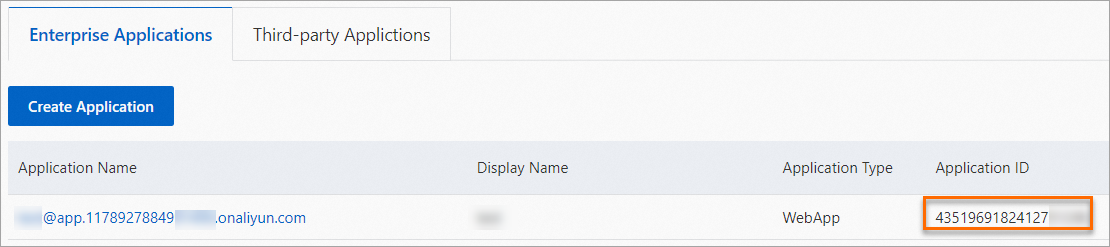
Create an application secret for the OAuth application and save it. See Create an application secret.
ImportantThe application secret is only visible at creation time and cannot be retrieved later. Copy and store the secret immediately.
Step 2: Connect Mesh Topology to the OAuth application through OIDC
Log on to the ASM console. In the left-side navigation pane, choose Service Mesh > Mesh Management.
On the Mesh Management page, click the name of the target ASM instance. In the left-side navigation pane, choose Observability Management Center > Mesh Topology.
In the Authentication section on the Mesh Topology page, select Login with OIDC and configure the following parameters:
Parameter Value Client ID The application ID saved in Step 1. Client Secret The application secret saved in Step 1. OIDC Issuer URL Enter https://oauth.aliyun.com.OAuth Scope Select Basic Information only. Click Save configuration of Mesh Topology.
Step 3: Log on to ASM Mesh Topology
Choose one of the following methods based on how Mesh Topology is exposed in your environment.
Method 1: Log on through a CLB instance
Log on to the ASM console. In the left-side navigation pane, choose Service Mesh > Mesh Management.
On the Mesh Management page, click the name of the target ASM instance. In the left-side navigation pane, choose Observability Management Center > Mesh Topology.
In the Access section on the Mesh Topology page, click Click here to access ASM Mesh Topology next to Access ASM Mesh Topology.
On the logon page, click Log In With OpenID to open the ASM Mesh Topology console.
NoteIf you are not already logged on to the Alibaba Cloud Management Console, clicking Log In With OpenID redirects you to the RAM User Logon page. Log on with your Alibaba Cloud account or RAM user credentials, then click Next to proceed to the ASM Mesh Topology console.
Method 2: Log on through an ingress gateway
Log on to the ASM console. In the left-side navigation pane, choose Service Mesh > Mesh Management.
On the Mesh Management page, click the name of the target ASM instance. In the left-side navigation pane, choose ASM Instance > Base Information.
In the Config Info section on the Base Information page, click Access from Ingress Gateway next to Enable ASM Mesh Topology.
On the logon page, click Log In With OpenID to open the ASM Mesh Topology console.
NoteIf you are not already logged on to the Alibaba Cloud Management Console, clicking Log In With OpenID redirects you to the RAM User Logon page. Log on with your Alibaba Cloud account or RAM user credentials, then click Next to proceed to the ASM Mesh Topology console.