The Service Mesh (ASM) traffic scheduling suite provides advanced throttling features such as global throttling, user-specific throttling, burst traffic windows, and custom request token consumption rates for traffic destined to a specified service. You can use RateLimitingPolicy to implement user-specific throttling.
Background information
The throttling policies of the ASM traffic scheduling suite use the token bucket algorithm. The system generates tokens at a fixed rate and adds them to a token bucket until the bucket reaches its capacity. Requests between services consume tokens from the bucket. If enough tokens are available, the request proceeds. If tokens are insufficient, the request may be queued or discarded. This ensures the average data transmission rate does not exceed the token generation rate while allowing a certain degree of burst traffic.

Prerequisites
-
A Container Service for Kubernetes (ACK) managed cluster is added to your ASM instance whose version is 1.21.6.83 or later. For more information, see Add a cluster to an ASM instance.
-
You have connected to the ACK cluster by using kubectl. For more information, see Connect to an ACK cluster using kubectl.
-
The ASM traffic scheduling suite is enabled. For more information, see Enable the ASM traffic scheduling suite.
-
Automatic sidecar proxy injection is enabled for the default namespace in the ACK cluster. For more information, see Manage global namespaces.
-
An ingress gateway named ingressgateway is created and port 80 is enabled. For more information, see Create an ingress gateway.
Preparations
Deploy the sample HTTPBin and sleep services and check whether the sleep service can access the HTTPBin service.
-
Create an httpbin.yaml file that contains the following content:
-
Run the following command to deploy the HTTPBin service:
kubectl apply -f httpbin.yaml -n default -
Create a sleep.yaml file that contains the following content:
-
Run the following command to deploy the sleep service:
kubectl apply -f sleep.yaml -n default -
Run the following command to access the sleep pod:
kubectl exec -it deploy/sleep -- sh -
Run the following command to send a request to the HTTPBin service:
curl -I http://httpbin:8000/headersExpected output:
HTTP/1.1 200 OK
server: envoy
date: Tue, 26 Dec 2023 07:23:49 GMT
content-type: application/json
content-length: 353
access-control-allow-origin: *
access-control-allow-credentials: true
x-envoy-upstream-service-time: 1
A 200 OK response indicates that the access is successful.
Step 1: Create a throttling policy by using RateLimitingPolicy
-
Use kubectl to connect to the ASM instance. For more information, see Access Istio resources with kubectl.
-
Create a ratelimitingpolicy.yaml file that contains the following content:
apiVersion: istio.alibabacloud.com/v1
kind: RateLimitingPolicy
metadata:
  name: ratelimit
  namespace: istio-system
spec:
  rate_limiter:
    bucket_capacity: 2
    fill_amount: 2
    parameters:
      interval: 30s
      limit_by_label_key: http.request.header.user_id
    selectors:
    - agent_group: default
      control_point: ingress
      service: httpbin.default.svc.cluster.local
The following table describes some of the fields. For more information, see RateLimitingPolicy field reference.
Field
Description
fill_amount
The number of tokens added to the bucket within each time interval specified by the interval field. In this example, the value is 2, meaning two tokens are added after each interval.
interval
The interval at which tokens are added to the token bucket. In this example, the value is 30s, meaning two tokens are added every 30 seconds.
bucket_capacity
The maximum number of tokens in the token bucket. When the request rate is lower than the filling rate, tokens accumulate until
bucket_capacityis reached. A higherbucket_capacityallows a certain degree of burst traffic. In this example, the value is 2, the same as fill_amount, so no burst traffic is allowed.limit_by_label_key
The label key used to group requests for the throttling policy. Requests with different label values are throttled separately using independent token buckets. In this example,
http.request.header.user_idgroups requests by theuser_idrequest header, simulating user-specific throttling. This example assumes that requests from different users have differentused_idrequest headers.selectors
The services to which the throttling policy applies. In this example,
service: httpbin.default.svc.cluster.localapplies throttling to thehttpbin.default.svc.cluster.localservice.
-
Run the following command to create a throttling policy by using RateLimitingPolicy:
kubectl apply -f ratelimitingpolicy.yaml
Step 2: Verify the result of user-specific throttling
-
Use kubectl to connect to the ACK cluster, and then run the following command to enable bash for the sleep service:
kubectl exec -it deploy/sleep -- sh -
Run the following commands to access the /headers path of the HTTPBin service twice in succession as user1:
curl -H "user_id: user1" httpbin:8000/headers -v
curl -H "user_id: user1" httpbin:8000/headers -v
Expected output:
< HTTP/1.1 429 Too Many Requests < retry-after: 14 < date: Mon, 17 Jun 2024 11:48:53 GMT < server: envoy < content-length: 0 < x-envoy-upstream-service-time: 1 < * Connection #0 to host httpbin left intact -
Within 30 seconds after the previous step is executed, run the following command to access the /headers path of the HTTPBin service once as user2:
curl -H "user_id: user2" httpbin:8000/headers -vExpected output:
< HTTP/1.1 200 OK
< server: envoy
< date: Mon, 17 Jun 2024 12:42:17 GMT
< content-type: application/json
< content-length: 378
< access-control-allow-origin: *
< access-control-allow-credentials: true
< x-envoy-upstream-service-time: 5
<
{
  "headers": {
    "Accept": "*/*",
    "Host": "httpbin:8000",
    "User-Agent": "curl/8.1.2",
    "User-Id": "user2",
    "X-Envoy-Attempt-Count": "1",
    "X-Forwarded-Client-Cert": "By=spiffe://cluster.local/ns/default/sa/httpbin;Hash=ddab183a1502e5ededa933f83e90d3d5266e2ddf87555fb3da1ad40dde3c722e;Subject=\"\";URI=spiffe://cluster.local/ns/default/sa/sleep"
  }
}
* Connection #0 to host httpbin left intact
The output shows that throttling is not triggered for user2 accessing the same path, confirming that user-specific throttling works as expected.
References
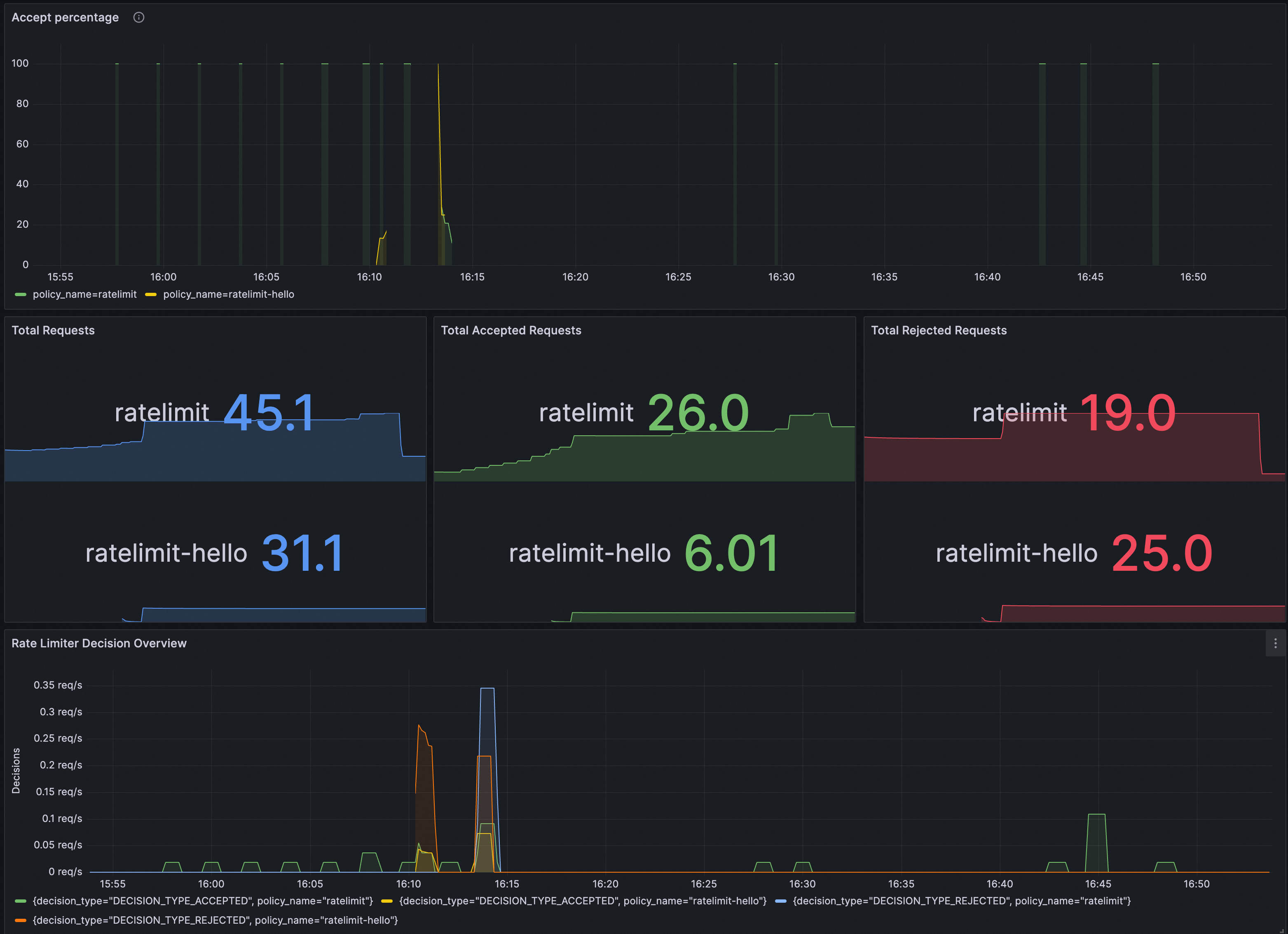
You can verify whether RateLimitingPolicy takes effect in Grafana. Make sure the Prometheus instance for Grafana is configured with ASM traffic scheduling suite.
Import the following content into Grafana to create a RateLimitingPolicy dashboard.
The following figure shows the dashboard.