Traffic mirroring, also called traffic shadowing, copies live production traffic to a test service in real time without affecting the production environment. Mirrored requests are fire-and-forget: the mesh sends them out of band of the critical request path and discards all responses. Service Mesh (ASM) supports cross-cluster traffic mirroring, so you can validate new service versions, debug issues, or run simulation tests against real production traffic.
In the following setup, Cluster A is the production environment and Cluster B is the test environment. The ingress gateway in Cluster A mirrors incoming traffic to Cluster B, where a test service processes the mirrored requests.
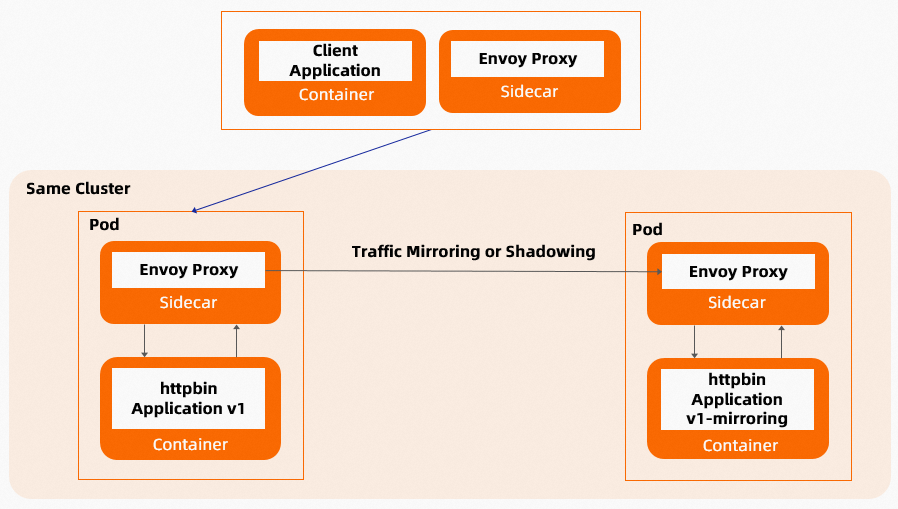
When to use traffic mirroring
| Use case | Description |
|---|---|
| Pre-release validation | Mirror production traffic to a new service version and compare results before deploying. Unlike manual testing with sample data, mirrored traffic covers real-world edge cases such as malformed input and malicious payloads. |
| System migration | Mirror traffic from the old system to the new system for a trial run. Verify that the new system handles all production scenarios before cutover. |
| Live debugging | Mirror traffic from a running service to a temporary debugging instance. Reproduce issues with real traffic without affecting users. |
| Test data isolation | Route mirrored production traffic to a separate test database, keeping production data untouched. |
| User behavior logging | Capture real user behavior data for recommendation algorithms and user profile analysis by storing mirrored traffic in logs. |
How traffic mirroring works
Two behaviors to understand before you configure mirroring:
Host header modification: Mirrored requests have
-shadowappended to the Host/Authority header. For example, if the original Host ishttpbin, the mirrored request Host becomeshttpbin-shadow. Thehostfield in the VirtualServicemirrorsection only determines the destination address -- it does not overwrite the original Host header.Mirror percentage: The
mirrorPercentage.valuefield controls what fraction of traffic to mirror. If omitted, 100% of traffic is mirrored.
Sample VirtualService configuration
The following VirtualService routes all traffic to the v1 subset and mirrors it to the v1-mirroring subset:
apiVersion: networking.istio.io/v1beta1
kind: VirtualService
metadata:
  name: myapp-traffic-mirroring
spec:
  hosts:
    - myapp
  http:
    - route:
        - destination:
            host: myapp.default.svc.cluster.local
            port:
              number: 8000
            subset: v1
          weight: 100
      mirror:
        host: myapp.default.svc.cluster.local
        port:
          number: 8000
        subset: v1-mirroring
After you apply this configuration, every request to myapp is served by the v1 subset, while a copy of each request is sent to the v1-mirroring subset.
Prerequisites
Before you begin, make sure that you have:
Two Kubernetes clusters (Cluster A and Cluster B) with ASM configured
kubectl configured to access both clusters
Automatic sidecar injection enabled in the target namespaces
Step 1: Deploy the httpbin service in Cluster B
Create a file named
httpbin.yamlwith the following content:Deploy the httpbin v1 application:
kubectl apply -f httpbin.yamlVerify the Pod is running:
kubectl get pods -l app=httpbinThe expected output is similar to:
NAME                         READY   STATUS    RESTARTS   AGE
httpbin-v1-xxxxxxxxx-xxxxx   2/2     Running   0          30s
A
2/2in the READY column confirms the sidecar proxy was injected alongside the application container.
Step 2: Configure a routing rule for the ingress gateway in Cluster B
This step exposes the httpbin service through the Cluster B ingress gateway so that mirrored traffic from Cluster A can reach it.
Create a file named
httpbin-gateway.yamlwith the following content:Apply the Gateway and VirtualService:
kubectl apply -f httpbin-gateway.yamlSend a test request to verify the service is reachable through the ingress gateway:
curl http://<cluster-b-ingress-gateway-ip>/headersReplace
<cluster-b-ingress-gateway-ip>with the external IP of the ingress gateway in Cluster B.The expected output is similar to:
{
  "headers": {
    "Accept": "*/*",
    "Host": "47.99.XX.XX",
    "User-Agent": "curl/7.79.1",
    "X-Envoy-Attempt-Count": "1",
    "X-Envoy-External-Address": "120.244.XXX.XXX",
    "X-Forwarded-Client-Cert": "By=spiffe://cluster.local/ns/default/sa/httpbin;Hash=158e4ef69876550c34d10e3bfbd8d43f5ab481b16ba0e90b4e38a2d53ac****;Subject=\"\";URI=spiffe://cluster.local/ns/istio-system/sa/istio-ingressgateway-service-account"
  }
}
Step 3: Configure traffic mirroring in Cluster A
Deploy the same httpbin application in Cluster A if you have not already done so. Use the same httpbin.yaml from Step 1:
kubectl apply -f httpbin.yamlNext, create four resources in Cluster A:
A ServiceEntry that registers the Cluster B ingress gateway as an external service
A DestinationRule that defines the
v1subset for the local httpbin serviceA Gateway and VirtualService that route traffic to the local httpbin service and mirror it to Cluster B
Create the ServiceEntry
The mirrored traffic targets an external address (the Cluster B ingress gateway). A ServiceEntry tells the mesh how to resolve this address.
Create a file named
httpbin-cluster-b.yamlwith the following content:apiVersion: networking.istio.io/v1alpha3 kind: ServiceEntry metadata: name: httpbin-cluster-b spec: hosts: - httpbin.mirror.cluster-b location: MESH_EXTERNAL ports: - number: 80 # Port of the ingress gateway in Cluster B name: http protocol: HTTP resolution: STATIC endpoints: - address: 47.95.XX.XX # External IP of the ingress gateway in Cluster BReplace
47.95.XX.XXwith the actual external IP of the ingress gateway in Cluster B.Apply the ServiceEntry:
kubectl apply -f httpbin-cluster-b.yaml
Create the DestinationRule
The VirtualService routes traffic to the v1 subset of httpbin. A DestinationRule defines this subset.
Create a file named
httpbin-destinationrule.yamlwith the following content:apiVersion: networking.istio.io/v1alpha3 kind: DestinationRule metadata: name: httpbin spec: host: httpbin subsets: - name: v1 labels: version: v1Apply the DestinationRule:
kubectl apply -f httpbin-destinationrule.yaml
Create the Gateway and VirtualService with mirroring
The VirtualService routes all traffic to the v1 subset of the local httpbin service, while mirroring a percentage of that traffic to Cluster B through the ServiceEntry.
Create a file named
httpbin-gateway.yamlwith the following content:NoteThe
mirror.hostfield is used only for destination resolution. The actual Host header of mirrored requests is the original Host with-shadowappended, nothttpbin.mirror.cluster-b.Apply the configuration:
kubectl apply -f httpbin-gateway.yaml
Step 4: Verify that traffic mirroring works
Check the Envoy configuration
View the Envoy config dump of the ingress gateway Pod in Cluster A to confirm the mirror policy is applied:
"routes": [
  {
    "match": {
      "prefix": "/headers",
      "case_sensitive": true
    },
    "route": {
      "cluster": "outbound|8000|v1|httpbin.default.svc.cluster.local",
      "timeout": "0s",
      "retry_policy": {
        "retry_on": "connect-failure,refused-stream,unavailable,cancelled,retriable-status-codes",
        "num_retries": 2,
        "retry_host_predicate": [
          {
            "name": "envoy.retry_host_predicates.previous_hosts",
            "typed_config": {
              "@type": "type.googleapis.com/envoy.extensions.retry.host.previous_hosts.v3.PreviousHostsPredicate"
            }
          }
        ],
        "host_selection_retry_max_attempts": "5",
        "retriable_status_codes": [503]
      },
      "request_mirror_policies": [
        {
          "cluster": "outbound|80||httpbin.mirror.cluster-b",
          "runtime_fraction": {
            "default_value": {
              "numerator": 500000,
              "denominator": "MILLION"
            }
          },
          "trace_sampled": false
        }
      ]
    }
  }
]
Key fields to verify:
| Field | Expected value | Meaning |
|---|---|---|
request_mirror_policies.cluster | outbound|80||httpbin.mirror.cluster-b | Mirrored traffic is sent to the Cluster B ingress gateway |
runtime_fraction.numerator | 500000 | 50% of traffic is mirrored (500,000 / 1,000,000) |
Send test traffic and check logs
The Envoy config dump confirms the configuration, but you also need to verify that mirrored traffic actually reaches Cluster B. Send test requests and check the httpbin Pod logs on both clusters.
Send a request to the ingress gateway in Cluster A:
curl http://<cluster-a-ingress-gateway-ip>/headersCheck the httpbin Pod logs in Cluster A to confirm the request was served:
kubectl logs -l app=httpbin -c httpbinThe expected output shows that Cluster A received and processed the request:
127.0.0.6 - - [11/Mar/2026 06:00:00] "GET /headers HTTP/1.1" 200 -Check the httpbin Pod logs in Cluster B to confirm the mirrored request arrived:
kubectl logs -l app=httpbin -c httpbinIf mirroring is working, the Cluster B logs show a corresponding
GET /headersrequest entry:127.0.0.6 - - [11/Mar/2026 06:00:00] "GET /headers HTTP/1.1" 200 -The mirrored request carries a Host header with the
-shadowsuffix (for example,httpbin-shadow), but the default httpbin access log format does not display Host headers. To inspect the-shadowheader, check the Envoy access logs of the sidecar proxy or enable verbose logging.NoteIf Cluster B does not show the mirrored request, verify that the ServiceEntry IP address matches the actual external IP of the Cluster B ingress gateway and that the ingress gateway accepts traffic on port 80.
Clean up
To remove the resources created in this tutorial:
On Cluster B:
kubectl delete -f httpbin-gateway.yaml
kubectl delete -f httpbin.yaml
On Cluster A:
kubectl delete -f httpbin-gateway.yaml
kubectl delete -f httpbin-destinationrule.yaml
kubectl delete -f httpbin-cluster-b.yaml
kubectl delete -f httpbin.yaml