ConcurrencySchedulingPolicy, provided by the traffic scheduling suite, enables priority-based request scheduling under controlled concurrency.
Background information
ConcurrencySchedulingPolicy determines whether traffic is overloaded based on concurrent request limits. When the number of concurrent requests exceeds the specified upper limit, subsequent requests are queued and scheduled based on their priorities. The general workflow is as follows:
-
A concurrency limiter records the number of in-flight requests and determines whether the concurrency upper limit is reached.
-
When the concurrency upper limit is reached, subsequent requests are queued and forwarded to the destination service as earlier requests complete. High-priority requests are dequeued first, ensuring they are served ahead of lower-priority ones.
Unlike ConcurrencyLimitingPolicy, which rejects requests when the threshold is reached, ConcurrencySchedulingPolicy queues excess requests in a priority queue instead of rejecting them. Requests are then scheduled based on priority while keeping the number of concurrent requests within the upper limit.
Prerequisites
-
A Container Service for Kubernetes (ACK) managed cluster is added to your Service Mesh (ASM) instance, and the version of your ASM instance is V1.21.6.97 or later. For more information, see Add a cluster to an ASM instance.
-
Automatic sidecar proxy injection is enabled for the default namespace in the ACK cluster. For more information, see Manage global namespaces.
-
You have connected to the ACK cluster by using kubectl. For more information, see Connect to an ACK cluster using kubectl.
-
The ASM traffic scheduling suite is enabled. For more information, see Enable the ASM traffic scheduling suite.
-
The HTTPBin application is deployed and can be accessed by using an ASM ingress gateway. For more information, see Deploy the HTTPBin application.
Step 1: Create ConcurrencySchedulingPolicy
-
Use kubectl to connect to your ASM instance. For more information, see Access Istio resources with kubectl.
-
Create a concurrencyschedulingpoilcy.yaml file that contains the following content:
apiVersion: istio.alibabacloud.com/v1
kind: ConcurrencySchedulingPolicy
metadata:
  name: concurrencyscheduling
  namespace: istio-system
spec:
  concurrency_scheduler:
    max_concurrency: 10
    concurrency_limiter:
      max_inflight_duration: 60s
    scheduler:
      workloads:
        - label_matcher:
            match_labels:
              http.request.header.user_type: guest
          parameters:
            priority: 50.0
          name: guest
        - label_matcher:
            match_labels:
              http.request.header.user_type: subscriber
          parameters:
            priority: 200.0
          name: subscriber
    selectors:
    - service: httpbin.default.svc.cluster.local
The following table describes some of the parameters. For more information about configuration items, see ConcurrencySchedulingPolicy fields.
Field
Description
max_concurrency
The maximum number of concurrent requests. In this example, this field is set to 10, which indicates that the service is allowed to process 10 requests at a time.
max_inflight_duration
The timeout period for request processing. Due to unexpected events such as the restart of pods in the cluster, the ASM traffic scheduling suite may fail to record request termination events. To prevent such requests from affecting the judgment of the concurrency limiting algorithm, you need to specify the timeout period for request processing. If requests have not been responded to before this timeout period, the system considers that such requests have been processed. You can set this field by evaluating the expected maximum response time of a request. In this example, this field is set to 60s.
workloads
Two types of requests are defined based on user_type in the request headers: guest and subscriber. The priority of a request of the guest type is 50, and that of a request of the subscriber type is 200.
selectors
The services to which the throttling policy is applied. In this example, service: httpbin.default.svc.cluster.local is used, which indicates that the concurrency limiting policy is applied to the httpbin.default.svc.cluster.local service.
-
Run the following command to create ConcurrencySchedulingPolicy:
kubectl apply -f concurrencyschedulingpoilcy.yaml
Step 2: Verify the result of the priority-based request scheduling in scenarios where concurrent requests are controlled
This example uses the stress testing tool Fortio. For more information, see the Installation section of Fortio on the GitHub website.
-
Open two terminals and run the following two stress testing commands at the same time to start testing. During the entire testing, make sure that the two terminals work as expected. In the tests on the two terminals, 10 concurrent requests are sent to the service and the queries per second (QPS) is 10,000, which significantly exceeds the concurrent requests that the service can bear.
fortio load -c 10 -qps 10000 -H "user_type:guest" -t 30s -timeout 60s -a http://${IP address of the ASM ingress gateway}/status/201fortio load -c 10 -qps 10000 -H "user_type:subscriber" -t 30s -timeout 60s -a http://${IP address of the ASM ingress gateway}/status/202NoteReplace
${IP address of the ASM gateway}in the preceding commands with the IP address of your ASM ingress gateway. For more information about how to obtain the IP address of the ASM ingress gateway, see substep 1 of Step 3 in the Version-based traffic routing with Istio topic.Expected output from test 1:
...
# target 50% 4.35294
# target 75% 5.39689
# target 90% 5.89697
# target 99% 6.19701
# target 99.9% 6.22702
Sockets used: 10 (for perfect keepalive, would be 10)
Uniform: false, Jitter: false
Code 201 : 84 (100.0 %)
Response Header Sizes : count 84 avg 249.88095 +/- 0.3587 min 248 max 250 sum 20990
Response Body/Total Sizes : count 84 avg 249.88095 +/- 0.3587 min 248 max 250 sum 20990
All done 84 calls (plus 10 warmup) 3802.559 ms avg, 2.6 qps
Successfully wrote 5186 bytes of Json data to xxxxxx.json
Record the name of the JSON file output by test 1, for example, xxxxxx.json.
Expected output from test 2:
...
# target 50% 1.18121
# target 75% 1.63423
# target 90% 1.90604
# target 99% 2.22941
# target 99.9% 2.28353
Sockets used: 10 (for perfect keepalive, would be 10)
Uniform: false, Jitter: false
Code 202 : 270 (100.0 %)
Response Header Sizes : count 270 avg 250.52963 +/- 0.5418 min 249 max 251 sum 67643
Response Body/Total Sizes : count 270 avg 250.52963 +/- 0.5418 min 249 max 251 sum 67643
All done 270 calls (plus 10 warmup) 1117.614 ms avg, 8.8 qps
Successfully wrote 5305 bytes of Json data to yyyyyy.json
Record the name of the JSON file output by test 2, for example, yyyyyy.json.
The preceding outputs show that the average request latency of test 2 is about 1/4 times that of test 1, and the QPS is about four times that of test 1. This is because in the previously defined policy, the priority of the requests of the subscriber type is four times that of requests of the guest type.
-
(Optional) View the results in a visualized manner.
-
Run the following command in the on-premises directory where the two commands were executed in the previous step to open the local Fortio server:
fortio server -
Use a browser to access
http://localhost:8080/fortio/browse, and click the name of the corresponding JSON file that you record in substep 1 to view the visualized test results.Example of visualized results for test 1:

Example of visualized results for test 2:

The preceding visualized results show that except for a few unrestricted requests, most requests of the guest type have a latency of 4,000-6,000 ms. However, most requests of the subscriber type have a latency of 1,000-2,000 ms. When requests to the service exceed the upper limit, requests of the subscriber type are responded to first. In addition, concurrent requests sent to the service are limited to a specific value.
-
References
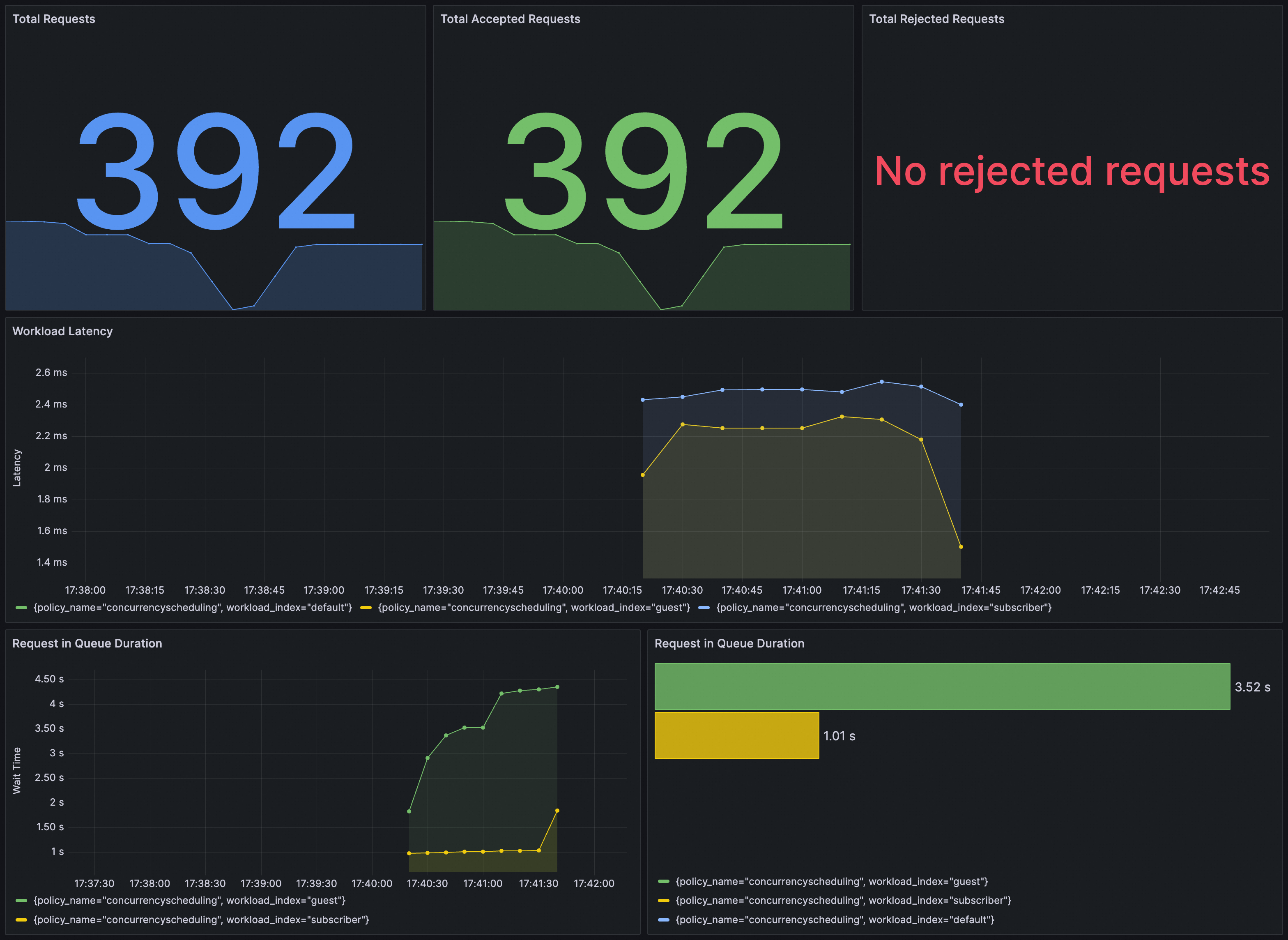
To verify whether ConcurrencySchedulingPolicy takes effect, use Grafana. Ensure the Prometheus instance for Grafana is configured with ASM traffic scheduling suite.
Import the following content into Grafana to create a dashboard for ConcurrencySchedulingPolicy.
The following figure shows an example dashboard.