This topic describes how to migrate a self-managed Istio ingress gateway to an ASM ingress gateway.
Migration solution
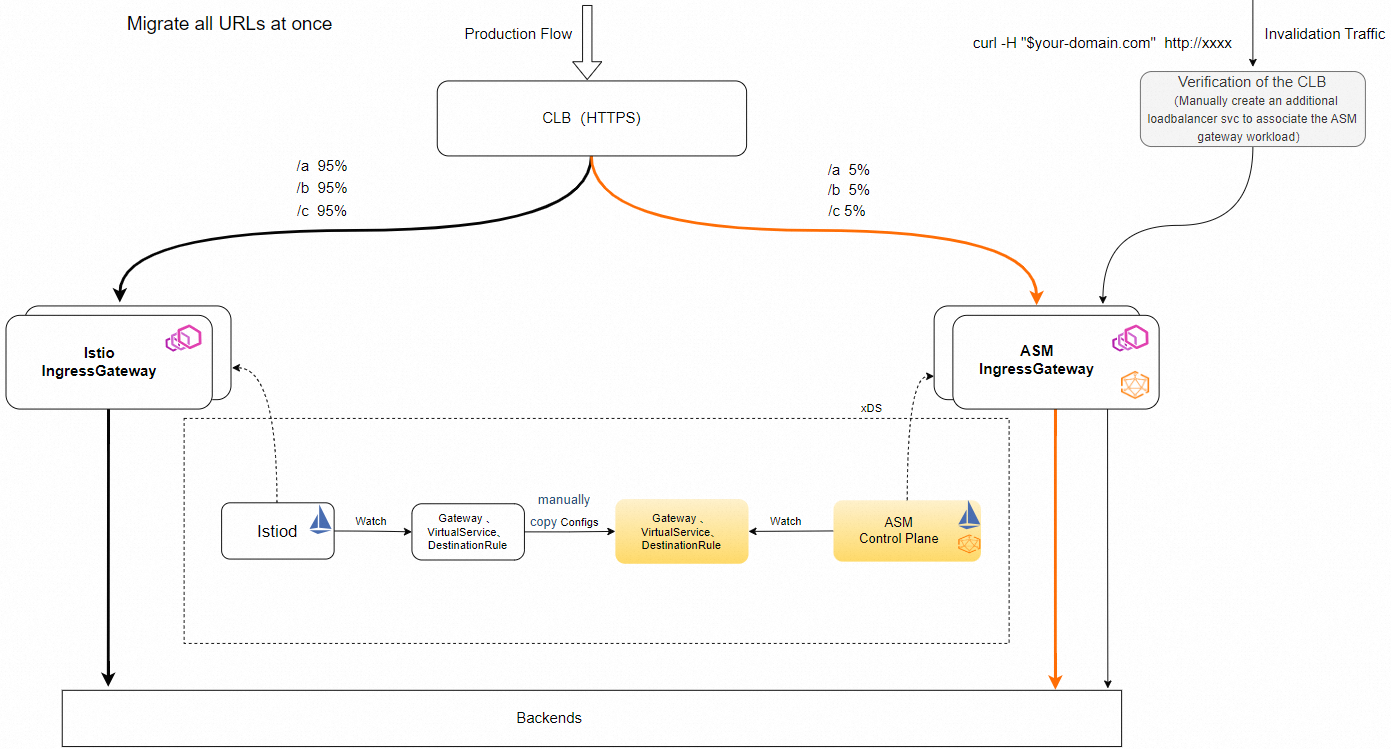
Step 1: Make the CLB instance created by the Istio ingress gateway reusable
If the CLB instance used by the Istio ingress gateway was automatically created by a Service, the CLB instance is not reusable by default. To distribute traffic between the Istio ingress gateway and the ASM ingress gateway at a specified ratio through the CLB instance during the migration, you must make the CLB instance reusable.
-
Log on to the CLB console and find the target CLB instance. Click the instance ID to go to the instance configuration page.
-
Disable modification protection for the instance.
-
Remove the following two tags from the CLB instance:
kubernetes.do.not.deleteandack.aliyun.com. -
Add the following annotations to the Service of the Istio ingress gateway:
# If this annotation is set to false, port changes of the Service do not affect the listeners of the CLB instance.
service.beta.kubernetes.io/alibaba-cloud-loadbalancer-force-override-listeners: "false"
service.beta.kubernetes.io/alibaba-cloud-loadbalancer-id: <CLB_INSTANCE_ID>
service.beta.kubernetes.io/alibaba-cloud-loadbalancer-vgroup-port: <VSERVER_GROUP_ID>:<PORT>,<VSERVER_GROUP_ID>:<PORT>...
service.beta.kubernetes.io/alibaba-cloud-loadbalancer-weight: "100"
Example:
service.beta.kubernetes.io/alibaba-cloud-loadbalancer-force-override-listeners: "false"
service.beta.kubernetes.io/alibaba-cloud-loadbalancer-id: lb-bp1onpskfeceg********
# You can obtain the vServer group information from the CLB console. Enter the instance and click the vServer Group tab.
# You must list all vServer groups of the CLB instance in the following annotation, in the format of <VSERVER_GROUP_ID>:<PORT>.
# Separate multiple values with commas (,).
service.beta.kubernetes.io/alibaba-cloud-loadbalancer-vgroup-port: rsp-bp1r4xk******:15021,rsp-bp1kaqd******:80,rsp-bp1jyz0******:443
# Before the migration starts, the weight of the Istio ingress gateway is 100, and all traffic goes through the Istio ingress gateway.
service.beta.kubernetes.io/alibaba-cloud-loadbalancer-weight: "100"
Step 2: Create an ingress gateway in the ASM instance
For more information about how to create an ingress gateway, see Create an ingress gateway.
When you create the ingress gateway, note the following points:
-
Create the ASM gateway by using a YAML file. For more information, see CRD fields for an ASM gateway.
-
When you name the ASM gateway, make sure that the name does not duplicate an existing gateway. You can add the -asm suffix to the name to distinguish it from existing gateways, for example, ingressgateway-asm.
-
Make sure that the port list and targetPort of the ASM gateway are the same as those of the Istio ingress gateway.
-
Refer to item (4) in Step 1: Make the CLB instance created by the Istio ingress gateway reusable and create the ASM gateway by using a CRD. For more information, see CRD fields. To reuse the CLB instance of the Istio ingress gateway and implement CLB-based traffic switching, configure the serviceAnnotation of the ASM gateway as follows:
# If this annotation is set to true, ACK uses the ports of the Service of the ASM gateway to update the listeners of the CLB instance.
# To ensure service continuity, make sure that the ports exposed by the ASM gateway are the same as those of the Istio ingress gateway.
# If traffic exceptions occur after the ASM gateway is created, change this annotation on the ASM gateway to false and change this annotation on the Istio ingress gateway to true to restore the listener configurations.
service.beta.kubernetes.io/alibaba-cloud-loadbalancer-force-override-listeners: "true"
service.beta.kubernetes.io/alibaba-cloud-loadbalancer-id: lb-bp1onpskfeceg********
# You can obtain the vServer group information from the CLB console. Enter the instance and click the vServer Group tab.
# You must list all vServer groups of the CLB instance in the following annotation, in the format of <VSERVER_GROUP_ID>:<PORT>.
# Separate multiple values with commas (,).
service.beta.kubernetes.io/alibaba-cloud-loadbalancer-vgroup-port: rsp-bp1r4xk******:15021,rsp-bp1kaqd******:80,rsp-bp1jyz0******:443
# Before the migration starts, the weight of the Istio ingress gateway is 100, and all traffic goes through the Istio ingress gateway. The weight of the ASM gateway is 0.
service.beta.kubernetes.io/alibaba-cloud-loadbalancer-weight: "0"
-
-
Verify CLB reuse: Log on to the CLB console, select a vServer group, and then click the vServer group name to view the backend servers of the vServer group. If both the pod IP address of the Istio ingress gateway and the pod IP address of the ASM gateway appear in the list, this step is successful.
Step 3: Migrate gateway-related configurations to ASM
To make the ASM gateway behave the same as the Istio ingress gateway, you must apply the gateway-related configurations in Istio to ASM.
-
The ASM gateway cannot have the same name as the Istio ingress gateway. When you migrate the Gateway CR, you must change the
spec.selector.istiofield of the Gateway CR to the actual ASM gateway name. The following YAML provides an example:spec: selector: istio: ingressgateway-asm -
VirtualService CRs and DestinationRule CRs do not need to be modified. Migrate them directly.
Step 4: Gradually migrate traffic to the ASM gateway
By separately modifying the serviceAnnotations of the Istio ingress gateway and the ASM ingress gateway, you can switch the weights of the two gateways. You can gradually increase the traffic ratio of the ASM gateway while decreasing the traffic ratio of the Istio ingress gateway, until all traffic is switched to the ASM gateway. The migration is then completed.
You can modify the Service annotations of the Istio ingress gateway and the ASM gateway to control the ratio of traffic forwarded by the CLB instance:
-
Modify the weight of the original Istio ingress gateway: Add an annotation to the corresponding Service, for example,
service.beta.kubernetes.io/alibaba-cloud-loadbalancer-weight: "90". -
Modify the weight of the ASM gateway instance: Add serviceAnnotations to the corresponding IstioGateway resource, for example,
service.beta.kubernetes.io/alibaba-cloud-loadbalancer-weight: "10".