When a VirtualService redirects traffic from one service to another, the destination service may reject the request if the Host or Authority header still references the original service. Configure a rewrite.authority rule in a Service Mesh (ASM) VirtualService to replace these headers before the request reaches the destination.
Use cases
Traffic migration: Redirect requests from service A to service B while the destination validates the Host header.
Blue-green deployments: Route traffic to a new service version that expects a specific Host value.
Service consolidation: Merge multiple services behind a single entry point and rewrite headers to match each backend's expectations.
How it works
The VirtualService rewrite.authority field replaces the Authority and Host headers of matching HTTP requests before forwarding them to the route destination. The rewrite applies to every request that matches the routing rules defined in the VirtualService.
The rewrite block supports the following fields:
| Field | Description |
|---|---|
authority | Replaces the Authority and Host headers with the specified value. |
uri | Replaces the path or the matched prefix portion of the URI. |
uriRegexRewrite | Rewrites the path portion of the URI based on a regex pattern and substitution. |
For the full API specification, see the Istio VirtualService API reference.
The rewrite and redirect fields are mutually exclusive. A single HTTP route rule cannot use both.
Prerequisites
Complete the environment setup and deploy the HTTPBin, sleep, and NGINX services. For details, see Preparations.
Rewrite Authority and Host headers for the NGINX service
This procedure creates a VirtualService that forwards requests destined for the NGINX service to the HTTPBin service, and rewrites the Authority and Host headers to httpbin:8000.
Step 1: Deploy a waypoint proxy for the NGINX service
Run the following istioctl command to deploy a waypoint proxy for the NGINX service:
istioctl x waypoint apply --service-account nginxExpected output:
waypoint default/nginx appliedStep 2: Create a VirtualService with a host rewrite rule
Log on to the ASM console. In the left-side navigation pane, choose Service Mesh > Mesh Management.
On the Mesh Management page, click the name of the ASM instance. In the left-side navigation pane, choose Traffic Management Center > VirtualService. On the page that appears, click Create.
On the Create page, paste the following YAML, and then click Preview. Confirm that the content is correct, click Submit, and then click Create.
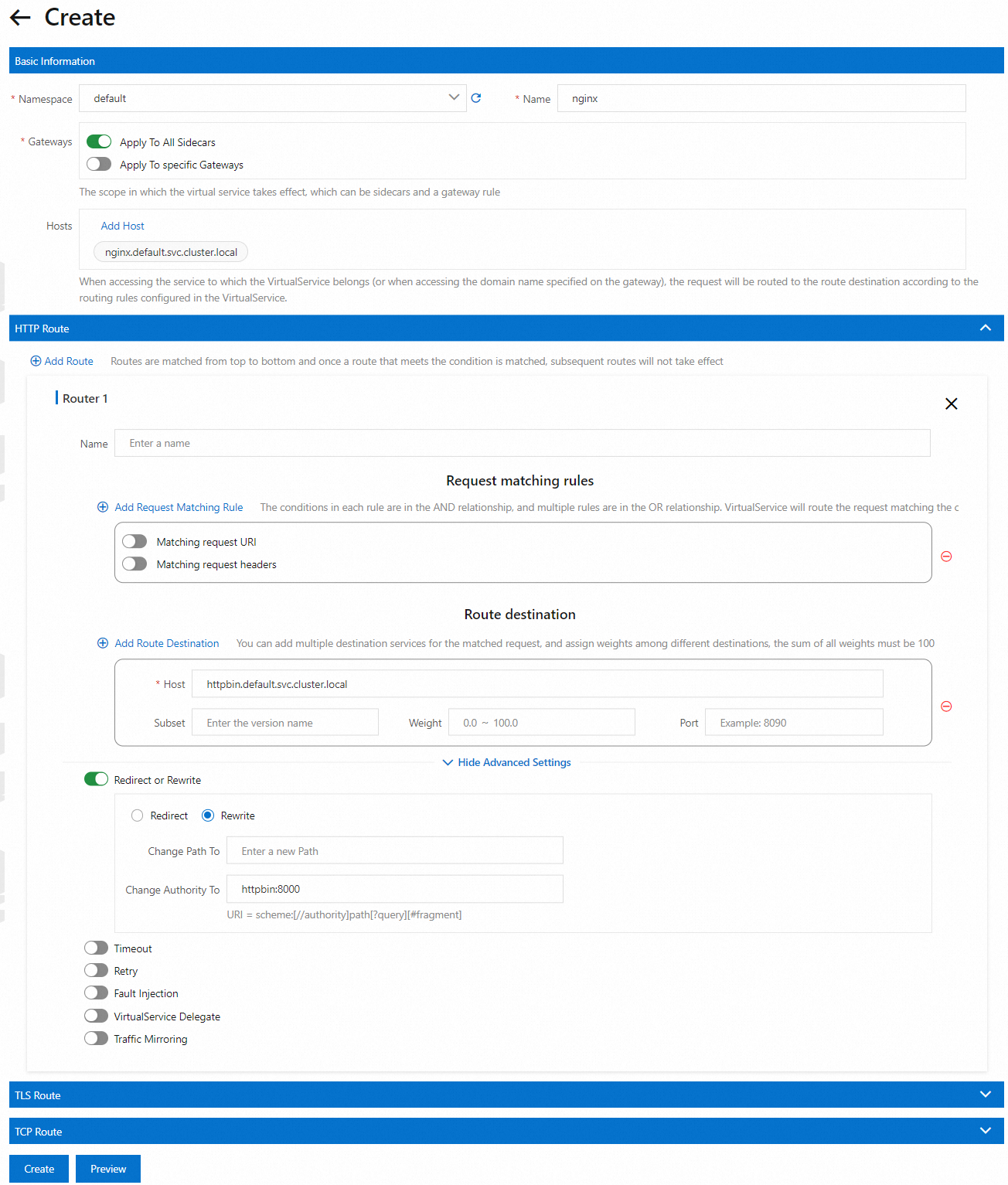
Key fields:
| Field | Description |
|---|---|
spec.hosts | The original destination service to match against incoming requests. |
http.rewrite.authority | The value that replaces the Authority and Host headers. |
http.route.destination.host | The backend service that receives the forwarded request. |
Step 3: Verify the rewrite rule
Send a request from the sleep container to the NGINX service and check the returned headers:
kubectl exec -it deploy/sleep -- curl nginx:8000/headersExpected output:
{
  "headers": {
    "Accept": "*/*",
    "Host": "httpbin:8000",
    "User-Agent": "curl/8.1.2"
  }
}
The Host header reads httpbin:8000 instead of nginx:8000. This confirms that the request was forwarded from the NGINX service to the HTTPBin /headers endpoint, and the Authority and Host headers were rewritten before forwarding.
Constraints
Ambient Mesh waypoint constraint: When rewriting the Authority and Host headers to forward requests from service A to service B, do not deploy a waypoint proxy for service B. A waypoint proxy on service B causes routing conflicts.