In a multi-cluster service mesh, each cluster's DNS server only resolves services deployed locally. When a service in one cluster sends a request to a service that exists only in another cluster, DNS resolution fails. DNS proxy solves this -- the sidecar proxy intercepts DNS queries and resolves service names across all clusters managed by the same Alibaba Cloud Service Mesh (ASM) control plane.
This document walks through the following steps:
Deploy two services across two clusters:
sleepin one,HTTPBinin the other.Confirm that cross-cluster DNS resolution fails without DNS proxy.
Enable DNS proxy and verify that cross-cluster service discovery works.
How DNS proxy works
Without DNS proxy, each cluster's DNS server only knows about services deployed in that cluster. If the sleep service in cluster m1c2 sends a request to httpbin:8000, the lookup fails because no httpbin Service object exists in m1c2.
With DNS proxy enabled, the sidecar proxy intercepts outbound DNS queries before they reach the cluster DNS server. The ASM control plane maintains a unified view of all services across managed clusters, so the sidecar resolves httpbin to the correct endpoint in cluster m1c1 -- even without a local Service object.
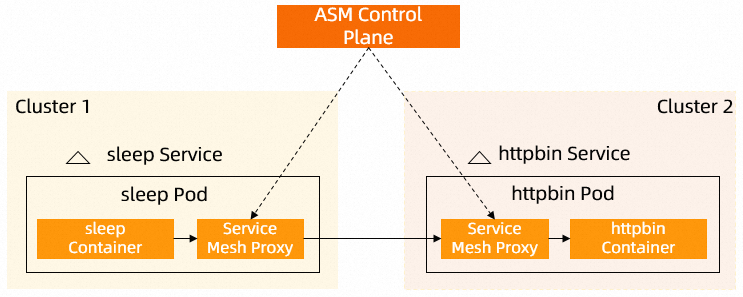
Prerequisites
Before you begin, make sure that you have:
Two Container Service for Kubernetes (ACK) clusters (named m1c1 and m1c2 in this document) added to an ASM instance. For setup instructions, see Step 1 through Step 3 in Use an ASM serverless gateway as a single entry point for multiple clusters
Automatic sidecar proxy injection enabled for the
defaultnamespace. See Manage global namespaces
Step 1: Deploy the sleep and HTTPBin services
Deploy each service to a separate cluster so that cross-cluster discovery is required.
1a. Deploy sleep in m1c2
Apply the following YAML to cluster m1c2. For deployment instructions, see Deploy an application in an ASM instance.
1b. Deploy HTTPBin in m1c1
Apply the following YAML to cluster m1c1. For deployment instructions, see Deploy an application in an ASM instance.
Step 2: Confirm that cross-cluster discovery fails
Before enabling DNS proxy, verify that the sleep service in m1c2 cannot resolve httpbin.
Connect to cluster m1c2 with kubectl and run:
kubectl exec -it deploy/sleep -c sleep -- curl httpbin:8000Expected output:
curl: (6) Could not resolve host: httpbinThe DNS server in m1c2 has no record for httpbin because the HTTPBin Service object only exists in m1c1.
Step 3: Enable DNS proxy and verify cross-cluster discovery
3a. Enable DNS proxy
Enable the DNS proxy feature for the ASM instance. See the "Enable DNS Proxy" section in Configure sidecar proxies.
3b. Redeploy the sleep workload
Redeploy the sleep workload in cluster m1c2 so that the updated sidecar configuration takes effect. See the "(Optional) Redeploy workloads" section in Configure sidecar proxies.
3c. Test cross-cluster discovery
Connect to cluster m1c2 with kubectl and run the same command:
kubectl exec -it deploy/sleep -c sleep -- curl httpbin:8000Expected output:
<!DOCTYPE html>
<html lang="en">

<head>
    <meta charset="UTF-8">
    <title>httpbin.org</title>
...
The response is the HTTPBin HTML page served from cluster m1c1. The sidecar proxy in m1c2 intercepted the DNS query, resolved httpbin through the ASM control plane, and routed the request to the HTTPBin service in m1c1.
Related topics
Configure sidecar proxies -- DNS proxy settings and sidecar configuration options
Manage global namespaces -- Sidecar injection settings across namespaces
Use an ASM serverless gateway as a single entry point for multiple clusters -- Multi-cluster ingress with an ASM gateway