Argo CD monitors application orchestration configurations in a Git repository, compares them with the live state of applications in a cluster, and automatically or manually synchronizes the changes to the target cluster. To improve the efficiency and traceability of service deployments in a Kubernetes environment, you can integrate Argo CD with ASM to implement a GitOps workflow. This approach uses a version control system to automatically synchronize and deploy applications. It simplifies the deployment process, ensures configuration consistency, provides a transparent operational history, enhances system maintainability and stability, and reduces operational costs.
Prerequisites
-
You have created an ASM instance of version 1.12.4.50 or later. For more information, see Create an ASM instance.
-
You have created a Git repository.
Background information
GitOps is a method for implementing continuous deployment for cloud-native applications. Alibaba Cloud Service Mesh (ASM) integrates with Argo CD for application releases and updates to implement GitOps. Developers commit application definitions (Deployment, Service) and traffic management rules (VirtualService, Gateway, DestinationRule) written in YAML to a Git repository. Argo CD monitors the current state of application resources in the cluster, such as Deployment, Service, and VirtualService, and compares it with the desired state defined in the Git repository, which serves as the source of truth. When the repository is updated, Argo CD supports automatic or manual synchronization and deployment of the application.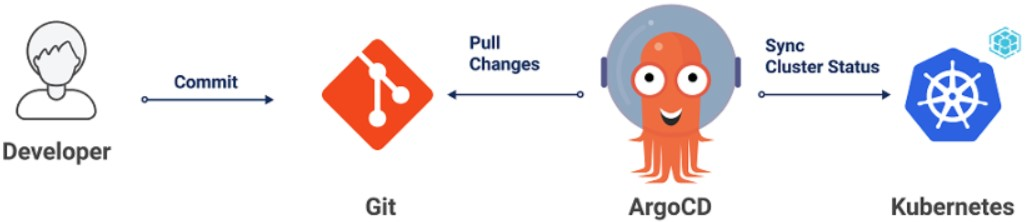
Step 1: Install Argo CD
You can install Argo CD manually or use the built-in Argo CD feature in the Application Center of Container Service for Kubernetes (ACK). This topic demonstrates a manual installation of Argo CD integrated with ASM for a GitOps workflow.
-
To manually install Argo CD, see the Argo CD documentation.
-
The Application Center of ACK provides a built-in Argo CD feature, which saves you from performing a manual installation. The ACK Application Center allows you to check application status, deploy application versions to Kubernetes clusters by using Git repositories and Helm charts, and perform rollbacks and releases. For more information, see Application Center overview.
Step 2: Enable data plane KubeAPI access
Because Alibaba Cloud Service Mesh (ASM) is a managed, Istio-compatible control plane, the Service Mesh ASM control plane and the data plane (Container Service for Kubernetes (ACK)) are in different Kubernetes clusters. Therefore, you need to enable data plane KubeAPI access in ASM to allow Argo CD to access Istio resources in the ASM cluster in the same way that it accesses resources in the ACK cluster.
-
Log on to the ASM console. In the left-side navigation pane, choose .
-
On the Mesh Management page, find the ASM instance that you want to configure. Click the name of the ASM instance or click Manage in the Actions column.
-
In the Basic Information section, click Enable next to Enable Data-plane KubeAPI access.
-
In the dialog box that appears, click Submit.
Step 3: Create an ASM gateway
-
Log on to the ASM console. In the left-side navigation pane, choose .
-
On the Mesh Management page, click the name of the ASM instance. In the left-side navigation pane, choose .
-
On the Ingress Gateway page, click Create. Configure the settings and then click Create.
The following table describes some of the parameters. For more information about all parameters, see Create an ingress gateway.
Parameter
Description
Name
This topic uses ingressgateway as an example.
Gateway types
For North-South IngressGateway, select North-South-Ingress.
Port Mapping
Click Add Port and configure the following protocols and ports.
-
Set Protocol to HTTP and Service Port to 80.
-
Set Protocol to HTTPS and Service Port to 443.
-
Step 4: Deploy Istio resources with Argo CD
You can define Istio resources as Kubernetes manifests and store them in the Git repository alongside your application's manifests.
-
Create the Bookinfo sample application.
-
In the Argo CD UI, click NEW APP and configure the following settings.
-
In the GENERAL section, set Application Name to bookinfo, Project to default, and select PRUNE RESOURCES.
-
In the SOURCE section, set Repository URL to https://github.com/AliyunContainerService/asm-labs.git, Revision to argocd-asm, and Path to argo-cd/bookinfo.
-
In the DESTINATION section, set Cluster URL to https://kubernetes.default.svc and Namespace to default.
-
-
After you complete the configuration, click CREATE at the top of the page.
After creation is complete, the bookinfo application appears in the Argo CD application list with a Healthy (green heart icon) and Synced (green checkmark icon) status. This indicates that the application is successfully synced to the target cluster. Click bookinfo to go to the application details page, where APP HEALTH shows Healthy and CURRENT SYNC STATUS shows Synced. The resource tree contains Deployment resources (details-v1, productpage-v1, ratings-v1, reviews-v1, reviews-v2, and reviews-v3), their associated ReplicaSets and Pods (with a status of running 2/2), and DestinationRule (details, productpage, and reviews), Gateway (bookinfo-gateway), and VirtualService (bookinfo) resources, all of which are in a synced and healthy state.
-
-
Verify the resource status on the ASM console.
-
Log on to the ASM console. In the left-side navigation pane, choose .
-
On the Mesh Management page, click the name of the ASM instance. In the left-side navigation pane, choose .
-
On the Virtual Service page, verify that the bookinfo VirtualService was created.
-
-
Verify the resource status on the ACK console.
-
Log on to the ACK console. In the left navigation pane, click Clusters.
-
On the Clusters page, click the name of your cluster. In the left navigation pane, click .
-
Verify that the Deployments were created. The page shows that six Deployments were created successfully, each with one running Pod: details-v1, productpage-v1, ratings-v1, reviews-v1, reviews-v2, and reviews-v3.
-
-
Access the application through the ASM gateway.
-
Obtain the ASM gateway address.
-
Log on to the ASM console. In the left-side navigation pane, choose .
-
On the Mesh Management page, click the name of the ASM instance. In the left-side navigation pane, choose .
-
On the Ingress Gateway page, copy the Service address of the target gateway.
-
-
In your browser, go to http://{YOUR_ASM_GATEWAY_ADDRESS}/productpage.
The Bookinfo application page loads, showing details for the book The Comedy of Errors. Because the Reviews service has three versions and no specific routing rules are applied yet, the reviews section changes each time you refresh the page. For example, one refresh might show Reviews served by: reviews-v3-xxx at the bottom of the reviews section. This behavior confirms that the application is accessible through the ASM gateway and that the Istio resources are deployed successfully.
-
Step 5: Implement GitOps-driven traffic routing
After you configure the traffic rules, access http://{your ASM Gateway address}/productpage. Only the v1 version of Reviews is displayed if you are not logged in, while the v2 version of Reviews is displayed if you log in with the username jason.
-
Modify the local VirtualService and Deployment YAML files.
-
Modify the VirtualService YAML file as follows:
apiVersion: networking.istio.io/v1alpha3 kind: VirtualService metadata: name: reviews spec: hosts: - reviews http: - match: - headers: end-user: exact: jason route: - destination: host: reviews subset: v2 - route: - destination: host: reviews subset: v1 --- -
Modify the Deployment YAML file as follows:
apiVersion: apps/v1
kind: Deployment
metadata:
  namespace: argocd
  name: reviews-v1
  labels:
    app: reviews
    version: v1
spec:
  replicas: 2
-
-
Commit and push the changes to your Git repository.
git add * git commit -m "reviews-v1" git push -
Synchronize the Git configuration with the cluster.
If you enabled automatic synchronization in Argo CD, the configurations are automatically synchronized with the cluster. Otherwise, follow these steps to synchronize them manually.
-
On the bookinfo card in the Argo CD management interface, click SYNC.
When a file changes, the OutOfSync status appears to the right of Status on the bookinfo card. The status of the bookinfo application is now OutOfSync.
-
In the panel that appears, click SYNCHRONIZE.
After the synchronization is complete, you can view the created resources on the ASM console and the updated resources on the ACK console. For more information, see Verify the resource status on the ASM console and Verify the resource status on the ACK console.
-
-
Verify the access result.
-
Without logging in, go to http://{YOUR_ASM_GATEWAY_ADDRESS}/productpage in your browser.
Result: All traffic to the Reviews service is routed to v1 (no star ratings). The Bookinfo product details page loads, showing the summary for The Comedy of Errors, Book Details (Type: paperback, Pages: 200, Publisher: PublisherA, Language: English, ISBN-10: 1234567890, ISBN-13: 123-1234567890), and Book Reviews. The bottom of the reviews section shows the Pod name of the microservice instance, such as
reviews-v1-55b668fc65-s48wm, which indicates that the application is deployed successfully and is accessible. -
Log in with the username
jasonand any password.Result: After logging in, traffic to the Reviews service is routed to v2 (black star ratings). The username jason and a sign out link appear in the upper-right corner of the page. The star ratings and the appearance of the username jason confirm that you have logged in successfully and that traffic is being routed to the v2 service.
-