Stateful applications such as shopping carts, login sessions, and personalized dashboards require all requests from the same client to reach the same backend pod. Session affinity (sticky sessions) in ASM routes requests to a consistent backend by applying consistent hashing in an Istio destination rule.
Consistent hashing maps each request to a backend based on a hash key -- a cookie, HTTP header, source IP, or query parameter. This provides soft session affinity: requests from the same client typically reach the same pod, but affinity may break when backends are added or removed.
How it works
Hashing algorithms
Envoy supports two consistent hashing algorithms:
| Algorithm | Default | When to use |
|---|---|---|
| HashRing | Yes | General-purpose session affinity with moderate backend churn |
| Maglev | No | High-throughput scenarios where lookup speed matters. Requires ASM v1.16 or later |
Prerequisites
Before you begin, make sure that you have:
A Container Service for Kubernetes (ACK) cluster added to your Service Mesh (ASM) instance. For more information, see Add a cluster to an ASM instance
An ingress gateway with port 80 exposed. For more information, see Create an ingress gateway
The HTTPBin application deployed. For more information, see Deploy the HTTPBin application
Configure cookie-based session affinity
This tutorial demonstrates cookie-based session affinity. The same DestinationRule structure applies to other hash key types -- replace the httpCookie block with the corresponding field.
Step 1: Scale the HTTPBin deployment to three replicas
Three replicas are needed to observe how requests distribute across pods. Connect to the ACK cluster data plane with kubectl and run:
kubectl scale deployment/httpbin --replicas 3Step 2: Verify request distribution without session affinity
Open
http://<ingress-gateway-ip>/status/418in a browser and refresh the page several times.For instructions on getting the ingress gateway IP, see substep 1 of Step 3 in Use Istio resources to route traffic to different versions of a service.
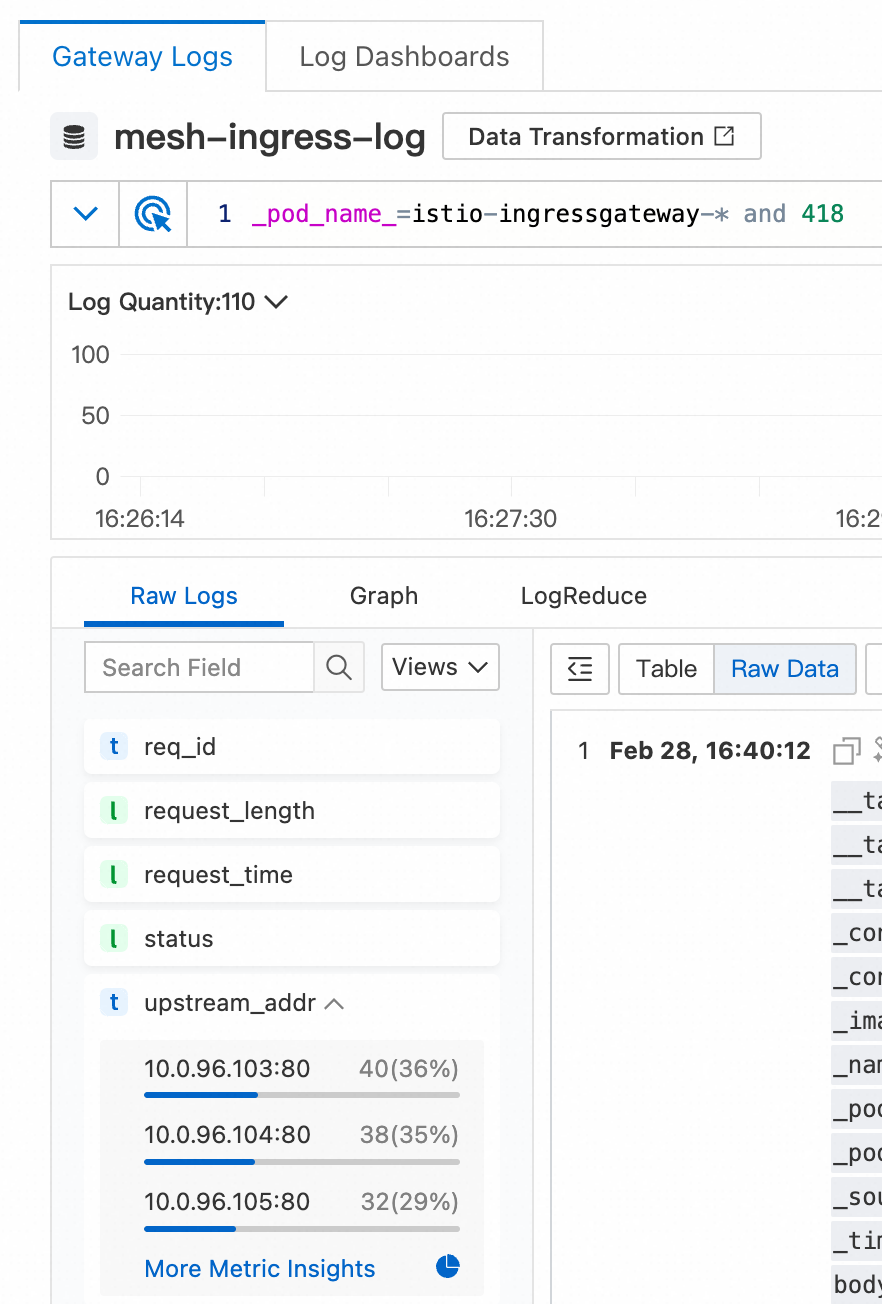
Check the gateway logs to confirm that requests are distributed across all three pods:
Log on to the ASM console. In the left-side navigation pane, choose Service Mesh > Mesh Management.
On the Mesh Management page, click the name of the ASM instance. In the left-side navigation pane, choose ASM Gateways > Ingress Gateway.
On the Ingress Gateway page, find the target ingress gateway and click Log Center. On the Gateway Logs tab, add
and 418to the search box and click Search & Analyze. On the Raw Logs tab in the lower-left corner, expand the upstream_addr index.
The logs show requests distributed roughly evenly across the three HTTPBin pods.
Step 3: Create a destination rule for cookie-based session affinity
Apply the following DestinationRule. For details on managing destination rules, see Manage destination rules.
apiVersion: networking.istio.io/v1beta1
kind: DestinationRule
metadata:
  name: httpbin
  namespace: default
spec:
  host: httpbin.default.svc.cluster.local
  trafficPolicy:
    loadBalancer:
      consistentHash:
        httpCookie:
          name: sticky-session-key
ttl: 0s| Field | Value | Description |
|---|---|---|
host | httpbin.default.svc.cluster.local | Fully qualified service hostname that this rule applies to |
consistentHash.httpCookie.name | sticky-session-key | Cookie name used as the hash key |
consistentHash.httpCookie.ttl | 0s | Cookie lifetime |
After you apply this rule:
On the first request (no cookie present), the gateway generates a hash from the source and destination IP addresses and ports, routes the request to a backend, and sets the
sticky-session-keycookie in the response.On subsequent requests, the client sends this cookie back. The gateway hashes the cookie value to determine the backend, routing the request to the same pod.
This example uses the default HashRing algorithm. To use Maglev (requires ASM v1.16 or later), add the hashAlgorithm field to your traffic policy based on your requirements.
Step 4: Verify that session affinity is working
Open
http://<ingress-gateway-ip>/status/333in a browser and refresh the page several times.For instructions on getting the ingress gateway IP, see substep 1 of Step 3 in Use Istio resources to route traffic to different versions of a service.
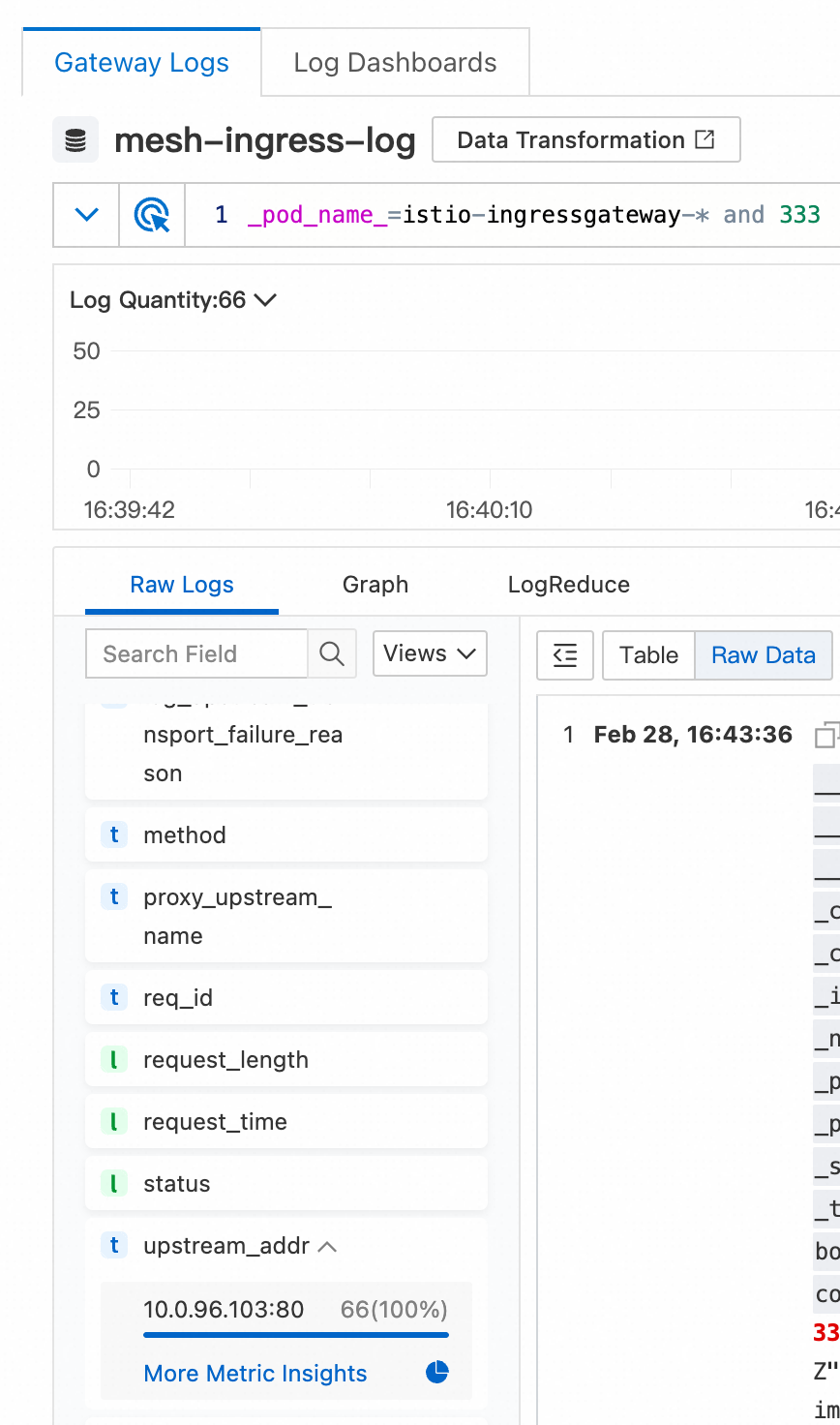
Check the gateway logs to confirm that all requests reach the same pod:
Log on to the ASM console. In the left-side navigation pane, choose Service Mesh > Mesh Management.
On the Mesh Management page, click the name of the ASM instance. In the left-side navigation pane, choose ASM Gateways > Ingress Gateway.
On the Ingress Gateway page, find the target ingress gateway and click Log Center. On the Gateway Logs tab, add
and 333to the search box and click Search & Analyze. On the Raw Logs tab in the lower-left corner, expand the upstream_addr index.
The logs show all requests routed to the same backend pod.
Confirm the cookie in the browser: open developer tools, click the Network tab, refresh the page, and inspect a request. The response includes a
sticky-session-keycookie that matches the name in the DestinationRule. The gateway uses this cookie to maintain session affinity.