The ASM gateway supports deployment across multiple clusters to improve service availability. Deploy your services in multiple clusters and configure a unified ingress gateway for those clusters to proxy ingress traffic for all of them. This topic describes how to configure a unified ingress gateway for multiple clusters.
Prerequisites
-
Deploy applications in two clusters associated with your ASM instance. For more information, see Add clusters to an ASM instance and Deploy applications in clusters associated with an ASM instance.
-
Inject Sidecar proxies into the namespace. For more information, see Configure Sidecar injection policies.
Configuration overview
When you deploy an ASM gateway across multiple clusters, the system creates gateway pods and corresponding Services in each cluster and attaches a CLB instance to each Service. As a result, a multi-cluster gateway has multiple IP addresses.
The ASM gateway supports reusing existing CLB instances, but do not use the same CLB instance for multiple Services.
This topic covers configuration methods for the following two scenarios:
-
Scenario 1: Gateway-related resource configurations are identical across all clusters.
-
Scenario 2: Gateway-related resource configurations differ across clusters, such as differences in CLB specifications or the number of gateway replicas.
Scenario 1: Gateway-related resource configurations are identical across all clusters
When gateway-related resources are identical across all clusters, create a multi-cluster gateway through the ASM console or convert an existing single-cluster gateway into a multi-cluster gateway. ASM creates identically configured gateways in all specified clusters based on your configuration.
Method 1: Create a multi-cluster gateway
Create a multi-cluster gateway through the ASM console using either the UI configuration options or a YAML file.
-
Log on to the ASM console. In the left-side navigation pane, choose .
-
On the Mesh Management page, click the name of the ASM instance. In the left-side navigation pane, choose .
-
Create a multi-cluster gateway.
-
Method 1: Create a multi-cluster gateway using UI configuration options
-
On the Ingress Gateway page, click Create.
-
On the Create page, select multiple target clusters for Cluster, configure other settings as needed, and then click Create.
For details about other configuration options, see Create an ingress gateway.
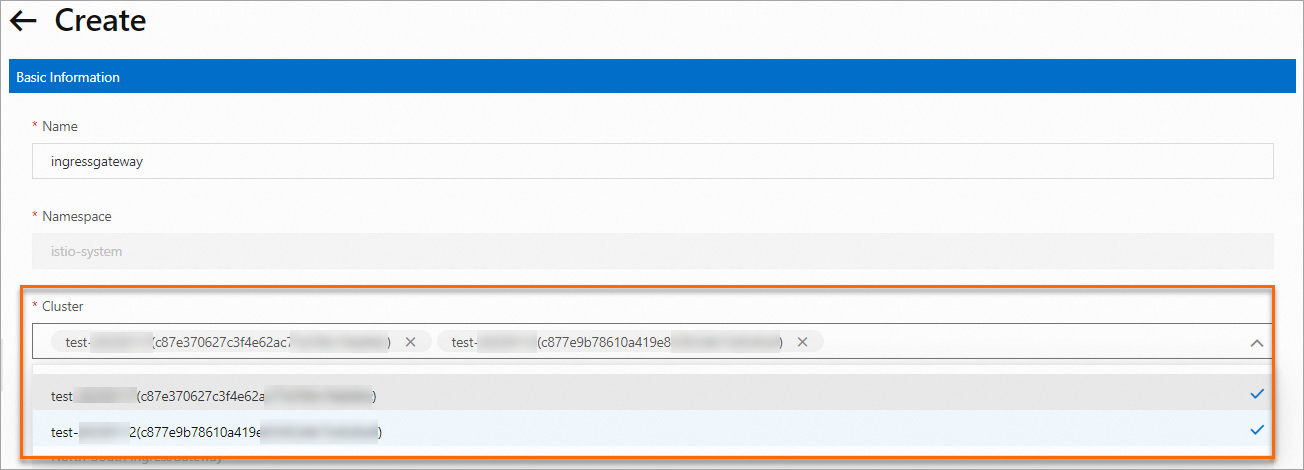
-
-
Method 2: Create a multi-cluster gateway using a YAML file
-
On the Ingress Gateway page, click Create from YAML.
-
On the Create page, configure the following YAML and then click Create.
apiVersion: istio.alibabacloud.com/v1beta1
kind: IstioGateway
metadata:
  name: ingressgateway-multi-cluster
  namespace: istio-system
spec:
  affinity: {}
  autoCreateGatewayYaml: false
  clusterIds:
    - c87e370627c3f4e62ac77a7*********
    - c877e9b78610a419e833f22*********
  compression: {}
  cpu: {}
  dnsPolicy: ClusterFirst
  externalTrafficPolicy: Local
  gatewayType: ingress
  hostNetwork: false
  kernel:
    parameters: {}
  memory: {}
  ports:
    - name: http-0
      port: 80
      protocol: HTTP
      targetPort: 80
    - name: https-1
      port: 443
      protocol: HTTPS
      targetPort: 443
  readinessProbe: {}
  replicaCount: 2
  resources:
    limits:
      cpu: '2'
      memory: 4G
    requests:
      cpu: 200m
      memory: 256Mi
  runAsRoot: true
  sds: {}
  serviceAnnotations:
    service.beta.kubernetes.io/alibaba-cloud-loadbalancer-spec: slb.s1.small
    service.beta.kubernetes.io/alicloud-loadbalancer-address-type: internet
  serviceType: LoadBalancer
-
-
Method 2: Convert a single-cluster gateway to a multi-cluster gateway
If you already have a single-cluster gateway, add the required cluster IDs to the spec.clusterIds array in the gateway YAML to convert it into a multi-cluster gateway.
-
Log on to the ASM console. In the left-side navigation pane, choose .
-
On the Mesh Management page, click the name of the ASM instance. In the left-side navigation pane, choose .
-
On the Ingress Gateway page, click View YAML next to the target gateway.
-
In the Edit dialog box, add the target cluster ID to the spec.clusterIds field and then click OK.
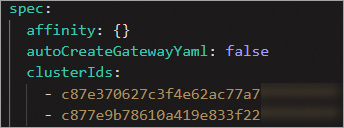
Verify that the multi-cluster gateway was created successfully
Check the gateway-related resources such as Services and Deployments in the istio-system namespace of both data plane clusters. If both clusters contain identically configured resources, the multi-cluster gateway was created successfully.
Scenario 2: Gateway-related resource configurations differ across clusters
You might need different gateway configurations for each of two clusters where a gateway is deployed. For example, one cluster requires an automatically created CLB while the other reuses an existing CLB. Or one cluster needs three gateway replicas while the other needs five. To customize multi-cluster gateway configurations, modify the corresponding YAML file. The following example shows how to configure different CLB types for a new multi-cluster gateway: one cluster uses an automatically created CLB, and the other reuses an existing CLB.
-
Log on to the ASM console. In the left-side navigation pane, choose .
-
On the Mesh Management page, click the name of the ASM instance. In the left-side navigation pane, choose .
-
On the Ingress Gateway page, click Create from YAML.
-
On the Create page, configure the following YAML and then click Create.
apiVersion: istio.alibabacloud.com/v1beta1
kind: IstioGateway
metadata:
  name: ingressgateway2
  namespace: istio-system
spec:
  autoCreateGatewayYaml: false
  clusterIds:
    - c0ed16dbd6c5e429faca464**********
    - c7d5fba8f3c974353b56522**********
  compression: {}
  cpu: {}
  dnsPolicy: ClusterFirst
  externalTrafficPolicy: Local
  gatewayType: ingress
  hostNetwork: false
  kernel:
    parameters: {}
  memory: {}
  overrides:
    c0ed16dbd6c5e429faca464***********:
      serviceAnnotations:
        service.beta.kubernetes.io/alibaba-cloud-loadbalancer-spec: slb.s1.small
        service.beta.kubernetes.io/alicloud-loadbalancer-address-type: internet
    c7d5fba8f3c974353b56522**********:
      serviceAnnotations:
        service.beta.kubernetes.io/alibaba-cloud-loadbalancer-id: lb-bp1lv01rlga********
  ports:
    - name: http-0
      port: 80
      protocol: HTTP
      targetPort: 80
    - name: https-2
      port: 443
      protocol: HTTPS
      targetPort: 443
  readinessProbe: {}
  replicaCount: 1
  resources:
    limits:
      cpu: '2'
      memory: 4G
    requests:
      cpu: 200m
      memory: 256Mi
  rollingMaxSurge: 25%
  rollingMaxUnavailable: 25%
  runAsRoot: true
  sds: {}
  serviceType: LoadBalancer
The overrides field uses a map structure. Keys are cluster IDs, and values use the same field names as those in the gateway spec. You can configure CLB-related parameters, the number of gateway replicas, gateway resource specifications, and other settings for each cluster individually in the overrides field. Settings in this field take precedence over top-level gateway configurations. For more information about these fields, see ASM gateway CRD reference.
-
Verify that the multi-cluster gateway was created successfully.
Check the gateway-related Service in the istio-system namespace of each cluster. If one cluster's Service uses the IP of an automatically created CLB and the other uses the IP of a specified CLB, the multi-cluster gateway was created successfully.