When Envoy sidecars intercept traffic in Service Mesh (ASM), they replace the original client IP address with an internal proxy address. Backend applications then see 127.0.0.6 (east-west traffic) or a Kubernetes node IP (north-south traffic) instead of the real client address. This breaks IP-based access control, session persistence, and accurate access logging.
This guide covers how to configure ASM to preserve source IP addresses for both east-west (pod-to-pod) and north-south (ingress) traffic.
How source IPs are lost
Source IPs are lost at two different points depending on traffic direction:
| Traffic direction | Where IP is lost | Root cause | What the application sees |
|---|---|---|---|
| East-west (pod-to-pod) | Envoy sidecar | Envoy uses iptables REDIRECT rules. It reroutes packets to itself, then forwards them to the application over loopback address 127.0.0.6. | 127.0.0.6 |
| North-south (ingress) | Kubernetes networking | When kube-proxy forwards traffic across nodes, it performs Source NAT (SNAT), replacing the client IP with a node IP. | A Kubernetes node IP (for example, 10.0.0.93) |
Choose the right solution
The correct approach depends on your traffic direction and load balancer type:
| Scenario | Solution | Configuration |
|---|---|---|
| Pod-to-pod traffic within the mesh | Enable TPROXY interception mode on the receiving pod | Annotation: sidecar.istio.io/interceptionMode: TPROXY |
| Ingress through a load balancer | Set externalTrafficPolicy: Local on the ingress gateway Service | spec.externalTrafficPolicy: Local |
If your cluster uses the Terway network plug-in, source IPs are preserved by default for north-south traffic. You can skip the externalTrafficPolicy configuration.Prerequisites
An ASM instance of Enterprise Edition or Ultimate Edition, version 1.15 or later. For more information, see Create an ASM instance and Update an ASM instance.
An ACK managed cluster added to the ASM instance. For more information, see Create an ACK managed cluster and Add a cluster to an ASM instance.
An ingress gateway deployed in the ASM instance. For more information, see Create an ingress gateway.
kubectl connected to the ACK cluster. For more information, see Obtain the kubeconfig file of a cluster and use kubectl to connect to the cluster.
Deploy sample applications
The following steps deploy two sample applications used throughout this guide:
sleep: A curl-based client that sends requests.
HTTPBin: A backend that echoes request metadata, including the source IP.
Deploy the sleep application
Create a
sleep.yamlfile with the following content:apiVersion: v1 kind: ServiceAccount metadata: name: sleep --- apiVersion: v1 kind: Service metadata: name: sleep labels: app: sleep service: sleep spec: ports: - port: 80 name: http selector: app: sleep --- apiVersion: apps/v1 kind: Deployment metadata: name: sleep spec: replicas: 1 selector: matchLabels: app: sleep template: metadata: labels: app: sleep spec: terminationGracePeriodSeconds: 0 serviceAccountName: sleep containers: - name: sleep image: curlimages/curl command: ["/bin/sleep", "3650d"] imagePullPolicy: IfNotPresent volumeMounts: - mountPath: /etc/sleep/tls name: secret-volume volumes: - name: secret-volume secret: secretName: sleep-secret optional: trueApply the manifest:
kubectl -n default apply -f sleep.yaml
Deploy the HTTPBin application
Create an
httpbin.yamlfile with the following content:apiVersion: v1 kind: Service metadata: name: httpbin labels: app: httpbin spec: ports: - name: http port: 8000 selector: app: httpbin --- apiVersion: apps/v1 kind: Deployment metadata: name: httpbin spec: replicas: 1 selector: matchLabels: app: httpbin version: v1 template: metadata: labels: app: httpbin version: v1 spec: containers: - image: docker.io/citizenstig/httpbin imagePullPolicy: IfNotPresent name: httpbin ports: - containerPort: 8000Apply the manifest:
kubectl -n default apply -f httpbin.yaml
Preserve source IPs for east-west traffic (TPROXY)
East-west traffic flows between pods within the mesh. By default, Envoy uses iptables REDIRECT mode, which replaces the source IP with 127.0.0.6. Switching to TPROXY (transparent proxy) mode preserves the original source IP.
Verify the default behavior
Check the pod IPs: Expected output: Note the IP address of the sleep pod (
172.17.X.XXX).kubectl -n default get pods -o wideNAME READY STATUS RESTARTS AGE IP NODE NOMINATED NODE READINESS GATES httpbin-c85bdb469-4ll2m 2/2 Running 0 3m22s 172.17.X.XXX cn-hongkong.10.0.0.XX <none> <none> sleep-8f764df66-q7dr2 2/2 Running 0 3m9s 172.17.X.XXX cn-hongkong.10.0.0.XX <none> <none>Send a request from the sleep pod to HTTPBin: Expected output: The reported origin is
127.0.0.6(the Envoy loopback address), not the sleep pod IP.kubectl -n default exec -it deploy/sleep -c sleep -- curl http://httpbin:8000/ip{ "origin": "127.0.0.6" }Confirm at the socket level. First, log in to the HTTPBin container and install
netstat: Exit the container and check port 80 connections: Expected output: The source address is127.0.0.6.apt update & apt install net-toolskubectl -n default exec -it deploy/httpbin -c httpbin -- netstat -ntp | grep 80tcp 0 0 172.17.X.XXX:80 127.0.0.6:42691 TIME_WAIT -Examine the Envoy access logs for the HTTPBin pod. Key fields in the formatted log:
Field Value Meaning downstream_remote_address172.17.X.XXX:56160Sleep pod IP (the actual sender) downstream_local_address172.17.X.XXX:80Address the sleep pod connected to upstream_local_address127.0.0.6:42169Address Envoy used to connect to HTTPBin -- this is why the application sees 127.0.0.6upstream_host172.17.X.XXX:80HTTPBin pod address { "downstream_remote_address": "172.17.X.XXX:56160", "downstream_local_address": "172.17.X.XXX:80", "upstream_local_address": "127.0.0.6:42169", "upstream_host": "172.17.X.XXX:80" }
Enable TPROXY mode
Patch the HTTPBin Deployment to use TPROXY interception mode:
kubectl patch deployment -n default httpbin -p '{"spec":{"template":{"metadata":{"annotations":{"sidecar.istio.io/interceptionMode":"TPROXY"}}}}}'After the pod restarts, send a request from the sleep pod: Expected output: HTTPBin now sees the real IP address of the sleep pod.
kubectl -n default exec -it deploy/sleep -c sleep -- curl http://httpbin:8000/ip{ "origin": "172.17.X.XXX" }Confirm at the socket level: Expected output: The source address is now the sleep pod IP.
After the pod restarts, reinstall
netstatinside the HTTPBin container.kubectl -n default exec -it deploy/httpbin -c httpbin -- netstat -ntp | grep 80tcp 0 0 172.17.X.XXX:80 172.17.X.XXX:36728 ESTABLISHED -Examine the Envoy access logs. Key fields:
Field Value Meaning downstream_remote_address172.17.X.XXX:39058Sleep pod IP downstream_local_address172.17.X.XXX:80Address the sleep pod connected to upstream_local_address172.17.X.XXX:46129Now the sleep pod IP, confirming source IP preservation upstream_host172.17.X.XXX:80HTTPBin pod address { "downstream_remote_address": "172.17.X.XXX:39058", "downstream_local_address": "172.17.X.XXX:80", "upstream_local_address": "172.17.X.XXX:46129", "upstream_host": "172.17.X.XXX:80" }
Preserve source IPs for north-south traffic (externalTrafficPolicy)
North-south traffic enters the mesh from external clients through a load balancer and an ingress gateway. By default, Kubernetes performs Source NAT (SNAT) as packets cross nodes, causing the ingress gateway to see a node IP instead of the real client address.
Setting externalTrafficPolicy to Local on the ingress gateway Service directs the load balancer to send traffic only to nodes that run an ingress gateway pod. This eliminates the cross-node hop that triggers SNAT.
When externalTrafficPolicy is set to Local, only nodes with an active ingress gateway pod receive incoming traffic. For production deployments, run ingress gateway pods on multiple nodes to avoid a single point of failure or traffic bottleneck. If all ingress gateway pods on a node go down, that node stops receiving external traffic entirely.
HTTP requests
Verify the default behavior
Create an
http-demo.yamlfile that defines a Gateway and VirtualService for HTTP access to HTTPBin:apiVersion: networking.istio.io/v1alpha3 kind: Gateway metadata: name: httpbin-gw-httpprotocol namespace: default spec: selector: istio: ingressgateway servers: - hosts: - '*' port: name: http number: 80 protocol: HTTP --- apiVersion: networking.istio.io/v1alpha3 kind: VirtualService metadata: name: httpbin namespace: default spec: gateways: - httpbin-gw-httpprotocol hosts: - '*' http: - route: - destination: host: httpbin port: number: 8000Apply the manifest:
kubectl -n default apply -f http-demo.yamlSend a request through the ingress gateway: Expected output: The returned IP is a Kubernetes node address, not the client IP.
   export GATEWAY_URL=$(kubectl -n istio-system get service istio-ingressgateway -o jsonpath='{.status.loadBalancer.ingress[0].ip}')
   curl http://$GATEWAY_URL:80/ip
{ "origin": "10.0.0.93" }Ingress gateway access log (key fields):
downstream_remote_addressshows a node IP, not the client IP.{ "downstream_remote_address": "10.0.0.93:5899", "downstream_local_address": "172.17.X.XXX:80", "upstream_local_address": "172.17.X.XXX:54322", "upstream_host": "172.17.X.XXX:80", "x_forwarded_for": "10.0.0.93" }
Set externalTrafficPolicy to Local
If your cluster uses the Terway network plug-in, skip this step. Terway preserves source IPs by default.
Log on to the ASM console. In the left-side navigation pane, choose Service Mesh > Mesh Management.
On the Mesh Management page, click the name of the ASM instance. In the left-side navigation pane, choose ASM Gateways > Ingress Gateway.
On the Ingress Gateway page, find the target ingress gateway and click YAML.
In the Edit dialog box, add the
externalTrafficPolicyfield in thespecsection and set it toLocal, then click OK.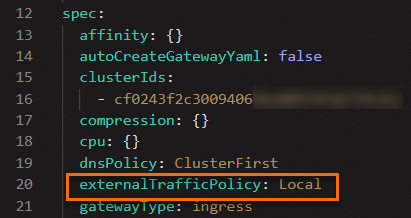
Verify that source IPs are preserved
Send the request again: Expected output: The returned IP is the actual client source IP address.
curl http://$GATEWAY_URL:80/ip{ "origin": "120.244.xxx.xxx" }Ingress gateway access log (key fields):
downstream_remote_addressandx_forwarded_fornow show the real client IP.{ "downstream_remote_address": "120.244.XXX.XXX:28504", "downstream_local_address": "172.17.X.XXX:80", "upstream_local_address": "172.17.X.XXX:57498", "upstream_host": "172.17.X.XXX:80", "x_forwarded_for": "120.244.XXX.XXX" }
HTTPS requests
Source IP preservation for HTTPS traffic uses the same externalTrafficPolicy: Local setting. Complete the externalTrafficPolicy configuration above before proceeding.
Create an
https-demo.yamlfile that defines a Gateway and VirtualService for HTTPS access:apiVersion: networking.istio.io/v1alpha3 kind: Gateway metadata: name: httpbin-gw-https namespace: default spec: selector: istio: ingressgateway servers: - hosts: - '*' port: name: https number: 443 protocol: HTTPS tls: credentialName: myexample-credential mode: SIMPLE --- apiVersion: networking.istio.io/v1alpha3 kind: VirtualService metadata: name: httpbin-https namespace: default spec: gateways: - httpbin-gw-https hosts: - '*' http: - route: - destination: host: httpbin port: number: 8000Apply the manifest:
kubectl -n default apply -f https-demo.yamlSend an HTTPS request through the ingress gateway: Expected output: The returned IP is the real client source IP address.
   export GATEWAY_URL=$(kubectl -n istio-system get service istio-ingressgateway -o jsonpath='{.status.loadBalancer.ingress[0].ip}')
   curl -k https://$GATEWAY_URL:443/ip
{ "origin": "120.244.XXX.XXX" }
Summary
| Traffic direction | Root cause of IP loss | Solution | Configuration |
|---|---|---|---|
| East-west (pod-to-pod) | Envoy sidecar forwards traffic over loopback 127.0.0.6 | Enable TPROXY interception mode | sidecar.istio.io/interceptionMode: TPROXY |
| North-south (ingress) | Kubernetes SNAT during cross-node forwarding | Set externalTrafficPolicy to Local on the ingress gateway Service | spec.externalTrafficPolicy: Local |