This topic describes how to use OpenTelemetry to perform tracing analysis on OpenResty. OpenResty is a high-performance web platform based on Nginx and LuaJIT. It provides powerful dynamic processing capabilities by integrating the Lua scripting language. OpenResty supports collecting trace data through the ngx_otel_module module and reporting the data directly to Managed Service for OpenTelemetry.
Limits
The ngx_otel_module module currently supports only the gRPC protocol for data reporting, not the HTTP protocol.
The version of the ngx_otel_module module must be 0.1.2 or later.
Prerequisites
Log on to the Application Real-Time Monitoring Service (ARMS) console. In the left-side navigation pane, click Integration Center.
On the Integration Center page, click the OpenTelemetry card in the Server-side Applications section.
In the OpenTelemetry panel, click the Start Integration tab, and then select a region in which you want to report the trace data.
NoteResources are automatically initialized in the region that you access for the first time.
Configure the Connection Type and Export Protocol parameters and copy an endpoint.
Connection Type: If your service is deployed on Alibaba Cloud and resides in the region that you selected, we recommend that you set this parameter to Alibaba Cloud VPC Network. Otherwise, set this parameter to Public Network.
Export Protocol: Set this parameter to gRPC based on the protocol that is supported by the client.

Integration procedure
Step 1: Build the ngx_otel_module module
This section guides you through the process of building the ngx_otel_module module. We will start by preparing the build environment, installing the necessary tools and dependencies, obtaining the configuration information of your current OpenResty system, downloading the matching Nginx source code, configuring compilation parameters, and finally compiling the ngx_otel_module module for OpenTelemetry integration. You can also refer to the official ngx_otel_module documentation for building instructions. For more information, see build ngx_otel_module from source.
Install build tools and dependencies.
sudo apt update

sudo apt install cmake build-essential libssl-dev zlib1g-dev libpcre3-dev

sudo apt install pkg-config libc-ares-dev libre2-dev # for gRPC
Determine the Nginx version and compilation configuration used by OpenResty.
openresty -VThe following is an example of the output.
/# openresty -V
nginx version: openresty/1.25.3.2
built with OpenSSL 1.1.1w  11 Sep 2023
TLS SNI support enabled
configure arguments: --prefix=/usr/local/openresty/nginx --with-cc-opt='-O2 -DNGX_LUA_ABORT_AT_PANIC -I/usr/local/openresty/zlib/include -I/usr/local/openresty/pcre/include -I/usr/local/openresty/openssl111/include' --add-module=../ngx_devel_kit-0.3.3 --add-module=../echo-nginx-module-0.63 --add-module=../xss-nginx-module-0.06 --add-module=../ngx_coolkit-0.2 --add-module=../set-misc-nginx-module-0.33 --add-module=../form-input-nginx-module-0.12 --add-module=../encrypted-session-nginx-module-0.09 --add-module=../srcache-nginx-module-0.33 --add-module=../ngx_lua-0.10.26 --add-module=../ngx_lua_upstream-0.07 --add-module=../headers-more-nginx-module-0.37 --add-module=../array-var-nginx-module-0.06 --add-module=../memc-nginx-module-0.20 --add-module=../redis2-nginx-module-0.15 --add-module=../redis-nginx-module-0.3.9 --add-module=../ngx_stream_lua-0.0.14 --with-ld-opt='-Wl,-rpath,/usr/local/openresty/luajit/lib -L/usr/local/openresty/zlib/lib -L/usr/local/openresty/pcre/lib -L/usr/local/openresty/openssl111/lib -Wl,-rpath,/usr/local/openresty/zlib/lib:/usr/local/openresty/pcre/lib:/usr/local/openresty/openssl111/lib' --with-pcre-jit --with-stream --with-stream_ssl_module --with-stream_ssl_preread_module --with-http_v2_module --with-http_v3_module --without-mail_pop3_module --without-mail_imap_module --without-mail_smtp_module --with-http_stub_status_module --with-http_realip_module --with-http_addition_module --with-http_auth_request_module --with-http_secure_link_module --with-http_random_index_module --with-http_gzip_static_module --with-http_sub_module --with-http_dav_module --with-http_flv_module --with-http_mp4_module --with-http_slice_module --with-http_gunzip_module --with-threads --with-stream --without-pcre2 --with-http_ssl_module
Download the corresponding version of the Nginx source code.
Replace
{OPENRESTY_NGINX_VERSION}with the corresponding version tag. To find the tag name, visit https://github.com/nginx/nginx/tags. For example, for version 1.25.3.2, the corresponding version tag isrelease-1.25.3.git clone https://github.com/nginx/nginx.git cd nginx git checkout {OPENRESTY_NGINX_VERSION} # Switch to the corresponding version tagConfigure Nginx compilation parameters.
Execute the following command in the nginx source code root directory.
{NGINX_CONFIGURE_ARGUMENTS}is the configure arguments content obtained in Step 2: Determine the Nginx version and compilation configuration used by OpenResty, with the parameters related to--add-moduleremoved../auto/configure {NGINX_CONFIGURE_ARGUMENTS} --with-compatDownload the ngx_otel_module module source code.
cd ..
git clone https://github.com/nginxinc/nginx-otel.git
cd /nginx-otel
Compile the ngx_otel_module module.
Create and enter the build directory to compile. After compilation is complete, the
ngx_otel_module.sofile will be generated in the build directory.mkdir build cd build cmake -DNGX_OTEL_NGINX_BUILD_DIR=/nginx/objs .. make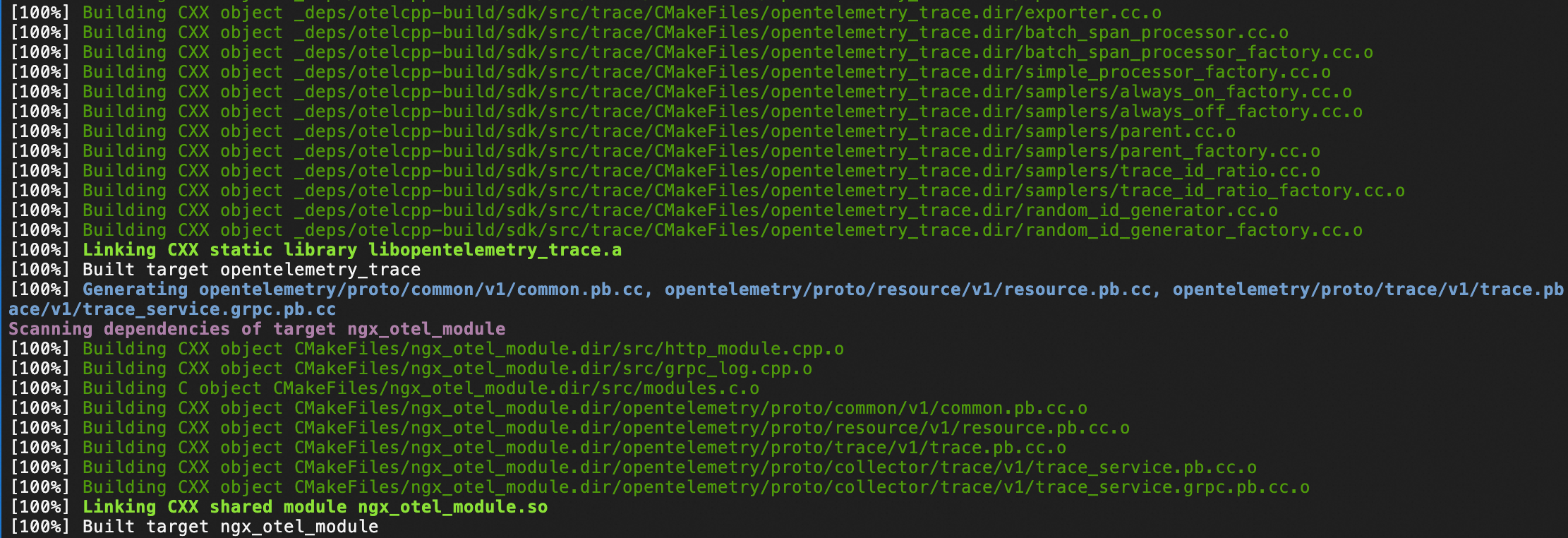
Step 2: Enable the ngx_otel_module module
Copy the
ngx_otel_module.somodule file to the nginx modules directory.mkdir -p /usr/local/openresty/nginx/modules/ cp ngx_otel_module.so /usr/local/openresty/nginx/modules/Configure nginx.conf.
To enable tracing for OpenResty, you need to load the ngx_otel_module module and add configuration items in the Nginx main configuration file
/usr/local/openresty/nginx/conf/nginx.conf. For more parameter configuration information about the ngx_otel_module module, see ngx_otel_module module documentation.Global configuration: Enable tracing for all HTTP requests.
load_module modules/ngx_otel_module.so; # Load ngx_otel_module
...
http {
    ...

    otel_exporter {
        endpoint "${GRPC_ENDPOINT}"; # gRPC endpoint obtained in the prerequisites
        header Authentication "${GRPC_TOKEN}"; # Authentication token obtained in the prerequisites
    }

    otel_trace on;                     # Enable tracing
    otel_service_name ${SERVICE_NAME};  # Application name
    otel_trace_context propagate;         # Inject trace context to downstream services
    ...
}
Single location configuration: Enable tracing for a single location.
load_module modules/ngx_otel_module.so; # Load ngx_otel_module

...

http {

    otel_exporter {
        endpoint "${GRPC_ENDPOINT}"; # gRPC endpoint obtained in the prerequisites
        header Authentication "${GRPC_TOKEN}"; # Authentication token obtained in the prerequisites
    }

    server {
        listen 127.0.0.1:80;

        location /hello {
            otel_trace         on;             # Enable tracing only for 127.0.0.1:80/hello
            otel_service_name ${SERVICE_NAME}  # Application name
            otel_trace_context propagate;         # Inject trace context to downstream services

            ...
        }
    }
}
Check if the nginx.conf configuration is correct.
/usr/local/openresty/nginx/sbin/nginx -tThe expected output is as follows, indicating that the configuration is correct.
nginx: the configuration file /usr/local/openresty/nginx/conf/nginx.conf syntax is ok
nginx: configuration file /usr/local/openresty/nginx/conf/nginx.conf test is successful
Reload the configuration.
# Method 1: Use the openresty command to reload the configuration
openresty -s reload

# Method 2: Use the nginx command to reload the configuration
/usr/local/openresty/nginx/sbin/nginx -s reload
Step 3: View OpenResty traces
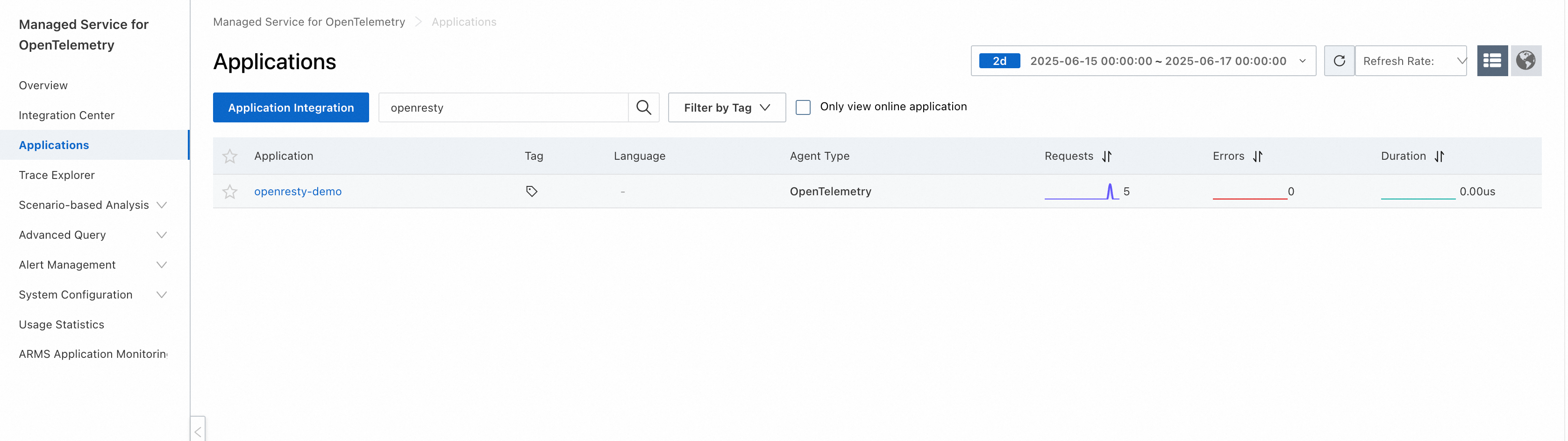
After completing the above configuration and reloading, you can send requests to OpenResty to generate traces. Then, log on to the Managed Service for OpenTelemetry console to view the OpenResty traces generated by OpenTelemetry.
View the OpenResty application in the application list.
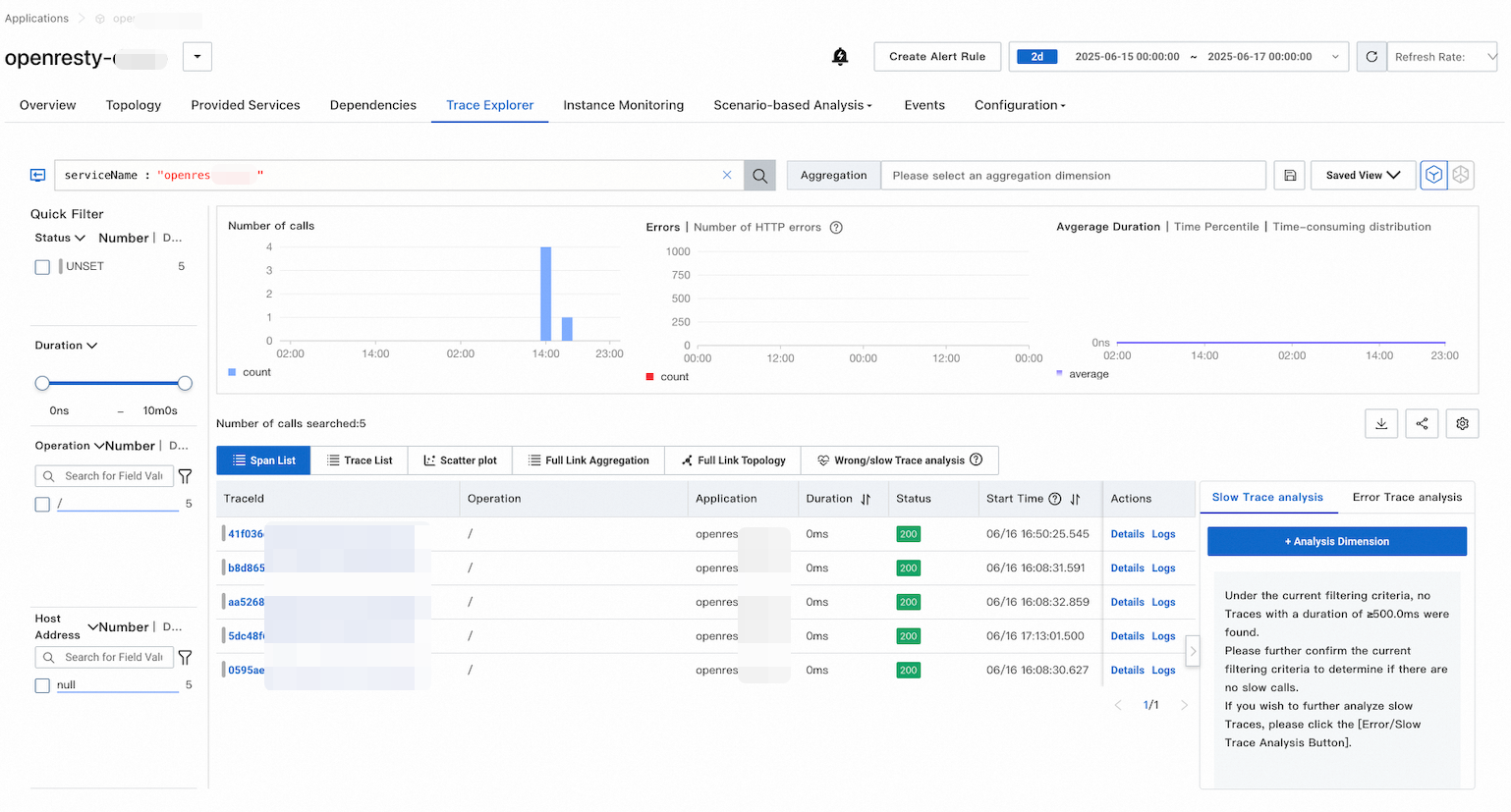
View OpenResty traces on the trace analysis page.
View all traces for a specific time period.
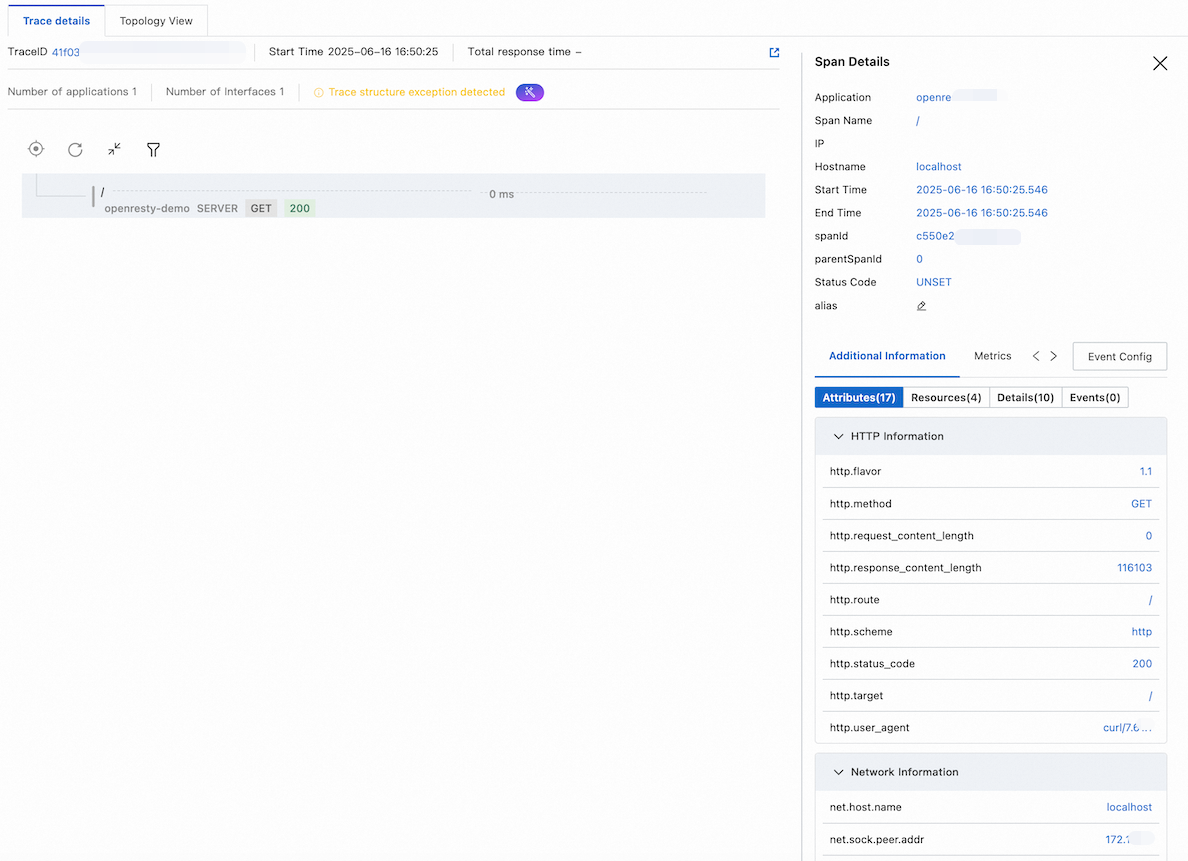
View the complete trace details for a single trace.
FAQ
When enabling the ngx_otel_module module, an error message indicates that the module is not compatible. Running bash/usr/local/openresty/nginx/sbin/nginx -t returns the following error:
[emerg] module "/usr/local/openresty/nginx/modules/ngx_otel_module.so" is not binary compatibleTo resolve the issue, perform the following operations:
Ensure that you are using exactly the same nginx version.
Use
nginx -Vto check the compilation parameters of the current nginx.Ensure that the paths are correct:
Actual nginx installation path:
which nginxStandard OpenResty path:
/usr/local/openresty/nginxModule placement path:
/usr/local/openresty/nginx/modules/