After you instrument your application with Jaeger and report trace data to Managed Service for OpenTelemetry, Managed Service for OpenTelemetry starts to monitor your application. You can view a series of monitoring data, such as application topology, traces, abnormal transactions, slow transactions, and SQL analysis. This topic describes how to perform manual instrumentation, and automatic instrumentation by using Spring Cloud and gRPC components.
For advanced features and tracing capabilities, we recommend connecting your application to Managed Service for OpenTelemetry using the OpenTelemetry protocol.
Our detailed OpenTelemetry integration guides and best practices help you get started with Managed Service for OpenTelemetry. For more information, see Connect an application.
Prerequisites
Background information
Jaeger is an open source distributed tracing system that is compatible with the OpenTracing API and is a graduated project of the Cloud Native Computing Foundation (CNCF). It aggregates real-time monitoring data from various heterogeneous systems. The OpenTracing community provides many components that support a variety of Java frameworks. Examples include:
To report Java application data to the Managed Service for OpenTelemetry console using Jaeger, you must first instrument the application. You can perform manual instrumentation or use various existing plug-ins for automatic instrumentation. This topic describes the following three instrumentation methods.
-
Manual instrumentation
-
Instrumentation by using a Spring Cloud component
-
Instrumentation by using a gRPC component
-
The following figure shows how to report data without using the Jaeger agent.

-
The following figure shows how to report data by using the Jaeger agent.

Instrument a Java application
Before you can use Jaeger to submit the data of a Java application to Managed Service for OpenTelemetry, you must instrument the application. In this example, the application is manually instrumented.
-
Download the demo project. Go to the manualDemo directory and run the program as instructed in the README.md file.
-
Add the following dependency for Jaeger clients to the pom.xml file:
<dependency> <groupId>io.jaegertracing</groupId> <artifactId>jaeger-client</artifactId> <version>0.31.0</version> </dependency> -
Configure initialization parameters and create a tracer.
A tracer can be used to create spans to record distributed operation time, transmit data across servers in pass-through mode by using the Extract or Inject method, or specify the current span. The tracer also contains data such as the endpoint used for data reporting, local IP address, sampling rate, and service name. You can adjust the sampling rate to reduce the overheads caused by data reporting.
NoteReplace
<endpoint>with the endpoint that you obtained in the "Prerequisites" section of this topic.// Replace manualDemo with your application name. io.jaegertracing.Configuration config = new io.jaegertracing.Configuration("manualDemo"); io.jaegertracing.Configuration.SenderConfiguration sender = new io.jaegertracing.Configuration.SenderConfiguration(); // Replace <endpoint> with the endpoint that you obtained in the "Prerequisites" section of this topic. sender.withEndpoint("<endpoint>"); config.withSampler(new io.jaegertracing.Configuration.SamplerConfiguration().withType("const").withParam(1)); config.withReporter(new io.jaegertracing.Configuration.ReporterConfiguration().withSender(sender).withMaxQueueSize(10000)); // Set resource tags, such as the application version and deployment environment. Map<String, String> map = new HashMap<>(); map.put("service.version", "1.0.0"); map.put("deployment.environment", "test"); config.withTracerTags(map); GlobalTracer.register(config.getTracer()); -
Record the request data.
Tracer tracer = GlobalTracer.get(); // Create a span. Span span = tracer.buildSpan("parentSpan").withTag("myTag", "spanFirst").start(); tracer.scopeManager().activate(span, false); tracer.activeSpan().setTag("methodName", "testTracing"); // The business logic. secondBiz(); span.finish(); -
Optional. You can run the preceding code to create a root span to record the root operation of a request. If you want to record the previous and subsequent operations of a request, specify the context information.
Tracer tracer = GlobalTracer.get(); Span parentspan = tracer.activeSpan(); Tracer.SpanBuilder spanBuilder = tracer.buildSpan("childSpan").withTag("myTag", "spanSecond"); if (parentspan !=null) { spanBuilder.asChildOf(parentspan).start(); } Span childSpan = spanBuilder.start(); Scope scope = tracer.scopeManager().activate(childSpan); // The statement is executed once when the request starts. // The business logic. The buildSpan function can be executed multiple times. childSpan.finish(); tracer.activeSpan().setTag("methodName", "testCall"); // The statement is executed once when the request ends. scope.close(); -
Optional. To efficiently troubleshoot issues, you can add custom tags to a span. For example, you can add a custom tag to check whether an error occurs or to record the returned value of a request.
tracer.activeSpan().setTag("methodName", "testCall"); -
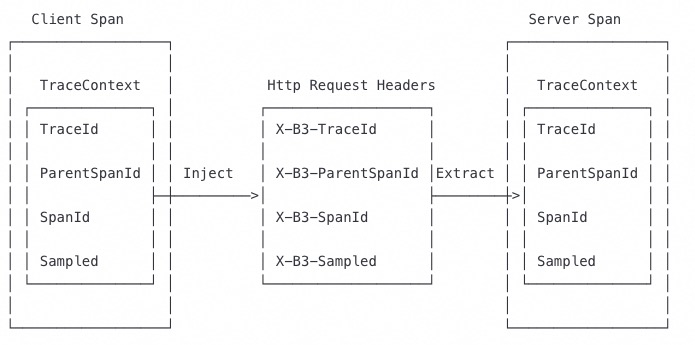
In a distributed system, remote procedure call (RPC) requests are sent together with trace data. Trace data contains the values of the TraceId, ParentSpanId, SpanId, and Sampled parameters. You can call the Extract or Inject method to pass through trace data in HTTP request headers. The following figure shows the entire process.
-
Call the Inject method on the client to specify the context information.
private void attachTraceInfo(Tracer tracer, Span span, final Request request) { tracer.inject(span.context(), Format.Builtin.TEXT_MAP, new TextMap() { @Override public void put(String key, String value) { request.setHeader(key, value); } @Override public Iterator<Map.Entry<String, String>> iterator() { throw new UnsupportedOperationException("TextMapInjectAdapter should only be used with Tracer.inject()"); } }); } -
Call the Extract method on the server to extract the context information.
protected Span extractTraceInfo(Request request, Tracer tracer) {
    Tracer.SpanBuilder spanBuilder = tracer.buildSpan("/api/xtrace/test03");
    try {
        SpanContext spanContext = tracer.extract(Format.Builtin.TEXT_MAP, new TextMapExtractAdapter(request.getAttachments()));
        if (spanContext !=null) {
            spanBuilder.asChildOf(spanContext);
        }
    } catch (Exception e) {
        spanBuilder.withTag("Error", "extract from request fail, error msg:" + e.getMessage());
    }
    return spanBuilder.start();
}
-
Instrument a Java application with Spring Cloud
To report Java application data to the Managed Service for OpenTelemetry console by using Jaeger, you must first perform instrumentation. This example uses Spring Cloud components for instrumentation. Spring Cloud provides instrumentation for the following components:
-
@Async, @Scheduled, Executors
-
Feign, HystrixFeign
-
Hystrix
-
JDBC
-
JMS
-
Mongo
-
RabbitMQ
-
Redis
-
RxJava
-
Spring Messaging - Traces are sent over message channels.
-
Spring Web (RestControllers, RestTemplates, WebAsyncTask)
-
Standard Logging - Logs are added to the current Span.
-
WebSocket STOMP
-
Zuul
Download the demo project, go to the springMvcDemo/webmvc4-boot directory, and run the program as described in the README file.
-
Open the pom.xml file and add the JAR dependencies.
<dependency> <groupId>io.opentracing.contrib</groupId> <artifactId>opentracing-spring-cloud-starter</artifactId> <version>0.5.8</version> </dependency> <dependency> <groupId>io.jaegertracing</groupId> <artifactId>jaeger-client</artifactId> <version>1.4.0</version> </dependency> -
Add the OpenTracing Tracer bean.
NoteReplace
<endpoint>with the endpoint that you obtained in the "Prerequisites" section of this topic.@Bean public io.opentracing.Tracer tracer() { io.jaegertracing.Configuration config = new io.jaegertracing.Configuration("springFrontend"); io.jaegertracing.Configuration.SenderConfiguration sender = new io.jaegertracing.Configuration.SenderConfiguration(); sender.withEndpoint("<endpoint>"); config.withSampler(new io.jaegertracing.Configuration.SamplerConfiguration().withType("const").withParam(1)); config.withReporter(new io.jaegertracing.Configuration.ReporterConfiguration().withSender(sender).withMaxQueueSize(10000)); return config.getTracer(); }
Instrument a Java application with gRPC
To send Java application data to the Managed Service for OpenTelemetry console by using Jaeger, you must first instrument your application. This example uses the gRPC component for instrumentation.
Download the demo project, go to the grpcDemo directory, and run the program as described in the README file.
-
Open the pom.xml file and add the JAR dependency.
<dependency> <groupId>io.opentracing.contrib</groupId> <artifactId>opentracing-grpc</artifactId> <version>0.2.3</version> </dependency> -
On the server, initialize the Tracer object, create a ServerTracingInterceptor, and add it as a server interceptor.
import io.opentracing.Tracer; public class YourServer { private int port; private Server server; private final Tracer tracer; private void start() throws IOException { ServerTracingInterceptor tracingInterceptor = new ServerTracingInterceptor(this.tracer); // If GlobalTracer is used: // ServerTracingInterceptor tracingInterceptor = new ServerTracingInterceptor(); server = ServerBuilder.forPort(port) .addService(tracingInterceptor.intercept(someServiceDef)) .build() .start(); } } -
On the client, initialize the Tracer object, create a ClientTracingInterceptor, and add it as a client channel interceptor.
import io.opentracing.Tracer;
    public class YourClient {
        private final ManagedChannel channel;
        private final GreeterGrpc.GreeterBlockingStub blockingStub;
        private final Tracer tracer;
        public YourClient(String host, int port) {
            channel = ManagedChannelBuilder.forAddress(host, port)
                .usePlaintext(true)
                .build();
            ClientTracingInterceptor tracingInterceptor = new ClientTracingInterceptor(this.tracer);
            // If GlobalTracer is used:
            // ClientTracingInterceptor tracingInterceptor = new ClientTracingInterceptor();
            blockingStub = GreeterGrpc.newBlockingStub(tracingInterceptor.intercept(channel));
        }
    }
FAQ
Q: My demo program runs without errors, but no data appears in the console. What could be the issue?
A: Debug the method io.jaegertracing.thrift.internal.senders.HttpSender.send(Process process, List<Span> spans) and check the return value when data is reported. If a 403 error is reported, it indicates that the endpoint configuration is incorrect. Please check and modify it.