The latest release of ARMS Prometheus is Helm v1.1.17, which corresponds to agent v4.0.0. This version includes multiple enhancements to improve collection stability, fix known bugs, and optimize resource consumption.
If your cluster is running an ARMS Prometheus agent from the v3.x.x series, we strongly recommend upgrading to the latest version. Older versions may contain unoptimized components and pose a risk of data disconnection.
What's new in v4.0.0
Change type | Description |
New | Added a collection job for cluster events to support the Kubernetes Deployment dashboard. |
New | Added self-monitoring metrics based on Service Level Agreements (SLAs) to provide data for the SLA stability dashboard. |
New | Added support for BasicAuth authentication in ServiceMonitor. The Secret must be in the same namespace as the ServiceMonitor. |
New | Added a metrics metadata feature to display the meaning of specific metrics. |
New | The agent can now transmit its chart version to the server, which uses the version number to initialize or upgrade dashboards. |
New | Added RemoteWrite self-monitoring metrics to track the send duration for each data batch. |
New | Added self-monitoring metrics for basic metric collection errors and latency. |
New | Added self-monitoring metrics for business metric collection errors and latency. |
Improved | Improved the default RemoteWrite |
Improved | Improved the service discovery method for CSI collection jobs, primarily for PersistentVolume (PV) collection. |
Improved | Optimized the frequency of |
Improved | Streamlined some log entries and enhanced others to provide more detailed timing information for the scraping pipeline. |
Improved | Improved basic metric collection jobs to use a fixed scrape interval and timeout, decoupling them from the global configuration to reduce interference. |
Improved | Optimized the interaction logic in master-slave multi-replica mode. Master and worker replicas no longer interfere with each other, enhancing overall stability. |
Improved | Improved the target distribution strategy from the master replica, reducing CPU consumption by approximately 30% and memory consumption by 40% to enhance collection performance. |
Improved | Optimized |
Improved | Optimized the Informer listener logic for multi-tenant scenarios, reducing CPU consumption by about 20%. |
Improved | Improved handling of intermittent CoreDNS resolution failures. The agent now falls back to a cached IP address, reducing reliance on real-time DNS resolution and increasing data transmission stability. |
Improved | Optimized the logic for distributing scrape configurations via |
Improved | Optimized the pre-scraping strategy on the master replica to reduce resource consumption and enhance its service discovery and target scheduling capabilities. |
Improved | Added adaptive handling for single data batches that exceed 1 MB to reduce data loss caused by backend limitations. |
Fixed | Fixed an issue in |
Fixed | Fixed an issue in multi-tenant scenarios where delayed updates to the Pod label cache caused a single time series to split into two. |
Fixed | Fixed an issue where the master replica would occasionally fail to distribute targets to a replica that had restarted or experienced an Out-Of-Memory (OOM) error, resulting in missed scrape targets. |
Fixed | Fixed issues with Secret type parsing and header transmission in RemoteWrite. |
Fixed | Fixed an issue where the |
Fixed | Fixed an issue where global default parameters and |
Upgrade risks
Upgrade risk: This upgrade to Helm v1.1.17/agent v4.0.0 is a disruptive upgrade. Depending on the metric collection load of your cluster (number of targets and time series), you may experience a brief data interruption. The disruption is expected to last 0 to 5 minutes, but this can vary between clusters.
Before upgrading: You must perform the pre-upgrade checks described in Step 1: Pre-upgrade checks (Required) to minimize the impact on your cluster's monitoring data.
After upgrading: If you notice any data issues, follow the steps in Step 3: Post-upgrade checks (Optional). If a problem persists, see Post-upgrade FAQ. For further assistance, contact our technical experts on DingTalk (ID: aliprometheus).
Upgrade procedure
Step 1: Pre-upgrade checks (required)
When you upgrade from a Helm version earlier than 1.1.16 to version 1.1.17, the upgrade will not preserve your custom parameter settings. You must check for any custom settings before upgrading. If you want to retain these settings, you must manually re-apply them after the upgrade is complete.
Upgrades from Helm version 1.1.16 or later automatically inherit custom parameters, so you do not need to re-apply them in subsequent upgrades. Follow these steps to check your parameters before upgrading:
Log on to the Container Service for Kubernetes (ACK) console.
Click the name of your target cluster. In the left-side navigation pane, choose Workload > Stateless. Select the
arms-promnamespace. Find thearms-prometheus-ack-arms-prometheusworkload, and in the Operation column, choose More > View YAML to see the full YAML configuration.Check the following parameters and record any custom values that you want to retain:
spec.replicas: The default value after the upgrade is 1. If your current value is different, record it.spec.containers.args: These are the agent startup parameters for multi-tenant mode. If multi-tenant mode is not enabled, this field may not exist. If you have customized these parameters, record their values:tenant_useridtenant_clusteridtenant_token
spec.containers.resources: The default limits are 3 Cores and 4 GiB of memory. The default requests are 1 Core and 1 GiB of memory.If your settings are different, record the values so you can re-apply them after the upgrade.
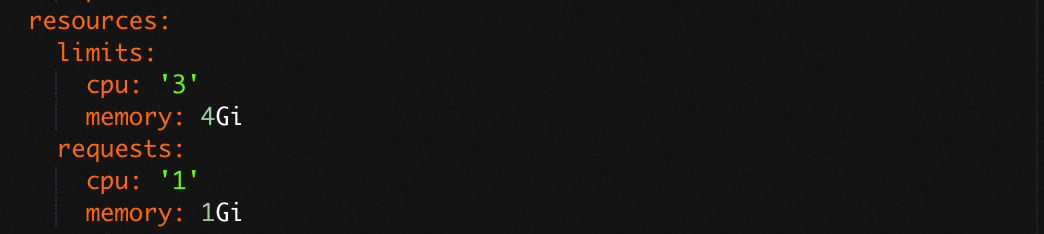
After the upgrade, use the same method to view the YAML configuration, edit the file to re-apply your custom values, and then click Update to save the changes.

Step 2: Upgrade procedure
We recommend upgrading the Helm version of the ARMS Prometheus component through the ACK console. Follow these steps:
Log on to the Container Service for Kubernetes (ACK) console.
Click the name of your target cluster. In the left-side navigation pane, choose Operations > Component Management. Click the Logs and Monitoring tab, find the ack-arms-prometheus card, and click Upgrade.
After the upgrade is complete, choose Operations > Managed Service for Prometheus in the left-side navigation pane. In the upper-right corner, click Go to ARMS Prometheus. You are redirected to the Prometheus instance list page in the Managed Service for Prometheus console, where you can view agent status and metric collection details.
To verify the upgrade, you can also click Settings in the left-side navigation pane and check the component version on the Settings tab.
Step 3: Post-upgrade checks (optional)
-
Log on to the ARMS console.
-
In the left navigation pane, choose .
Click the name of your target Prometheus instance. In the left-side navigation pane, click Service Discovery. Click the Targets tab to review the status of your collection jobs.
In the left-side navigation pane, click Settings. On the Self-Monitoring tab, click View Grafana Dashboard in the upper-right corner. After the upgrade, monitor the agent's operating status. Ensure that the number of replicas is correct and that there are no anomalies in data sending rates, resource consumption, or error counts.
On the Self-Monitoring page, click the Agent Self-monitoring tab to view the Prometheus agent self-monitoring dashboard.
After the upgrade, check the four basic metric collection jobs:
_arms/kubelet/cadvisor,_arms/kubelet/metric,_kube-state-metrics, andnode-exporter. Use the time range selector in the upper-right corner to compare data from before and after the upgrade to check for any collection issues.
Post-upgrade FAQ
Replica count mismatch after upgrade
Check if any agent replicas are in a Pending state. The ARMS Prometheus agent requires all replicas to be in a Running state to function correctly. You can view the status of all replicas on the Workload > Stateless page of your target cluster in the ACK console, under the arms-prom namespace.
High resource consumption after upgrade
Check for data transmission errors. Such errors can cause data to build up in the agent's memory, leading to increased resource consumption. You can view the memory and CPU usage of the Prometheus agent in the ACK console. Navigate to your target cluster's Operations > Managed Service for Prometheus page, click the Others tab, and find the Prometheus Agent section to view resource usage.
Missing or discontinuous basic metrics
If you notice issues with basic metrics such as node_*** (icon ①), container_*** (icon ②), kubelet_*** (icon ③), or kube_*** (icon ④), check if the corresponding collection jobs are reporting errors. You can check the status of these jobs on the Service Discovery > Targets tab in the Managed Service for Prometheus console. If you find errors, contact our technical experts on DingTalk (ID: aliprometheus) for assistance.
RemoteWrite traffic drop or data loss
If you have not configured RemoteWrite, you can ignore this issue.
If you have configured RemoteWrite, be aware that in agent v4.0.0, the
write_relabel_configssetting is now enabled by default, unlike in previous versions. If your configuration includes actions such asdroporkeep, you may observe a drop in traffic. You can adjust this setting as needed. To do so, navigate to the Settings page in the Managed Service for Prometheus console. On the Settings tab, click Edit Prometheus.yaml and modify the configuration.The following example shows the remote_write configuration in Prometheus.yaml, where
write_relabel_configsuses thedropaction to filter specific metrics:remote_write: - basic_auth: password: xxx username: xxx queue_config: max_shards: 100 max_samples_per_send: 5000 max_backoff: 500ms batch_send_deadline: 2s min_shards: 10 min_backoff: 10ms capacity: 10000 write_relabel_configs: - regex: container_.*,kube_.*,node_.* source_labels: - __name__ action: drop - regex: kube_.*,node_.* source_labels: - __name__ action: drop - regex: node_.* source_labels: - __name__ action: drop url: http://cn-hangzhou-intranet.arms.aliyuncs.co...cc3b7/cn-hangzhou/api/v3/write