After you install the Python agent for your Large Language Model (LLM) application, Application Real-Time Monitoring Service (ARMS) begins monitoring the application. On the Overview page, you can view key metrics for your LLM application, such as the number of model calls, token usage, trace count, and session count.
Prerequisites
The agent must be installed for your LLM application. For more information, see Connect an LLM application or inference service to ARMS.
LLM application overview
Log on to the ARMS console. In the left-side navigation pane, choose .
On the Application list page, select a region at the top of the page, and then click the name of your target application.
In the top navigation bar, click Overview.
Dashboard
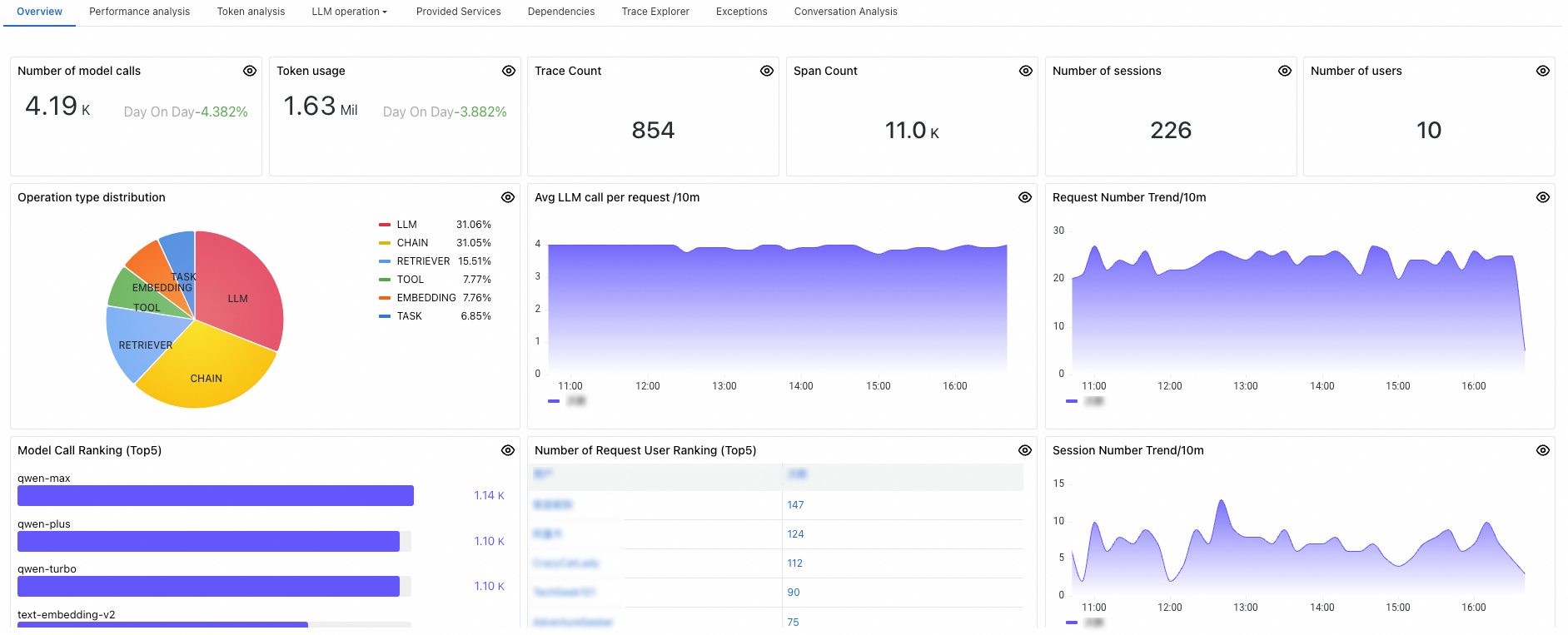
Panel | Description |
Number of model calls | The number of times the application calls the LLM in the selected time range. |
Token usage | The number of tokens the application consumes in the selected time range. |
Trace count | The number of traces generated by the application in the selected time range. |
Span count | The number of spans generated by the application in the selected time range. |
Session count | The number of sessions initiated by the application in the selected time range. |
Number of users | The total number of unique users interacting with the application in the selected time range. |
Operation type distribution |
|
Avg LLM call per request | The average number of LLM calls per request, calculated over a one-minute interval. |
Request count trend | Tracks the number of requests to the LLM application per minute. |
Model call ranking | Lists the top 5 most frequently called LLMs in the application. |
User ranking by request count | Lists the top 5 users who made the most requests in the application. |
Session count trend | Tracks the session count for the LLM application per minute. |
Supported products and sampling rate configuration
The LLM monitoring entry in the ARMS console has been renamed to AI Agent Observability. Clicking this entry redirects you to the Cloud Monitor 2.0 console. On Alibaba Cloud, LLM call trace analysis is supported by ARMS Application Monitoring and CMS AI application observability.
To configure the sampling rate, log on to the ARMS console. In the left-side navigation pane, choose System Management > Application Configuration Template, and then modify the sampler.rate parameter. The default value is 100, which indicates full sampling.
The Python agent supports automatic instrumentation for LLM frameworks such as langchain, dify, dashscope, openai, and llamaindex. For information about the resource overhead of the Python agent, see Performance test report of the ARMS agent for Python.