The JVM monitoring feature offers a detailed view of key Java Virtual Machine (JVM) metrics. You can track garbage collection (GC) activity, heap memory and non-heap memory usage, metaspace, direct buffer allocation, and JVM threads. This topic describes the feature and how to view its metrics.
Access
Log on to the ARMS console. In the left-side navigation pane, choose .
On the Application List page, select the region in the top navigation bar and then click the name of the application.
NoteIcons in the Language column have the following meanings:
 : a Java application connected to Application Monitoring.
 : a Golang application connected to Application Monitoring.
 : a Python application connected to Application Monitoring.
-: an application connected to Managed Service for OpenTelemetry.
-
In the left-side navigation pane, click Application Details.
-
On the Application Details page, select the desired instance, and then click the JVM Monitoring tab in the right-side pane.
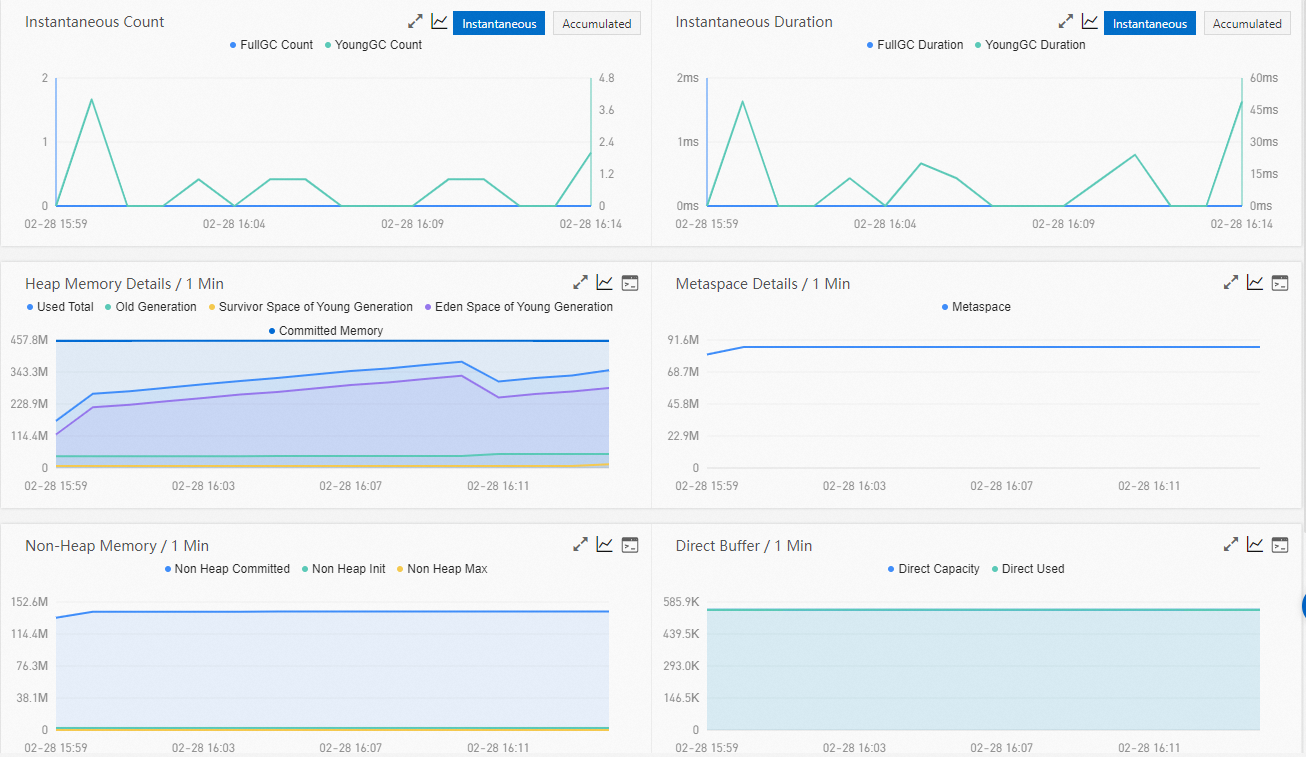
View metrics
The JVM Monitoring tab displays time-series charts for GC Instantaneous Count, GC Instantaneous Duration, Heap Memory Details, Metaspace Details, Non-Heap Memory, Direct Buffer, and JVM Threads.
For GC types other than ZGC and Shenandoah, GC duration refers to the stop-the-world (STW) duration, during which all Java application threads are paused. For ZGC and Shenandoah, Pauses corresponds to the STW duration, while Cycles represents the total duration of a GC event.
-
On the Instantaneous GC Times and Instantaneous GC Duration charts, click the Instantaneous and Accumulated buttons in the upper-right corner of each chart area.
-
Click a metric name on a chart (for example, Full GC count) to show or hide its curve.
NoteEach chart must display at least one metric.
-
Click the
 icon on a chart to view statistics for a specific time period or compare statistics for the same time period across different dates.
 -
On the Heap Memory Details / 1 Min, Metaspace Details / 1 Min, Non-Heap Memory / 1 Min, Direct Buffer / 1 Min, and JVM Threads / 1 Min charts, click the View API button in the upper-right corner to view API details for the corresponding metrics.
Metrics reference
JVM monitoring provides the following metrics:
-
GC (garbage collection)
-
Full GC count
-
Young GC count
-
Full GC duration
-
Young GC duration
-
-
Heap memory
-
Total heap memory
-
Old generation
-
Young generation (survivor space)
-
Young generation (eden space)
-
-
Metaspace
Metaspace size
-
Non-heap memory
-
Maximum non-heap memory
-
Used non-heap memory
-
-
Direct buffer
-
Total direct buffer
-
Used direct buffer
-
-
JVM threads
-
Total threads
-
Deadlocked threads
-
New threads
-
Blocked threads
-
Runnable threads
-
Terminated threads
-
Timed waiting threads
-
Waiting threads
-
References
Application Monitoring collects data by using Java Management Extensions (JMX). The non-heap memory reported by JMX is a subset of the total non-heap memory that a Java process uses. As a result, the sum of heap and non-heap memory in the monitoring data may differ from the Resident Set Size (RES) displayed by the top command. For details, see JVM memory details.