By default, the probe records conversation history during LLM and agent calls in OpenTelemetry-compliant format. You can configure how this data is collected and stored for your LLM applications.
The ARMS agent supports three modes for collecting and recording conversation history:
-
Record conversation history in span attributes (default).
-
Stop recording conversation history.
-
Record conversation history in logs.
You can configure the collection behavior to suit your requirements.
Prerequisites
-
You have installed the Python probe or the Java probe.
-
Python
Component/Framework
Supported versions
Scenarios
Probe version
OpenAI Python SDK
1.X
-
ChatCompletion
-
Completion
-
Embedding
2.0.0 or later
Java
Component/Framework
Supported versions
Scenarios
Probe version
OpenAI Java SDK
1.1.0 or later
-
ChatCompletion
-
Completion
-
Embedding
4.6.0 or later
Spring AI
1.0.0 or later
-
OpenAI ChatModel
-
ChatClient (Default)
-
ToolManager (Default)
4.6.0 or later
Spring AI Alibaba
1.0.0.3 or later
-
DashScope ChatModel
4.6.0 or later
-
Example
This example shows how a React agent performs a tool call. The LLM application sends a request with a tool definition to the large model, which responds with a tool_call request. The application executes the call, returns the tool call result, and the large model generates the final response. The following sequence diagram illustrates this process.
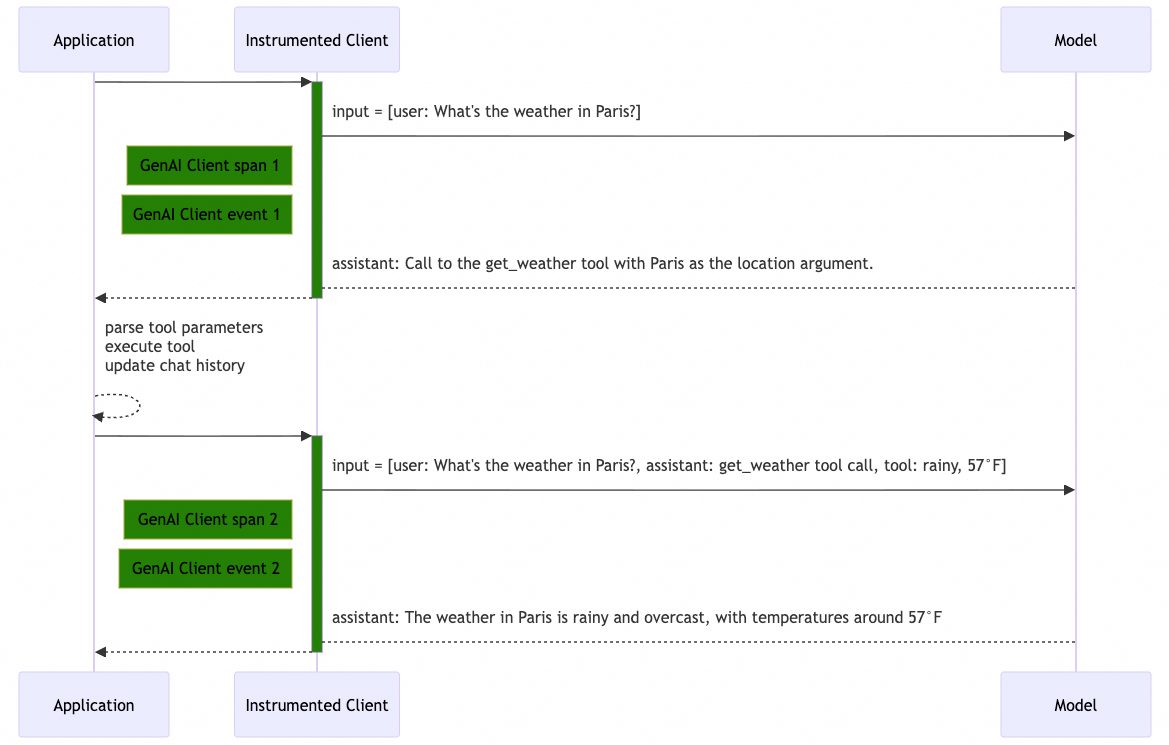
Recording dialogue history in span attributes
Collection behavior and data format
By default, the probe records input messages, output messages, system instructions, and tool definitions as JSON in the span attributes.
|
Attribute name |
Description |
Schema |
Content completeness |
|
|
input messages |
Full |
|
|
|
output messages |
Full |
|
|
|
system instructions |
Full |
|
|
|
tool definitions |
- |
|
Configuration
-
Configure using the following environment variables:
Environment variable name
Value
OTEL_INSTRUMENTATION_GENAI_CAPTURE_MESSAGE_CONTENT
TrueOTEL_INSTRUMENTATION_GENAI_MESSAGE_CONTENT_CAPTURE_STRATEGY
"span-attributes" -
For Java applications, you can also configure this with system properties in the startup command, for example:
-Dotel.instrumentation.genai.capture-message-content=true \
-Dotel.instrumentation.genai.message-content.capture-strategy=span-attributes
Example
GenAI client span 1
|
Attribute |
Value |
|
span name |
|
|
|
|
|
|
|
|
|
|
|
|
|
|
|
|
|
|
|
|
|
|
|
|
|
|
|
|
|
|
|
|
|
|
|
|
|
|
|
|
GenAI client span 2
|
Attribute |
Value |
|
span name |
|
|
|
|
|
|
|
|
|
|
|
|
|
|
|
|
|
|
|
|
|
|
|
|
|
|
|
|
|
|
|
|
|
|
Disable collection of conversation history
Collection behavior and data format
In this mode, the probe does not record input messages, output messages, or system instructions. For tool definitions, only basic information is recorded in JSON format.
|
Attribute |
Description |
Schema |
Content completeness |
|
|
input messages |
Not recorded |
|
|
|
output messages |
Not recorded |
|
|
|
system instructions |
Not recorded |
|
|
|
tool definitions |
- |
|
Configuration
-
Set this environment variable:
Environment variable name
Value
OTEL_INSTRUMENTATION_GENAI_CAPTURE_MESSAGE_CONTENT
False -
For Java applications, you can also add the following system property to the startup command:
-Dotel.instrumentation.genai.capture-message-content=false
Example
GenAI Client Span 1
|
Attribute |
Value |
|
span name |
|
|
|
|
|
|
|
|
|
|
|
|
|
|
|
|
|
|
|
|
|
|
|
|
|
|
|
|
|
|
|
|
|
|
GenAI Client Span 2
|
Attribute |
Value |
|
span name |
|
|
|
|
|
|
|
|
|
|
|
|
|
|
|
|
|
|
|
|
|
|
|
|
|
|
|
|
Record conversation history to logs
Collection behavior and data format
In this mode, span attributes store only basic information. The agent writes detailed conversation data — input messages, output messages, system instructions, and tool definitions — to a local log file as single-line JSON entries.
|
Attribute |
Description |
Schema |
Content completeness |
|
|
input messages |
Complete |
|
|
|
output messages |
Complete |
|
|
|
system instructions |
Complete |
|
|
|
tool definitions |
- |
|
By default, when the agent starts, it searches for an available log directory by checking the following locations in order:
-
If a directory is specified using the APSARA_APM_AGENT_WORKSPACE_DIR environment variable, the agent writes logs to the
.apsara-apm/{language}/logssubdirectory within that directory. -
Agent log directory:
/home/admin/.opt/.apsara-apm/{language}/logs -
Home directory:
~/.apsara-apm/{language}/{agent_version}_{agent_commit_id}/logs
At startup, the agent prints the log storage directory to stdout. To simplify directory management, specify a directory using the APSARA_APM_AGENT_WORKSPACE_DIR environment variable.
Picked up [/Uxxxs/tools/log/.apsara-apm/python] as Agent Workspace.The conversation history log file is named genai_messages_{ip}_{pid}.log. The maximum file size is 256 MB. When this limit is reached, file rotation is triggered. Only the two most recent log files are retained.
Configuration
-
Set the following environment variables:
Environment variable
Value
OTEL_INSTRUMENTATION_GENAI_CAPTURE_MESSAGE_CONTENT
TrueOTEL_INSTRUMENTATION_GENAI_MESSAGE_CONTENT_CAPTURE_STRATEGY
event -
For Java applications, you can also add system properties to the startup command, for example:
-Dotel.instrumentation.genai.capture-message-content=true \
-Dotel.instrumentation.genai.message-content.capture-strategy=event
Example
GenAI Client Span 1
|
Attribute |
Value |
|
span name |
|
|
|
|
|
|
|
|
|
|
|
|
|
|
|
|
|
|
|
|
|
|
|
|
|
|
|
|
|
|
|
GenAI Client Event 1
The spanId corresponds to GenAI Client Span 1.
{
  "scope": {
    "name": "aliyun.instrumentation.openai",
    "version": "1.0.1"
  },
  "timeUnixNano": 1760080084146812928,
  "severity": "UNSPECIFIED",
  "attributes": {
    "event.name": "gen_ai.client.inference.operation.details",
    "gen_ai.provider.name": "openai",
    "gen_ai.operation.name": "chat",
    "gen_ai.request.model": "gpt-4",
    "gen_ai.request.max_tokens": 200,
    "gen_ai.request.top_p": 1.0,
    "gen_ai.response.id": "chatcmpl-9J3uIL87gldCFtiIbyaOvTeYBRA3l",
    "gen_ai.response.model": "gpt-4-0613",
    "gen_ai.usage.output_tokens": 17,
    "gen_ai.usage.input_tokens": 47,
    "gen_ai.response.finish_reasons": ["tool_calls"],
    "gen_ai.input.messages": "[{\"role\":\"user\",\"parts\":[{\"type\":\"text\",\"content\":\"Weather in Paris?\"}]}]",
    "gen_ai.output.messages": "[{\"role\":\"assistant\",\"parts\":[{\"type\":\"tool_call\",\"id\":\"call_VSPygqKTWdrhaFErNvMV18Yl\",\"name\":\"get_weather\",\"arguments\":{\"location\":\"Paris\"}}],\"finish_reason\":\"tool_call\"}]",
    "gen_ai.tool.definitions": "[{\"type\":\"function\",\"name\":\"get_weather\",\"description\":\"Get the current temperature for a specific location.\"}]"
  },
  "traceId": "0b46a347592ac487ed092ebe802c6818",
  "spanId": "b3c40af8cd1a522c"
}
GenAI Client Span 2
|
Attribute |
Value |
|
span name |
|
|
|
|
|
|
|
|
|
|
|
|
|
|
|
|
|
|
|
|
|
|
|
|
|
|
|
|
GenAI Client Event 2
The spanId corresponds to GenAI Client Span 2.
{
  "scope": {
    "name": "aliyun.instrumentation.openai",
    "version": "1.0.1"
  },
  "timeUnixNano": 1760080084176812928,
  "severity": "UNSPECIFIED",
  "attributes": {
    "event.name": "gen_ai.client.inference.operation.details",
    "gen_ai.provider.name": "openai",
    "gen_ai.operation.name": "chat",
    "gen_ai.request.model": "gpt-4",
    "gen_ai.request.max_tokens": 200,
    "gen_ai.request.top_p": 1.0,
    "gen_ai.response.id": "chatcmpl-VSPygqKTWdrhaFErNvMV18Yl",
    "gen_ai.response.model": "gpt-4-0613",
    "gen_ai.usage.output_tokens": 52,
    "gen_ai.usage.input_tokens": 97,
    "gen_ai.response.finish_reasons": ["stop"],
    "gen_ai.input.messages": "[{\"role\":\"user\",\"parts\":[{\"type\":\"text\",\"content\":\"Weather in Paris?\"}]},{\"role\":\"assistant\",\"parts\":[{\"type\":\"tool_call\",\"id\":\"call_VSPygqKTWdrhaFErNvMV18Yl\",\"name\":\"get_weather\",\"arguments\":{\"location\": \"Paris\"}}]},{\"role\":\"tool\",\"parts\":[{\"type\":\"tool_call_response\",\"id\":\"call_VSPygqKTWdrhaFErNvMV18Yl\",\"response\":\"rainy, 57°F\"}]}]",
    "gen_ai.output.messages": "[{\"role\":\"assistant\",\"parts\":[{\"type\":\"text\",\"content\":\"The weather in Paris is currently rainy with a temperature of 57°F.\"}],\"finish_reason\":\"stop\"}]"
  },
  "traceId": "0b46a347592ac487ed092ebe802c6818",
  "spanId": "0a706a178bd746c5"
}
Send conversation history to SLS
When conversation history is recorded to local logs, you can use LoongCollector to collect and send the logs to Log Service (SLS) for processing.
Step 1: Install LoongCollector
If LoongCollector is already installed in your environment, you can skip this step.
|
Environment type |
Reference |
|
Linux |
|
|
Windows |
|
|
Kubernetes |
Step 2: Create collection configuration
-
Log in to the Log Service console. Click the target Project, expand the Logstore where you want to store the logs, and then click the
 icon next to Data Import. In the JSON - Text Log section, click Connect Now.
 -
Select an existing machine group or create one for the host where the logs are stored.
For Scenario, select Host Scenario. For Installation Environment, select ECS. In the Applied Machine Group list, confirm that the target machine group (for example,
genai) has been added. -
Create a collection configuration. Under Input Configuration, replace the File Path with your actual log directory. To find the directory path, check the standard output from your application at startup. For Processing Configuration, select standard JSON parsing.
For example, set Configuration Name to
playground-test-config, select Text Log Collection for Input Type, use a file path format such as/home/admin/logs/.apsara-apm/java/**/logs/genai_messages_*.log, and set Maximum Directory Monitoring Depth to1.xxx Picked up /home/admin/logs/.apsara-apm/java/4.6.0_4e280e61/ as Agent Workspace. Unable to locate the -XX:ErrorFile parameter in the JVM options. If you are using Kubernetes, we recommend updating ack-onepilot to version 3.2.3 or later. For other environments, please consider adding the following parameters manually: -XX:ErrorFile=/{JavaAgentDirectory}/hs_err_pid%p.log -XX:OnError=/{JavaAgentDirectory}/crash_log_collector.sh These settings will enable automatic crash log collection to ARMS, helping us monitor incidents and provide timely feedback. Please note that this reminder does not affect the functionality of ARMS. If you prefer not to make these changes, feel free to disregard this message. Apsara Java Agent start cost: 5071 ms -
To enable data retrieval and analysis, configure the indexes as follows:
Enable Full-Text Index, but disable Case Sensitive and Include Chinese Characters. Under Query on Specified Fields, add indexes for the following fields: attributes (type: json; enable Case Sensitive and Include Chinese Characters), resource (type: json; enable Case Sensitive and Include Chinese Characters), spanId (type: text; disable Case Sensitive and Include Chinese Characters), and traceId (type: text; disable Case Sensitive and Include Chinese Characters).
For details on log collection, see Continuously collect text logs from hosts.
Step 3: View collected logs in SLS
After completing the initial configuration, logs appear in Log Service (SLS) within a few minutes:
▼ attributes: {}
    event.name: "gen_ai.client.inference.operation.details"
    gen_ai.input.messages: "[{"role":"system","parts":[{"type":"text","content":"
xxx
xxx
xxx
:
xxx
                              xxx"}]},{"role":"user","parts":[{"type":"text","content":"xxx"}]}]"
    gen_ai.operation.name: "invoke_agent"
    gen_ai.output.messages: "[{"role":"assistant","parts":[{"type":"text","content":"
xxx
                                    "}],"finishReason":"stop"}]"
    gen_ai.provider.name: "spring-ai"
    gen_ai.request.model: "qwen-max"
    gen_ai.request.temperature: 0.8
  ► gen_ai.response.finish_reasons: []
    gen_ai.response.id: "0d98f.xxx"
    gen_ai.tool.definitions: "[{"type":"function","name":"getBookingDetails"},{"type":"function","name":"cancelBooking"},{"type":"function","name":"changeBooking"}]"
    gen_ai.usage.input_tokens: 1300
    gen_ai.usage.output_tokens: 59
body:
▼ resource: {}
  ► attributes: {}
Adjust the message length limit
The probe truncates message content that exceeds the default limit of 8192 characters per message. Truncated messages are marked with a ...[truncated] identifier, as shown below:
[
  {
    "role": "assistant",
    "parts": [
      {
        "type": "text",
        "content": "The weather in Paris...[truncated]"
      }
    ],
    "finish_reason": "stop"
  }
]
Configuration
-
Configure the limit using the following environment variable:
Environment variable
Value
OTEL_INSTRUMENTATION_GENAI_MESSAGE_CONTENT_MAX_LENGTH
8192
-
For Java applications, you can also add a system property to the startup command, for example:
-Dotel.instrumentation.genai.message-content.max-length=8192
Message bodies subject to truncation
|
Conversation history type |
Message |
|
|
TextPart.content |
|
|
TextPart.content |
|
|
TextPart.content |