URL-based hotlink protection only controls access to streaming URLs -- it does not protect the video data itself. Alibaba Cloud proprietary cryptography encrypts video files during transcoding. Encrypted files cannot play without authorization through ApsaraVideo Player SDK, which prevents unauthorized redistribution even after download.
Alibaba Cloud proprietary cryptography supports only the HLS container format. Encrypted content can be decrypted and played only by using the ApsaraVideo Player SDK that is provided by ApsaraVideo VOD.
Common use cases include copyrighted content in online education, finance, industry training, and premium TV shows.
How encryption and playback work
Alibaba Cloud proprietary cryptography uses a cloud-device integrated encryption model. Videos are encrypted during transcoding in the cloud and decrypted through authorized playback on the client side.
Security architecture
Per-file encryption keys: Each media file gets its own encryption key. A single leaked key does not expose other files.
Envelope encryption: ApsaraVideo VOD uses ciphertext and plaintext keys. Plaintext keys are never stored and are used only to process data in memory.
Permission management: Control access through RAM users and playback credentials.
ApsaraVideo Player SDK: Provides secure decryption and playback on the client side.
Encryption and transcoding
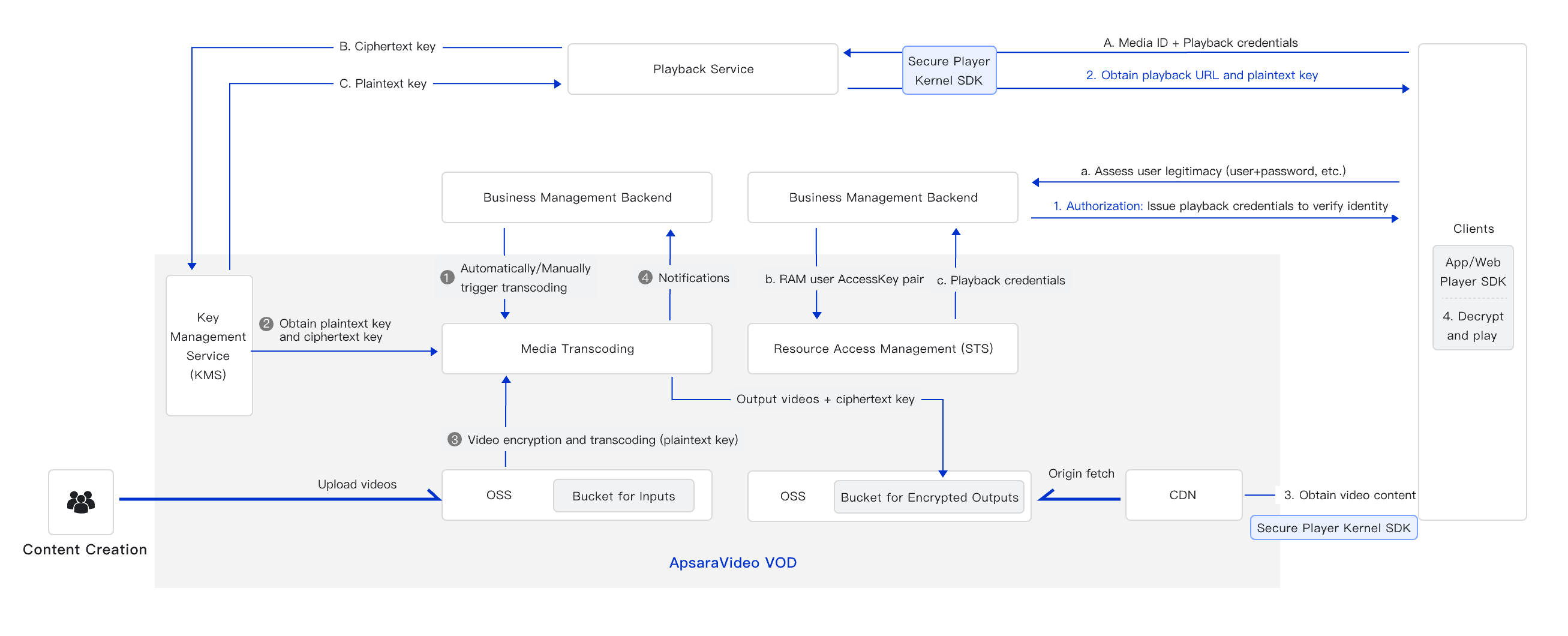
Your application sends a transcoding request with encryption enabled (Step 1).
ApsaraVideo VOD uses Key Management Service (KMS) to generate a plaintext key and a ciphertext key (Step 2).
ApsaraVideo VOD encrypts the video with the plaintext key, then discards the plaintext key after transcoding completes (Step 3).
ApsaraVideo VOD saves the encrypted video and sends a completion notification (Step 4).
Decryption and playback
When a user requests playback, the request goes to your backend first. Apply your own access control (for example, require login). If authorized, use the AccessKey pair of a RAM user to get a playback credential from ApsaraVideo VOD, then pass this credential to the client. Use HTTPS for your domain name to protect this exchange.
The client sends the playback credential and media ID to ApsaraVideo Player SDK. Player SDK retrieves the playback URL (with the video format and definition) and the encryption key from ApsaraVideo VOD.
ApsaraVideo Player SDK uses the encryption key to decrypt and play the video.
Standard vs. license-based encryption
ApsaraVideo VOD offers two proprietary encryption types. Choose the one that matches your playback requirements.
| Feature | Standard proprietary cryptography | License-based proprietary cryptography |
|---|---|---|
| HLS support | Supported | Supported |
| MP4 support | Not supported | Supported |
| Playback method | VidAuth (video playback credential) or Security Token Service (STS) token | URL-based playback |
| Player requirement | ApsaraVideo Player SDK (Configure License) | ApsaraVideo Player SDK (Configure License) |
| License constraint | -- | Player SDK license must be in the same account as the encrypted video |
| Startup performance | Standard | Faster -- reduces one HTTP request for obtaining the key |
| Best for | VidAuth or STS-based playback workflows | URL-based playback or faster startup |
Prerequisites
Before you begin, make sure that you have:
An activated ApsaraVideo VOD service. For details, see Activate ApsaraVideo VOD
An accelerated domain name added to ApsaraVideo VOD. For details, see Add a domain name for CDN
Proprietary cryptography itself is free. However, transcoding is required for encryption, and transcoding fees apply. For pricing details, see Media transcoding.
Different playback platforms support different encryption types. Check platform compatibility before you choose your encryption type. For details, see Compatibility of Player SDK.
Encrypt videos
Step 1: Create a transcoding template with encryption
Create a transcoding template group that has Alibaba Cloud proprietary cryptography enabled.
Console
Log on to the ApsaraVideo VOD console. In the left-side navigation pane, choose Configuration Management > Media Processing > Transcoding Template Groups.
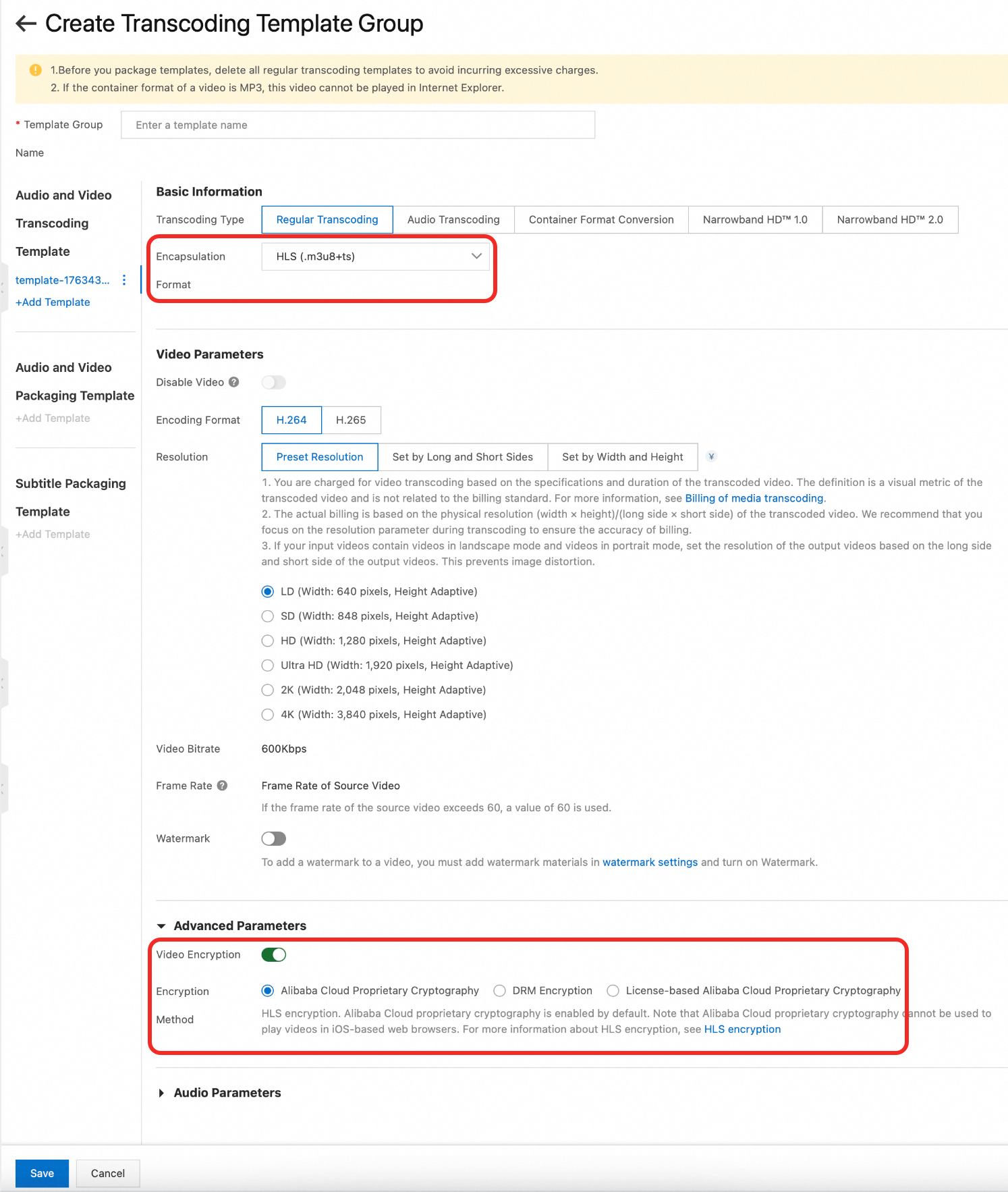
On the Transcoding Template Groups page, click Create Transcoding Template Group and create an Audio and Video Transcoding Template. The following example uses a Regular Transcoding template:
In the Basic Information section, set Encapsulation Format to HLS (.m3u8+ts).
In the Advanced Parameters section, turn on Video Encryption. Under Encryption Method, select Alibaba Cloud Proprietary Cryptography.
Configure other parameters as needed. For details, see Transcoding templates.
Click Save.
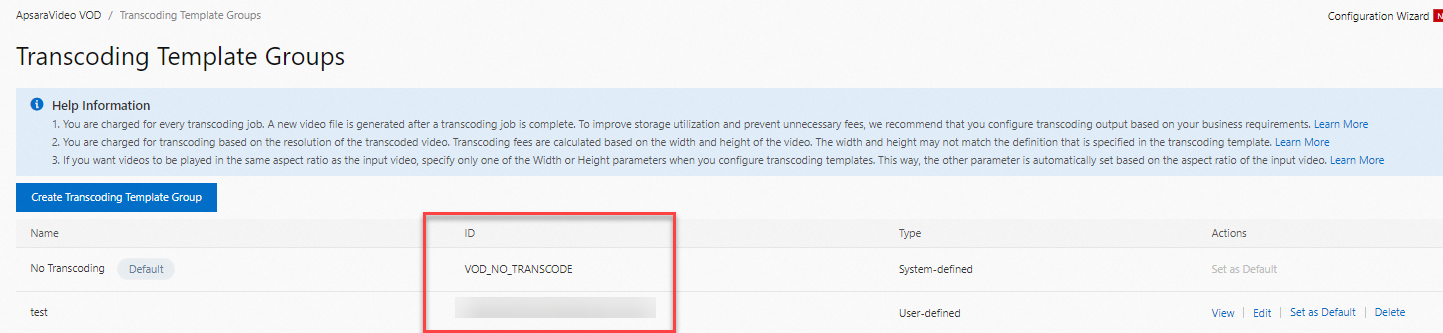
After the template is created, the transcoding template group ID appears on the Transcoding Template Groups page. Save this ID for later use.
OpenAPI
Call the AddTranscodeTemplateGroup operation. Set the EncryptType field in EncryptSetting within TranscodeTemplate.
Step 2: (Optional) Create a workflow
Add the transcoding template group to a workflow to combine encryption with other media processing tasks such as review and snapshot capture.
Add a Transcode node to your workflow and select the transcoding template group with proprietary cryptography. Create workflows in the ApsaraVideo VOD console. For details, see Workflows.
Step 3: Start transcoding
Submit a transcoding task after you upload media files. Use either a transcoding template group or a workflow that contains a transcoding node.
Console: See Step 2: Start transcoding.
API: See Step 2: Start transcoding.
Step 4: Verify encryption results
Use either asynchronous notifications or synchronous queries to confirm encryption.
Asynchronous notifications
If you configured event notifications, receive the transcoding results from the StreamTranscodeComplete or TranscodeComplete callback.
Console
Log on to the ApsaraVideo VOD console. In the left-side navigation pane, go to Media Files > Audio/Video.
On the Audio/Video page, check the Status of the video. A Status of Normal indicates that transcoding and encryption are complete.
Click Manage in the Actions column.
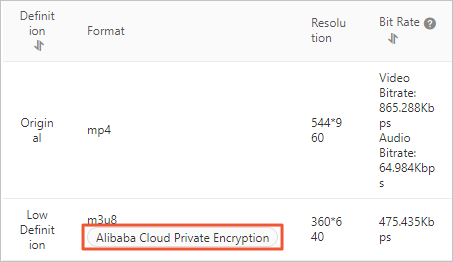
On the Video URL tab, the Format column displays Alibaba Cloud Private Encryption for streams encrypted with proprietary cryptography.
The console UI displays this feature as "Alibaba Cloud Private Encryption" in the Format column, which refers to the same feature described in this document as "Alibaba Cloud proprietary cryptography."
OpenAPI
Call the GetPlayInfo operation. The EncryptType parameter in the response indicates the encryption type of the stream.
Play encrypted videos
Videos encrypted with Alibaba Cloud proprietary cryptography can only play through ApsaraVideo Player SDK. Player SDK supports iOS, Android, and Web (HTML and Flash players).
Alibaba Cloud proprietary cryptography cannot be used to play videos in iOS-based web browsers.
Before you integrate Player SDK:
Get a license. Obtain a Player SDK license. For details, see Manage licenses.
Check platform compatibility. Verify that your target platform supports proprietary cryptography. For details, see Compatibility of Player SDK.
Integrate playback. Follow the integration guide for your platform. For details, see Play an encrypted video.
Protect offline downloads
For users who download videos for offline playback, set the Download Mode parameter to Secure Download to apply secondary encryption. This secondary encryption uses a separate key file to re-encrypt the downloaded video. After download, Player SDK decrypts the video and allows playback only in the authorized application.
For configuration steps, see Configure download settings.