ApsaraMQ for RocketMQ 5.x introduces a storage-compute separation architecture, elastic scaling, and a flexible cost model. The following sections cover the differences between server versions 5.x and 4.x, help you choose the right SDK, and provide a migration path from 4.x to 5.x.
In-place upgrades from 4.x to 5.x using an upgrade tool are not supported. To upgrade, purchase a new 5.x instance and migrate your traffic. See Upgrade from 4.x to 5.x for the procedure.
What 5.x improves
Storage-compute separation
Version 5.x decouples storage from computing. Each layer scales horizontally and independently, which supports elastic O&M and large-scale capacity without over-provisioning.
Simplified development
Client SDKs are fully compatible with Apache RocketMQ. All previous SDK versions and API operations continue to work. Version 5.x also supports security authentication within a VPC, so migrating to the cloud requires only an endpoint change -- no code modifications.
Simplified O&M
Automatic elasticity and lightweight test environments are built in, addressing common challenges such as online capacity assessment, service traffic fluctuations, and daily grayscale environment management. This reduces overall O&M effort and operational risk.
Flexible cost model
Version 5.x combines reserved and burst traffic elasticity for message processing, eliminating the need to reserve a large buffer for traffic spikes. Message storage is pay-as-you-go and scales elastically, unlike fixed attached disks that cannot be scaled down.
Broader instance types
Version 5.x offers a wider range of instance types with both subscription and pay-as-you-go billing models.
LiteTopic for AI workloads
The LiteTopic model provides lightweight topics designed for asynchronous communication in AI applications. It addresses common pain points in AI services -- long task processing times, scarce and expensive computing power, and fluctuating traffic loads -- enabling developers to build scalable systems that manage request peaks, relieve backend pressure, and improve resource utilization and reduce costs.
Choose an SDK
Six SDK types are available, each with different protocol support and instance compatibility.
Item | ||||||
Protocol | gRPC v2 | Remoting | Remoting | Remoting | gRPC v1 | HTTP |
Compatible instances | 5.x only | 5.x and 4.x | 5.x and 4.x | 5.x and 4.x | 4.x only | 4.x only |
Recommendation:
5.x gRPC SDK (recommended) -- Provides the broadest language support. All new features and optimizations target this SDK first. If a specific feature is not yet available, use the 5.x Remoting SDK as a fallback.
5.x Remoting SDK, 4.x/3.x SDK, ONS TCP 1.x SDK -- If your service already uses one of these, you can continue using it. 5.x instances remain compatible.
ONS TCP 2.x SDK, ONS HTTP SDK -- Do not use for new projects. These SDKs only access 4.x instances and will not receive new features.
Feature support by SDK
Feature | 5.x gRPC | 5.x Remoting | 4.x/3.x | ONS TCP 1.x | ONS TCP 2.x | ONS HTTP |
Send normal, ordered, transactional, and scheduled messages | Yes | Yes | Yes | Yes | Yes | Yes |
Concurrent consumption | Yes | Yes | Yes | Yes | Yes | Yes |
Ordered consumption | Yes | Yes | Yes | Yes | Yes | Yes |
Ordered consumption with optimized concurrency | Yes | No | No | No | No | No |
Broadcasting consumption | No | Yes | Yes | Yes | No | No |
Stream consumption (Flink integration) | No | Yes | Yes | No | No | No |
Message trace | Yes | Yes | Supported in 4.5.2 and later | Yes | Yes | No |
Yes | No | No | No | No | No | |
Yes | 5.x instances only | No | No | No | No |
Pre-migration checklist
Version 5.x is optimized based on large-scale enterprise production practices. Some feature behaviors and parameter configurations differ from 4.x. These differences generally do not affect the primary message processing flow, but review each item below before migrating an existing 4.x instance to 5.x.
What changed | Version 4.x | Version 5.x | Action required |
Maximum scheduled message delay | 40 days | Shared architecture instances: up to 7 days. Dedicated architecture instances: Platinum Edition supports up to 40 days, and Serverless Dedicated Edition supports custom configurations. For details, see Limits. | If your workload requires delays longer than 7 days, choose Professional Edition or Enterprise Platinum Edition. Avoid excessively long delays, as they pose stability risks. For details, see Scheduled and delayed messages. If the limit does not meet your requirements, submit a ticket. |
HTTP protocol | Supported | Not supported | If your 4.x instance uses the HTTP protocol, postpone the upgrade until you migrate to a supported SDK. |
RAM authorization | Data link + control link | Control link only (with different policy format). Data link uses RocketMQ open source ACL 2.0. | Re-grant permissions using the version 5.x access policy. Version 5.x uses more standard ARN and policy definitions. For data-link authentication, see User identification. |
Global message routing | Supported | Use the Global Replicator feature. | Global Replicator supports open source, Alibaba Cloud 4.x, and Alibaba Cloud 5.x instance types, and provides cross-region and cross-instance message and consumption progress synchronization. |
Message type enforcement | No restrictions | Strict type verification per topic | Version 5.x separates message types into topics for independent processing. The system rejects messages whose type does not match the topic definition and returns a type mismatch exception. See Topic behavior constraints. |
Purchase availability
Version | Availability |
5.x | Available to all users |
4.x | Available only to existing users. Upgrade to 5.x is recommended. To upgrade, submit a ticket. |
Upgrade from 4.x to 5.x
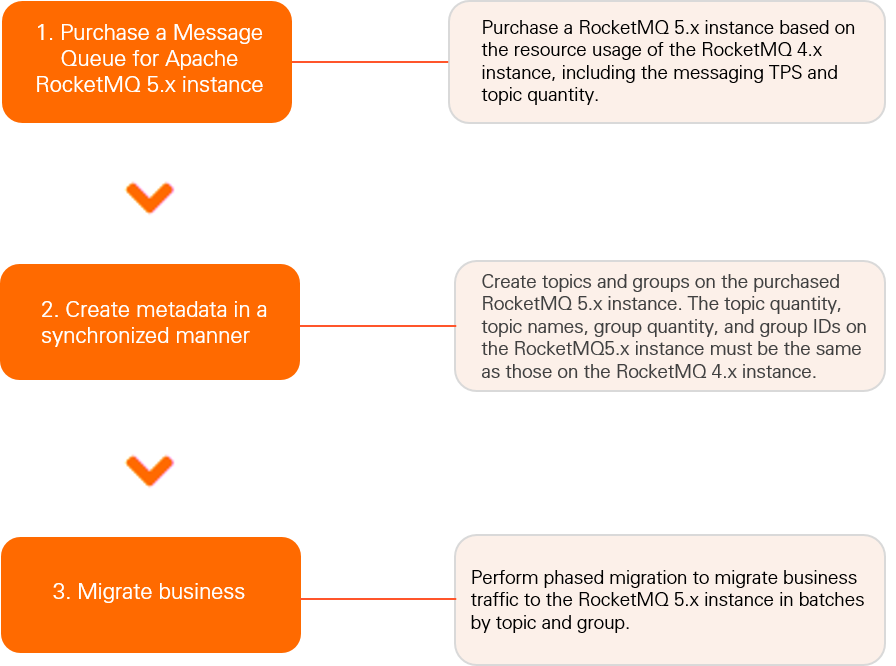
In-place upgrades using an upgrade tool are not currently supported. Instead, purchase a 5.x instance and gradually migrate your service traffic using the following approach:
Purchase a 5.x instance.
Migrate metadata. Use the topic and group import and export features to quickly recreate your metadata on the new instance. See Import and export topics and Import and export groups.
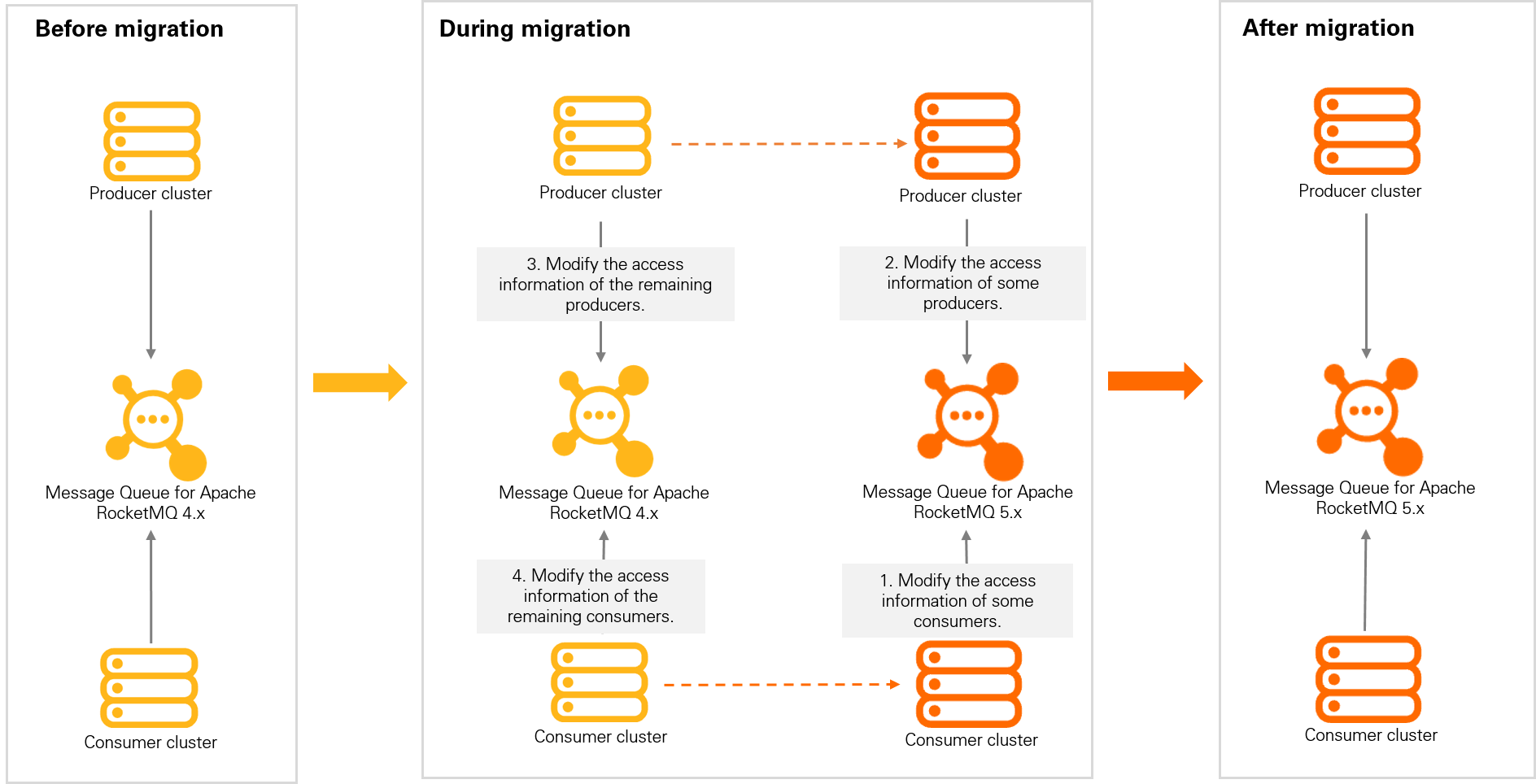
Migrate service traffic using a dual-read, dual-write, and phased release strategy to minimize risk.
The following diagram shows the overall migration flow:
During service migration, use the dual-read, dual-write, and phased release approach shown in the following diagram: