This topic explains the billing differences between the RocketMQ Serverless legacy Standard/Professional mode and the shared pay-as-you-go mode. It also describes how to identify your instance type, view billing rules, and smoothly upgrade to the shared edition.
Legacy Standard and Professional Editions
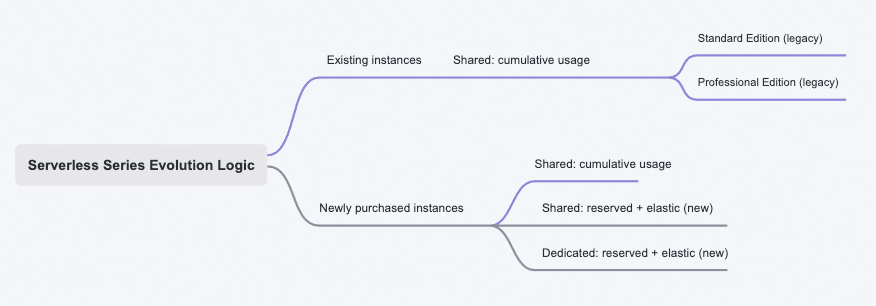
The Serverless edition has evolved as follows:
Legacy instances: The shared pay-as-you-go billing mode no longer distinguishes between Standard and Professional editions. Both are consolidated into a single shared pay-as-you-go billing model.
New instances: Three billing modes are available: shared pay-as-you-go, shared reserved + elastic, and dedicated reserved + elastic.
How to Identify Whether Your Instance Is a Legacy Standard/Professional Edition
On the RocketMQ console, go to Instances > Instance Details > Basic Information and check the following fields:
If Primary Edition displays Standard or Professional, the instance is a legacy Standard/Professional instance.
If Primary Edition displays Shared, the instance is a new shared instance. In this case, check the Capacity Type field to determine whether the billing mode is pay-as-you-go or reserved + elastic.
Billing for Legacy Standard/Professional Editions
For billing details of legacy Standard/Professional editions, see Billing for legacy Serverless Standard and Professional Edition instances.
Billing mode selection
When you purchase an instance, you first select a capacity mode and then decide whether to reserve TPS capacity. Cumulative pay-as-you-go reserves no capacity and charges you for the cumulative number of messages that are sent and received. Reserved + elastic requires you to purchase a reserved TPS capacity tier first, and traffic that exceeds the reserved capacity is charged as elastic TPS. The two modes have different cost structures and directly affect your monthly cost, so compare them against the traffic pattern of your workload before you buy:
Comparison Item | Cumulative pay-as-you-go | Reserved + elastic |
Reserved capacity | No reserved capacity is required. | Capacity must be reserved by TPS tier. |
Cost structure | Fee for the number of messages sent and received, plus the instance fee. | Reserved capacity fee (reserved capacity × unit price of reserved capacity × duration), plus the elastic TPS fee for traffic that exceeds the reserved capacity. |
Supported deployment architectures | Shared. | Shared and dedicated. |
Scenarios | Workloads with fluctuating traffic and large peak-to-valley differences, or workloads that are still in the validation phase and have a low total message volume. You do not need to reserve capacity for traffic that you cannot predict, and the cost changes with the actual volume of messages sent and received. | Online workloads with a stable baseline and predictable daily traffic. The unit cost of reserved capacity is lower than that of cumulative pay-as-you-go alone, and elastic TPS still covers traffic bursts. |
For an instance that you have already purchased, check the Primary Edition and Capacity Type fields in the Basic Information section of the Instance Details page to confirm which billing mode is in use. For details about how to identify the mode, see the "How to Identify Whether Your Instance Is a Legacy Standard/Professional Edition" section in this topic.
Recommendations for sizing reserved TPS capacity
If you select the Reserved + elastic mode, size the reserved capacity tier against the concurrent traffic that your workload actually produces rather than against its theoretical peak:
A reserved capacity of 500 to 2,000 TPS is typically sufficient for the daily traffic of a small e-commerce system. Validate the exact value against the measured peak of your own workload.
Traffic that exceeds the reserved capacity is automatically charged as elastic TPS. You do not need to reserve extra capacity for infrequent extreme peaks and pay an excessive reserved capacity fee for occasional bursts.
For the unit price and billing formula of each billing item, and for more capacity selection references, see Billing of Serverless instances.
Feature comparison
Comparison Item | Standard/Professional Edition | Shared/Pay-as-you-go |
PrivateLink fees | Additional fees apply. Billing is handled by the PrivateLink service. | No additional fees. This significantly reduces costs for PrivateLink traffic processing. |
Billing method | Cumulative Amount |
|
Instance fee | None | Instance fees apply only to Shared instances that use the pay-as-you-go billing method. |
Resource fees |
|
|
Number of concurrent online clients | None |
Note Avoid abnormal usage patterns, such as creating a new producer instance for each message sent. This can lead to an excessive number of online clients. |
How to upgrade from a Standard/Professional Edition to the Shared Edition
Upgrade the instance to the Shared Edition: On the Instance Details page, click the Upgrade button. Set Primary Edition to Shared, and then confirm the upgrade.
Switching endpoints after upgrading to the Shared type:
When you upgrade an instance to the Shared type, the payer for PrivateLink changes from the service consumer to the service provider. This change causes the endpoint address to change. To ensure a smooth transition for sending and receiving messages and to avoid unnecessary PrivateLink fees, follow these steps:
After the upgrade, identify the endpoints:
After the upgrade is successful, you will see two endpoints for the VPC in the Endpoint and Network Information section on the Instance Details page.
The endpoint marked (Deprecated): This is the old endpoint from the service consumer billing model. This endpoint will be deprecated.
The unmarked endpoint: This is the new endpoint for the service provider billing model. Switch to this endpoint.
Switch the client configuration and restart:
Modify the configuration for all your producer and consumer applications.
Replace the old endpoint address (the one marked (Deprecated)) with the new service provider endpoint address.
Restart these applications one by one to apply the new configuration.
Note: Both endpoints point to the same RocketMQ instance during the switch. The process is seamless and does not interrupt the service.
Delete the old endpoint (critical step):
After you confirm that all producer and consumer applications have successfully switched to the new endpoint and are running stably, return to the Instance Details page.
Find and delete the old endpoint marked (Deprecated).
ImportantIf any client continues to use the old endpoint, fees for PrivateLink traffic will continue to be generated.
Even after all clients have switched, PrivateLink instance fees will continue to be generated until the old endpoint is deleted.