A queue in ApsaraMQ for RocketMQ is an append-only, ordered log that stores and delivers messages. It is the smallest unit of message storage. Producers append new messages at the tail. Consumers read from any position by referencing an offset -- a sequential integer that indexes each message's position in the log. The consumer controls this offset and can read forward, skip ahead to the latest position, or reset to an earlier offset to replay history.
Every topic (and lightweight topic) consists of one or more queues. Queues provide two core capabilities:
Ordered storage -- Messages within a queue preserve their write order. The earliest message sits at the head, and the latest at the tail. Consumers use the offset to track their read position.
Streaming semantics -- Because the storage model is queue-based, consumers can read any range of messages starting from any offset. This enables aggregate reads (batch consumption across a range) and backtrack reads (replaying earlier messages). Traditional brokers such as RabbitMQ and ActiveMQ do not support these operations because they lack a queue-based storage model.
How queues relate to topics
The following diagram shows how queues fit into the ApsaraMQ for RocketMQ domain model:
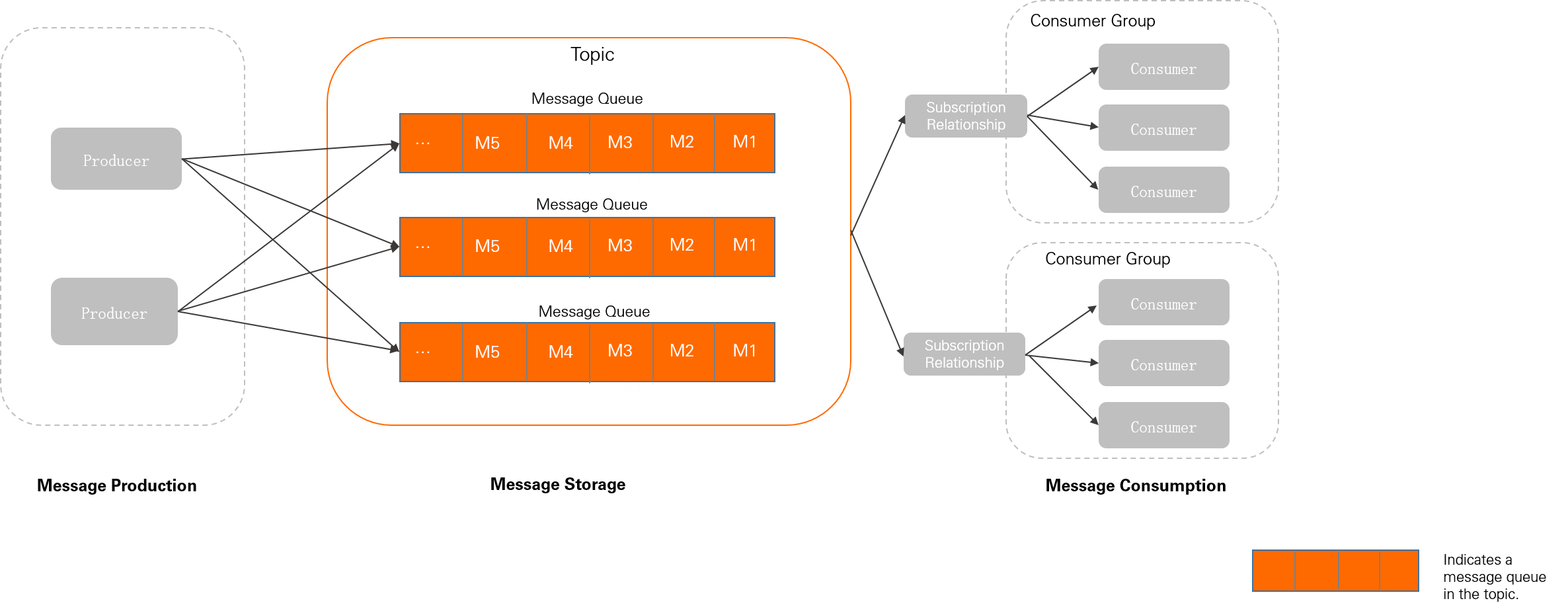
A topic is a logical grouping of messages. Queues are the physical storage components within a topic where messages are persisted and read. Although all message resources are managed at the topic and lightweight topic level, actual operations are performed on queues. For example, when a producer sends a message to a topic, the broker delivers it to one of the topic's queues.
All successfully sent messages are durably stored. Combined with producer and consumer client acknowledgments, this provides at-least-once delivery semantics.
Queues in ApsaraMQ for RocketMQ serve the same role as partitions in Apache Kafka. If you are familiar with Kafka partitions, the queue model works the same way.
Horizontal scaling
ApsaraMQ for RocketMQ scales horizontally by adjusting the number of queues in a topic:
Scaling out -- Add queues to distribute load across more service nodes.
Scaling in -- Remove queues to consolidate resources.
Queue count constraints
The queue count for each topic or lightweight topic depends on:
The message type
The region where the instance resides
Queue counts are system-managed and cannot be modified.
Version compatibility
Queue naming differs between service versions:
| Version | Queue name format | Relationship to nodes |
|---|---|---|
| 3.x and 4.x | Trituple: {Topic Name}+{Broker ID}+{Queue ID} | Bound to a physical node |
| 5.x | Globally unique string assigned by the cluster | Decoupled from physical nodes |
Never hardcode or assume a specific queue name format in your application. Manually constructed queue names break after a version upgrade because the naming scheme changes.
Best practices for queue sizing
Keep queue counts low
Use only as many queues as your workload requires. Excess queues cause two problems:
Metadata bloat -- Metrics are collected at the queue level. More queues means more control-plane metadata to manage.
Wasted client resources -- Reads and writes are performed per queue. Idle queues generate empty polling requests that consume client and server resources.
When to add queues
Physical node load balancing: After you add nodes to a cluster, create queues on the new nodes or migrate existing queues to distribute traffic evenly.
Ordered message throughput (v4.x): In service version 4.x, message ordering is guaranteed only within a single queue, so the queue count directly limits ordered-message concurrency. Add queues only when you hit a performance bottleneck.
Unordered messages on v5.x -- no action needed: Service version 5.x supports message-level consumer load balancing. Messages within the same queue are distributed evenly across all consumers, so the queue count does not affect consumption concurrency. For details, see Consumer load balancing.