This topic describes the definition, model relationships, internal attributes, behavioral constraints, version compatibility, and usage recommendations for LiteTopic in ApsaraMQ for RocketMQ.
Prerequisites
-
Lite topics are currently supported only by non-Serverless instances (subscription and pay-as-you-go) and dedicated Serverless instances.
-
To purchase an instance that supports the lite topic model:
-
When purchasing a new instance, add a product capability tag on the purchase page with tag key version_capability and tag value lite-topic.
-
For existing instances, submit a ticket to upgrade to a version that supports the lite topic model. Include the instance ID and region when submitting the ticket.
-
-
You can submit a ticket for free consultation on LiteTopic solutions for your specific scenarios.
Definition
A lite topic is a secondary container for message transmission and storage in ApsaraMQ for RocketMQ, used to identify messages belonging to different subclasses (such as different sessions, tasks, or other granularities) under the same type of business logic.
The main purposes of lite topics are:
-
Enable exclusive consumption and define second-level data isolation.
We recommend splitting data from different subcategories into separate lite topics to achieve finer-grained storage and subscription isolation.
-
Define data identity and permissions.
Built on top of topic-based identity and permission management, lite topics allow further refinement of user identities and permissions.
Model relationships
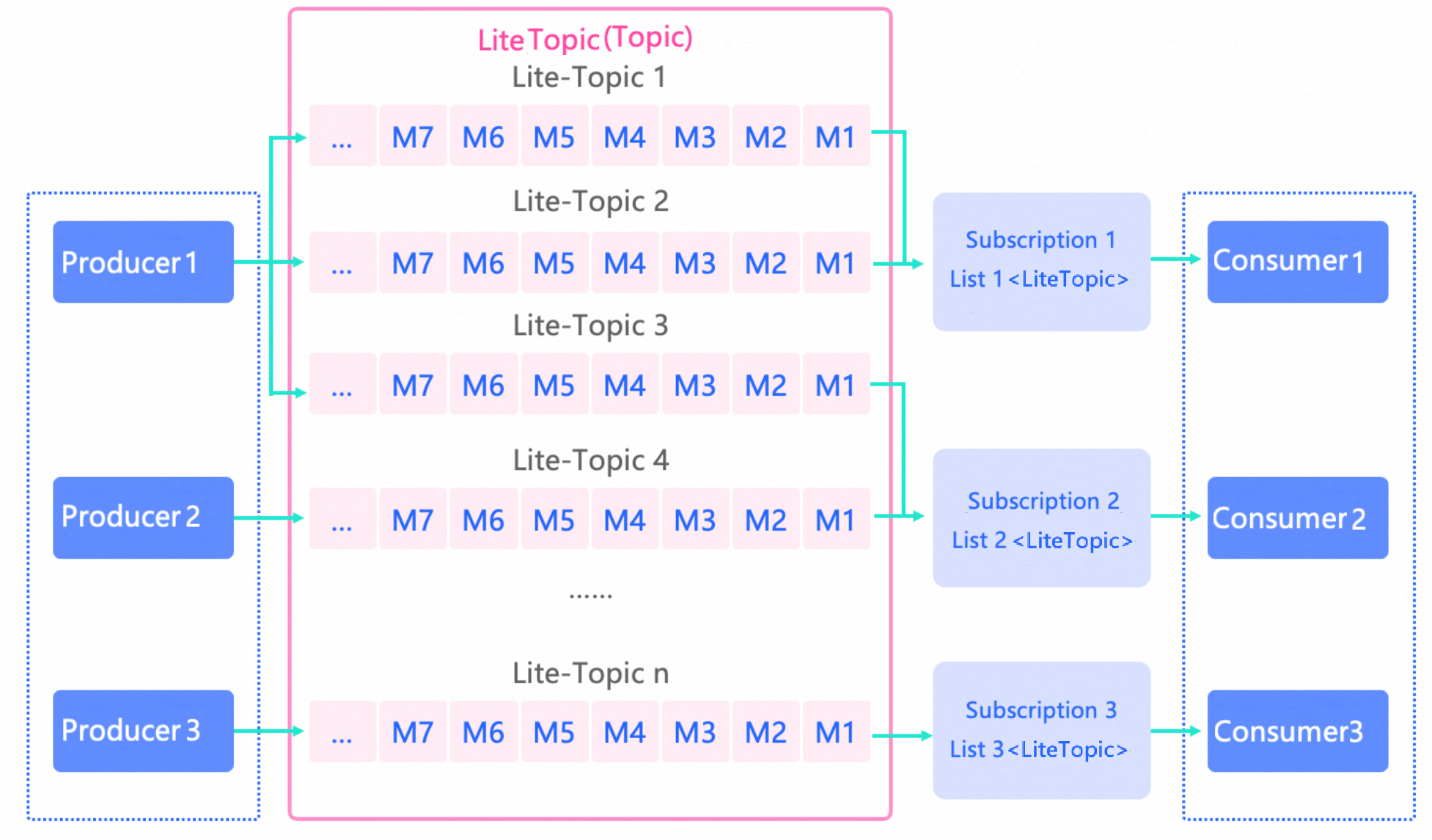
In the domain model of ApsaraMQ for RocketMQ, the flow and position of lite topics are as follows:
-
A topic is the top-level container for message transmission and storage in ApsaraMQ for RocketMQ. When the topic type is Lite, you can create a lite topic under it, and the combination of topic and lite topic uniquely identifies the message storage container.
-
When the topic type is Lite, each storage container defaults to one queue.
Internal properties
Lite topic name
-
Definition: The name that identifies a lite topic. Lite topic names are globally unique within their parent topic.
-
Value: When the topic type is Lite and you call setLiteTopic on a message, the system automatically creates the lite topic if it does not already exist.
-
Constraint: See Parameter limits.
Time-to-live (TTL)
-
Definition: The expiration time for a lite topic. If no new messages are written to the lite topic for longer than its TTL, the system automatically deletes it. Deletion means releasing the count allocated to the lite topic (total count minus one).
-
Value: When creating a Lite-type topic, you can set the expiration parameter.
-
Constraint: See Parameter limits.
Version compatibility
-
Server-side version: 5.0-rmq-20251024-1 or later
-
Client-side version: RocketMQ gRPC 5.1.0 or later
Differences between lite-type and standard-type topics
|
Scenario |
Comparison item |
Lightweight Topics |
Standard-type topic |
|
Message storage |
Top-level topic |
Same. Both require pre-creating the topic resource. |
|
|
Second-level topic |
You can create millions of second-level LiteTopic resources under a topic, each with new capabilities. |
No second-level topic resources. |
|
|
Automated lifecycle management |
Lifecycle management for LiteTopic is automated:
|
None |
|
|
Ordering |
Each LiteTopic has exactly one queue. Messages in the same queue are stored in order.
|
Multiple queues are created. Only partitioned ordered topics guarantee ordering. |
|
|
Max concurrent TPS for send/receive |
Because each LiteTopic has only one queue, its TPS is limited. However, you can create millions of LiteTopics under one topic, so total TPS scales with the number of LiteTopics. |
Topic TPS scales horizontally based on queue count and cluster node count. |
|
|
Message consumption |
Subscription consistency |
They do not need to be the same. Within the same group, each consumer can subscribe to a different set of LiteTopics. Group-level restrictions are relaxed. |
Required. All consumers in the same group must maintain identical subscriptions to share messages from the target topic. |
|
Ordering |
Ordered consumption: Messages in one LiteTopic are processed by only one consumer thread. |
Supports either concurrent or ordered consumption. |
|
|
Dynamic subscription |
Each consumer can dynamically add or remove subscriptions to specific LiteTopics. |
None |
|
|
Max LiteTopics a single consumer can subscribe to |
Each consumer can subscribe to thousands of LiteTopics. |
None |
|
|
Observability |
Metrics |
Includes message accumulation metrics. No metric is available for message processing lag time. |
Includes message accumulation metrics. Message Processing Time Metric |
|
Message trace |
Same |
||
Common lite topic use cases
Use case 1: Asynchronous communication for Multi-Agent systems to resolve long-running call blocking
As AI scenarios grow more complex, single-agent systems face limitations: lack of specialization, difficulty integrating multiple domains, and inability to enable dynamic collaborative decision-making. Single-agent applications and workflows are shifting toward Multi-Agent architectures. However, because AI tasks often take a long time, synchronous calls block the caller’s thread, limiting scalability for large-scale collaboration.

As shown above, the Multi-Agent workflow works like this: The Supervisor Agent splits a request into two subtasks for two child agents. Each child agent solves its part and returns results to the Supervisor Agent, which aggregates them and sends the final response to the web client. Using RocketMQ for asynchronous communication:
-
Request handling flow:
-
Create a topic (Request) for each child agent as a task buffer queue. Use a priority topic to process high-priority tasks first.
-
The Supervisor Agent sends split task details to the corresponding request topic.
-
-
Response handling flow:
-
The Supervisor Agent creates a Lite-type topic (Response) and subscribes to it.
-
Each child agent sends its task result to a LiteTopic under the Response topic. Name each LiteTopic using the task ID to give every task its own dedicated LiteTopic.
-
The Supervisor Agent receives results in real time through subscription and pushes them to the web client using HTTP SSE.
-
Use case 2: Distributed session state management to solve session continuity issues in AI applications
AI application interactions are unique: long-running, multi-turn, and heavily dependent on expensive compute resources per session. When applications rely on persistent connections such as SSE, any disconnection (due to gateway restarts, timeouts, or network instability) causes loss of current session context and wastes already invested AI compute resources.

As in use case 1’s response flow, use a Lite-type topic for real-time result notifications. Name each LiteTopic using the SessionID (for example, chatbot/{sessionID}). All session results are delivered as ordered messages in this topic. To maintain session continuity after reconnection:
-
The web client establishes a persistent connection with application server node 1 and starts session Session2.
-
Application server node 1 subscribes to LiteTopic [chat/SessionID2].
-
The Large Language Model (LLM) task scheduler sends results to LiteTopic [chat/SessionID2] based on the SessionID in the request.
-
Due to a network issue, the WebSocket reconnects to application server node 2.
-
Application server node 1 unsubscribes from LiteTopic [chat/SessionID2]. Application server node 2 subscribes to it.
-
LiteTopic [chat/SessionID2] resumes delivery from the last consumed offset, ensuring continuous session state and data.
Sample code
For complete examples, see the sample code in RocketMQ 5.x gRPC SDK.
Send messages
Producer producer = provider.newProducerBuilder()
    .setTopics(topic)
    .setClientConfiguration(clientConfiguration)
    .build();
final Message message = provider.newMessageBuilder()
    .setTopic(topic)
    // Set a message key for precise lookup by keyword.
    .setKeys("messageKey")
    // Set LiteTopic
    .setLiteTopic("lite-topic-1")
    // Message body
    .setBody("messageBody".getBytes())
    .build();
try {
    final SendReceipt sendReceipt = producer.send(message);
    log.info("Send message successfully, messageId={}", sendReceipt.getMessageId());
} catch (LiteTopicQuotaExceededException e) {
    // LiteTopic quota exceeded. Evaluate and increase quota.
    log.error("Lite topic quota exceeded", e);
} catch (Throwable t) {
    log.error("Failed to send message", t);
}
Consume messages
Use the LitePushConsumer class:
// Initialize LitePushConsumer with consumer group, target topic, and communication parameters.
LitePushConsumer litePushConsumer = provider.newLitePushConsumerBuilder()
    .setClientConfiguration(clientConfiguration)
    // Topic bound to the ConsumerGroup when created in the console
    .bindTopic(topicName)
    // Set consumer group
    .setConsumerGroup(consumerGroup)
    .setMessageListener(messageView -> {
        // Process message and return consumption result.
        LOGGER.info("Consume message={}", messageView);
        return ConsumeResult.SUCCESS;
    })
    .build();
try {
    // Subscribe to desired LiteTopics
    litePushConsumer.subscribeLite("lite-topic-1");
    litePushConsumer.subscribeLite("lite-topic-2");
    litePushConsumer.subscribeLite("lite-topic-3");
} catch (LiteSubscriptionQuotaExceededException e) {
    // LiteTopic subscription quota exceeded. Evaluate and increase quota.
    log.error("Lite subscription quota exceeded", e);
} catch (Throwable t) {
    log.error("Failed to subscribe lite topic", t);
}
// After business processing, unsubscribe from unused LiteTopics promptly
litePushConsumer.unsubscribeLite("lite-topic-3");
// Get current set of subscribed LiteTopics
Set<String> liteTopicSet = litePushConsumer.getLiteTopicSet();
Dynamically update subscriptions
/**
 * Dynamically add a subscription.
 * The subscribeLite() method makes a network call and validates quotas,
 * so it might fail.
 * Always check the result to confirm successful subscription.
 * Possible failure scenarios:
 * 1. Network error – retry the call.
 * 2. Quota validation fails – throws LiteSubscriptionQuotaExceededException.
 * Evaluate whether your quota meets requirements, and promptly call
 * unsubscribeLite() to release resources for unused topics.
 */
litePushConsumer.subscribeLite("lite-topic-1");
// Dynamically remove a subscription
litePushConsumer.unsubscribeLite("lite-topic-1");
Limits
-
A single consumer can subscribe to up to 2,000 LiteTopics (adjustable via ticket).
-
Each LiteTopic supports a maximum consumption TPS of 200.
-
To ensure service stability, each instance enforces a limit on the total number of LiteTopics that can be created or subscribed to. See the following table for specific quotas (adjustable via ticket).
-
Number of LiteTopics
-
Definition: The total number of LiteTopics currently created and active under a single instance during its lifecycle.
-
Trigger and impact: When this limit is reached, attempts to send a message to a non-existent LiteTopic (which would trigger auto-creation) fail with a send error.
-
-
LiteTopic Subscription Count
-
Definition: The total number of active subscription relationships between all online consumer clients and LiteTopics under an instance. This number changes dynamically.
-
Impact: When this limit is reached, any attempt by a consumer to subscribe to a new LiteTopic fails.
-
Special rule: Even if a LiteTopic is deleted, any remaining consumer subscriptions to it still count toward the total until those consumers unsubscribe.
-
-
Serverless instances
|
Deployment architecture |
Capacity mode |
Specifications |
Max LiteTopics creatable or subscribable |
|
Dedicated |
Reserved + elastic |
5000 |
300,000 |
|
10000 |
600,000 |
||
|
15000 |
720,000 |
||
|
[20,000, 50,000] |
1,000,000 |
||
|
(50,000, 100,000] |
1,500,000 |
||
|
(100,000, 200,000] |
2,400,000 |
||
|
(200,000, 300,000] |
4,700,000 |
||
|
(300,000, 500,000] |
6,300,000 |
||
|
(500,000, 1,000,000] |
11,600,000 |
Non-Serverless instances (subscription and pay-as-you-go)
Standard Edition
|
Instance type |
Base TPS limit for send/receive (ops/sec) |
Max LiteTopics creatable or subscribable |
|
rmq.s2.2xlarge |
2000 |
150,000 |
|
rmq.s2.4xlarge |
4000 |
250,000 |
|
rmq.s2.6xlarge |
6000 |
300,000 |
Professional Edition
|
Instance type |
Base TPS limit for send/receive (ops/sec) |
Max LiteTopics creatable or subscribable |
|
rmq.p2.2xlarge |
2000 |
150,000 |
|
rmq.p2.4xlarge |
4000 |
250,000 |
|
rmq.p2.6xlarge |
6000 |
300,000 |
|
rmq.p2.10xlarge |
10000 |
600,000 |
|
rmq.p2.20xlarge |
20000 |
800,000 |
|
rmq.p2.30xlarge |
30000 |
1,000,000 |
|
rmq.p2.40xlarge |
40000 |
1.2 million |
|
rmq.p2.50xlarge |
50000 |
1.4 million |
|
rmq.p2.100xlarge |
100000 |
2,200,000 |
|
rmq.p2.120xlarge |
120000 |
2.7 million |
|
rmq.p2.150xlarge |
150000 |
3.3 million |
|
rmq.p2.200xlarge |
200000 |
4.5 million |
Platinum Edition
|
Instance type |
Base TPS limit for send/receive (ops/sec) |
Max LiteTopics creatable or subscribable |
|
rmq.u2.10xlarge |
10000 |
600,000 |
|
rmq.u2.20xlarge |
20000 |
800,000 |
|
rmq.u2.30xlarge |
30000 |
1,000,000 |
|
rmq.u2.40xlarge |
40000 |
1,200,000 |
|
rmq.u2.50xlarge |
50000 |
1,400,000 |
|
rmq.u2.60xlarge |
60000 |
1,600,000 |
|
rmq.u2.70xlarge |
70000 |
1,700,000 |
|
rmq.u2.80xlarge |
80000 |
1,800,000 |
|
rmq.u2.90xlarge |
90000 |
2,000,000 |
|
rmq.u2.100xlarge |
100000 |
2,200,000 |
|
rmq.u2.120xlarge |
120000 |
2,700,000 |
|
rmq.u2.150xlarge |
150000 |
3,300,000 |
|
rmq.u2.200xlarge |
200000 |
4,500,000 |
|
rmq.u2.250xlarge |
250000 |
5,600,000 |
|
rmq.u2.300xlarge |
300000 |
6,300,000 |
|
rmq.u2.350xlarge |
350000 |
7,500,000 |
|
rmq.u2.400xlarge |
400000 |
9,300,000 |
|
rmq.u2.450xlarge |
450000 |
10,400,000 |
|
rmq.u2.500xlarge |
500000 |
11,600,000 |
|
rmq.u2.550xlarge |
550000 |
12,800,000 |
|
rmq.u2.600xlarge |
600000 |
14,000,000 |
|
rmq.u2.1000xlarge |
1000000 |
23,200,000 |