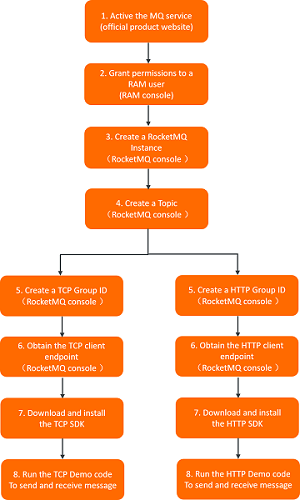
ApsaraMQ for RocketMQ provides TCP and HTTP client SDKs for multiple programming languages. This guide walks you through activating the service, creating resources, and sending your first normal messages.
Choose a protocol
Each ApsaraMQ for RocketMQ instance exposes a TCP endpoint and an HTTP endpoint. Select the protocol that fits your workload, then use the matching SDK and endpoint.
| Protocol | SDK |
|---|---|
| TCP | TCP client SDK |
| HTTP | HTTP client SDK |
Always pair the SDK with its corresponding endpoint. A TCP client SDK connects only to the TCP endpoint, and an HTTP client SDK connects only to the HTTP endpoint.
Prerequisites
Before you begin, ensure that you have:
An Alibaba Cloud account with ApsaraMQ for RocketMQ activated
RAM permissions to create and manage ApsaraMQ for RocketMQ resources
A client environment with the SDK for your programming language installed
Send and receive normal messages
ApsaraMQ for RocketMQ supports four message types. The following steps use normal messages as the example. To work with ordered, transactional, or scheduled messages, see the documentation for each type.
Step 1: Activate the service and grant permissions
Enable ApsaraMQ for RocketMQ in the Alibaba Cloud console and configure RAM permissions for your account.
Step 2: Create resources
Create an instance, a topic, and a group in the ApsaraMQ for RocketMQ console.
When you create the topic, select Normal Message as the message type. Each topic supports only one message type, so a normal message topic cannot send or receive other message types.
We recommend that you create separate groups for TCP and HTTP consumers. Different protocols require different client SDKs. For group limits and configuration details, see Manage groups.
Step 3: Obtain the endpoint
Locate the TCP or HTTP endpoint for your instance. Choose the endpoint that matches your protocol.
Both public and private endpoints are available for TCP and HTTP in all regions:
| Endpoint type | When to use |
|---|---|
| VPC endpoint (recommended) | Production workloads. No Internet traffic charges. |
| Public endpoint | Cross-region access, on-premises data centers, or Internet-based access when Cloud Enterprise Network (CEN) is not available. Outbound traffic charges apply. For details, see Billing of Internet traffic. |
Step 4: Send and receive messages
Use the SDK for your programming language to connect to the endpoint, send messages to the topic, and subscribe to messages from the topic.
For TCP, see Send and subscribe to messages with TCP client SDKs.
For HTTP, see Send and subscribe to messages with HTTP client SDKs.
The following flowchart shows the end-to-end process: