ApsaraMQ for RocketMQ supports three transmission modes for normal messages. Each mode offers a different trade-off between delivery reliability and throughput.
| Mode | Broker response | Reliability | Throughput | Best for |
|---|---|---|---|---|
| Synchronous | Blocks until acknowledged | No message loss | High | Email notifications, registration confirmations, promotional messages |
| Asynchronous | Delivered through callback | No message loss | High | Response-time-sensitive workflows, video transcoding pipelines |
| One-way | None | Possible message loss | Highest | Log collection |
All three modes share the same producer setup. The only difference is the send call:
Synchronous:
producer.send(msg)-- blocks and returnsSendResultAsynchronous:
producer.send(msg, callback)-- returns immediately, result delivered throughSendCallbackOne-way:
producer.sendOneway(msg)-- fire-and-forget, no return value
Prerequisites
AccessKey pair created for your Alibaba Cloud account
Common producer setup
The producer initialization below applies to all three modes. Replace the following placeholders with your values:
| Placeholder | Description | Example |
|---|---|---|
YOUR GROUP ID | Group ID created in the ApsaraMQ for RocketMQ console | GID_example |
YOUR ACCESS POINT | Endpoint from the ApsaraMQ for RocketMQ console | http://MQ_INST_XXXX.aliyuncs.com:80 |
YOUR TOPIC | Topic created in the ApsaraMQ for RocketMQ console | topic_example |
YOUR MESSAGE TAG | Tag for message filtering | tag_example |
import org.apache.rocketmq.acl.common.AclClientRPCHook;
import org.apache.rocketmq.acl.common.SessionCredentials;
import org.apache.rocketmq.client.AccessChannel;
import org.apache.rocketmq.client.producer.DefaultMQProducer;
import org.apache.rocketmq.remoting.RPCHook;
import org.apache.rocketmq.remoting.common.RemotingHelper;

// Retrieve credentials from environment variables
private static RPCHook getAclRPCHook() {
    return new AclClientRPCHook(new SessionCredentials(
        System.getenv("ALIBABA_CLOUD_ACCESS_KEY_ID"),
        System.getenv("ALIBABA_CLOUD_ACCESS_KEY_SECRET")));
}

// Create a producer with message trace enabled.
// To disable message trace, use: new DefaultMQProducer("YOUR GROUP ID", getAclRPCHook());
DefaultMQProducer producer = new DefaultMQProducer("YOUR GROUP ID", getAclRPCHook(), true, null);

// Set the access channel to CLOUD for message trace on Alibaba Cloud.
// Skip this line if message trace is not needed.
producer.setAccessChannel(AccessChannel.CLOUD);

// Set the endpoint from the ApsaraMQ for RocketMQ console.
producer.setNamesrvAddr("YOUR ACCESS POINT");

producer.start();
Synchronous transmission
The producer sends a message and blocks until the broker returns a response. This guarantees delivery confirmation before the next message is sent.
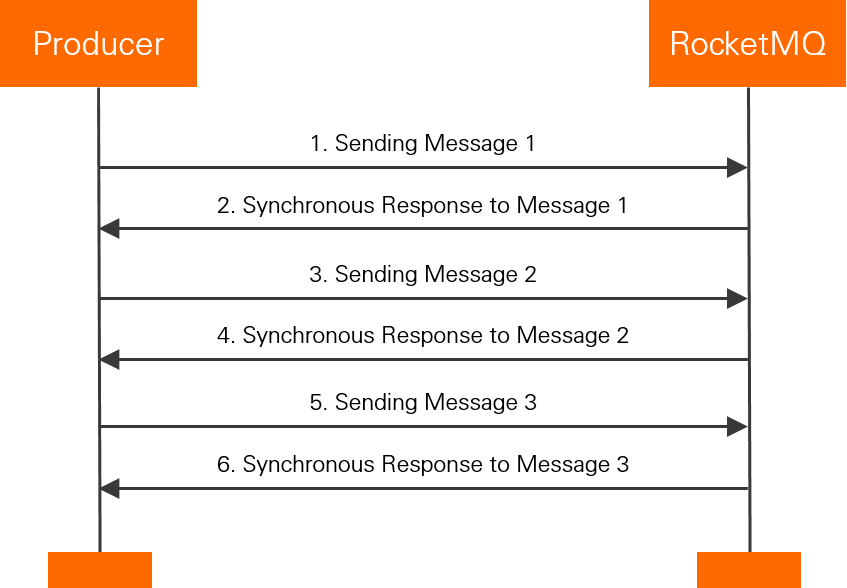
Trade-off: Reliable -- no messages are lost. However, throughput is lower than asynchronous mode because the producer waits for each response before sending the next message.
Use cases: Email notifications, registration confirmations, promotional messages -- scenarios where delivery confirmation is required before proceeding.
Sample code
import java.util.Date;
import org.apache.rocketmq.acl.common.AclClientRPCHook;
import org.apache.rocketmq.acl.common.SessionCredentials;
import org.apache.rocketmq.client.AccessChannel;
import org.apache.rocketmq.client.exception.MQClientException;
import org.apache.rocketmq.client.producer.DefaultMQProducer;
import org.apache.rocketmq.client.producer.SendResult;
import org.apache.rocketmq.common.message.Message;
import org.apache.rocketmq.remoting.RPCHook;
import org.apache.rocketmq.remoting.common.RemotingHelper;
public class RocketMQProducer {
    /**
    * Make sure that the environment variables ALIBABA_CLOUD_ACCESS_KEY_ID
    * and ALIBABA_CLOUD_ACCESS_KEY_SECRET are configured.
    */
    private static RPCHook getAclRPCHook() {
	  return new AclClientRPCHook(new SessionCredentials(System.getenv("ALIBABA_CLOUD_ACCESS_KEY_ID"), System.getenv("ALIBABA_CLOUD_ACCESS_KEY_SECRET")));
    }

    public static void main(String[] args) throws MQClientException {
        // Create a producer with message trace enabled.
        // To disable message trace: new DefaultMQProducer("YOUR GROUP ID", getAclRPCHook());
        DefaultMQProducer producer = new DefaultMQProducer("YOUR GROUP ID", getAclRPCHook(), true, null);

        // Set to CLOUD for message trace on Alibaba Cloud. Skip if not needed.
        producer.setAccessChannel(AccessChannel.CLOUD);

        // Endpoint from the ApsaraMQ for RocketMQ console (format: http://MQ_INST_XXXX.aliyuncs.com:80).
        producer.setNamesrvAddr("YOUR ACCESS POINT");
        producer.start();

        for (int i = 0; i < 128; i++) {
            try {
                Message msg = new Message("YOUR TOPIC",
                    "YOUR MESSAGE TAG",
                    "Hello world".getBytes(RemotingHelper.DEFAULT_CHARSET));
                SendResult sendResult = producer.send(msg);
                System.out.printf("%s%n", sendResult);
            } catch (Exception e) {
                // Resend or persist the message if delivery fails.
                System.out.println(new Date() + " Send mq message failed.");
                e.printStackTrace();
            }
        }

        // Shut down the producer before exiting the application. (Optional)
        producer.shutdown();
    }
}
producer.send(msg) blocks and returns a SendResult containing the message ID and send status.
Asynchronous transmission
The producer sends a message and immediately moves on without waiting for a broker response. Implement a SendCallback to handle the broker response asynchronously.
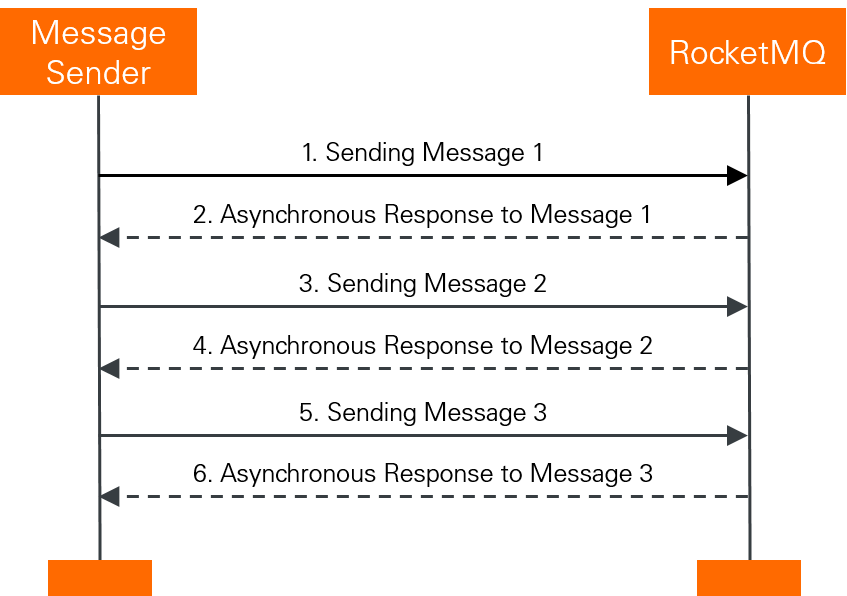
Trade-off: Same reliability as synchronous mode (no message loss), but the producer does not block between sends. The added complexity is implementing SendCallback for success and failure handling.
Use cases: Response-time-sensitive workflows with long-running downstream processes. For example, after a video is uploaded, a callback triggers transcoding, and another callback pushes the transcoding result.
Sample code
import java.util.Date;
import org.apache.rocketmq.acl.common.AclClientRPCHook;
import org.apache.rocketmq.acl.common.SessionCredentials;
import org.apache.rocketmq.client.AccessChannel;
import org.apache.rocketmq.client.exception.MQClientException;
import org.apache.rocketmq.client.producer.DefaultMQProducer;
import org.apache.rocketmq.client.producer.SendCallback;
import org.apache.rocketmq.client.producer.SendResult;
import org.apache.rocketmq.common.message.Message;
import org.apache.rocketmq.remoting.RPCHook;
import org.apache.rocketmq.remoting.common.RemotingHelper;
public class RocketMQAsyncProducer {
    /**
    * Make sure that the environment variables ALIBABA_CLOUD_ACCESS_KEY_ID
    * and ALIBABA_CLOUD_ACCESS_KEY_SECRET are configured.
    */
    private static RPCHook getAclRPCHook() {
        return new AclClientRPCHook(new SessionCredentials(System.getenv("ALIBABA_CLOUD_ACCESS_KEY_ID"), System.getenv("ALIBABA_CLOUD_ACCESS_KEY_SECRET")));
    }

    public static void main(String[] args) throws MQClientException {
        // Create a producer with message trace enabled.
        // To disable message trace: new DefaultMQProducer("YOUR GROUP ID", getAclRPCHook());
        DefaultMQProducer producer = new DefaultMQProducer("YOUR GROUP ID", getAclRPCHook(), true, null);

        // Set to CLOUD for message trace on Alibaba Cloud. Skip if not needed.
        producer.setAccessChannel(AccessChannel.CLOUD);

        // Endpoint from the ApsaraMQ for RocketMQ console (format: http://MQ_INST_XXXX.aliyuncs.com:80).
        producer.setNamesrvAddr("YOUR ACCESS POINT");
        producer.start();

        for (int i = 0; i < 128; i++) {
            try {
                Message msg = new Message("YOUR TOPIC",
                    "YOUR MESSAGE TAG",
                    "Hello world".getBytes(RemotingHelper.DEFAULT_CHARSET));
                producer.send(msg, new SendCallback() {
                    @Override public void onSuccess(SendResult result) {
                        // Message delivered successfully.
                        System.out.println("send message success. msgId= " + result.getMsgId());
                    }

                    @Override public void onException(Throwable throwable) {
                        // Resend or persist the message if delivery fails.
                        System.out.println("send message failed.");
                        throwable.printStackTrace();
                    }
                });
            } catch (Exception e) {
                // Resend or persist the message if delivery fails.
                System.out.println(new Date() + " Send mq message failed.");
                e.printStackTrace();
            }
        }

        // Shut down the producer before exiting the application. (Optional)
        producer.shutdown();
    }
}
producer.send(msg, new SendCallback() {...}) does not block. The result is delivered through onSuccess or onException.
One-way transmission
The producer sends a message and returns immediately. No broker response is returned and no callback is triggered. A message can be sent within microseconds.
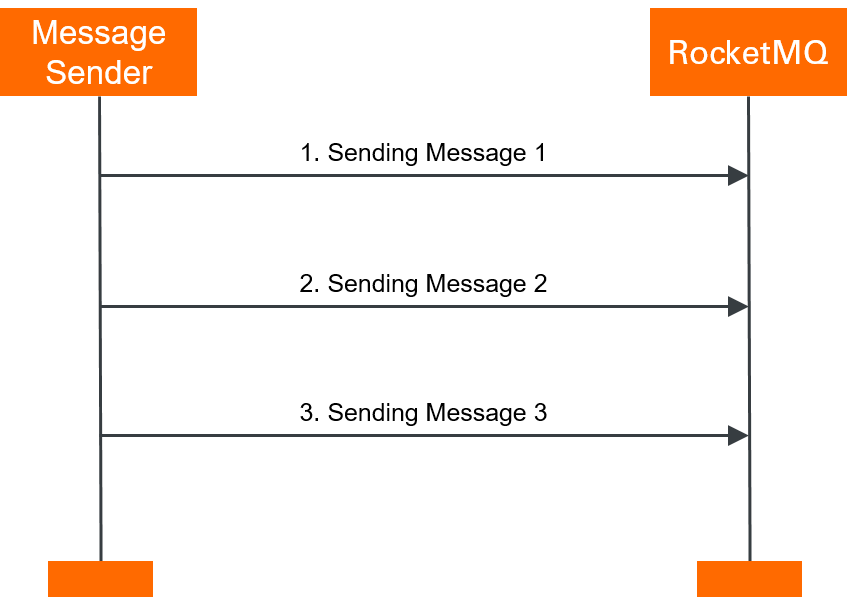
Trade-off: Highest throughput of all three modes, but messages may be lost because the producer cannot confirm delivery.
Use cases: High-volume, low-criticality data streams where occasional message loss is acceptable, such as log collection.
Sample code
import java.util.Date;
import org.apache.rocketmq.acl.common.AclClientRPCHook;
import org.apache.rocketmq.acl.common.SessionCredentials;
import org.apache.rocketmq.client.AccessChannel;
import org.apache.rocketmq.client.exception.MQClientException;
import org.apache.rocketmq.client.producer.DefaultMQProducer;
import org.apache.rocketmq.common.message.Message;
import org.apache.rocketmq.remoting.RPCHook;
import org.apache.rocketmq.remoting.common.RemotingHelper;
public class RocketMQOnewayProducer {
    /**
    * Make sure that the environment variables ALIBABA_CLOUD_ACCESS_KEY_ID
    * and ALIBABA_CLOUD_ACCESS_KEY_SECRET are configured.
    */
    private static RPCHook getAclRPCHook() {
        return new AclClientRPCHook(new SessionCredentials(System.getenv("ALIBABA_CLOUD_ACCESS_KEY_ID"), System.getenv("ALIBABA_CLOUD_ACCESS_KEY_SECRET")));
    }

    public static void main(String[] args) throws MQClientException {
        // Create a producer with message trace enabled.
        // To disable message trace: new DefaultMQProducer("YOUR GROUP ID", getAclRPCHook());
        DefaultMQProducer producer = new DefaultMQProducer("YOUR GROUP ID", getAclRPCHook(), true, null);

        // Set to CLOUD for message trace on Alibaba Cloud. Skip if not needed.
        producer.setAccessChannel(AccessChannel.CLOUD);

        // Endpoint from the ApsaraMQ for RocketMQ console (format: http://MQ_INST_XXXX.aliyuncs.com:80).
        producer.setNamesrvAddr("YOUR ACCESS POINT");
        producer.start();

        for (int i = 0; i < 128; i++) {
            try {
                Message msg = new Message("YOUR TOPIC",
                    "YOUR MESSAGE TAG",
                    "Hello world".getBytes(RemotingHelper.DEFAULT_CHARSET));
                producer.sendOneway(msg);
            } catch (Exception e) {
                // Resend or persist the message if delivery fails.
                System.out.println(new Date() + " Send mq message failed.");
                e.printStackTrace();
            }
        }

        // Shut down the producer before exiting the application. (Optional)
        producer.shutdown();
    }
}
producer.sendOneway(msg) returns no SendResult and invokes no callback -- the message is sent on a best-effort basis.
Subscribe to normal messages
Regardless of the transmission mode used to send messages, consume them with DefaultMQPushConsumer. The broker pushes messages to the consumer, which processes them through a MessageListenerConcurrently listener.
import java.util.List;
import org.apache.rocketmq.acl.common.AclClientRPCHook;
import org.apache.rocketmq.acl.common.SessionCredentials;
import org.apache.rocketmq.client.AccessChannel;
import org.apache.rocketmq.client.consumer.DefaultMQPushConsumer;
import org.apache.rocketmq.client.consumer.listener.ConsumeConcurrentlyContext;
import org.apache.rocketmq.client.consumer.listener.ConsumeConcurrentlyStatus;
import org.apache.rocketmq.client.consumer.listener.MessageListenerConcurrently;
import org.apache.rocketmq.client.consumer.rebalance.AllocateMessageQueueAveragely;
import org.apache.rocketmq.client.exception.MQClientException;
import org.apache.rocketmq.common.message.MessageExt;
import org.apache.rocketmq.remoting.RPCHook;

public class RocketMQPushConsumer {
    /**
    * Make sure that the environment variables ALIBABA_CLOUD_ACCESS_KEY_ID
    * and ALIBABA_CLOUD_ACCESS_KEY_SECRET are configured.
    */
    private static RPCHook getAclRPCHook() {
        return new AclClientRPCHook(new SessionCredentials(System.getenv("ALIBABA_CLOUD_ACCESS_KEY_ID"), System.getenv("ALIBABA_CLOUD_ACCESS_KEY_SECRET")));
    }
  public static void main(String[] args) throws MQClientException {
        // Create a consumer with message trace enabled.
        // To disable message trace:
        // DefaultMQPushConsumer consumer = new DefaultMQPushConsumer("YOUR GROUP ID", getAclRPCHook(), new AllocateMessageQueueAveragely());
         DefaultMQPushConsumer consumer = new DefaultMQPushConsumer("YOUR GROUP ID", getAclRPCHook(), new AllocateMessageQueueAveragely(), true, null);

        // Endpoint of the ApsaraMQ for RocketMQ instance.
    consumer.setNamesrvAddr("http://xxxx.mq-internet.aliyuncs.com:80");

        // Set to CLOUD for message trace on Alibaba Cloud. Skip if not needed.
    consumer.setAccessChannel(AccessChannel.CLOUD);

        // Topic created in the ApsaraMQ for RocketMQ console.
    consumer.subscribe("YOUR TOPIC", "*");
    consumer.registerMessageListener(new MessageListenerConcurrently() {
      @Override
      public ConsumeConcurrentlyStatus consumeMessage(List<MessageExt> msgs,
        ConsumeConcurrentlyContext context) {
        System.out.printf("Receive New Messages: %s %n", msgs);
        return ConsumeConcurrentlyStatus.CONSUME_SUCCESS;
      }
    });
    consumer.start();
  }
}