Transactional messages guarantee atomicity between a local transaction and downstream message delivery. If the local transaction commits, the message is delivered to consumers. If it rolls back, the message is discarded. This prevents two failure modes: delivering a message for a transaction that never completed, and completing a transaction without delivering its message.
The following examples use the TCP client SDK for Java (Community Edition) to implement a transactional message producer and consumer.
How transactional messages work
A transactional message passes through five stages between the producer and the ApsaraMQ for RocketMQ broker:
The producer sends a half message to the broker. A half message is stored on the broker but not yet delivered to consumers.
The broker persists the half message and returns an acknowledgment (ACK) to the producer.
The producer executes the local transaction -- for example, inserting an order into a database.
The producer commits the transaction result to the broker. Based on the local transaction outcome, the producer sends one of three statuses:
LocalTransactionState.COMMIT_MESSAGE-- The local transaction succeeded. The broker delivers the message to consumers.LocalTransactionState.ROLLBACK_MESSAGE-- The local transaction failed. The broker discards the message.LocalTransactionState.UNKNOW-- The outcome is uncertain. The broker checks back later.
The broker initiates a transaction status check if it does not receive a definitive commit or rollback. This happens when the producer returns
UNKNOW, crashes before committing a status, or loses network connectivity. The broker periodically calls the producer's transaction check listener until it receives a commit or rollback.
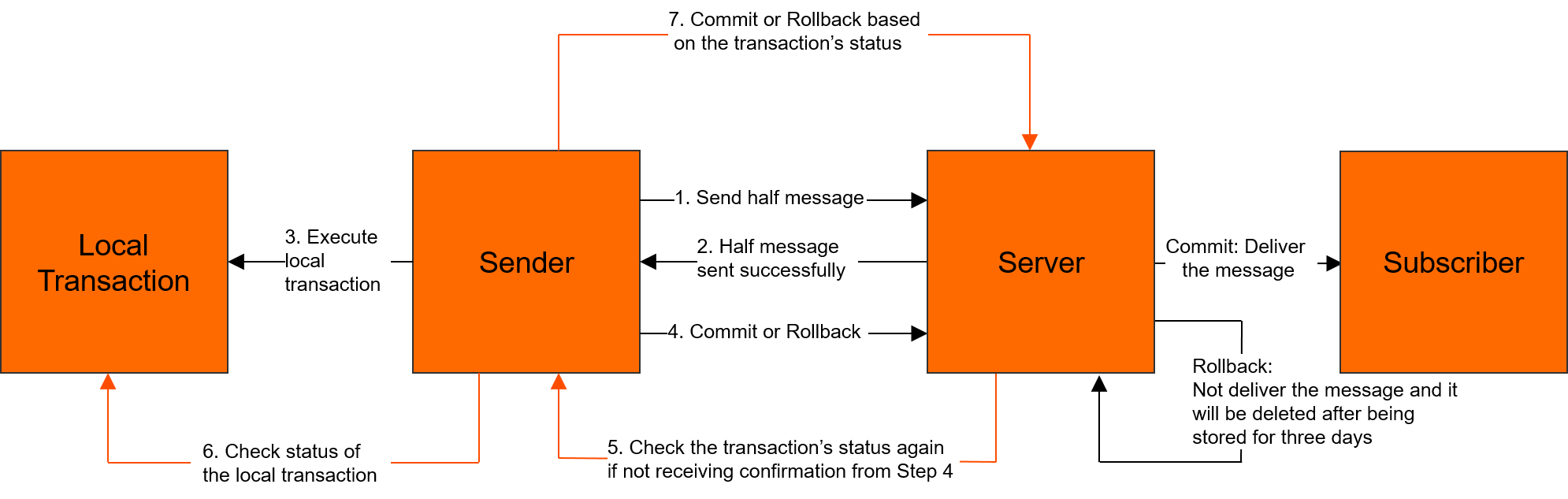
For more information about the transactional message model, see Transactional messages.
Prerequisites
Before you begin, make sure that you have:
Downloaded the Community Edition of the SDK for Java 4.5.2 or later from the RocketMQ download page
Created an AccessKey pair for your Alibaba Cloud account
Send transactional messages
Sending a transactional message requires two components:
A producer that sends the half message and executes the local transaction.
A transaction check listener that responds to status check requests from the broker.
Step 1: Implement the transaction check listener
The broker calls this listener when it needs to verify the outcome of a local transaction. After a transactional message is sent, ApsaraMQ for RocketMQ calls the LocalTransactionChecker API operation to respond to the status check request from the broker. Your implementation should query the actual transaction state -- for example, by checking whether an order exists in your database -- and return the appropriate status.
import org.apache.rocketmq.client.producer.LocalTransactionState;
import org.apache.rocketmq.client.producer.TransactionCheckListener;
import org.apache.rocketmq.common.message.MessageExt;

public class LocalTransactionCheckerImpl implements TransactionCheckListener {

    @Override
    public LocalTransactionState checkLocalTransactionState(MessageExt msg) {
        System.out.println("Received transaction status check request. MsgId: " + msg.getMsgId());

        // Query your business data to determine the transaction outcome.
        // Example: Check whether the order associated with this message
        // was committed to the database.
        //
        // boolean orderExists = orderService.existsByOrderId(msg.getKeys());
        // if (orderExists) {
        //     return LocalTransactionState.COMMIT_MESSAGE;
        // }
        // return LocalTransactionState.ROLLBACK_MESSAGE;

        return LocalTransactionState.COMMIT_MESSAGE;
    }
}
Step 2: Send a half message and execute the local transaction
The producer sends a half message to the broker and immediately executes the local transaction in the executeLocalTransactionBranch callback. Based on the return value, the broker commits, rolls back, or schedules a status check for the message.
Replace the following placeholders with your actual values:
| Placeholder | Description | Example |
|---|---|---|
YOUR TRANSACTION GROUP ID | The group ID created in the ApsaraMQ for RocketMQ console | GID_tx_order |
YOUR TRANSACTION TOPIC | The topic created in the ApsaraMQ for RocketMQ console | tx_order_topic |
YOUR MESSAGE TAG | A tag for filtering messages | TagA |
http://xxxx.mq-internet.aliyuncs.com:80 | The endpoint from the ApsaraMQ for RocketMQ console, in the format http://MQ_INST_XXXX.aliyuncs.com:80 | http://MQ_INST_1234.mq-internet.aliyuncs.com:80 |
import org.apache.rocketmq.acl.common.AclClientRPCHook;
import org.apache.rocketmq.acl.common.SessionCredentials;
import org.apache.rocketmq.client.AccessChannel;
import org.apache.rocketmq.client.exception.MQClientException;
import org.apache.rocketmq.client.producer.LocalTransactionExecuter;
import org.apache.rocketmq.client.producer.LocalTransactionState;
import org.apache.rocketmq.client.producer.SendResult;
import org.apache.rocketmq.client.producer.TransactionMQProducer;
import org.apache.rocketmq.common.message.Message;
import org.apache.rocketmq.remoting.RPCHook;
import org.apache.rocketmq.remoting.common.RemotingHelper;

public class RocketMQTransactionProducer {

    // Load AccessKey credentials from environment variables.
    private static RPCHook getAclRPCHook() {
        return new AclClientRPCHook(new SessionCredentials(
            System.getenv("ALIBABA_CLOUD_ACCESS_KEY_ID"),
            System.getenv("ALIBABA_CLOUD_ACCESS_KEY_SECRET")));
    }

    public static void main(String[] args) throws MQClientException {
        // Create a transactional producer with message trace enabled.
        // To disable message trace, use:
        // new TransactionMQProducer("YOUR TRANSACTION GROUP ID", getAclRPCHook());
        TransactionMQProducer producer = new TransactionMQProducer(
            null, "YOUR TRANSACTION GROUP ID", getAclRPCHook(), true, null);

        // Set the endpoint from the ApsaraMQ for RocketMQ console.
        producer.setNamesrvAddr("http://xxxx.mq-internet.aliyuncs.com:80");

        // Required for message trace on Alibaba Cloud.
        producer.setAccessChannel(AccessChannel.CLOUD);

        // Register the transaction check listener (see Step 1).
        producer.setTransactionCheckListener(new LocalTransactionCheckerImpl());

        producer.start();

        for (int i = 0; i < 10; i++) {
            try {
                Message message = new Message(
                    "YOUR TRANSACTION TOPIC",
                    "YOUR MESSAGE TAG",
                    "Hello world".getBytes(RemotingHelper.DEFAULT_CHARSET));

                // Send the half message and execute the local transaction.
                SendResult sendResult = producer.sendMessageInTransaction(
                    message,
                    new LocalTransactionExecuter() {
                        @Override
                        public LocalTransactionState executeLocalTransactionBranch(
                                Message msg, Object arg) {
                            System.out.println("Executing local transaction: " + msg);
                            // Run your business logic here (e.g., insert order into DB).
                            // Return COMMIT_MESSAGE, ROLLBACK_MESSAGE, or UNKNOW
                            // based on the outcome.
                            return LocalTransactionState.UNKNOW;
                        }
                    },
                    null);
                assert sendResult != null;
            } catch (Exception e) {
                e.printStackTrace();
            }
        }
    }
}
Transaction states
| State | Meaning | Broker behavior |
|---|---|---|
LocalTransactionState.COMMIT_MESSAGE | Local transaction succeeded | Delivers the message to consumers |
LocalTransactionState.ROLLBACK_MESSAGE | Local transaction failed | Discards the message |
LocalTransactionState.UNKNOW | Outcome not yet determined | Periodically checks the transaction status through the check listener |
Why the transaction status check matters
If the producer returns UNKNOW, crashes, or loses connectivity after sending the half message, the broker cannot determine whether to deliver or discard the message. The transaction status check resolves this by periodically querying the producer until it receives a definitive commit or rollback.
Your LocalTransactionCheckerImpl must:
Query the state of the local transaction that corresponds to the half message -- for example, look up the order in your database.
Return the correct
LocalTransactionStateto the broker.
Subscribe to transactional messages
Subscribe to transactional messages the same way you subscribe to normal messages. The consumer is unaware of the transaction -- it receives the message only after the broker commits it.
Replace the following placeholders with your actual values:
| Placeholder | Description | Example |
|---|---|---|
YOUR GROUP ID | The consumer group ID created in the ApsaraMQ for RocketMQ console | GID_consumer_order |
YOUR TOPIC | The topic to subscribe to | tx_order_topic |
http://xxxx.mq-internet.aliyuncs.com:80 | The endpoint from the ApsaraMQ for RocketMQ console | http://MQ_INST_1234.mq-internet.aliyuncs.com:80 |
import java.util.List;
import org.apache.rocketmq.acl.common.AclClientRPCHook;
import org.apache.rocketmq.acl.common.SessionCredentials;
import org.apache.rocketmq.client.AccessChannel;
import org.apache.rocketmq.client.consumer.DefaultMQPushConsumer;
import org.apache.rocketmq.client.consumer.listener.ConsumeConcurrentlyContext;
import org.apache.rocketmq.client.consumer.listener.ConsumeConcurrentlyStatus;
import org.apache.rocketmq.client.consumer.listener.MessageListenerConcurrently;
import org.apache.rocketmq.client.consumer.rebalance.AllocateMessageQueueAveragely;
import org.apache.rocketmq.client.exception.MQClientException;
import org.apache.rocketmq.common.message.MessageExt;
import org.apache.rocketmq.remoting.RPCHook;

public class RocketMQPushConsumer {

    // Load AccessKey credentials from environment variables.
    private static RPCHook getAclRPCHook() {
        return new AclClientRPCHook(new SessionCredentials(
            System.getenv("ALIBABA_CLOUD_ACCESS_KEY_ID"),
            System.getenv("ALIBABA_CLOUD_ACCESS_KEY_SECRET")));
    }

    public static void main(String[] args) throws MQClientException {
        // Create a push consumer with message trace enabled.
        // To disable message trace, use:
        // new DefaultMQPushConsumer("YOUR GROUP ID", getAclRPCHook(),
        //     new AllocateMessageQueueAveragely());
        DefaultMQPushConsumer consumer = new DefaultMQPushConsumer(
            "YOUR GROUP ID", getAclRPCHook(),
            new AllocateMessageQueueAveragely(), true, null);

        // Set the endpoint from the ApsaraMQ for RocketMQ console.
        consumer.setNamesrvAddr("http://xxxx.mq-internet.aliyuncs.com:80");

        // Required for message trace on Alibaba Cloud.
        consumer.setAccessChannel(AccessChannel.CLOUD);

        // Subscribe to all tags (*) on the topic.
        consumer.subscribe("YOUR TOPIC", "*");

        consumer.registerMessageListener(new MessageListenerConcurrently() {
            @Override
            public ConsumeConcurrentlyStatus consumeMessage(
                    List<MessageExt> msgs, ConsumeConcurrentlyContext context) {
                System.out.printf("Received messages: %s %n", msgs);
                return ConsumeConcurrentlyStatus.CONSUME_SUCCESS;
            }
        });

        consumer.start();
    }
}