An exchange receives messages from producers and routes them to one or more queues. Rather than sending messages directly to queues, producers always publish to an exchange, which then decides where each message goes based on its routing rules.
How message routing works
A message flows through ApsaraMQ for RabbitMQ in four steps:
A producer publishes a message to an exchange.
The exchange evaluates the message against its routing rules.
Based on the bindings between the exchange and queues, the exchange routes the message to one or more matching queues.
Each queue stores the message until a consumer retrieves and processes it.
Two concepts are central to this routing process:
Binding: A link between an exchange and a queue. Each binding can include a routing key or header arguments that the exchange uses to filter messages.
Routing key: A string attribute attached to each message. Exchanges compare this key against the binding keys of their bound queues to determine where to route the message.
Exchange types
ApsaraMQ for RabbitMQ supports six exchange types. Each type uses a different routing strategy.
| Exchange type | Routing strategy | Typical use case |
|---|---|---|
| Direct | Exact routing key match | Route a message to one specific queue |
| Topic | Wildcard routing key match | Route messages to queues by category or pattern |
| Fanout | Broadcast to all bound queues | Push the same message to every consumer |
| Headers | Header attribute match | Route by multiple metadata fields instead of a routing key |
| x-delayed-message | Delayed delivery + configurable routing | Deliver messages after a specified delay |
| x-consistent-hash | Consistent hash of routing key or header | Distribute messages across queues by weight |
Direct exchanges
A direct exchange routes a message to the queue whose binding key exactly matches the message's routing key.
When to use a direct exchange:
Task dispatch where each task type maps to a dedicated processing queue
Log routing where each log level (error, warning, info) goes to a separate queue
Any scenario that requires one-to-one (unicast) message delivery based on a simple string identifier
Routing example
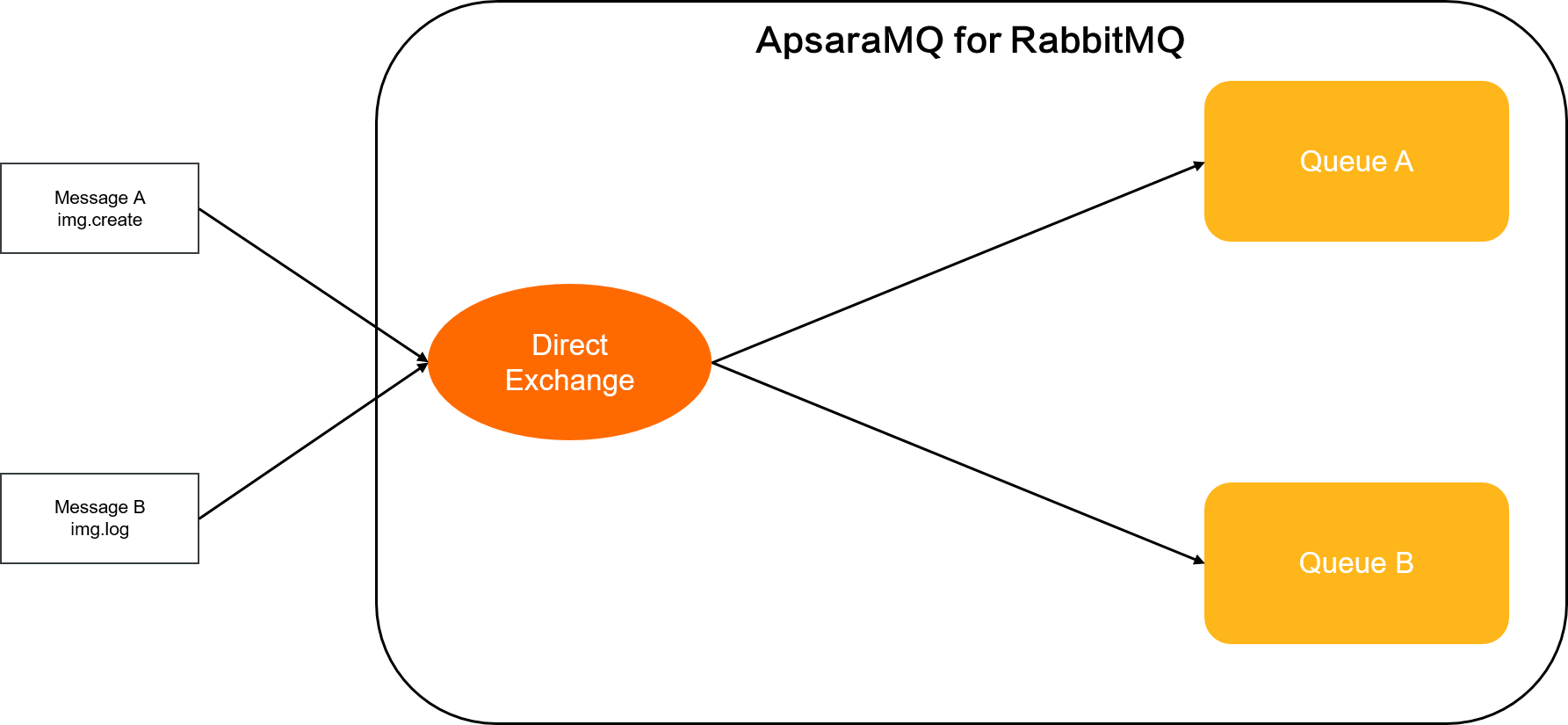
| Message | Routing key | Binding key | Destination queue |
|---|---|---|---|
| Message A | img.create | img.create | Queue A |
| Message B | img.log | img.log | Queue B |
Message A carries the routing key img.create. The exchange finds that Queue A is bound with the same key, so it routes Message A to Queue A. Message B works the same way: its routing key img.log matches the binding key on Queue B.
Topic exchanges
A topic exchange routes messages to queues whose binding keys match the message's routing key through wildcard patterns. Routing keys and binding keys are dot-delimited strings (for example, files.cn.hz), and binding keys can include two wildcards:
*(asterisk) -- matches exactly one segment. For example,files.cn.*.storematchesfiles.cn.hz.storeandfiles.cn.sz.store, but does not matchfiles.cn.store(missing segment) orfiles.cn.hz.sz.store(extra segment).#(hash) -- matches zero or more segments. For example,files.cn.hz.#matchesfiles.cn.hz,files.cn.hz.store, andfiles.cn.hz.store.backup.
A binding key of # alone matches every routing key, which makes the topic exchange behave like a fanout exchange.
When to use a topic exchange:
Distribute data by geographic location, such as routing regional sales events to region-specific consumers
Background task processing where multiple workers each handle a specific subset of tasks
News or event feeds where consumers subscribe to messages by category or tag
Any scenario that requires selective one-to-many (multicast) message delivery
Routing example
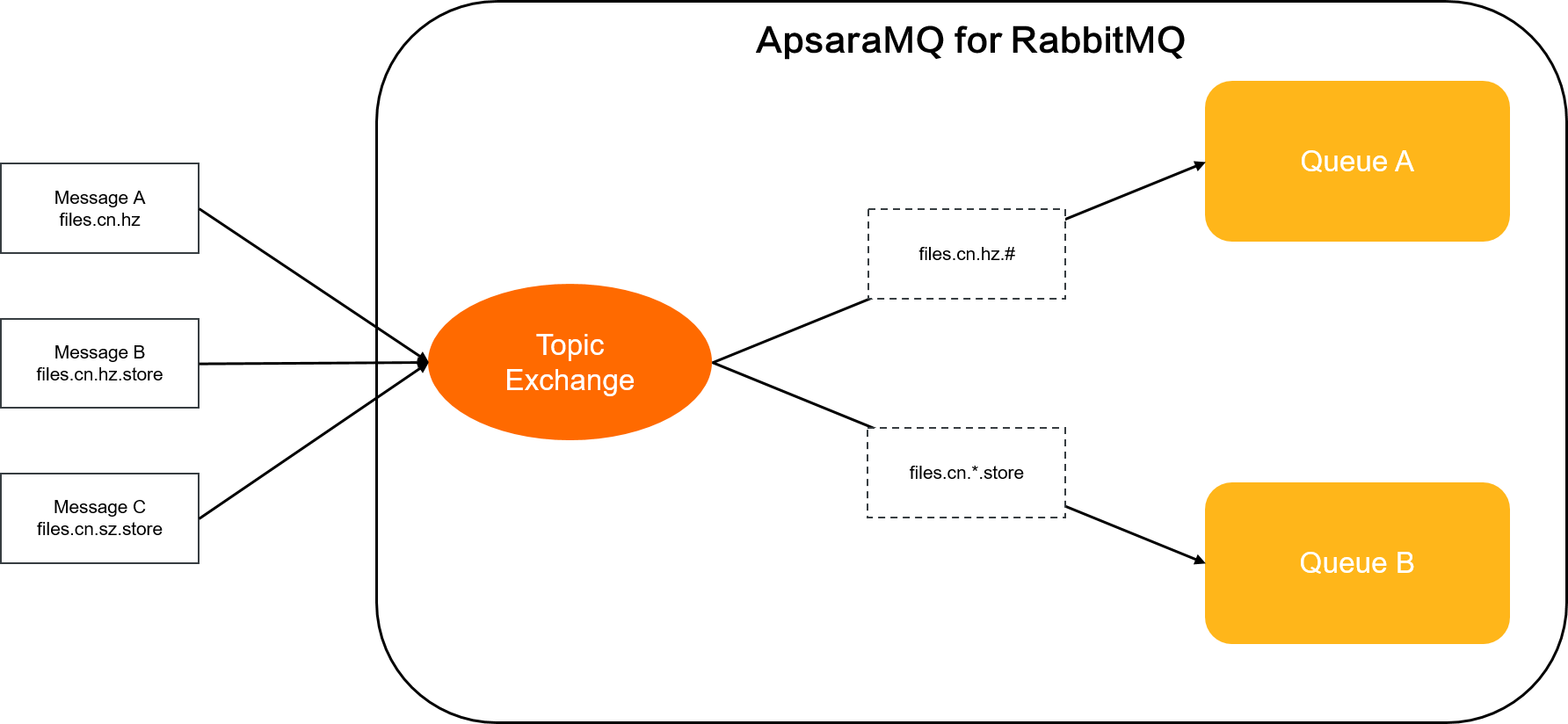
| Message | Routing key | Matching binding key | Destination queue |
|---|---|---|---|
| Message A | files.cn.hz | files.cn.hz.# | Queue A |
| Message B | files.cn.hz.store | files.cn.hz.#, files.cn.*.store | Queue A, Queue B |
| Message C | files.cn.sz.store | files.cn.*.store | Queue B |
Message A (
files.cn.hz): The#wildcard infiles.cn.hz.#matches zero trailing segments, so Message A goes to Queue A. It does not matchfiles.cn.*.storebecause no fourth segment exists.Message B (
files.cn.hz.store): Matchesfiles.cn.hz.#(one trailing segment) andfiles.cn.*.store(*matcheshz), so it goes to both Queue A and Queue B.Message C (
files.cn.sz.store): Matchesfiles.cn.*.store(*matchessz) but notfiles.cn.hz.#(third segmentszdiffers fromhz), so it goes only to Queue B.
Fanout exchanges
A fanout exchange routes every message to all bound queues, regardless of routing keys. The exchange ignores the routing key entirely.
When to use a fanout exchange:
Broadcast system-wide configuration or status updates to all services
Push real-time score updates to all connected mobile clients
Distribute messages to all participants in a group chat
Any scenario that requires one-to-all (broadcast) message delivery
Routing example
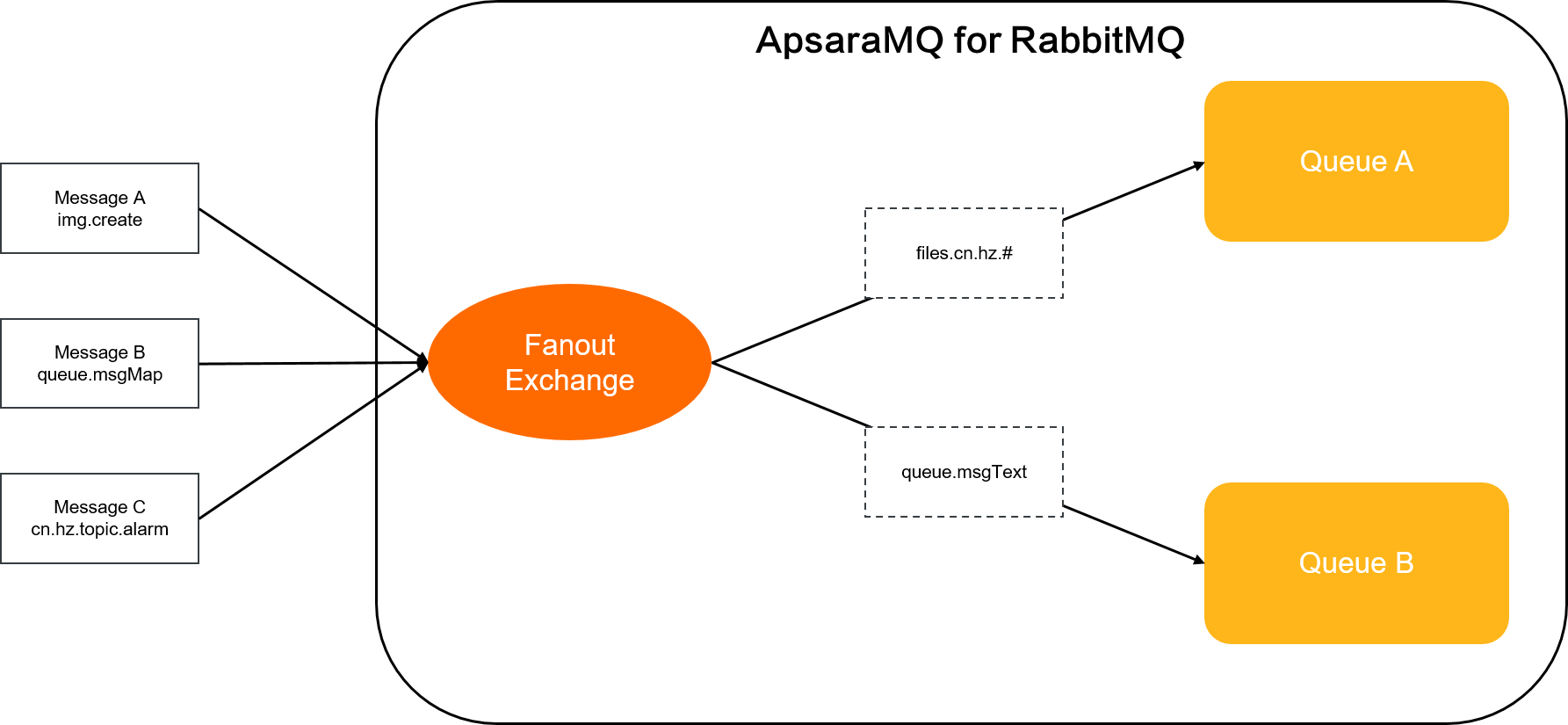
| Message | Routing key | Destination queue |
|---|---|---|
| Message A | img.create | Queue A, Queue B |
| Message B | queue.msgMap | Queue A, Queue B |
| Message C | cn.hz.topic.alarm | Queue A, Queue B |
All three messages carry different routing keys, but the fanout exchange delivers every message to both Queue A and Queue B. Routing keys have no effect.
Headers exchanges
A headers exchange routes messages based on header attributes instead of routing keys. It works like a more flexible direct exchange: rather than matching a single routing key string, it matches against multiple key-value pairs in the message headers.
How matching works
When you bind a queue to a headers exchange, you define a set of key-value pairs as binding arguments. When a producer publishes a message, it sets key-value pairs in the message headers. The exchange compares message headers against each queue's binding arguments to decide where to route the message.
A special binding argument, x-match, controls the matching strategy:
| x-match value | Behavior |
|---|---|
all | The message must match every binding argument (except x-match itself). This is a logical AND. |
any | The message must match at least one binding argument (except x-match itself). This is a logical OR. |
A header matches a binding argument when either of these conditions is true:
The header key and value are both identical to the binding argument's key and value.
The header key matches the binding argument's key, and the binding argument's value is empty.
When to use a headers exchange:
Route messages by multiple metadata dimensions (for example, content type, priority, and source)
Distribute categorized or tagged content, such as news articles filtered by topic and format
Any scenario where routing based on a single string key is too limiting
Routing example
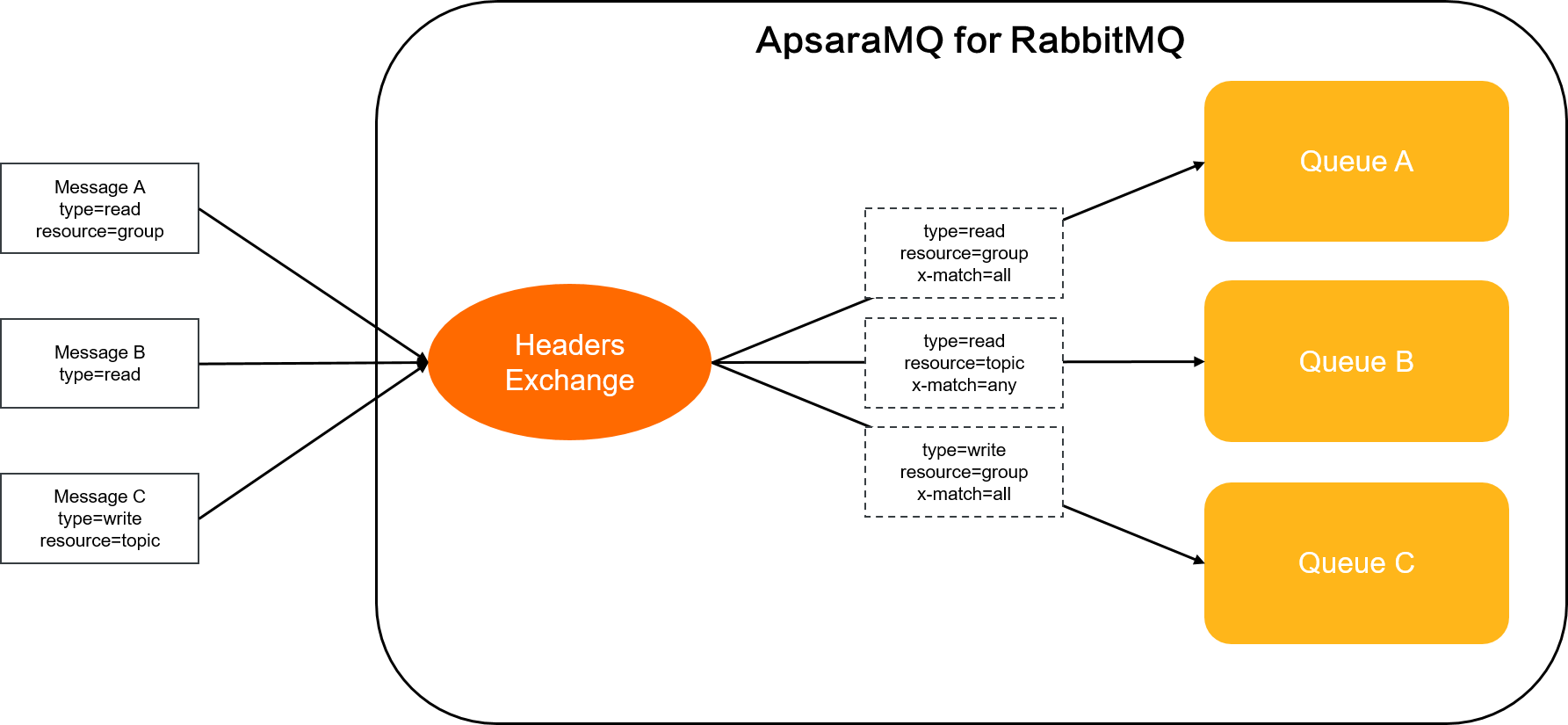
Binding setup:
| Queue | Binding arguments |
|---|---|
| Queue A | type=read, resource=group, x-match=all |
| Queue B | type=read, resource=topic, x-match=any |
Routing results:
| Message | Message headers | Destination queue | Reasoning |
|---|---|---|---|
| Message A | type=read, resource=group | Queue A, Queue B | Matches all of Queue A's arguments (type=read AND resource=group). Matches at least one of Queue B's arguments (type=read). |
| Message B | type=read | Queue B | Does not match Queue A because resource=group is missing (x-match=all requires all arguments). Matches Queue B because type=read satisfies x-match=any. |
| Message C | type=write, resource=topic | Queue B | Does not match Queue A because type=write differs from type=read. Matches Queue B because resource=topic satisfies x-match=any. |
x-delayed-message exchanges
ApsaraMQ for RabbitMQ is compatible with x-delayed-message exchanges provided by open-source RabbitMQ. Open-source RabbitMQ requires a plug-in to use x-delayed-message exchanges, but ApsaraMQ for RabbitMQ does not require plug-in installation.
An x-delayed-message exchange holds a message for a specified duration before delivering it to a queue. Set the x-delay header (in milliseconds) on each message to control the delay.
The exchange uses the x-delayed-type argument (specified at declaration time) to determine its routing behavior. The following exchange types are supported as x-delayed-type values:
Direct
Topic
Fanout
Headers
For example, an x-delayed-message exchange with x-delayed-type=direct routes messages by exact routing key match -- but only after the delay period elapses.
For more information, see Delayed messages.
Routing example
The following example shows an x-delayed-message exchange with x-delayed-type set to direct.
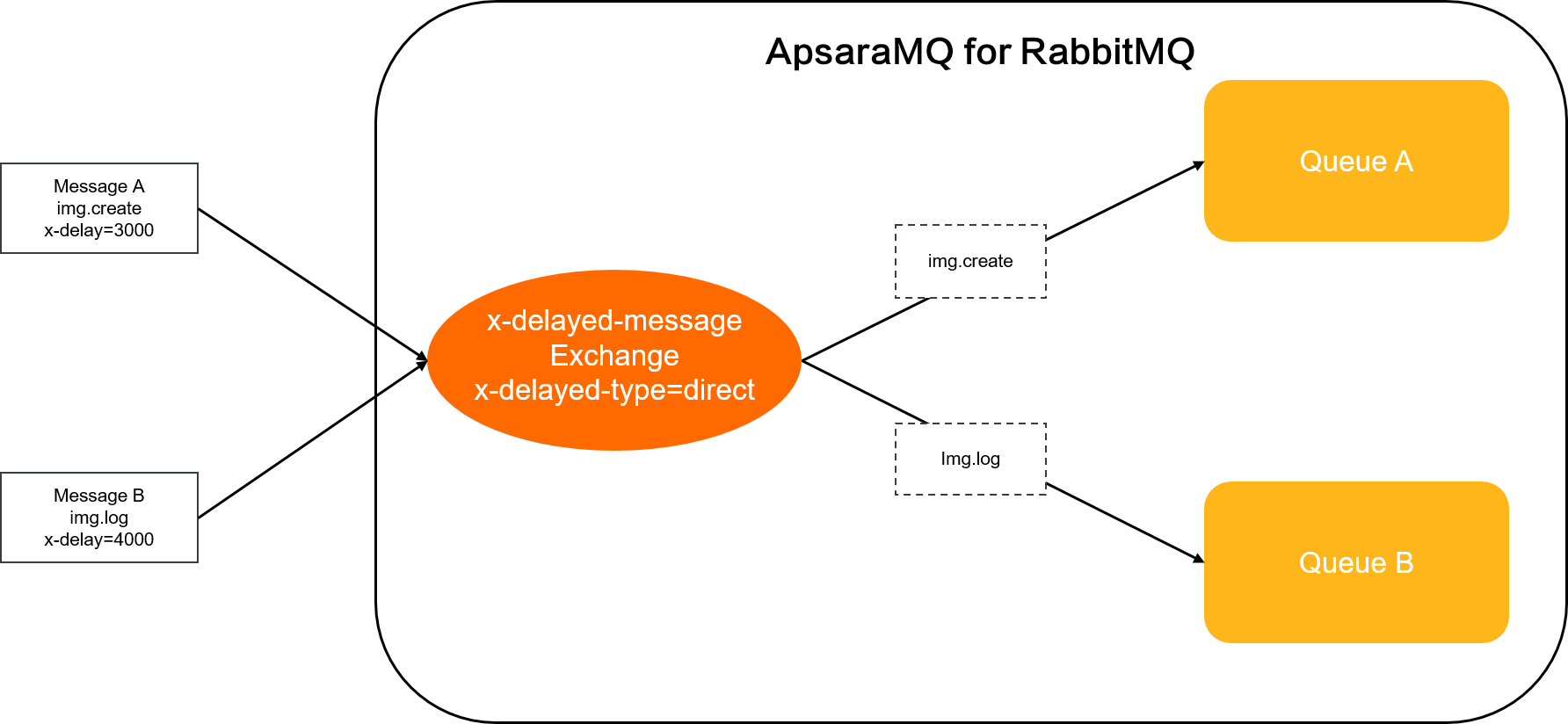
| Message | x-delay | Routing key | Binding key | Destination queue |
|---|---|---|---|---|
| Message A | 3000 | img.create | img.create | Queue A |
| Message B | 4000 | img.log | img.log | Queue B |
Message A: The exchange receives Message A and waits 3,000 milliseconds (3 seconds) before delivering it to Queue A.
Message B: The exchange receives Message B and waits 4,000 milliseconds (4 seconds) before delivering it to Queue B.
x-consistent-hash exchanges
ApsaraMQ for RabbitMQ is compatible with x-consistent-hash exchanges provided by open-source RabbitMQ. Open-source RabbitMQ requires a plug-in to use x-consistent-hash exchanges, but ApsaraMQ for RabbitMQ does not require plug-in installation.
An x-consistent-hash exchange uses consistent hashing to distribute messages across bound queues. It computes a hash from the message's routing key or a specified header value, then maps that hash to a queue. Messages with the same routing key (or header value) always land in the same queue.
x-consistent-hash exchanges do not support routing based on message ID, correlation ID, or timestamp.
Routing rules
Hash source: By default, the exchange hashes the routing key. To hash a header value instead, declare the exchange with the
hash-headerparameter and specify the header name. Producers must include this header in their messages. If the specified header is missing, all messages route to the same random queue.Priority: If both a routing key and
hash-headerare present, the exchange uses thehash-headervalue.Queue weight: When binding a queue, set the binding key to an integer from 1 to 20. This value represents the queue's weight -- a higher weight means the queue receives a larger share of messages. Values above 20 are treated as 20.
Binding constraints: If multiple bindings exist for a queue, only the first binding with a positive integer value takes effect. Delete the existing binding before changing a queue's weight.
When to use an x-consistent-hash exchange:
Distribute workload across multiple consumer queues with configurable weights
Routing example
The following example shows an x-consistent-hash exchange that routes by routing key.
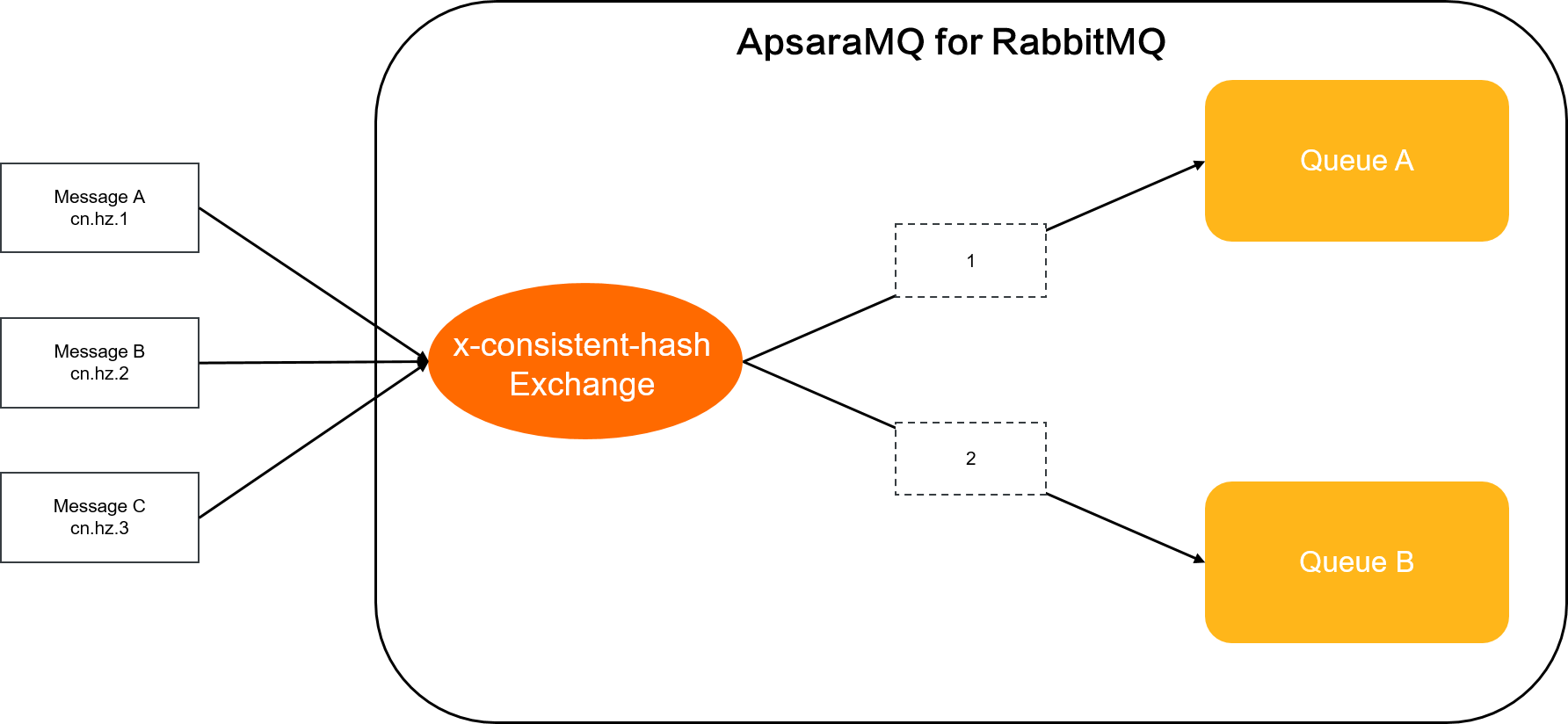
Messages:
| Message | Routing key |
|---|---|
| Message A | cn.hz.1 |
| Message B | cn.hz.2 |
| Message C | cn.hz.3 |
Queue bindings:
| Queue | Binding key (weight) |
|---|---|
| Queue A | 1 |
| Queue B | 2 |
The exchange hashes each message's routing key and maps it to a queue. Queue A has a weight of 1 and Queue B has a weight of 2, so approximately one-third of the messages go to Queue A and two-thirds go to Queue B.