Messages sometimes fail -- a consumer rejects them, retries run out, or the time-to-live (TTL) expires. Rather than losing these messages, a dead-letter exchange (DLX) captures them and routes them to a dedicated queue for inspection, reprocessing, or alerting.
The following sections cover key concepts, the routing process, configuration methods, and dead-letter message headers for ApsaraMQ for RabbitMQ.
Key concepts
| Term | Definition |
|---|---|
| Dead-letter exchange | An exchange that receives dead-letter messages and routes them to a dead-letter queue based on binding keys, routing keys, and header attributes. Any standard exchange type -- direct, fanout, topic, or headers -- can serve as a dead-letter exchange. |
| Dead-letter routing key | The routing key used to route a dead-letter message. If not specified, the message keeps its original routing key. |
| Dead-letter message | A message forwarded to a dead-letter exchange. See When messages become dead-lettered for the full list of triggers. |
| Dead-letter queue | A queue bound to a dead-letter exchange that stores dead-letter messages. |
When messages become dead-lettered
A message is sent to the dead-letter exchange when any of the following occurs:
Negative acknowledgment -- A consumer calls
basic.rejectorbasic.nackwithrequeueset tofalse.Retry exhaustion -- The message fails to be consumed after 16 retry attempts. For details, see Consumption retry policies.
TTL expiration -- The message stays in the queue longer than its configured message TTL. For details, see Message TTL.
How it works
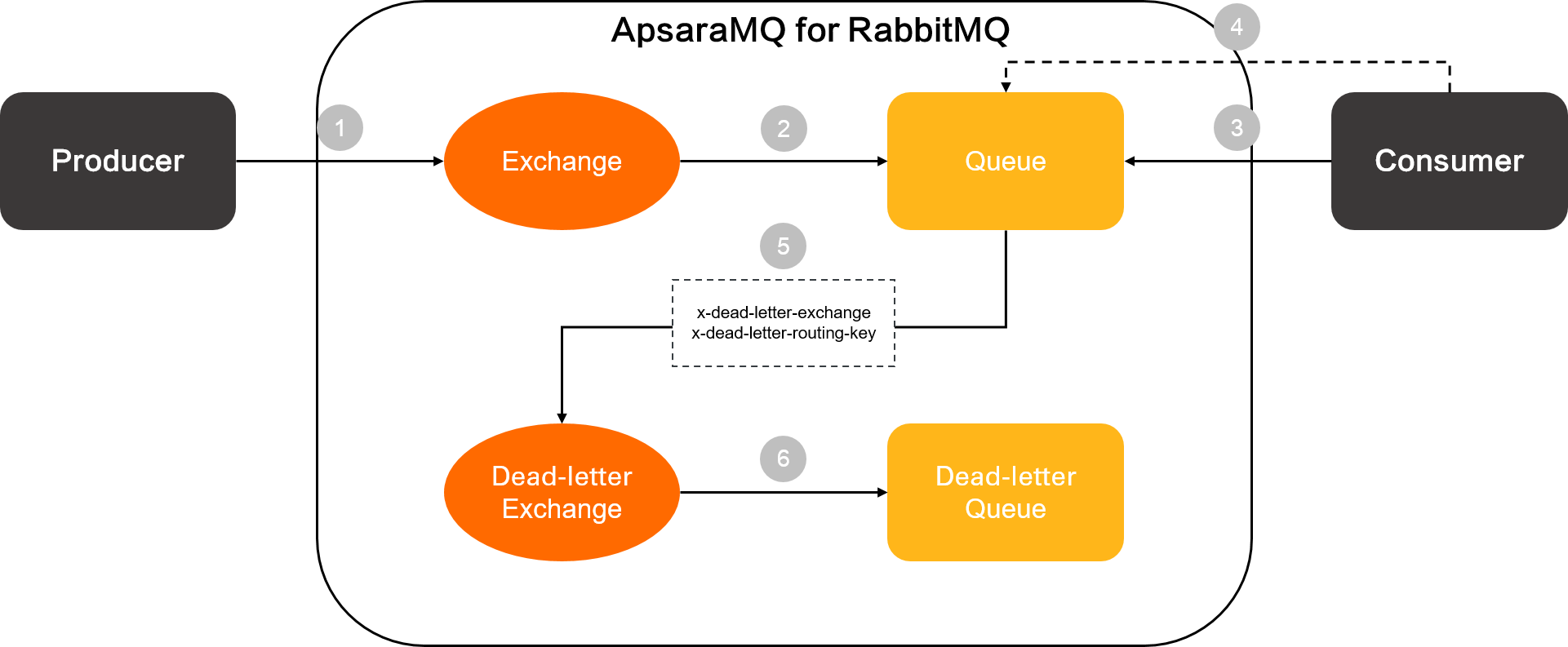
A producer publishes a message to an exchange.
The exchange routes the message to a queue.
A consumer pulls the message from the queue.
The message becomes dead-lettered -- through a negative acknowledgment, after 16 failed retry attempts, or when its TTL expires.
The queue forwards the dead-letter message to the exchange specified by
x-dead-letter-exchange, using the routing key specified byx-dead-letter-routing-key.The dead-letter exchange routes the message to the bound dead-letter queue.
Usage notes
Same-vhost requirement -- The dead-letter exchange and its bound queue must reside in the same vhost. Cross-vhost dead-letter routing is not supported.
Immutable DLX binding -- Once a queue is created with a dead-letter exchange, the DLX configuration cannot be changed. Delete the queue and create a new one with the updated configuration.
No DLX configured -- If a queue does not have a dead-letter exchange configured, messages are permanently deleted after the maximum number of delivery attempts (16 by default) is exceeded. If a dead-letter exchange is configured, the messages are routed to the corresponding dead-letter queue.
Configure a dead-letter exchange
Set up a dead-letter exchange through the ApsaraMQ for RabbitMQ console, the CreateQueue API, or a client SDK.
Console
Configure a dead-letter exchange when creating a queue in the console.
Log on to the ApsaraMQ for RabbitMQ console.
On the Overview page, in the Resource Distribution section, select a region.
On the Instances page, click the name of the target instance.
In the left-side navigation pane, click Queues.
On the Queues page, select a vhost from the Change drop-down list next to vhost, then click Create Queue.
In the Create Queue panel, set the following parameters, then click OK.
| Parameter | Description |
|---|---|
| Queue Name | The queue name. Supports letters, digits, hyphens (-), underscores (_), periods (.), number signs (#), forward slashes (/), and at signs (@). Length: 1 to 255 characters. Cannot be changed after creation. The prefix amq. is reserved and cannot be used. |
| Auto Delete | Whether to automatically delete the queue after the last consumer unsubscribes. Valid values: true, false. |
| Advanced Settings | Click to expand. Configure the dead-letter exchange and related settings: |
| - DeadLetterExchange | The exchange that receives dead-letter messages from this queue. |
| - DeadLetterRoutingKey | The routing key for dead-letter messages. The dead-letter exchange uses this key to route messages to the matching dead-letter queue. |
| - MessageTTL | The message TTL in milliseconds. Messages not consumed within this period become dead-letter messages and are forwarded to the dead-letter exchange. For details, see Message TTL. |
API
Call the CreateQueue operation with the dead-letter exchange parameters. For details, see CreateQueue.
Client SDK
Specify x-dead-letter-exchange and x-dead-letter-routing-key in the queue arguments when declaring the queue.
The following Java example declares a direct exchange named some.exchange.name as the dead-letter exchange with demo-routing-key as the dead-letter routing key:
channel.exchangeDeclare("some.exchange.name", "direct");

Map<String, Object> args = new HashMap<String, Object>();
args.put("x-dead-letter-exchange", "some.exchange.name");
args.put("x-dead-letter-routing-key", "demo-routing-key");

channel.queueDeclare("MyQueue", false, false, false, args);
Dead-letter message headers
When a message is dead-lettered, ApsaraMQ for RabbitMQ adds metadata headers to track the event history.
Summary headers
| Header | Description |
|---|---|
x-first-death-exchange | The exchange the message was in when it first became dead-lettered. |
x-first-death-queue | The queue the message was in when it first became dead-lettered. |
x-first-death-reason | The reason the message first became dead-lettered. |
x-death-total | The total number of times the message has been dead-lettered. |
The x-death array
The x-death header is an array of entries, each recording a dead-letter event with the following fields:
| Field | Description |
|---|---|
reason | Why the message was dead-lettered. |
queue | The queue the message was in when it was dead-lettered. |
exchange | The exchange the message was published to before being dead-lettered. |
routing-keys | The routing keys of the message at the time of dead-lettering. |
count | How many times the message was dead-lettered from this queue for this reason. |
time | When the message was dead-lettered. |
Dead-letter reason values
| Value | Trigger |
|---|---|
expired | The message TTL expired. |
nack | The message was negatively acknowledged with requeue set to false. |
reject | The message was rejected with requeue set to false. |
Consumption limit exceeded | The message failed after 16 retry attempts. |
Enable TTL for dead-letter queues
By default, messages in a dead-letter queue do not expire, even if the queue has a TTL configured. Enable the TTL feature at the instance level to allow dead-letter messages to honor the queue's TTL setting. When a dead-letter message's TTL expires, it is forwarded to the next configured dead-letter exchange.
Supported instance types
The TTL feature for dead-letter queues is available on the following instance types:
Serverless
Enterprise Edition (Subscription)
Platinum Edition (Subscription)
Procedure
On the Instances page of the ApsaraMQ for RabbitMQ console, click the name of the target instance.
On the Instance Details page, click the Limits tab.
Click Activate next to TTL Feature Supported.
Avoid creating dead-letter routing loops. For example, if Queue A's dead-letter queue is Queue B and Queue B's dead-letter queue is Queue A, messages loop indefinitely. If ApsaraMQ for RabbitMQ detects such a loop with no rejection event, it automatically disables TTL for the affected messages to stop the loop.
A dead-letter message can be routed between queues a maximum of 16 times. After reaching this limit, TTL is disabled for the affected messages.
What's next
Manage exchanges -- Delete a dead-letter exchange or bind a dead-letter queue to a dead-letter exchange.
Message TTL -- Set expiration times on messages.
Consumption retry policies -- Configure retry behavior before messages are dead-lettered.