Answers to common questions about sending and receiving messages with ApsaraMQ for MQTT, organized by topic.
Message delivery issues
Why are MQTT messages not consumed?
Check these three areas in order:
Wildcard subscription limit exceeded. Each first-level topic supports up to 100 wildcard subscriptions. Subscriptions beyond this limit do not take effect, so messages are not delivered to excess subscribers.
Consumer started after the producer. If no client has ever subscribed to the topic, start the consumer before the producer. Without a prior subscription record, the broker has no destination to queue messages.
cleanSessionis set totrue. To receive messages that arrive while the client is offline, setcleanSessiontofalse. This tells the broker to retain the subscription and queue messages during disconnection. When the client reconnects, the broker delivers the queued messages.QoS 2 does not support
cleanSession=false.
Why can't I receive offline messages even though offline messaging is enabled?
Start consumers before producers. If a producer sends messages to a topic that no client has ever subscribed to, those messages are not queued -- even with QoS 1 and cleanSession=false.
Offline messaging works only after a consumer has previously subscribed to the topic and then disconnects. On reconnection, the broker delivers the queued messages.
Why does a client miss messages from some topics?
ApsaraMQ for MQTT limits both the number of topics and the number of subscription relationships per client. When either limit is exceeded, excess subscriptions do not take effect and messages from those topics are not delivered.
Check the current subscription count against the limits listed in Client limits.
Is there a guaranteed order between offline and real-time messages?
No. When a client reconnects, offline messages and real-time messages are delivered independently. No ordering is guaranteed between the two streams.
Publishing issues
Why does the publishing thread hang?
Sending a QoS 1 message synchronously inside a message-receiving callback blocks the callback thread. This thread also handles heartbeats, so blocking it prevents heartbeat messages from being sent.
Fix: Send messages asynchronously from the callback, or use QoS 0, which does not wait for a broker acknowledgment.
Why can't the cloud SDK consume its own messages?
The cloud SDK does not support consuming messages that it produces. By design, the cloud SDK receives messages from end devices -- it is not intended for cloud-to-cloud messaging. Use end devices or dedicated MQTT clients for bidirectional messaging.
Message retry behavior
What is the retry interval for MQTT messages?
The retry interval is 3 to 6 seconds between retries.
Why do simultaneous retries appear for the same message?
This is a logging artifact. When write operations on the TCP connection are blocked (for example, due to network congestion), retry records accumulate in the write cache. Once the connection unblocks, all pending records are flushed and logged at once, creating the appearance of simultaneous retries. The actual retries occur at regular intervals.
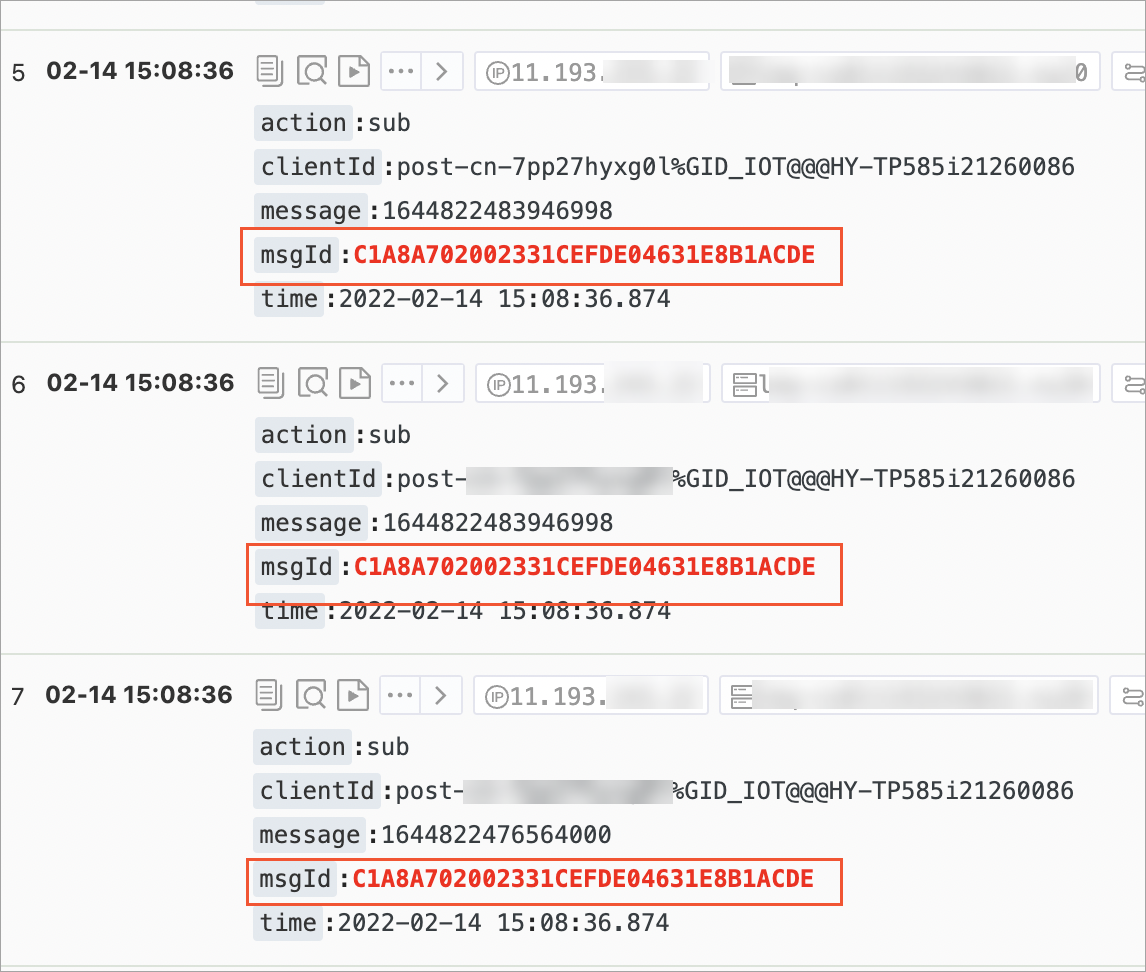
Why does the system repeatedly retry a message?
Retry behavior depends on the client connection state:
Client connected: The broker retries every 5 to 10 seconds. If all retry attempts are exhausted, the message is dropped.
Client disconnects during retries: Retries stop immediately. The retry count does not increase, and the consumer offset is not committed. The message remains in the queue and is delivered when the client reconnects.
Frequent transient disconnections: Each reconnection triggers the broker to re-deliver pending messages. Because the consumer offset is never committed during disconnections, messages are continuously re-pulled and re-pushed -- they are never dropped in this scenario.
Message forwarding
Why are no messages received when forwarding MQTT messages to Kafka?
Three common causes:
SQL mismatch. The SQL statement in the forwarding rule does not match the message content. Verify field names and filter conditions.
Wrong message format. MQTT-to-Kafka forwarding requires messages in JSON key-value format.
Unsupported message source. Messages sent through the MQTT quick-start feature or OpenAPI do not support rule-based forwarding. Use the official SDK instead.
Why are no messages received after configuring an MQTT egress rule to RocketMQ?
Egress rules only forward messages sent by end devices. Messages produced through server-side methods -- such as the cloud SDK or HTTP -- are not forwarded to ApsaraMQ for RocketMQ.
The message ID remains unchanged when messages flow from MQTT to RocketMQ.
Errors and diagnostics
Why do I get a "group ID is not granted permissions" error?
If your account is a RAM user, grant the RAM user explicit permissions to access ApsaraMQ for MQTT resources. Permissions can be granted at three levels: instance, topic, and Group.
For setup instructions, see Grant permissions to RAM users.
Why is msgId empty?
Two possible causes:
Message body exceeds the size limit. Reduce the payload size to within the allowed limit.
Internal RPC timeout. The broker's internal call timed out before generating a message ID. Implement a backoff retry on the client side to handle transient failures.
Why does a forward slash appear after the subtopic when transferring data from ApsaraMQ for RocketMQ to ApsaraMQ for MQTT?
When you use the mqttSecondTopic property to set a subtopic, the broker normalizes topic names by appending a forward slash (/) by default.
Why do I get a "Too many publishes in progress" error?
Your message-sending TPS exceeds the maximum allowed by your instance specification. Upgrade your instance to increase the messaging TPS limit. For instructions, see Renew, upgrade, or downgrade instances.
Throttling and instance limits
Does ApsaraMQ for MQTT throttle message sending and receiving?
Yes. Each instance enforces limits on:
Client connections
Messaging TPS
Client subscription relationships
When any limit is exceeded, messaging is throttled. To check the specifications for your instance, go to the Instance Information page in the ApsaraMQ for MQTT console.
To increase capacity, see Renew, upgrade, or downgrade instances.