ApsaraMQ for MQTT and Alibaba Cloud Real-Time Communication (RTC) together provide a foundation for real-time audio and video applications -- online conferencing, one-to-one voice calls, video meetings, and similar scenarios. ApsaraMQ for MQTT handles the signaling channel (call invitations, session control), while Alibaba Cloud RTC carries the media streams (audio and video data).
Solution architecture
The following diagram shows how signaling and media flow through the system.
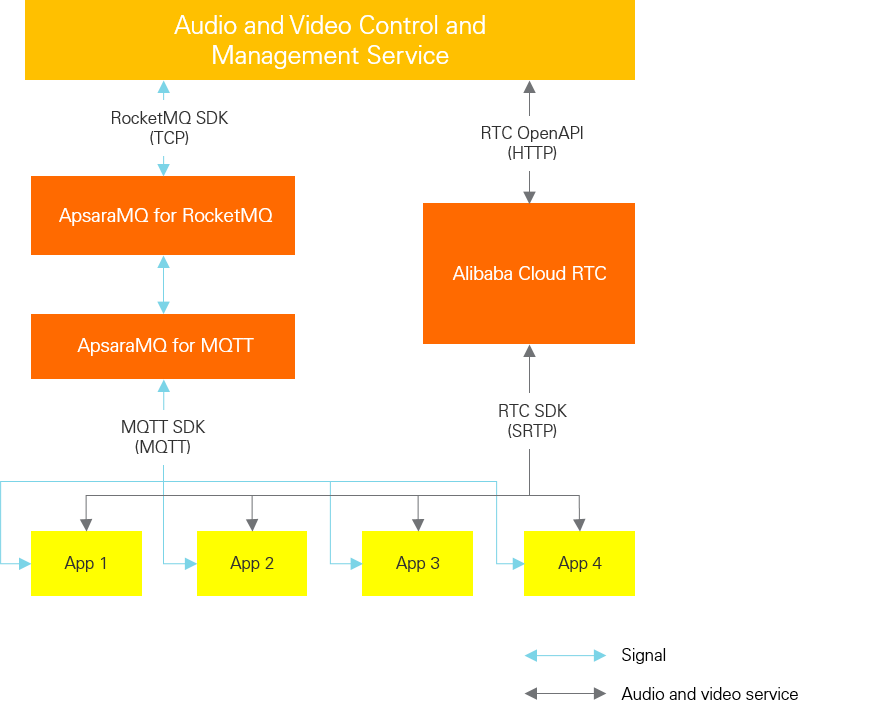
Two communication paths run in parallel:
Signaling path -- The terminal application sends and receives call-control messages through ApsaraMQ for MQTT. These messages route through ApsaraMQ for RocketMQ to the audio/video management service.
Media path -- After signaling establishes a session, audio and video data flows through Alibaba Cloud RTC servers.
| Benefit | Detail |
|---|---|
| Elastic scaling | Both ApsaraMQ for MQTT and Alibaba Cloud RTC scale on demand to handle traffic spikes. |
| Global reach | Global deployment with local access points saves cross-region and cross-border costs. |
| Fast integration | Fully managed services eliminate infrastructure setup and ongoing O&M, reducing labor and hardware costs. Easy-to-use APIs support rapid implementation. |
| End-to-end security | ApsaraMQ for MQTT supports SSL/TLS encryption. Media streams are protected by SRTP. |
| High reliability | All service nodes are highly available and stable. |
Call setup sequence
The following diagram illustrates the data flow when User A invites User B to a call.
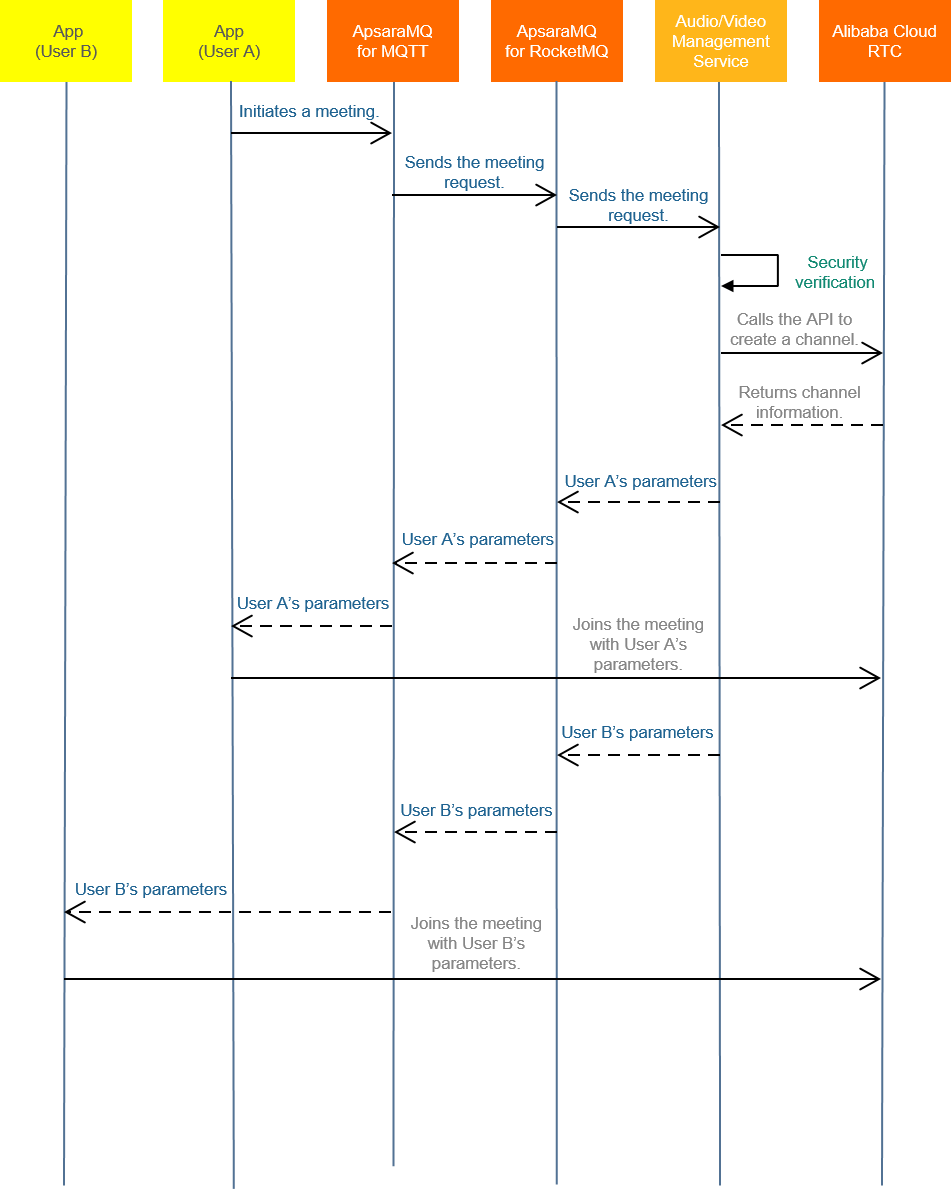
User A sends a call request. The terminal application publishes an MQTT message to the broker. ApsaraMQ for MQTT routes the message through ApsaraMQ for RocketMQ to the audio/video management service.
The management service registers the session. After validating the request, the service calls the Alibaba Cloud RTC API to register the resources and parameters for this communication.
User A receives session parameters. The management service packages the parameters into an invitation message, sends it to ApsaraMQ for RocketMQ, and ApsaraMQ for MQTT delivers it to User A's terminal application. User A joins the conference channel using these parameters.
User B receives the invitation. The management service looks up User B's information from User A's request and packages the session parameters into an invitation message. The message is delivered to User B through the same ApsaraMQ for MQTT path.
User B joins the call. User B's terminal application joins the conference channel. The call is now established.
ApsaraMQ for MQTT serves as the signaling channel. Use the same message-based pattern to implement additional workflows such as ending a meeting, inviting additional participants mid-call, or muting a participant.
Design client IDs
Every MQTT client must have a globally unique client ID. A client ID has two parts, joined by the @@@ separator:
<GroupID>@@@<DeviceID>The total length must not exceed 64 characters.
| Part | Source | Guidelines |
|---|---|---|
| Group ID (prefix) | Register in the ApsaraMQ for MQTT console. | Assign separate Group IDs per platform or channel -- for example, one for Android clients and another for iOS clients. This simplifies troubleshooting and enables platform-specific authorization. |
| Device ID (suffix) | Generated by the application. | Map each device ID to an application account ID to guarantee global uniqueness. |
For more details, see Terms.
Design topic names
MQTT uses a publish/subscribe model. Topics follow a hierarchical directory-tree structure with parent topics and subtopics. The total topic length (including all levels) must not exceed 64 characters.
| Level | Registration | Description |
|---|---|---|
| Parent topic | Register in the ApsaraMQ for MQTT console. | The first-level topic in the hierarchy. Equivalent to a namespace. |
| Subtopic | No registration required. | Any level below the parent topic. Define subtopics freely as needed. |
Topic design principles
Separate upstream and downstream traffic. Use different parent topics for messages sent from the terminal application to the management service (upstream) and messages sent from the management service to the terminal application (downstream).
Separate by priority or size. Assign different parent topics to messages with different priorities or significantly different payload sizes. This prevents large payloads from blocking time-sensitive signaling messages.
Use P2P messages for direct signaling. For the call-setup flow described above, P2P messages are the best fit -- the sender specifies the target client directly, and no subscription is required. See P2P messaging model.
For more details on topics, see Terms and the MQTT 3.1.1 specification.
Configure message parameters for mobile clients
Mobile applications are frequently killed by the OS while running in the background, causing the MQTT client to go offline. To make sure the client receives missed messages after reconnecting, configure the following parameters:
| Parameter | Value | Why |
|---|---|---|
| CleanSession | false | A persistent session tells the broker to store subscriptions and undelivered QoS 1/2 messages while the client is offline. When the client reconnects, the broker delivers those queued messages automatically. This avoids the overhead of re-subscribing and prevents missed call invitations. |
| QoS | 1 | QoS 1 (at-least-once delivery) guarantees that each message reaches the client at least once. If the broker does not receive an acknowledgment, it retransmits the message. QoS 0 (at-most-once) risks losing call invitations entirely. QoS 2 (exactly-once) adds a four-step handshake that increases latency without meaningful benefit for signaling, since the application handles deduplication anyway. |
Note: When you set CleanSession to false, the client ID must remain stable across reconnections. If the client ID changes, the broker treats the connection as a new session and the queued messages are lost.Handle duplicates
QoS 1 may deliver a message more than once -- for example, when an acknowledgment is lost in transit. There are two scenarios where this happens:
The PUBLISH packet did not reach the broker, so the client retransmits it.
The PUBLISH packet reached the broker, but the PUBACK was lost before reaching the client, so the client retransmits.
To handle duplicates, include a unique message ID or timestamp in the message payload. The terminal application should deduplicate incoming messages and verify timeliness. Discard call invitations older than a defined threshold, such as those received after the client has been offline for more than one day.
For more details on CleanSession and QoS, see Terms.
Key concepts
| Term | Definition |
|---|---|
| MQTT protocol | Message Queuing Telemetry Transport -- an industry-standard IoT and mobile Internet protocol optimized for lightweight data transmission between mobile devices. ApsaraMQ for MQTT supports MQTT by default. |
| MQTT broker | The server node that routes messages between MQTT clients and ApsaraMQ for RocketMQ. In this solution, ApsaraMQ for MQTT serves as the MQTT broker. |
| MQTT client | A node that connects to the MQTT broker to send or receive messages. In this solution, each MQTT client is an audio/video mobile application. |
| P2P message | An ApsaraMQ for MQTT extension to standard MQTT. A P2P message is delivered directly to a specified target client without subscription matching. For details, see P2P messaging model. |
| RTC | Real-Time Communication -- a real-time network communication method for voice and video. Common use cases include voice calling, video calling, and video conferencing. |
| RTC server | Hosts the audio/video media channel services provided by Alibaba Cloud RTC. |
| Audio/video management service | A control service that you build and deploy in the cloud, constructed using Alibaba Cloud products. It manages the lifecycle of all RTC sessions. |
| Terminal application | The end-user mobile application used to initiate or join audio/video calls. |
What's next
ApsaraMQ for MQTT SDK -- Download the MQTT client SDK for your platform.
ApsaraMQ for RocketMQ SDK -- Integrate the backend message routing service.
Alibaba Cloud RTC documentation -- Set up media channels and configure audio/video parameters.