ApsaraMQ for Kafka connectors run inside a virtual private cloud (VPC) and cannot reach the public Internet by default. If a connector needs to access Alibaba Cloud services deployed in other regions, set up a network route from the connector's VPC to the Internet by creating a Network Address Translation (NAT) gateway, an elastic IP address (EIP), and Source Network Address Translation (SNAT) entries.
Prerequisites
Before you begin, make sure you have:
An ApsaraMQ for Kafka instance with the connector feature enabled. For setup instructions, see Enable the connector feature
How it works
The following diagram shows the networking architecture that gives a connector Internet access.
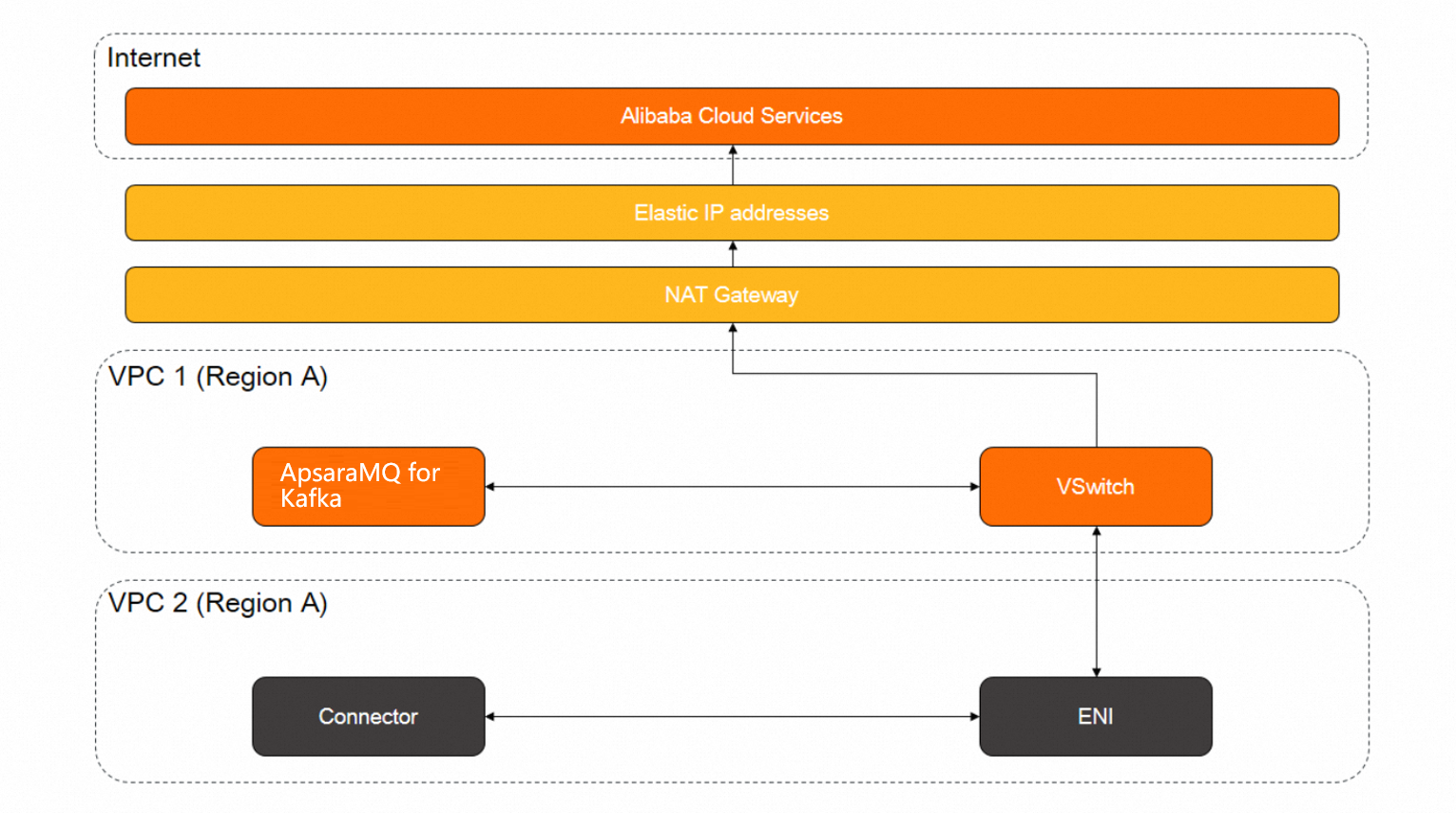
An Internet NAT gateway attached to the connector's VPC translates private IP addresses to a public EIP. SNAT entries map the vSwitch used by the ApsaraMQ for Kafka instance to that EIP, so all outbound traffic from the connector reaches the Internet.
To set up this route, create the following three resources:
| Resource | Purpose |
|---|---|
| Internet NAT gateway | Provides network address translation in the VPC where ApsaraMQ for Kafka is deployed (VPC 1) |
| EIP | Serves as the public IP address for all outbound connector traffic |
| SNAT entries | Map the instance's vSwitch to the EIP so outbound traffic is routed through the NAT gateway |
Set up Internet access
Step 1: Create an Internet NAT gateway
Create an Internet NAT gateway in VPC 1, the VPC where your ApsaraMQ for Kafka instance is deployed.
For instructions, see Create and manage Internet NAT gateways.
Step 2: Bind an EIP to the NAT gateway
Bind an EIP to the Internet NAT gateway you created in Step 1. This EIP serves as the public IP address for all outbound connector traffic.
For instructions, see Associate an EIP with a cloud resource.
Step 3: Create SNAT entries
Create SNAT entries for the vSwitch used by your ApsaraMQ for Kafka instance in VPC 1. SNAT entries route outbound traffic from the vSwitch through the EIP.
For instructions, see Create and manage SNAT entries.
Verify the result
After you complete all three steps, verify the networking path:
Open the NAT Gateway console and confirm that the Internet NAT gateway is active and associated with the correct VPC.
Confirm that the EIP is bound to the NAT gateway.
Confirm that the SNAT entry references the correct vSwitch and EIP.
Run a connector task that accesses an Alibaba Cloud service in another region, and confirm that data is delivered.
If the connector still cannot reach the target service, check the following:
| Issue | Action |
|---|---|
| NAT gateway status is not Active | Wait for provisioning to complete, or check for configuration errors in the NAT Gateway console |
| EIP not associated | Re-associate the EIP with the NAT gateway. See Associate an EIP with a cloud resource |
| SNAT entry references wrong vSwitch | Verify the vSwitch ID matches the one used by your ApsaraMQ for Kafka instance. Update the SNAT entry if needed |