After you configure an IP address whitelist for an ApsaraMQ for Kafka instance, only the IP addresses and ports that you specified in the whitelist can access the instance. This topic describes how to use the alicloud_alikafka_instance_allowed_ip_attachment resource provided by Terraform to add IP addresses or CIDR blocks to or remove IP addresses or CIDR blocks from IP address whitelists.
You can run the sample code in this topic with a few clicks.
Before you start
An Alibaba Cloud account has full permissions on all resources that belong to the account. If the credentials of an Alibaba Cloud account are leaked, security risks may arise. We recommend that you use a Resource Access Management (RAM) user and create an AccessKey pair for the RAM user. For more information, see Create a RAM user and Create an AccessKey pair.
You must use RAM to manage access permissions on cloud resources in an efficient manner. This helps meet the requirements for multi-user collaboration and allows you to grant permissions to users based on the principle of least privilege to prevent security vulnerabilities caused by excessive permissions. For more information, see Grant permissions to RAM users.
{
    "Version": "1",
    "Statement": [
        {
            "Effect": "Allow",
            "Action": [
                "vpc:DescribeVpcAttribute",
                "vpc:DescribeRouteTableList",
                "vpc:DescribeVSwitchAttributes",
                "vpc:DeleteVpc",
                "vpc:DeleteVSwitch",
                "vpc:CreateVpc",
                "vpc:CreateVSwitch"
            ],
            "Resource": "*"
        },
        {
            "Effect": "Allow",
            "Action": "bss:ModifyAgreementRecord",
            "Resource": "*"
        },
        {
            "Effect": "Allow",
            "Action": [
                "bss:DescribeOrderList",
                "bss:DescribeOrderDetail",
                "bss:PayOrder",
                "bss:CancelOrder"
            ],
            "Resource": "*"
        },
        {
            "Effect": "Allow",
            "Action": [
                "ecs:CreateSecurityGroup",
                "ecs:ModifySecurityGroupPolicy",
                "ecs:DescribeSecurityGroups",
                "ecs:ListTagResources",
                "ecs:DeleteSecurityGroup",
                "ecs:DescribeSecurityGroupAttribute",
                "ecs:AuthorizeSecurityGroup",
                "ecs:RevokeSecurityGroup"
            ],
            "Resource": "*"
        },
        {
            "Action": "alikafka:*",
            "Resource": "*",
            "Effect": "Allow"
        },
        {
            "Action": "ram:CreateServiceLinkedRole",
            "Resource": "*",
            "Effect": "Allow",
            "Condition": {
                "StringEquals": {
                    "ram:ServiceName": [
                        "connector.alikafka.aliyuncs.com",
                        "instanceencryption.alikafka.aliyuncs.com",
                        "alikafka.aliyuncs.com",
                        "etl.alikafka.aliyuncs.com"
                    ]
                }
            }
        }
    ]
}
Prepare the runtime environment for Terraform by using one of the following methods:
Use Terraform in Terraform Explorer: Alibaba Cloud provides Terraform Explorer, an online runtime environment for Terraform. You can use Terraform after you log on to Terraform Explorer without the need to install Terraform. This method is suitable for scenarios in which you want to use and debug Terraform in a fast and convenient manner at no additional costs.
Use Terraform in Cloud Shell: Terraform is preinstalled in Cloud Shell and identity credentials are configured. You can directly run Terraform commands in Cloud Shell. This method is suitable for scenarios in which you want to use and debug Terraform in a fast and convenient manner at low costs.
Install and configure Terraform on your on-premises machine: This method is suitable for scenarios in which network connections are unstable or a custom development environment is required.
Required resources
You are charged for specific resources required in this topic. If you no longer require the resources, release or unsubscribe from the resources at the earliest opportunity.
alicloud_vpc: creates a virtual private cloud (VPC).
alicloud_vswitch: creates a vSwitch in a VPC.
alicloud_security_group: creates a security group.
alicloud_alikafka_instance: creates an ApsaraMQ for Kafka instance.
alicloud_alikafka_instance_allowed_ip_attachment: adds IP addresses or CIDR blocks to the IP address whitelist of an instance.
Add IP addresses or CIDR blocks to an IP address whitelist
In the following example, IP addresses are added to the IP address whitelist of an ApsaraMQ for Kafka instance in the China (Shenzhen) region.
Create a working directory and a configuration file named main.tf in the directory. Copy the following code to the main.tf configuration file:
Create the required resources.
variable "region" {
  default = "cn-shenzhen"
}

variable "instance_name" {
  default = "alikafkaInstanceName"
}

variable "zone_id" {
  default = "cn-shenzhen-f"
}

provider "alicloud" {
  region = var.region
}

# Create a VPC.
resource "alicloud_vpc" "default" {
  vpc_name   = "alicloud"
  cidr_block = "172.16.0.0/16"
}

# Create a vSwitch.
resource "alicloud_vswitch" "default" {
  vpc_id     = alicloud_vpc.default.id
  cidr_block = "172.16.192.0/20"
  zone_id    = var.zone_id
}

# Create a security group.
resource "alicloud_security_group" "default" {
  vpc_id = alicloud_vpc.default.id
}

# Create an instance. The disk type is ultra disk, the disk capacity is 500 GB, and the traffic specification is alikafka.hw.2xlarge.
# Deploy the instance.
resource "alicloud_alikafka_instance" "default" {
  name           = var.instance_name
  partition_num  = 50
  disk_type      = 0
  disk_size      = 500
  deploy_type    = 5
  io_max_spec    = "alikafka.hw.2xlarge"
  vswitch_id     = alicloud_vswitch.default.id
  security_group = alicloud_security_group.default.id
}
In the main.tf configuration file, add the
resource "alicloud_alikafka_instance_allowed_ip_attachment" "default" {}configuration item.resource "alicloud_alikafka_instance_allowed_ip_attachment" "default" { instance_id = alicloud_alikafka_instance.default.id allowed_type = "vpc" port_range = "9092/9092" allowed_ip = "192.168.0.0/32" }
Run the following command to initialize the runtime environment for Terraform:
terraform initIf the following information is returned, Terraform is initialized.
Initializing the backend...

Initializing provider plugins...
- Checking for available provider plugins...
- Downloading plugin for provider "alicloud" (hashicorp/alicloud) 1.90.1...
...

You may now begin working with Terraform. Try running "terraform plan" to see
any changes that are required for your infrastructure. All Terraform commands
should now work.

If you ever set or change modules or backend configuration for Terraform,
rerun this command to reinitialize your working directory. If you forget, other
Create an execution plan and preview the changes.
terraform planRun the following command to create the resources:
terraform applyDuring the execution, enter
yesas prompted and press the Enter key. Wait until the command is executed. If the following information is returned, the command is run.alicloud_vpc.default: Creating... alicloud_vpc.default: Creation complete after 7s [id=vpc-****] alicloud_security_group.default: Creating... alicloud_vswitch.default: Creating... alicloud_security_group.default: Creation complete after 1s [id=sg-****] alicloud_vswitch.default: Creation complete after 4s [id=vsw-****] alicloud_alikafka_instance.default: Creating... alicloud_alikafka_instance.default: Still creating... [10s elapsed] ··· alicloud_alikafka_instance.default: Creation complete after 5m12s [id=alikafka_post-cn-****] alicloud_alikafka_instance_allowed_ip_attachment.default: Creating... alicloud_alikafka_instance_allowed_ip_attachment.default: Creation complete after 1s [id=alikafka_post-cn-****:vpc:9092/9092:192.168.0.0/32] Apply complete! Resources: 5 added, 0 changed, 0 destroyed.Verify the result.
Use the terraform show command
Run the
terraform showcommand to view information about the IP address whitelist.terraform show# alicloud_alikafka_instance_allowed_ip_attachment.default: resource "alicloud_alikafka_instance_allowed_ip_attachment" "default" { allowed_ip = "192.168.0.0/32" allowed_type = "vpc" id = "alikafka_post-cn-****:vpc:9092/9092:192.168.0.0/32" instance_id = "alikafka_post-cn-****" port_range = "9092/9092" }Use the ApsaraMQ for Kafka console
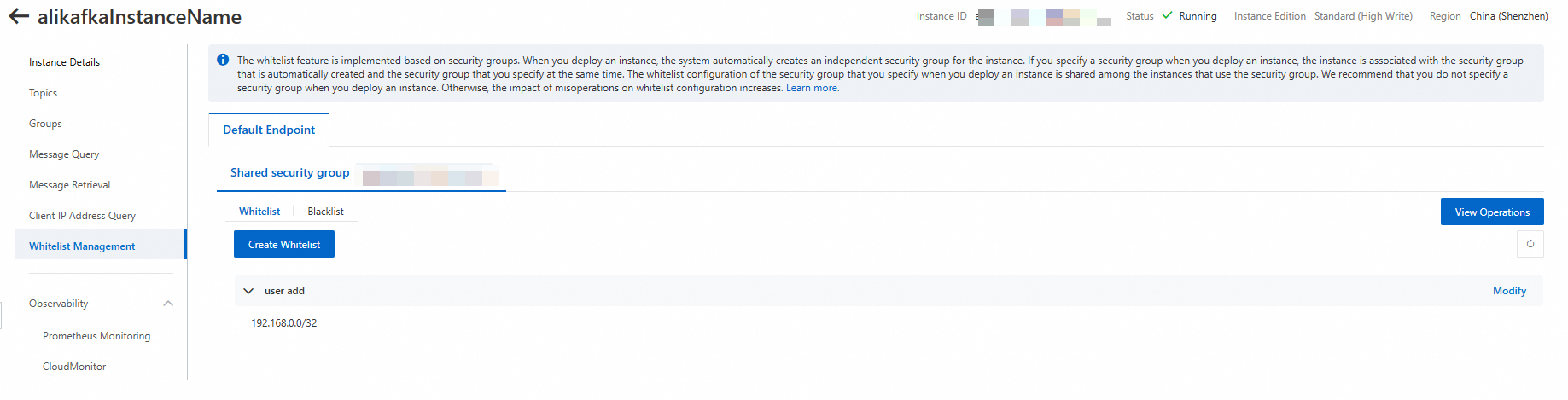
Log on to the ApsaraMQ for Kafka console to view information about the IP address whitelist.
Clear resources
If you no longer require the preceding resources that are created or managed by using Terraform, run the following command to release the resources. For more information about the terraform destroy command, see Common commands.
terraform destroySample code
You can run the sample code with a few clicks.
Sample code
References
You can also manage IP address whitelists in the ApsaraMQ for Kafka console or by calling API operations. For more information, see Configure whitelists and UpdateAllowedIp.
For information about other arguments provided by the
alicloud_alikafka_instance_allowed_ip_attachmentresource, see alicloud_alikafka_instance_allowed_ip_attachment.