This topic describes the instance types and performance test results for OceanBase Data Transmission Service. It also explains how to upgrade the instance type for a data migration or data synchronization task.
Notes
The instance types described in this topic are based on test data. This information is for reference only when you select an instance type and is not covered by the product's Service-Level Agreement (SLA).
Different instance types offer different performance levels for incremental synchronization, measured in records per second (RPS), and have different recommendations for the maximum number of table objects to migrate or synchronize. OceanBase Data Transmission Service can synchronize data to the destination within seconds. However, factors such as the source instance workload, network bandwidth, network latency, and the destination instance write performance can increase latency. For this reason, latency within seconds cannot be guaranteed.
Terms
Instance type: OceanBase Data Transmission Service provides instance types with different performance levels, which are measured by the number of records synchronized per second.
RPS: The number of data rows that are incrementally synchronized to the destination table per second. For example, if 5,000 rows of data are incrementally synchronized from the source database to the destination table per second, the RPS is 5,000.
Table object: The recommended maximum number of tables for a data migration or data synchronization task. This recommendation is based on a maximum of 50 fields per table object.
Specifications
OceanBase Data Transmission Service offers five instance types based on the upper performance limits for migration or synchronization: MICRO, SMALL, MEDIUM, LARGE, and XLARGE. To reach the upper performance limits for incremental synchronization listed in the table below, the following conditions must be met.
The load on the source instance is greater than or equal to the upper performance limit of the instance type.
The write performance of the destination instance is not a bottleneck.
The network latency between the source or destination instance and OceanBase Data Transmission Service is less than or equal to 2 ms.
The number of table objects to migrate or synchronize is less than or equal to the recommended maximum number of table objects in the table below.
Specifications
Upper performance limit (RPS) reference
Traffic Limit (MiB/s)
Recommended maximum number of table objects
MICRO
300
0.3
100
SMALL
3,000
3
2,000
MEDIUM
5,000
5
40,000
LARGE
10,000
10
100,000
XLARGE
25,000
25
200,000
NoteThe performance of an instance type is affected by factors such as the network environment and the performance and latency of the source and destination instances. Therefore, actual performance may vary. The upper performance limits in the table are for reference only and are not covered by the SLA.
Upgrade an instance type
If the current instance type does not meet your business needs, you can upgrade the instance type for your data migration or data synchronization task.
Limits
You cannot downgrade the instance type for a data migration or data synchronization task.
For a data migration task, you can perform an upgrade only if the Incremental Synchronization or Reverse Incremental step is running and the task status is Running.
For a data synchronization job, you can perform an upgrade only if the Incremental Synchronization step is running and the job status is Running.
If a data migration task is in the Upgrading/Downgrading state, you cannot proceed to the Forward Switchover step or add or remove migration objects.
If a data synchronization task is in the Upgrading/Downgrading state, you cannot add or remove synchronization objects.
When you migrate data from a PolarDB-1.0 database to an OceanBase database MySQL tenant, if an instance is attached to multiple tasks, you can upgrade the instance only if all associated tasks are running in the Incremental Synchronization or Reverse Incremental step.
Upgrade an instance
Log on to the OceanBase console.
In the navigation pane on the left, click Data Transmission > Data Migration.
This topic uses the upgrade of an instance type for a data migration task as an example. To upgrade the instance type for a data synchronization task, click Data Transmission > Data Synchronization to go to the Sync Task List page and perform the same operations.
On the Migration Job List page, click ... > Upgrade for the target job.

You can also click the name of the target task to open the details page, and then click ... > Upgrade in the upper-right corner.

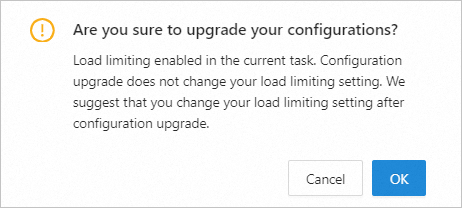
(Optional) Click OK in the dialog box.
If you enabled the rate limiting and throttling feature in the Incremental Synchronization or Reverse Incremental step of a data migration task, or in the Incremental Synchronization step of a data synchronization task, you must click OK in the pop-up dialog box. If this feature is not enabled, you are redirected to the upgrade and downgrade page.
On the Upgrade/Downgrade page, select the desired Instance Type, and then select the I Have Read And Agree To The Data Transmission Service - Pay-As-You-Go Terms Of Service checkbox.

Click Buy Now.
After the purchase is successful, you can return to the Migration Task List or Sync Task List page to view the new instance specifications for the task.