Use auto-generated software development kits (SDKs) from API Gateway to call published APIs from your business system — without implementing signature logic manually.
Before you begin
Auto-generated SDKs include a built-in signature implementation, so you don't need to handle signature calculations yourself. To implement signature authentication manually instead, see Client-side signature instructions.
Complete the steps in Create an API with an HTTP backend service before proceeding. The API must meet all of the following requirements before an SDK can call it:
The security authentication method is set to Alibaba Cloud App.
Your application is authorized to call the API.
The API is published to an online environment.
1. Download an SDK
The console provides two download paths, depending on whether you want an application-scoped SDK or a group-scoped SDK:
By application: In the left-side navigation pane, choose , and then click the Authorized APIs tab. In the Auto-generated SDKs/Documents for Authorized APIs section, download the SDK for your application. Supported auto-generated languages: Objective-C, Android, and Java. Call examples for other languages appear at the bottom of the page.
By API group: In the left-side navigation pane, choose , and then click Group APIs. In the Auto-generated SDKs/Documents section, download the SDK for the API group. Supported auto-generated languages: Objective-C, Android, Java, Go, and TypeScript.
2. Use the SDK to call an API
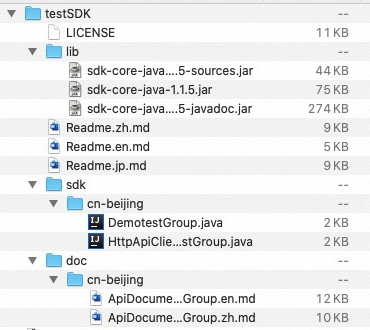
The decompressed SDK package contains the following directory structure:
-
The sdk folder — Java SDK source files organized by region and group.
* sdk/{{regionId}}: The Java SDK folder for all API operations in each group.
* HttpApiClient{{group}}.java: Client methods for API operations that use the HTTP channel.
* HttpsApiClient{{group}}.java: Client methods for API operations that use the HTTPS channel.
* WebSocketApiClient{{group}}.java: Client methods for API operations that use the WebSocket channel.
* Demo{{group}}.java: Runnable call examples for all API operations in the group.
-
The doc/{{regionId}} folder — API reference documentation.
* ApiDocument_{{group}}.md: The API reference for the corresponding group.
-
The lib folder — SDK core dependencies.
* sdk-core-java-1.1.5.jar: The core SDK package. Required.
* sdk-core-java-1.1.5-sources.jar: Source code for the core package.
* sdk-core-java-1.1.5-javadoc.jar: Javadoc for the core package.
Readme.md: The SDK user guide with step-by-step integration instructions.
LICENSE: The copyright license.
Follow the steps in Readme.md to integrate the SDK into your application and make API calls.
AppKey and AppSecret are the credentials the gateway uses to authenticate requests. Encrypt these values before deploying them on the client side.
3. Troubleshooting
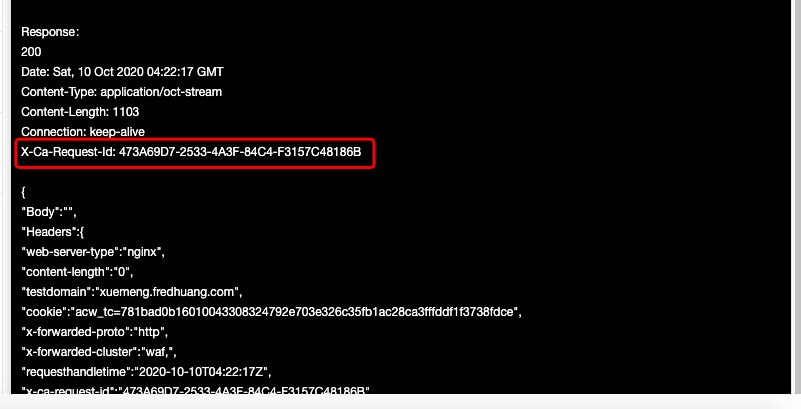
If a call fails, retrieve the request ID from the response header to identify the issue. For diagnostic steps, see API Debugging and Self-service Troubleshooting.