You can use a CMA mitigation plan only with an Anti-DDoS Proxy (Outside Chinese Mainland) instance that has an Insurance or Unlimited mitigation plan. After you add your service, which is deployed in a region outside the Chinese mainland, to an Anti-DDoS Proxy (Outside Chinese Mainland) instance for protection, you can configure a CMA mitigation plan to accelerate access for users in the Chinese mainland during normal conditions.
Prerequisites
You have purchased an Anti-DDoS Proxy (Outside Chinese Mainland) instance with the Insurance or Unlimited mitigation plan.
You have purchased an Anti-DDoS Proxy (Outside Chinese Mainland) instance with the CMA mitigation plan.
For more information, see Purchase an Anti-DDoS Proxy instance.
Background information
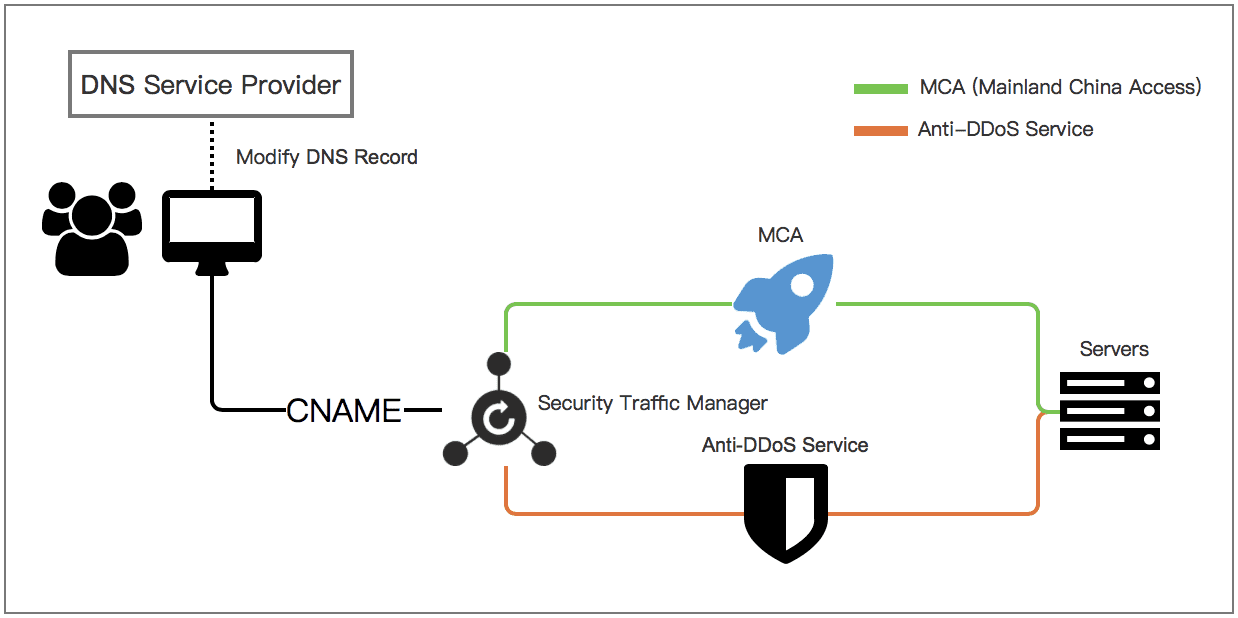
By configuring a CMA mitigation plan for Anti-DDoS Proxy (Outside Chinese Mainland), you can accelerate service access during normal conditions. When an attack is detected, traffic is automatically switched to the instance with the Insurance or Unlimited mitigation plan to mitigate the DDoS attack.
Procedure
Log on to the Anti-DDoS Proxy console.
In the top menu bar at the upper left corner, choose the Outside Chinese Mainland region.
If you select this region, you are redirected to the Anti-DDoS Proxy (Outside Chinese Mainland) console.
Add your service to both the instance with the Insurance or Unlimited mitigation plan and the instance with the CMA mitigation plan.
For website services, use the Website Config method.
On the page, click Add Website and enter the required website information. For more information, see Add a website configuration.
ImportantWhen you select an Instance, you must select both the instance with the Insurance or Unlimited mitigation plan and the instance with the CMA mitigation plan.
Complete only the Websites configuration. After you successfully configure the website, do not modify DNS records at this stage.
For non-website services, use the Port Config method.
On the page, click Create Rule to configure the service ports that you want to protect. For more information, see Configure a port forwarding rule.
ImportantThe CMA mitigation plan supports only non-website services that use a domain name, not an IP address, to specify the server address.
The forwarding rules must be identical on both the instance with the Insurance or Unlimited mitigation plan and the instance with the CMA mitigation plan.
Add a Network Acceleration traffic scheduling rule.
On the General Interaction tab of the page, click Create Rule to configure a Network Acceleration rule. For more information, see Add a network acceleration interaction rule.
After you create the rule, Sec-Traffic Manager generates a CNAME record. To enable automatic traffic scheduling, you must point your service's DNS record to this CNAME.
ImportantAutomatic traffic scheduling requires a CNAME record for DNS resolution.
At your DNS provider, update the DNS record for your service domain.
To activate the traffic scheduling rule, you must change the DNS record for your domain at your DNS provider. If you use Alibaba Cloud DNS, make this change in the Alibaba Cloud DNS console. Otherwise, use your third-party DNS provider's platform. Point the record to the CNAME address generated by Sec-Traffic Manager.
ImportantThe traffic scheduling rule takes effect after you modify the DNS record. Before modifying the DNS record, we recommend testing the traffic scheduling rule by modifying the hosts file on your local computer. This helps prevent service interruptions caused by inconsistent back-to-origin policies.
For information about how to test the rule, see Verify the forwarding configuration locally.
For information about how to modify the DNS record, see Modify the CNAME record to direct traffic to Sec-Traffic Manager.
Result
After you configure the network acceleration rule, traffic is handled as follows: During normal operations, users in the Chinese mainland access your server through the accelerated connection from the CMA mitigation plan. When an attack is detected, traffic is automatically switched to the Anti-DDoS Proxy (Outside Chinese Mainland) instance with the Insurance or Unlimited mitigation plan for scrubbing. Only legitimate traffic is forwarded to the origin server.