This topic describes how to use Terraform to configure port forwarding rules. An example of adding a new port forwarding rule is provided.
You can run the sample code in this topic with a single click. Run with one click
Prerequisites
You have purchased an Anti-DDoS Pro or Anti-DDoS Premium instance. For more information, see Purchase and manage an Anti-DDoS Pro or Anti-DDoS Premium instance using Terraform.
Your Alibaba Cloud account has full permissions on all resources. If the identity credentials of your Alibaba Cloud account are leaked, your resources are exposed to high security risks. We recommend that you use a Resource Access Management (RAM) user and create an AccessKey pair for the RAM user. For more information, see Create a RAM user and Create an AccessKey pair.
You can use the following sample code to grant permissions to the RAM user. For more information, see Grant permissions to a RAM user.
{
    "Version": "1",
    "Statement": [
        {
            "Action": [
                "slb:CreateLoadBalancer",
                "slb:CreateLoadBalancerHTTPListener",
                "slb:CreateLoadBalancerHTTPSListener",
                "slb:CreateLoadBalancerTCPListener",
                "slb:CreateLoadBalancerUDPListener",
                "slb:ModifyLoadBalancerInternetSpec",
                "slb:AddBackendServers",
                "slb:RemoveBackendServers",
                "slb:SetLoadBalancerName",
                "ecs:AuthorizeSecurityGroup",
                "ecs:RevokeSecurityGroup",
                "ecs:DescribeSecurityGroups",
                "ecs:DescribeSecurityGroupAttribute"
            ],
            "Resource": "*",
            "Effect": "Allow"
        }
    ]
}
Prepare a Terraform runtime environment. You can use one of the following methods to run Terraform:
Use Terraform in Terraform Explorer: Alibaba Cloud provides an online Terraform runtime environment. You can log on to the environment to use and test Terraform online without needing to install it. This method is suitable for scenarios where you want to quickly and conveniently test and debug Terraform at no cost.
Cloud Shell: The Terraform component is pre-installed in Alibaba Cloud Shell, and the identity credentials are configured. You can run Terraform commands directly in Cloud Shell. This method is suitable for scenarios where you want to quickly and conveniently access and use Terraform at a low cost.
Install and configure Terraform in an on-premises environment: This method is suitable for scenarios that have poor network connectivity or require custom development environments.
Procedure
Create a working directory and a configuration file named
main.tfin the directory.main.tf is the main Terraform file that defines the resources to be deployed. This topic uses the ddoscoo-cn-20s3zrc4k001 instance as an example to show how to add a port forwarding rule.
variable "region_id" {
  type    = string
  default = "cn-hangzhou"
}

# The name of the Anti-DDoS Pro or Anti-DDoS Premium instance
variable "ddoscoo_instance_name" {
  description = "The name of the DDoS CoO instance"
  type        = string
  default     = "Ddoscootest"  # The default value
}

# The basic bandwidth
variable "base_bandwidth" {
  description = "Base bandwidth of the DDoS CoO instance"
  type        = string
  default     = "30"  # The default value
}

# The bandwidth
variable "bandwidth" {
  description = "Bandwidth of the DDoS CoO instance"
  type        = string
  default     = "40"  # The default value
}

# The service bandwidth
variable "service_bandwidth" {
  description = "Service bandwidth of the DDoS CoO instance"
  type        = string
  default     = "100"  # The default value
}

# The number of ports
variable "port_count" {
  description = "Number of ports for the DDoS CoO instance"
  type        = string
  default     = "50"  # The default value
}

# The number of domain names
variable "domain_count" {
  description = "Number of domains for the DDoS CoO instance"
  type        = string
  default     = "50"  # The default value
}

# The subscription duration
variable "period" {
  description = "Purchase period of the DDoS CoO instance"
  type        = string
  default     = "1"  # The default value
}

# The product type
variable "product_type" {
  description = "Product type of the DDoS CoO instance"
  type        = string
  default     = "ddoscoo"  # The default value
}

# The billing method
variable "pricing_mode" {
  description = "Pricing mode of the DDoS CoO instance (Prepaid or Postpaid)"
  type        = string
  default     = "Postpaid"  # The default value
}

# The frontend port
variable "frontend_port" {
  description = "The frontend port for the DDoS CoO port"
  type        = string
  default     = "7001"
}

# The backend port
variable "backend_port" {
  description = "The backend port for the DDoS CoO port"
  type        = string
  default     = "7001"
}

# The frontend protocol
variable "frontend_protocol" {
  description = "The frontend protocol for the DDoS CoO port"
  type        = string
  default     = "tcp"
}

# The list of origin servers
variable "real_servers" {
  description = "The list of real servers for the DDoS CoO port"
  type        = list(string)
  default     = ["196.128.XX.XX", "196.129.XX.XX"] # Manually set by the user
}

provider "alicloud" {
  region = var.region_id
}

resource "alicloud_ddoscoo_instance" "newInstance" {
  name              = var.ddoscoo_instance_name
  base_bandwidth    = var.base_bandwidth
  bandwidth         = var.bandwidth
  service_bandwidth = var.service_bandwidth
  port_count        = var.port_count
  domain_count      = var.domain_count
  period            = var.pricing_mode == "Prepaid" ? var.period : null
  product_type      = var.product_type
}

resource "alicloud_ddoscoo_port" "default" {
  instance_id       = alicloud_ddoscoo_instance.newInstance.id
  frontend_port     = var.frontend_port
  backend_port      = var.backend_port
  frontend_protocol = var.frontend_protocol
  real_servers      = var.real_servers
}

output "instance_id" {
  description = "The ID of the DDoS CoO instance"
  value       = alicloud_ddoscoo_instance.newInstance.id
}

output "instance_name" {
  description = "The name of the DDoS CoO instance"
  value       = var.ddoscoo_instance_name
}

output "port_id" {
  description = "The ID of the DDoS CoO port"
  value       = alicloud_ddoscoo_port.default.id
}
Run the
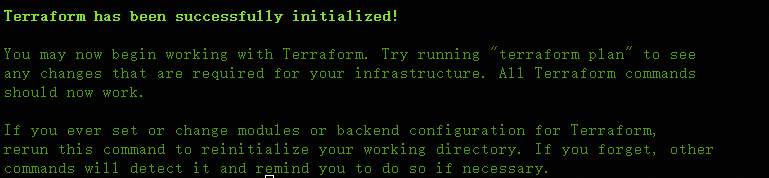
terraform initcommand to initialize the Terraform runtime environment.
Expected result:
Run the
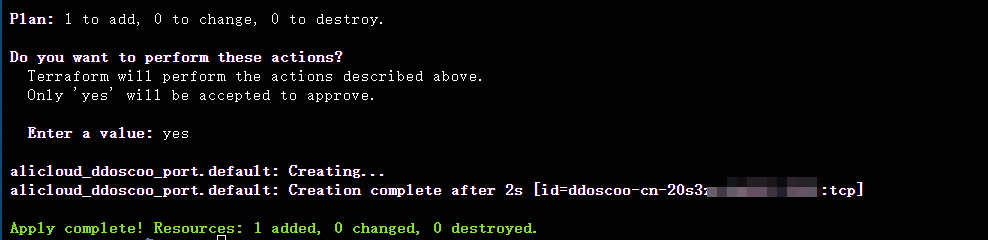
terraform applycommand. When prompted, enteryesand press the Enter key. Wait for the command to complete. If the following information is displayed, the authorization is complete.
Expected result:
Verify the result.
Run the terraform show command
You can run the following command to query the details of the resources that are created using Terraform:
terraform show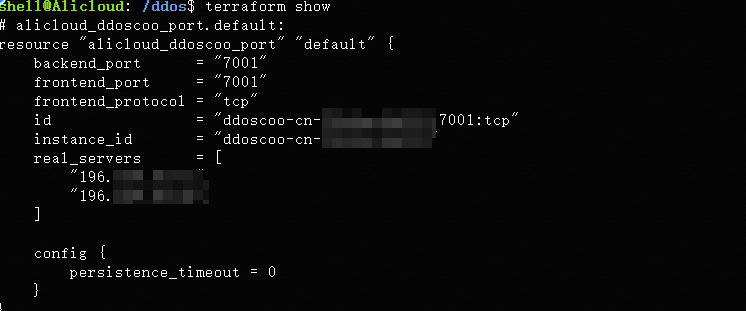
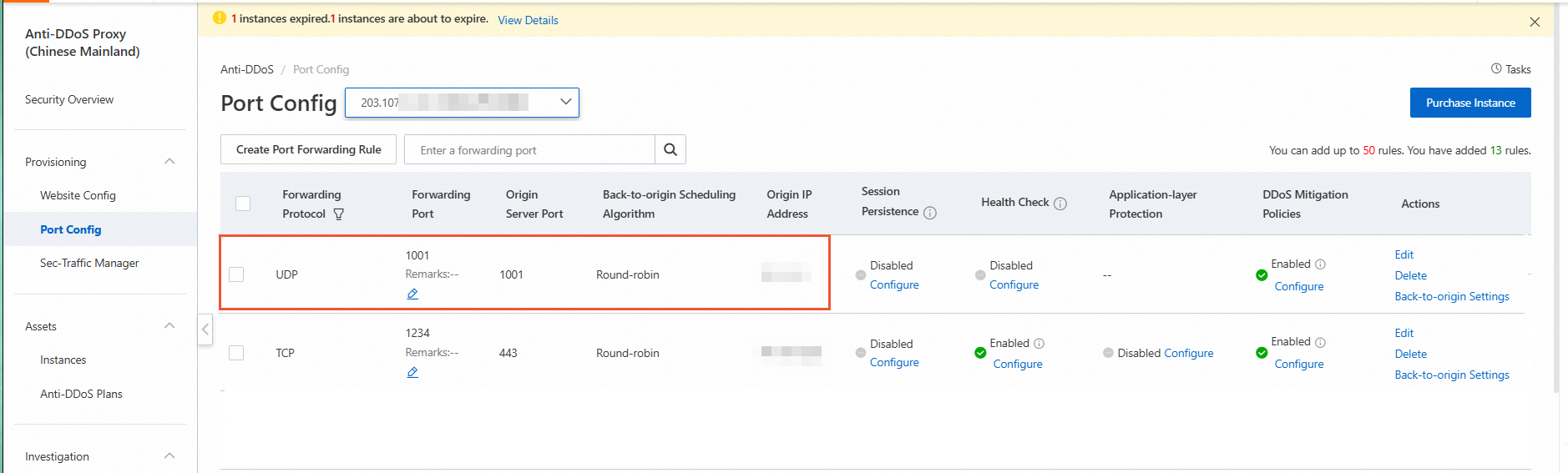
Screenshot of the Anti-DDoS Pro and Anti-DDoS Premium (Chinese mainland) console
Log on to the Anti-DDoS Pro and Anti-DDoS Premium console to view the created port forwarding rule.
Clean up resources
If you no longer need the resources that are created or managed using Terraform, run the following command to release them. For more information about the terraform destroy command, see Common commands.
terraform destroyComplete code example
You can run the sample code in this topic with a single click. Run with one click
variable "region_id" {
  type    = string
  default = "cn-hangzhou"
}

# The name of the Anti-DDoS Pro or Anti-DDoS Premium instance
variable "ddoscoo_instance_name" {
  description = "The name of the DDoS CoO instance"
  type        = string
  default     = "Ddoscootest"  # The default value
}

# The basic bandwidth
variable "base_bandwidth" {
  description = "Base bandwidth of the DDoS CoO instance"
  type        = string
  default     = "30"  # The default value
}

# The bandwidth
variable "bandwidth" {
  description = "Bandwidth of the DDoS CoO instance"
  type        = string
  default     = "40"  # The default value
}

# The service bandwidth
variable "service_bandwidth" {
  description = "Service bandwidth of the DDoS CoO instance"
  type        = string
  default     = "100"  # The default value
}

# The number of ports
variable "port_count" {
  description = "Number of ports for the DDoS CoO instance"
  type        = string
  default     = "50"  # The default value
}

# The number of domain names
variable "domain_count" {
  description = "Number of domains for the DDoS CoO instance"
  type        = string
  default     = "50"  # The default value
}

# The subscription duration
variable "period" {
  description = "Purchase period of the DDoS CoO instance"
  type        = string
  default     = "1"  # The default value
}

# The product type
variable "product_type" {
  description = "Product type of the DDoS CoO instance"
  type        = string
  default     = "ddoscoo"  # The default value
}

# The billing method
variable "pricing_mode" {
  description = "Pricing mode of the DDoS CoO instance (Prepaid or Postpaid)"
  type        = string
  default     = "Postpaid"  # The default value
}

# The frontend port
variable "frontend_port" {
  description = "The frontend port for the DDoS CoO port"
  type        = string
  default     = "7001"
}

# The backend port
variable "backend_port" {
  description = "The backend port for the DDoS CoO port"
  type        = string
  default     = "7001"
}

# The frontend protocol
variable "frontend_protocol" {
  description = "The frontend protocol for the DDoS CoO port"
  type        = string
  default     = "tcp"
}

# The list of origin servers
variable "real_servers" {
  description = "The list of real servers for the DDoS CoO port"
  type        = list(string)
  default     = ["196.128.XX.XX", "196.129.XX.XX"]
}

provider "alicloud" {
  region = var.region_id
}

resource "alicloud_ddoscoo_instance" "newInstance" {
  name              = var.ddoscoo_instance_name
  base_bandwidth    = var.base_bandwidth
  bandwidth         = var.bandwidth
  service_bandwidth = var.service_bandwidth
  port_count        = var.port_count
  domain_count      = var.domain_count
  period            = var.pricing_mode == "Prepaid" ? var.period : null
  product_type      = var.product_type
}

resource "alicloud_ddoscoo_port" "default" {
  instance_id       = alicloud_ddoscoo_instance.newInstance.id
  frontend_port     = var.frontend_port
  backend_port      = var.backend_port
  frontend_protocol = var.frontend_protocol
  real_servers      = var.real_servers
}

output "instance_id" {
  description = "The ID of the DDoS CoO instance"
  value       = alicloud_ddoscoo_instance.newInstance.id
}

output "instance_name" {
  description = "The name of the DDoS CoO instance"
  value       = var.ddoscoo_instance_name
}

output "port_id" {
  description = "The ID of the DDoS CoO port"
  value       = alicloud_ddoscoo_port.default.id
}
References
For an introduction to Terraform, see Introduction to Terraform.