After you add your website service to Anti-DDoS Proxy, if the website is under an HTTP flood attack, you can analyze the characteristics of HTTP fields and configure targeted rules to improve the detection and blocking of HTTP flood attacks. This applies to scenarios such as hotlink protection and protection of website management backends. This topic describes how to configure HTTP flood mitigation policies.
Products that defend against HTTP flood attacks
An HTTP flood attack (Challenge Collapsar, or CC, attack) is a type of distributed denial-of-service (DDoS) attack that usually refers to an application-layer attack. Attackers control hosts to continuously send forged HTTP or HTTPS requests to a target web server. For example, they repeatedly request a search page or a logon page that consumes a large amount of server resources. This exhausts server resources or network bandwidth, slows down the website, and prevents the website from processing requests from legitimate users.
Unlike traditional network-layer DDoS attacks, HTTP flood attacks are more difficult to detect because they mimic requests from legitimate users. To improve the security of website services, Alibaba Cloud provides Anti-DDoS Proxy and Web Application Firewall to defend against HTTP flood attacks.
Anti-DDoS Proxy
Anti-DDoS Proxy focuses on defense against volumetric attacks. It ensures that the network infrastructure is not affected by bandwidth exhaustion or resource exhaustion, and is usually deployed at the network edge. Anti-DDoS Proxy provides intelligent protection and custom HTTP flood mitigation policies to defend against HTTP flood attacks.
-
Intelligent protection: Based on the big data capabilities of Alibaba Cloud, this feature learns the traffic baseline of your website service, analyzes attack anomalies by using algorithms, automatically generates accurate access control rules, and dynamically adjusts the protection model. It helps you detect and block malicious web attacks, such as malicious bots and HTTP flood attacks, at the earliest opportunity. After you add a website to Anti-DDoS Proxy, intelligent protection is enabled by default. For more information, see Use the intelligent protection feature.
-
Custom HTTP flood mitigation policies: the content described in this topic. After your website is under an HTTP flood attack, you can analyze the characteristics of HTTP request fields and configure accurate access control rules or frequency control rules for the website. Measures such as frequency control, behavior analysis, and IP address blacklists help you better defend against DDoS attacks.
Web Application Firewall (WAF)
WAF analyzes HTTP and HTTPS traffic that reaches the application layer. It identifies and protects against malicious characteristics in the traffic of websites and apps, and prevents web servers from being maliciously intruded, which can cause performance issues. WAF uses multiple methods to identify and defend against application-layer attacks, including input validation, rule sets for specific vulnerabilities, session tracking, and protection mechanisms such as CAPTCHA, JavaScript challenges, and cookie verification. WAF is usually deployed close to the server. This allows WAF to monitor the traffic that reaches the server more closely and enforce application-layer security policies.
The two products focus on different aspects of protection. If you want to defend only against HTTP flood attacks and the attack volume is high, for example, the website is inaccessible, we recommend Anti-DDoS Proxy. If the attack volume is not high, for example, the website only responds slowly, we recommend Web Application Firewall. However, for the best protection, we recommend that you deploy both products to ensure that your website service is not damaged by malicious traffic and attackers.
Configuration recommendations for HTTP flood mitigation policies
We recommend that you configure this feature when your website is under an HTTP flood attack. The feature strengthens protection by allowing or filtering traffic with specified characteristics. We do not recommend that you use this feature for routine protection.
You can use the following methods to check whether HTTP requests contain obvious characteristics, such as the same source IP address or the same field in the URI, and configure HTTP flood mitigation policies based on the characteristics.
-
On the Attack Analysis page, view the HTTP Attack events that Anti-DDoS Proxy records. The event details include information such as the attack source IP address, User-Agent, Referer, HTTP method, and client fingerprint. For more information, see Attack analysis.
-
On the Log Analysis page, view fields such as
real_client_ip,http_user_agent,http_referer, andrequest_methodin the logs of Anti-DDoS Proxy. For the meanings of the fields, see Fields included in full logs.
Introduction to HTTP flood mitigation policies
-
Depending on whether Rate Limiting is enabled when you configure a rule, rules are classified as accurate access control rules and frequency control rules. Accurate access control rules are matched first, and then frequency control rules are matched. After a request matches a rule, no subsequent rules are matched.
NoteThe accurate access control rules that are automatically generated by intelligent protection of Anti-DDoS Proxy, which are the rules prefixed with
smartcc_, also follow this matching logic. -
To improve the default protection against HTTP flood attacks, the protection engine has two built-in frequency control rules. The rules are displayed in the frequency control rule configuration area, and are named Built-in HTTP Flood Mitigation Rule - Based on Request Frequency of Clients and Built-in HTTP Flood Mitigation Rule - Based on Response Codes of Origin Servers. Only the view and delete operations are supported.
|
Item |
Accurate access control rule |
Frequency control rule |
|
Description |
The action is executed when the match conditions are met. Note
If you find rules prefixed with |
The action is executed only when the statistical object meets the match conditions and reaches the threshold within the statistical period. Important
A built-in HTTP flood mitigation rule cannot be recovered after it is deleted. Proceed with caution. If you confirm that you want to delete the rule, we recommend that after you delete it, you configure custom frequency control rules based on the access frequency and characteristics of the important domain names or interfaces that you want to protect. This improves protection against HTTP flood attacks. |
|
Validity period of the rule |
Specified by you. You can set the validity period to permanent or to a custom duration from 5 to 120 minutes. Note
If you specify a custom duration, the rule is automatically deleted when the duration expires. |
Permanent. |
|
Matching principle |
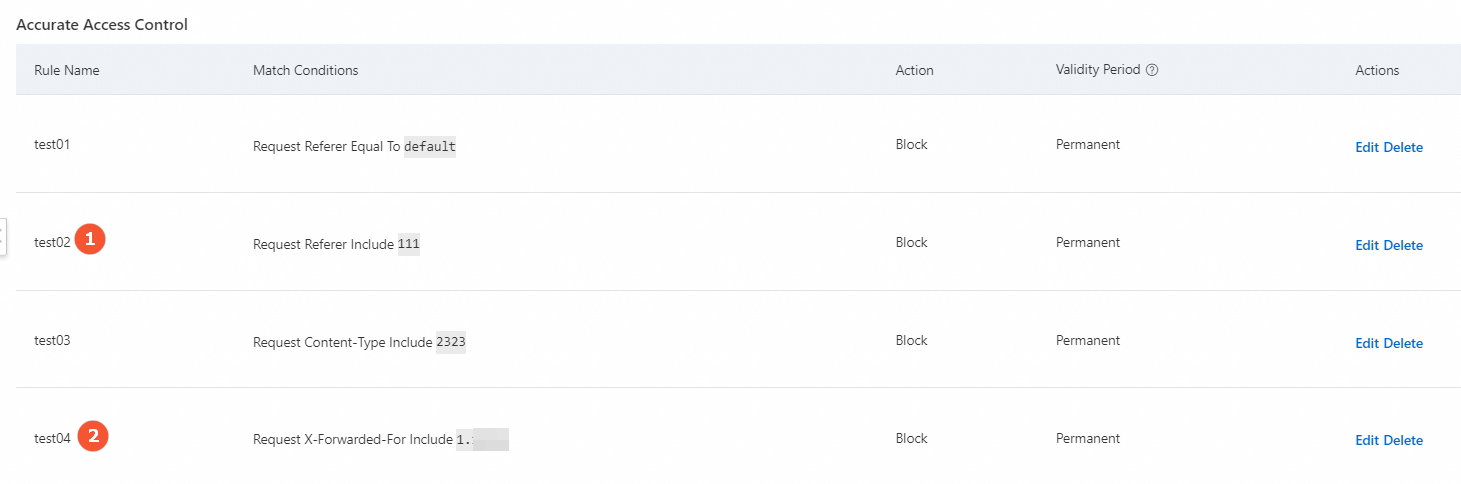
All rules are matched. If a request matches multiple rules, the action of the rule that ranks higher in the list is executed. For example, if a request matches both rule ① and rule ②, the action of rule ① is executed.
|
All rules are matched. If a request matches multiple rules, the action of one of the matched rules is executed at random. |
|
Limits |
The maximum number of accurate access control rules that can be configured for each domain name:
|
The maximum number of frequency control rules that can be configured for each domain name:
|
Cookie insertion
Cookies are inserted into Layer 7 services in the following two scenarios.
-
Scenario 1: HTTP flood mitigation is enabled in the DDoS protection policy for the website service of the domain name.
After you enable an HTTP flood mitigation policy, Anti-DDoS Proxy inserts a cookie into the client, such as a browser, to differentiate and count clients. When a user accesses the website, the inserted cookie is carried in the HTTP message. Anti-DDoS Proxy uses the statistical results to determine whether HTTP flood attacks exist in the service traffic and starts the HTTP flood scrubbing policy.
-
Scenario 2: The action of an HTTP flood mitigation rule is set to the challenge mode.
After you enable the challenge action for an HTTP flood mitigation policy, a cookie is inserted into the header of the HTTP message to obtain the fingerprint information of the client browser. The collected fingerprint information includes the host field of the HTTP message and the height and width of the browser. When traffic matches the rule, Anti-DDoS Proxy initiates a challenge probe to the client and uses the browser fingerprint statistics to determine whether the client is abnormal. This helps identify HTTP flood attacks from abnormal clients.
To stop Anti-DDoS Proxy from inserting cookies into your service, you can go to the page in the console, click Edit in the Actions column, and turn off the Cookie Settings switch in the website configuration. However, Anti-DDoS Proxy is then unable to actively detect and defend against HTTP flood attacks by using the HTTP flood mitigation policy module.
Configure an HTTP flood mitigation policy
Prerequisites
A website service is added to Anti-DDoS Proxy. For more information, see Add websites.
Procedure
Log on to the Anti-DDoS Proxy console.
In the top navigation bar, select the region of your instance.
Anti-DDoS Proxy (Chinese Mainland): Choose the Chinese Mainland region.
Anti-DDoS Proxy (Outside Chinese Mainland): Choose the Outside Chinese Mainland region.
In the left-side navigation pane, choose .
-
On the General Policies page, click the Protection for Website Services tab, and select the domain name that you want to configure from the domain name list on the left.
-
Find the HTTP Flood Mitigation configuration area, click Settings, click Create Rule in the upper-right corner, and then click OK after the configuration is complete.
Parameter
Description
Rule Name
The name of the rule. The name can contain letters, digits, and underscores (_), and cannot exceed 128 characters in length.
Match Conditions
The match conditions of the rule. For details about the fields, see Appendix 1: Supported HTTP request fields.
Note-
Field Value cannot be left empty. The match content of accurate access control rules is case-sensitive, and the match content of frequency control rules is case-insensitive.
-
You can configure up to five match conditions. If you add multiple match conditions, a request is considered a match only when it meets all the conditions.
Rate Limiting
Specifies whether to enable frequency verification.
-
Switch turned off: The rule is an accurate access control rule.
-
Switch turned on: The rule is a frequency control rule. After you turn on the switch, you must configure Statistical Object (IP, custom header, session, custom cookie, and custom request parameter are supported), Duration (Seconds), and Threshold (Occurrences). You can also configure more precise rules based on the number or proportion of response codes.
Action
The operation that is performed on a request when the request meets the match conditions. Valid values:
-
Allow: allows the request.
-
Block: blocks the request.
-
JavaScript Challenge: verifies the source IP address of the request by using a challenge algorithm.
-
Monitor: records requests that match the monitoring rule in logs and allows the requests.
NoteWhen frequency settings are enabled, Action supports only Block, JavaScript Challenge, and Monitor.
Validity Period
-
When the frequency setting switch is turned off: the validity period of the accurate access control rule. Permanent and custom durations from 5 to 120 minutes are supported.
NoteIf you specify a custom duration, the rule is automatically deleted when the duration expires.
-
When the frequency setting switch is turned on: the period during which the rule action is enforced after the frequency control rule is matched. Only custom durations from 1 to 1440 minutes are supported.
Advanced Settings
When frequency settings are enabled, deduplication during statistics collection is supported. The statistical object can be set to IP, Header, or URI.
-
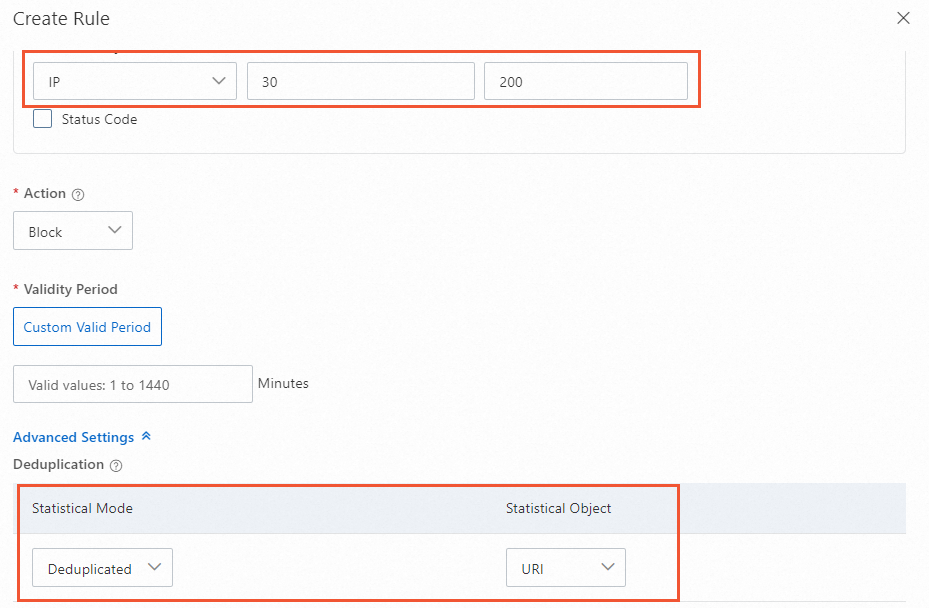
Scenario 1: Deduplication mode enabled
In the following figure, when the match conditions are met and the same source IP address accesses 200 or more different URIs within 30 seconds, the specified action is executed and requests from the IP address are blocked. Because deduplication mode is enabled, when the same source IP address accesses the same URI multiple times, the number of accesses is counted as 1.
-
Scenario 2: Deduplication mode not enabled
In the following figure, when the match conditions are met and the same source IP address sends 200 or more requests within 30 seconds, the specified action is executed and requests from the IP address are blocked. Because deduplication mode is not enabled, if the same source IP address accesses the same URI 10 times, the number of accesses is counted as 10.

The rule is triggered but traffic remains high
If you have configured an HTTP flood mitigation frequency control rule but a large number of requests still appear in the access logs, perform the following steps to troubleshoot the issue:
-
Confirm whether the rule takes effect: Check the response status codes in the access logs. If the status code that corresponds to Block appears, or a human-verification page appears, the rule has taken effect and the corresponding action has been executed.
-
Check for traffic from scattered IP addresses: A frequency control rule counts the number of requests from a statistical object, such as the request IP address, within the statistical period, and blocks requests only when a single statistical object exceeds the threshold. If attack traffic comes from a large number of scattered source IP addresses and the number of requests sent by each IP address is lower than the threshold, the rule does not block these requests. As a result, a large number of requests that are not blocked still appear in the logs.
-
Tighten the threshold: You can reduce the statistical period from the default 60 seconds to 10 seconds, and lower the threshold from 20 to 3. A shorter statistical period and a lower threshold make it easier for the number of requests from a single scattered IP address to reach the blocking condition. Adjust the settings based on the actual traffic characteristics of your service to avoid blocking legitimate requests.
-
Use the challenge mode to reduce the risk of false positives: If you are concerned that tightening the threshold may affect legitimate users, you can change the rule action from Block to JavaScript Challenge. Requests that match the rule then trigger a human-verification page instead of being blocked directly.
-
-
Return to the HTTP Flood Mitigation area and turn on the Status switch.
Appendix 1: Supported HTTP request fields
|
Match field |
Field description |
Logic operators |
Field example |
|
IP |
The source IP address of the request. The value supports multiple IP addresses or IP addresses with masks. |
belongs to, does not belong to, is in list, is not in list |
10.10.10.10 |
|
URI |
The URI of the request. Example: |
contains, does not contain, is, is not, length is less than, length is, length is greater than, prefix matches, is one of, is not one of Note
If the logic operator is is or is not, the value must start with |
/action/member/id.php?id=1&td=2 |
|
User-Agent |
Browser information of the client that sends the request, such as the browser identifier, rendering engine identifier, and version information. |
contains, does not contain, is, is not, length is less than, length is, length is greater than, is one of, is not one of |
Mozilla/5.0 (Windows NT 10.0; Win64; x64) AppleWebKit/537.36 (KHTML, like Gecko) Chrome/119.0.XX.XX Safari/537.36 |
|
Cookie |
The cookie information that is carried in the request. |
contains, does not contain, is, is not, length is less than, length is, length is greater than, does not exist, is one of, is not one of |
cna=Z87DHXX/jXIBASQBsYAimToU; sca=234ea940; yunpk=177699790**** |
|
Referer |
The source URL of the request, which indicates the page from which the request is redirected. |
contains, does not contain, is, is not, length is less than, length is, length is greater than, does not exist, is one of, is not one of |
https://example.aliyundoc.com/ |
|
Content-Type |
The HTTP content type of the response that is specified by the request, which is the MIME type information. |
contains, does not contain, is, is not, length is less than, length is, length is greater than, is one of, is not one of |
text/plain;charset=UTF-8 |
|
X-Forwarded-For |
The real IP address of the client that sends the request. Format: |
contains, does not contain, is, is not, length is less than, length is, length is greater than, does not exist, is one of, is not one of |
36.18.XX.XX,192.18.XX.XX |
|
Content-Length |
The number of bytes that the request contains. |
value is less than, value is, value is greater than |
806 |
|
Post-Body |
The content information of the request. |
contains, does not contain, is, is not, is one of, is not one of |
Content-Type: application/x-www-form-urlencoded name=John&age=25&email=**** |
|
Http-Method |
The method of the request. Valid values: GET, POST, DELETE, PUT, OPTIONS, CONNECT, HEAD, and TRACE. |
is, is not, is one of, is not one of |
POST |
|
Header |
The header information of the request, which is used to customize HTTP header fields and match content. |
contains, does not contain, is, is not, length is less than, length is, length is greater than, does not exist, is one of, is not one of |
*text/html,application/xhtml+xml,application/xml;q=0.9,image/webp,image/**** |
|
Params |
The parameter part in the URL of the request, which usually refers to the part after |
contains, does not contain, is, is not, length is less than, length is, length is greater than, is one of, is not one of |
action=login |
|
Raw-URI |
The unencoded URI, which retains the original character sequence. A Raw-URI can contain special characters and spaces. However, it must be encoded before use to prevent ambiguity or errors during network transmission and parsing. |
contains, does not contain, is, is not, length is less than, length is, length is greater than, regex matches, byte contains, byte is, is one of, is not one of |
GET /images/logo.png HTTP/1.1 |
|
Tls-Fingerprint |
The client fingerprint value that is identified and calculated by using a proprietary Alibaba Cloud algorithm based on the TLS fingerprint of the client that sends the request. The value is used to match and protect against requests. You can view client fingerprints in the following ways:
|
is, is not |
74dcbf6b790160370bb6b7bea98d5978 |
|
HTTP/HTTPS |
The protocol type of the request. HTTP and HTTPS are supported. |
is, is not |
HTTP |
|
HTTP version |
The version of the HTTP protocol. HTTP/1.0, HTTP/1.1, and HTTP/2.0 are supported. |
is, is not, is one of, is not one of |
HTTP/1.0 |
|
HTTP/2.0 fingerprint |
The HTTP/2.0 fingerprint that is generated by processing the original fingerprint of the HTTP/2 client with the MD5 algorithm. The fingerprint is used to analyze and identify different clients for more secure and efficient communication. |
is, is not |
ad8424af1cc590e09f7b0c499bf7fcdb |
|
JA3 fingerprint |
Anti-DDoS Proxy processes key parameters of the TLS handshake, including the TLS version, cipher suites, compression algorithms, and TLS extensions, with the MD5 hash algorithm to generate a string that represents the TLS configuration of the client. This string is the JA3 fingerprint. JA3 fingerprints can be used to identify and differentiate TLS clients of different types, such as web browsers, mobile applications, and malware. |
is, is not, is one of, is not one of |
eb6f49e8db7ad1809f885d12232f4855 |
|
JA4 fingerprint |
JA4 fingerprints introduce more context information and algorithms, such as the browser version and operating system, which reduces the duplication issues that JA3 fingerprints may cause. JA4 fingerprints can more accurately distinguish real users from impersonators and reduce the false positive rate. |
is, is not, is one of, is not one of |
f436b9416f37d134cadd04886327d3e8 |
|
Continent/Country |
The geographical location of the source IP address. |
Location blacklist selection |
Europe |
Appendix 2: Configuration examples
The following examples provide configuration suggestions for common service scenarios. Configure rules based on the actual requirements of your service. The examples are for reference only.
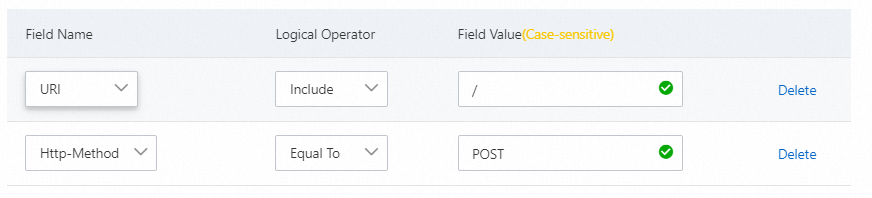
Block specific attack requests
In most cases, legitimate services do not send POST requests to the root directory. If your website service is under an HTTP flood attack and you find a large number of POST requests to the root directory in client requests, you can evaluate whether the requests are valid. If you confirm that the requests are not from legitimate services, you can configure the following rule.
Block web crawlers
If you find a large number of crawler requests in the traffic of your website during a period of time, and you cannot rule out that attack zombies are simulating crawlers to launch HTTP flood attacks, you can block the crawler requests. The following figure shows an example rule configuration.

Hotlink protection
When a browser accesses a web page, it carries the Referer field to inform the server of the page from which the request is linked. By configuring an access control rule for the Referer field, you can block hotlinking from specific websites. For example, if you find that "https://example.aliyundoc.com" frequently hotlinks images from your website, you can configure the following rule.
Configure a rate limit for a User-Agent
For example, if a User-Agent accesses URIs prefixed with /game/all_ more than 30 times within 10 seconds, the challenge action is performed on the requests from the User-Agent.
Configure a rate limit for logons
For example, to prevent the logon interface from malicious high-frequency credential stuffing attacks, you can configure the address of the logon interface and block requests when more than 20 requests are sent within 60 seconds.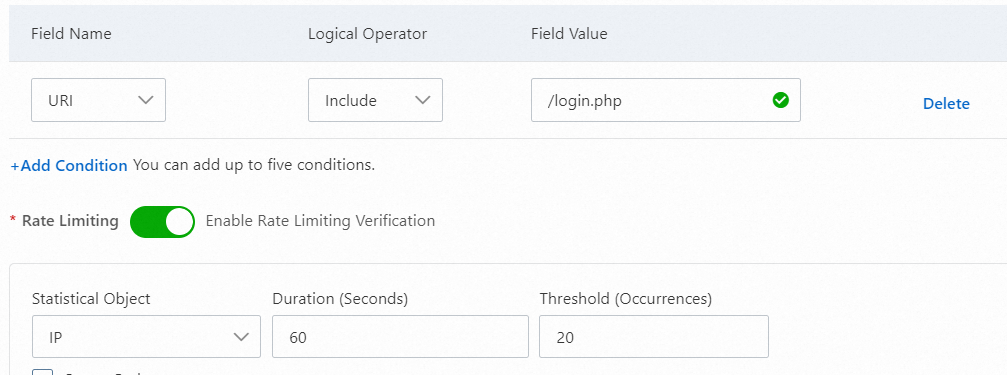
Configure frequency control rules based on origin server response codes
By configuring trigger conditions based on the number or proportion of origin server response codes, you can further improve protection accuracy on top of the existing frequency protection policy and reduce the risk of false positives for legitimate services. When the number of requests from a statistical object exceeds the threshold within the statistical period and the configured origin server response codes exceed the specified number or proportion, the corresponding action is triggered.
200
When the origin server has strong processing capabilities and still responds normally to high-frequency requests from attackers, you can handle IP addresses that exceed the normal request frequency of your service based on the characteristics of your service. This limits the request rate and protects the availability of the origin server and your service. Refer to the following configuration: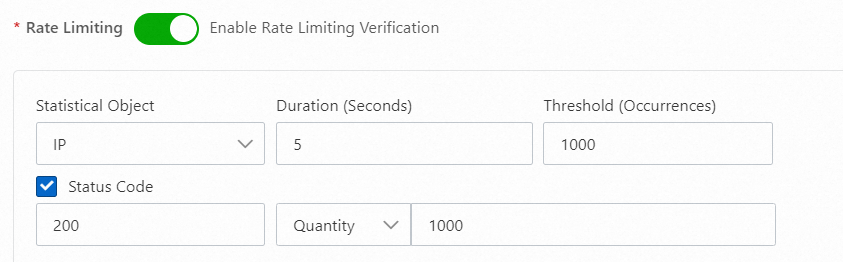
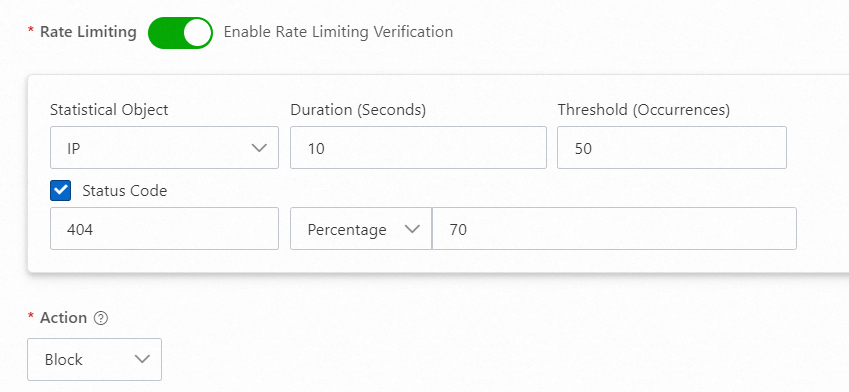
404
When attackers launch URI scanning attacks or continuously request paths that do not exist on the origin server, the origin server often responds with a large number of 404 status codes. You can configure a policy to add the attacking IP addresses to a blacklist. Refer to the following configuration:
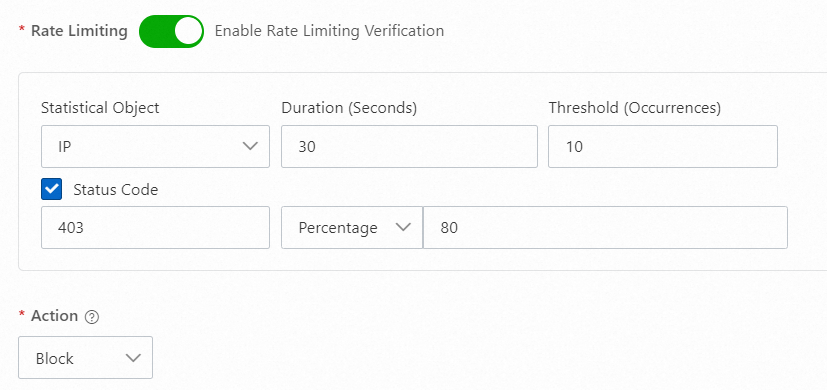
403
When attackers launch web attacks and a protection product such as WAF is deployed behind Anti-DDoS Proxy, you can configure rules based on the response codes that the other protection product returns for blocked requests. For example, Alibaba Cloud WAF blocks web attacks and responds with 403. You can configure a policy to add the attacking IP addresses to a blacklist on the Anti-DDoS Proxy side in advance. Refer to the following configuration:
429
If the origin server has its own throttling or service verification configurations, the origin server responds with 429 Too Many Requests or a custom response code when requests from attackers match these throttling or verification rules. You can configure a policy to add the attacking IP addresses to a blacklist and reduce the pressure on the origin server. Refer to the following configuration: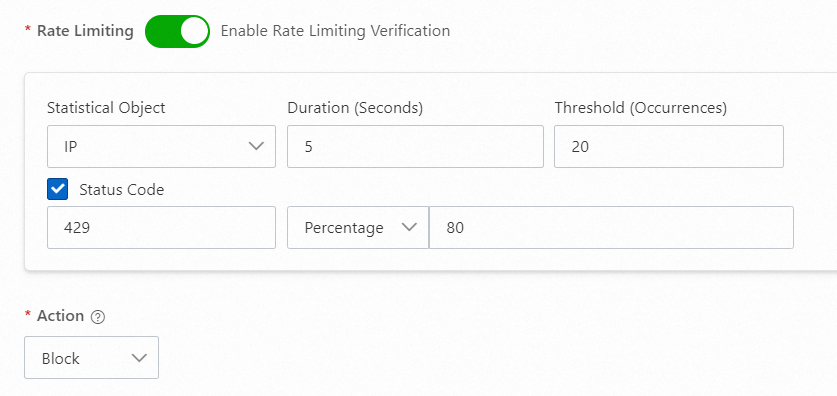
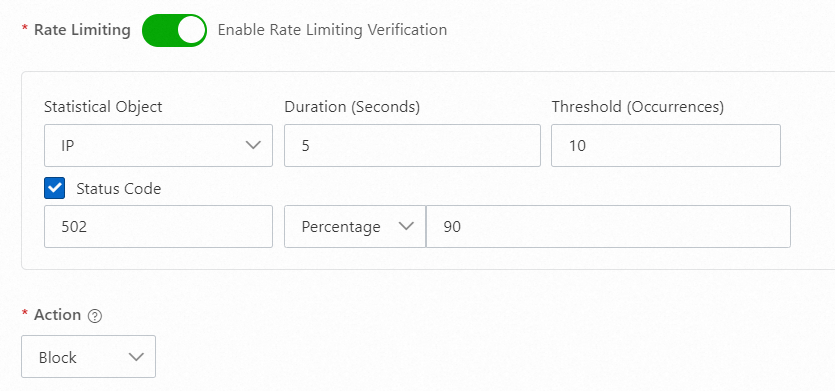
502
When the origin server takes a long time to process requests due to a sudden surge in requests and returns abnormal 502 responses, you can configure a policy to add high-frequency request IP addresses to a blacklist and ensure the availability of the origin server. Refer to the following configuration:
555
If the origin server has special service logic and responds with a custom status code such as 555 for unexpected requests, you can handle the IP addresses that send the unexpected requests on the Anti-DDoS Proxy side based on this characteristic. Refer to the following configuration: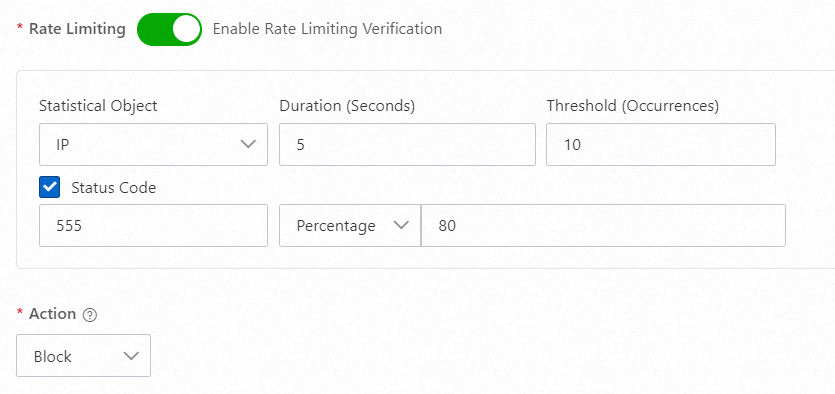
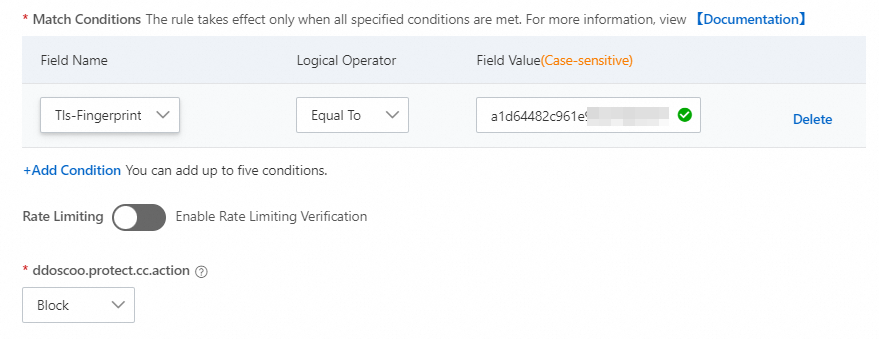
Block invalid client fingerprints
Attackers forge client fingerprints to simulate real clients and attempt to establish a large number of connections or send a large number of HTTP requests, which causes the server to crash or deny service. You can check and identify client fingerprints to deny these connections.
For example, during a volumetric HTTP flood attack, if attackers use the same script or tool, the number or proportion of requests that contain the same fingerprint value increases sharply. On the Security Overview page, click the Domain Names tab to view the top Client TLS Fingerprint data. Then, use the ssl_client_tls_fingerprinting_md5 field in the Log Analysis logs to view the proportion of top client fingerprints, analyze the behavior of the requests, detect suspicious fingerprint values at the earliest opportunity, and configure policies.