In a non-uniform memory access (NUMA) architecture, especially on Arm-based instances, processes sometimes access code segments stored on a remote NUMA node rather than their local node. This cross-node access adds latency and increases memory bandwidth usage. The code duptext feature eliminates this overhead by copying remote code segments to the local node so processes read from local memory instead.
How it works
When the kernel detects that a process on one NUMA node is accessing code segments on another node, it creates a local copy at page-level granularity (each page is 4 KB):
A process on node 1 accesses
libc.sostored on node 0, or a process on node 0 accessesteststored on node 1.The kernel creates a copy of the remote code segment on the local node — a
libc.socopy on node 1 and atestcopy on node 0.Each process reads from its local copy, eliminating cross-node access.
The original page holding the code segment is called the main page. The local copy created by the duptext feature is called a subpage.
The OS may allocate memory across multiple NUMA nodes to resolve memory pressure or meet load-balancing requirements, which causes cross-node code access. Enabling the code duptext feature is the recommended mitigation.

Limits
The code duptext feature requires both of the following:
Instance type: ECS Bare Metal Instance families. For more information, see Overview.
Image: Alibaba Cloud Linux 3 with kernel version
5.10.112-11or later.
To check the kernel version of your instance, run:
uname -rSwitches
The feature has two switches — a global switch and a per-memcg switch. Both must be enabled for the kernel to create subpages for a process.
| Switch | Description | Default |
|---|---|---|
/sys/kernel/mm/duptext/enabled | Global switch. Set to 1 to enable the feature for the entire system; set to 0 to disable it. | 0 |
/sys/fs/cgroup/memory/<memcg-dir>/memory.allow_duptext | Per-memcg switch. Set to 1 to enable the feature for all processes in that memcg; set to 0 to disable it. | 0 |
When the global switch is set to 0, the kernel automatically clears all subpages on the instance.Monitor subpages
Use the following files to check duptext activity:
| File or field | What it shows |
|---|---|
nr_duptext in /proc/vmstat | Number of subpages currently marked as duptext in the kernel. A value greater than zero confirms the feature is actively creating subpages. If the value stays at zero after enabling the feature, no cross-node code access was detected. |
DupText in /proc/meminfo | Total memory used by duptext subpages, in KB. |
/proc/<pid>/smaps | Per-process subpage statistics. The DupText field in the output confirms whether a subpage was created on the local node for that process. |
Enable the code duptext feature
This example compiles and runs a test program on a two-node NUMA instance.
Prerequisites
Before you begin, ensure that you have:
An ECS Bare Metal Instance running Alibaba Cloud Linux 3 (
5.10.112-11or later)Root or sudo access
Steps
Connect to the ECS instance. For instructions, see Use Workbench to connect to a Linux instance over SSH.
(Optional) View the NUMA topology of the instance:
If
numactlis not installed, runsudo yum install numactlfirst.numactl -HThe output lists all NUMA nodes. The following example shows a two-node instance with node 0 and node 1.

Compile the test program on node 1, so node 1 holds the page cache for the
testbinary:numactl -N 1 -m 1 gcc test.c -o testEnable the global switch:
sudo sh -c 'echo 1 > /sys/kernel/mm/duptext/enabled'Create a memcg directory and enable the duptext feature for it:
sudo mkdir /sys/fs/cgroup/memory/test
sudo sh -c 'echo 1 > /sys/fs/cgroup/memory/test/memory.allow_duptext'
Run the
testbinary under the memcg, bound to node 0. The kernel detects cross-node access and creates a subpage copy of thetestcode segment on node 0:If
cgexecis not installed, runsudo yum install -y libcgroup-toolsfirst.sudo cgexec -g "memory:test" numactl -N 0 -m 0 ./testVerify that a subpage was created for the
testprocess:sudo cat /proc/$(pidof test)/smapsThe
DupTextfield in the output confirms that a subpage copy was created on node 0.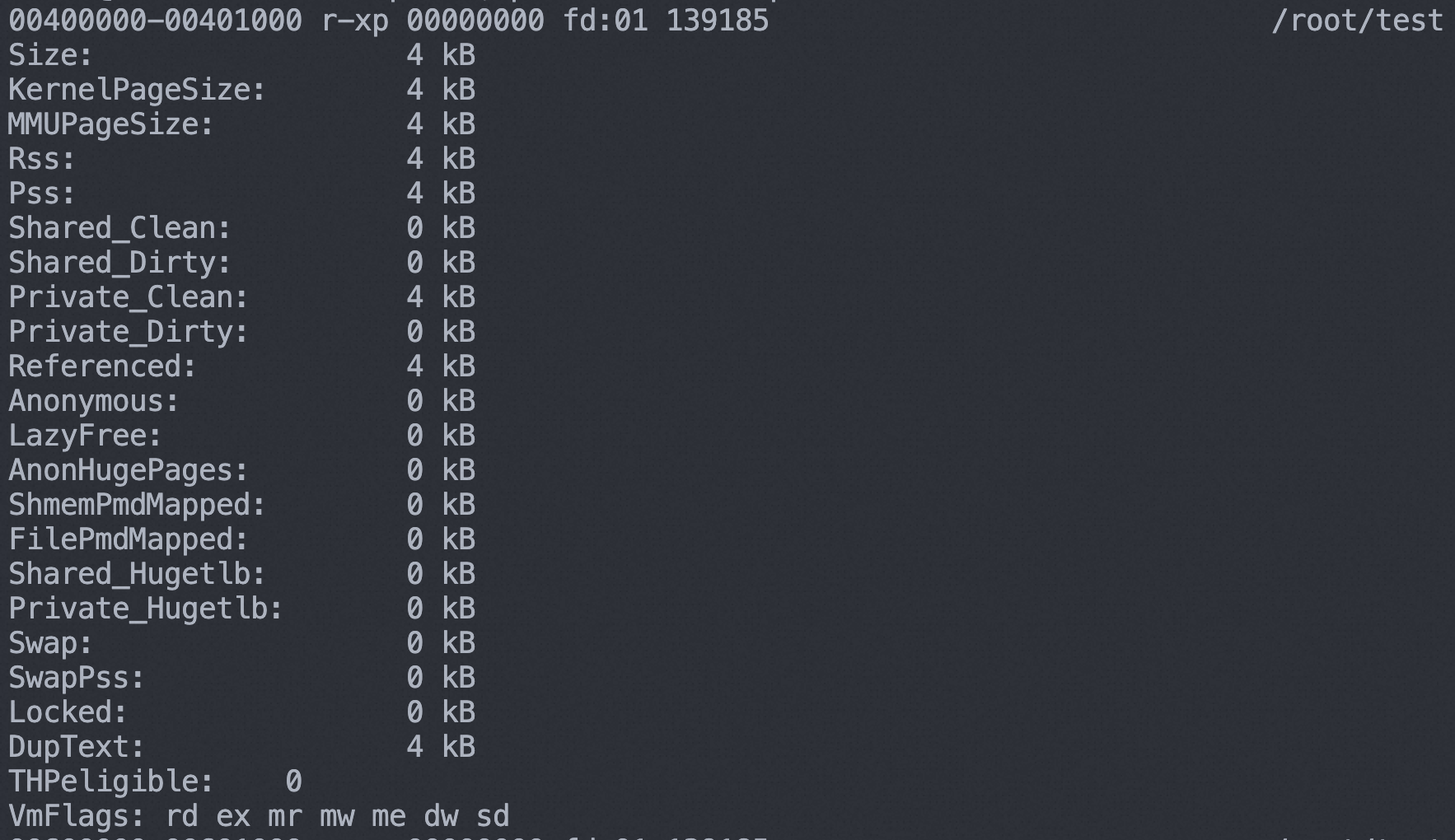
To check instance-level duptext statistics, run:
cat /proc/vmstat | grep -i duptext
cat /proc/meminfo | grep -i duptext
If
nr_duptextis greater than zero, the feature is actively creating subpages.
Disable the code duptext feature
You can disable the code duptext feature based on your business requirements. When disabled, the kernel automatically clears all subpages on the instance.
Connect to the ECS instance. For instructions, see Use Workbench to connect to a Linux instance over SSH.
Disable the global switch:
sudo sh -c 'echo 0 > /sys/kernel/mm/duptext/enabled'Verify that all subpages have been cleared:
cat /proc/vmstat | grep -i duptext
cat /proc/meminfo | grep -i duptext
Both values should be
0, confirming that the feature is disabled and all subpages have been reclaimed.